



 本文详细解析了在Android开发中,如何使用EditText的TextWatcher监听器实现文本输入限制,包括beforeTextChanged、onTextChanged和afterTextChanged方法的使用,以及调试技巧。
源代码
EditText etContent = findViewById(R.id.etcontent);
etContent.addTextChangedListener(new TextWatcher(){
	@Override
	public void beforeTextChanged(CharSequence charSequence, int i, int i1, int i2){}

	@Override
	public void onTextChanged(CharSequence charsequence, int i, int i1, int i2){}

	@Override
	public void afterTextChanged(Editable s){
		if(s.length() > MAX_NUM){
			s.delete(MAX_NUM, s.length());
			Toast.makeText(MainActivity.this, "您的输入已达上限!", Toast.LENGTH_SHORT).show();
		}
  	    int num = s.length();
        count.setText(String.valueOf(num) + "/10");
	}
});
一些无关紧要的介绍(可下翻至调试步骤)
afterTextChangedListener方法来自于TextView.addTextChangedListener
    /**
     * Adds a TextWatcher to the list of those whose methods are called
     * whenever this TextView's text changes.
     * 每当此TextView的文本更改时,将TextWatcher添加到其方法被调用的列表中
     * <p>
     * In 1.0, the {@link TextWatcher#afterTextChanged} method was erroneously
     * not called after {@link #setText} calls.  Now, doing {@link #setText}
     * if there are any text changed listeners forces the buffer type to
     * Editable if it would not otherwise be and does call this method.
     * 在1.0中,在调用{@link #setText}之后未正确调用{@link TextWatcher#afterTextChanged}方法。
     *  现在,如果侦听器中的任何文本已更改,则执行{@link #setText}会强制将缓冲区类型设置为Editable(如果不是),
     * 并会调用此方法。
     */
    public void addTextChangedListener(TextWatcher watcher) {
        if (mListeners == null) {
            mListeners = new ArrayList<TextWatcher>();
        }

        mListeners.add(watcher);
    }
TextWatcher是EditText的监听接口
/**
 * When an object of a type is attached to an Editable, its methods will
 * be called when the text is changed.
 */
public interface TextWatcher extends NoCopySpan {
    /**
     * This method is called to notify you that, within <code>s</code>,
     * the <code>count</code> characters beginning at <code>start</code>
     * are about to be replaced by new text with length <code>after</code>.
     * It is an error to attempt to make changes to <code>s</code> from
     * this callback.
     */
    public void beforeTextChanged(CharSequence s, int start,
                                  int count, int after);
    /**
     * This method is called to notify you that, within <code>s</code>,
     * the <code>count</code> characters beginning at <code>start</code>
     * have just replaced old text that had length <code>before</code>.
     * It is an error to attempt to make changes to <code>s</code> from
     * this callback.
     */
    public void onTextChanged(CharSequence s, int start, int before, int count);

    /**
     * This method is called to notify you that, somewhere within
     * <code>s</code>, the text has been changed.
     * It is legitimate to make further changes to <code>s</code> from
     * this callback, but be careful not to get yourself into an infinite
     * loop, because any changes you make will cause this method to be
     * called again recursively.
     * (You are not told where the change took place because other
     * afterTextChanged() methods may already have made other changes
     * and invalidated the offsets.  But if you need to know here,
     * you can use {@link Spannable#setSpan} in {@link #onTextChanged}
     * to mark your place and then look up from here where the span
     * ended up.
     */
    public void afterTextChanged(Editable s);
}
TextWatcher.afterTextChanged方法的参数类型是Editable接口
利用调试来追踪delete方法
(1)打断点(单击鼠标左键)
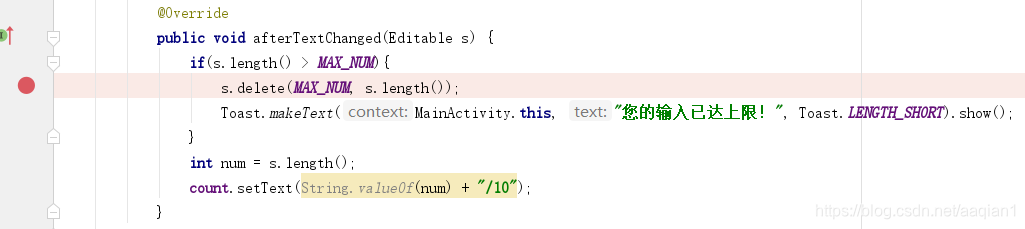
(2)调试
点击上方类似于小蜘蛛的一个标志

然后在模拟器的edittext框中进行输入
下图为刚好输入10个数,这时Android Studio无反应
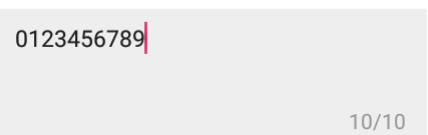
若再输入一个数,输入“01234567891”,此时Android Studio则会进入调试功能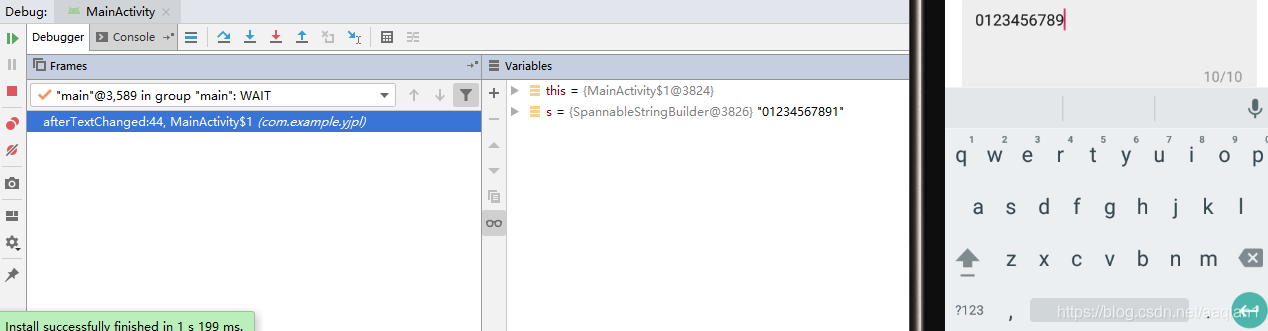
调试过程中会用到的快捷键:
F7 ------进入要调试的方法
F8 ------ 单步调试(遇到方法会跳过)
Shift+F8 ------ 进入下一个断点所在位置(当设置多个断点时)
(3)调试进入具体方法
1)可以看到首先进入的是SpannableStringBuilder.length方法
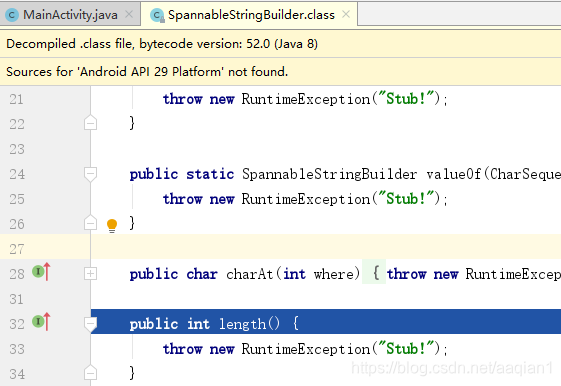
关于SpannableStringBuilder:
https://blog.youkuaiyun.com/a214024475/article/details/53261122
由于Android Studio跳转到的是.class文件,这时我通过Source Insight来搜索查看SpannableStringBuilder这个类的length方法:
    public SpannableStringBuilder(CharSequence text, int start, int end) {
		··· ···
		int srclen = end - start;
		mText = ArrayUtils.newUnpaddedCharArray(GrowingArrayUtils.growSize(srclen));
        mGapStart = srclen;
        mGapLength = mText.length - srclen;
        ··· ···
    }
    /*
     * Return the number of chars in the buffer.
     */
    public int length() {
        return mText.length - mGapLength;
    }
即得到edittext中输入的长度
2)再次点击F7,进入SpannableStringBuilder.delete方法
同样,查看Android源码中的SpannableStringBuilder.delete方法
    // Documentation from interface
    public SpannableStringBuilder delete(int start, int end) {
        SpannableStringBuilder ret = replace(start, end, "", 0, 0);

        if (mGapLength > 2 * length())
            resizeFor(length());

        return ret; // == this
    }
3)再次点击F7,进入SpannableStringBuilder.replace方法

同样,查看Android源码中的SpannableStringBuilder.replace方法
    // Documentation from interface
    public SpannableStringBuilder replace(final int start, final int end,
            CharSequence tb, int tbstart, int tbend) {
        checkRange("replace", start, end);  //检查范围的合法性

        int filtercount = mFilters.length;
        for (int i = 0; i < filtercount; i++) {
            CharSequence repl = mFilters[i].filter(tb, tbstart, tbend, this, start, end);

            if (repl != null) {
                tb = repl;
                tbstart = 0;
                tbend = repl.length();
            }
        }

        final int origLen = end - start;
        final int newLen = tbend - tbstart;

        if (origLen == 0 && newLen == 0 && !hasNonExclusiveExclusiveSpanAt(tb, tbstart)) {
            // This is a no-op iif there are no spans in tb that would be added (with a 0-length)
            // Early exit so that the text watchers do not get notified
            return this;
        }

        TextWatcher[] textWatchers = getSpans(start, start + origLen, TextWatcher.class);
        sendBeforeTextChanged(textWatchers, start, origLen, newLen);

        // Try to keep the cursor / selection at the same relative position during
        // a text replacement. If replaced or replacement text length is zero, this
        // is already taken care of.
        boolean adjustSelection = origLen != 0 && newLen != 0;
        int selectionStart = 0;
        int selectionEnd = 0;
        if (adjustSelection) {
            selectionStart = Selection.getSelectionStart(this);
            selectionEnd = Selection.getSelectionEnd(this);
        }

        change(start, end, tb, tbstart, tbend);

        if (adjustSelection) {
            if (selectionStart > start && selectionStart < end) {
                final int offset = (selectionStart - start) * newLen / origLen;
                selectionStart = start + offset;

                setSpan(false, Selection.SELECTION_START, selectionStart, selectionStart,
                        Spanned.SPAN_POINT_POINT);
            }
            if (selectionEnd > start && selectionEnd < end) {
                final int offset = (selectionEnd - start) * newLen / origLen;
                selectionEnd = start + offset;

                setSpan(false, Selection.SELECTION_END, selectionEnd, selectionEnd,
                        Spanned.SPAN_POINT_POINT);
            }
        }

        sendTextChanged(textWatchers, start, origLen, newLen);
        sendAfterTextChanged(textWatchers);

        // Span watchers need to be called after text watchers, which may update the layout
        sendToSpanWatchers(start, end, newLen - origLen);

        return this;
    }
好吧,上面的replece函数也是调用了很多其他的函数,读不懂也无所谓了,不得不感慨,写安卓系统的程序员们好厉害。





 扫一扫
扫一扫


&spm=1001.2101.3001.5002&articleId=102010116&d=1&t=3&u=c115bc0b82074e5c8423aebe7a302f6e)
 4227
4227

 被折叠的 条评论
为什么被折叠?
被折叠的 条评论
为什么被折叠?
 到【灌水乐园】发言





