


 本文详细介绍如何在SpringBoot项目中整合Mybatis,包括添加依赖、配置数据库连接、使用Mybatis自动生成代码插件,以及测试环境搭建步骤。
SpringBoot整合Mybatis
首先springboot基本的建立就不讲了,之前的博客里面有写
1.添加 pom.xml
  <!--mysql驱动-->
    <dependency>
      <groupId>mysql</groupId>
      <artifactId>mysql-connector-java</artifactId>
      <version>5.1.41</version>
    </dependency>
    <!--连接池-->
    <dependency>
      <groupId>com.alibaba</groupId>
      <artifactId>druid</artifactId>
      <version>1.1.3</version>
    </dependency>
    <!--springBoot对mybatis的支持-->
    <dependency>
      <groupId>org.mybatis.spring.boot</groupId>
      <artifactId>mybatis-spring-boot-starter</artifactId>
      <version>1.3.1</version>
    </dependency>
  </dependencies>
2.修改application.properties文件
#扫描mapper
mybatis.mapperLocations=classpath:mapper/*.xml
#连接数据库
spring.datasource.name=miaosha
spring.datasource.url=jdbc:mysql://localhost:3306/miaosha?useUnicode=true&characterEncodi=utf8&useSSL=false
spring.datasource.username=root
spring.datasource.password=root
#数据源
spring.datasource.type=com.alibaba.druid.pool.DruidDataSource
spring.datasource.driverClassName=com.mysql.jdbc.Driver
3.使用mybatis的自动生成的插件
3.1插件
<plugins>
    <plugin>
      <groupId>org.mybatis.generator</groupId>
      <artifactId>mybatis-generator-maven-plugin</artifactId>
      <version>1.3.2</version>
      <configuration>
        <configurationFile>src/main/resources/generatorConfig.xml</configurationFile>
        <verbose>true</verbose>
        <overwrite>true</overwrite>
      </configuration>
    </plugin>
  </plugins>
3.2 generatorConfig.xml
<?xml version="1.0" encoding="UTF-8"?>
<!DOCTYPE generatorConfiguration
        PUBLIC "-//mybatis.org//DTD MyBatis Generator Configuration 1.0//EN"
        "http://mybatis.org/dtd/mybatis-generator-config_1_0.dtd">
<generatorConfiguration>
    <!--数据库驱动-->
    <classPathEntry location="D:/working space/Maven/mysql/mysql-connector-java/5.1.39/mysql-connector-java-5.1.39.jar"/>
    <context id="DB2Tables" targetRuntime="MyBatis3">
        <commentGenerator>
            <property name="suppressDate" value="true"/>
            <property name="suppressAllComments" value="true"/>
        </commentGenerator>
        <!--数据库链接地址账号密码-->
        <jdbcConnection driverClass="com.mysql.jdbc.Driver" connectionURL="jdbc:mysql://127.0.0.1:3306/miaosha" userId="root" password="root">
        </jdbcConnection>
        <javaTypeResolver>
            <property name="forceBigDecimals" value="false"/>
        </javaTypeResolver>
        <!--生成 Model 类存放位置-->
        <javaModelGenerator targetPackage="com.xpx.po" targetProject="D:/working space/newIdea/Generator/src/main/java">
            <property name="enableSubPackages" value="true"/>
            <property name="trimStrings" value="true"/>
        </javaModelGenerator>
        <!--生成映射文件存放位置-->
        <sqlMapGenerator targetPackage="com.xpx.mapper" targetProject="D:/working space/newIdea/Generator/src/main/java">
            <property name="enableSubPackages" value="true"/>
        </sqlMapGenerator>
        <!--生成 Dao 类存放位置-->
        <javaClientGenerator type="XMLMAPPER" targetPackage="com.xpx.dao"  targetProject="D:/working space/newIdea/Generator/src/main/java">
            <property name="enableSubPackages" value="true"/>
        </javaClientGenerator>
        <table tableName="user_info" domainObjectName="UserInfo" enableCountByExample="false" enableUpdateByExample="false" enableDeleteByExample="false" enableSelectByExample="false" selectByExampleQueryId="false"></table>

        <table tableName="user_password" domainObjectName="UserPassWord" enableCountByExample="false" enableUpdateByExample="false" enableDeleteByExample="false" enableSelectByExample="false" selectByExampleQueryId="false"></table>
    </context>
</generatorConfiguration>
创建项目如下:
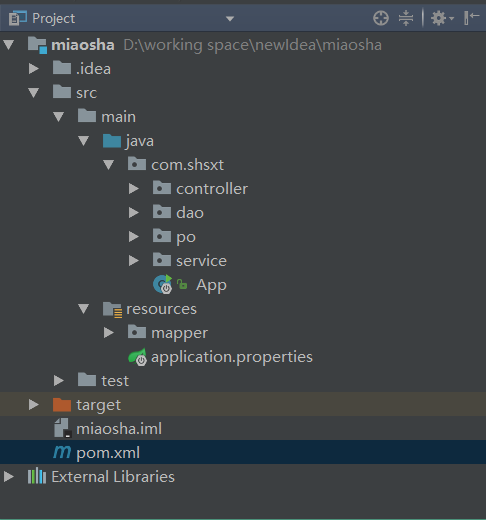
4.测试整合环境
@SpringBootApplication(scanBasePackages = {"xxx.xxx"})
指定所扫的包,会自动扫描指定包下的全部标有@Component的类,并注册成bean,当然包括@Component下的子注解@Service,@Repository,@Controller。
@SpringBootApplication(scanBasePackages = {"com.xpx"})
//实现mvccontroller功能
@RestController
@MapperScan("com.xpx.dao")
public class App {
    @Autowired
    private UserInfoMapper userInfoMapper;

    @RequestMapping("/")
    public String home(){
        UserInfo userInfo = userInfoMapper.selectByPrimaryKey(1);
        if(userInfo==null){
            return "用户不存在";
        }else {
            return userInfo.getName();
        }
    }
访问http://localhost:8088/ 查看结果





 扫一扫
扫一扫


 4267
4267

 被折叠的 条评论
为什么被折叠?
被折叠的 条评论
为什么被折叠?
 到【灌水乐园】发言





