



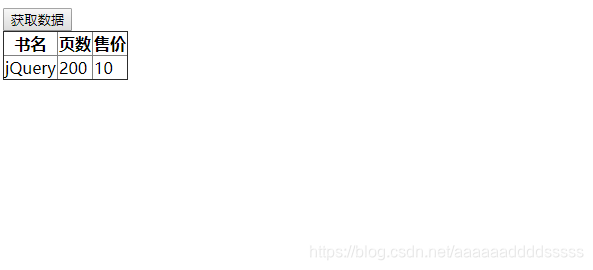
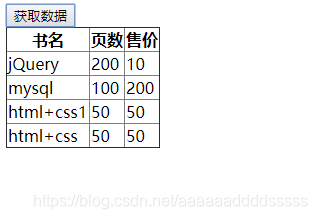
 这篇博客探讨了如何在网页中实现点击事件后,通过JavaScript从JSON数据源获取数据,并动态填充到HTML表格中,从而实现数据的动态展示。
<!DOCTYPE html>
<html>
	<head>
		<meta charset="utf-8" />
		<title></title>
		<style type="text/css">
			table{
				border-collapse: collapse;
			}
		</style>
		<script src="jquery-1.12.2.js" type="text/javascript" charset="utf-8"></script>
		<script type="text/javascript">
			// json数组
				var book=[{bookname:"mysql",page:"100",soul:"200"},
				          {bookname:"html+css1",page:"50",soul:"50"},
						   {bookname:"html+css",page:"50",soul:"50"}
				]
				//进入jquery函数
			$(function(){
				$("button").click(function(){ // 点击事件
					var tablehtml="";    // 定义表格
					for (var i in book) {   // 循环加值

						   tablehtml +="<tr>"
						   tablehtml +="<td>"+book[i].bookname+"</td>"
						   tablehtml +="<td>"+book[i].page+"</td>"
						   tablehtml +="<td>"+book[i].soul+"</td>"
						   tablehtml +="</tr>"
					}
					// 不重复添加
					$("tbody").children("tr").nextAll().remove()
					// 在tbody后面加上表格内容
					$("tbody").append(tablehtml)
				})
			})
		</script>
	</head>
	<body>
		<button>获取数据</button>
		<table border="1px" cellspacing="" cellpadding="">
		<thead>
			<tr>
				<th>书名</th>
				<th>页数</th>
				<th>售价</th>
			</tr>
		</thead>
		<tbody>
			<tr>
				<td>jQuery</td>
				<td>200</td>
				<td>10</td>
			</tr>
		</tbody>
		</table>
	</body>
</html>
点击后





 扫一扫
扫一扫


 877
877

 被折叠的 条评论
为什么被折叠?
被折叠的 条评论
为什么被折叠?
 到【灌水乐园】发言





