


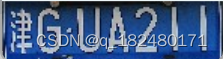
结果原始图:
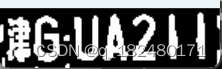
二值化
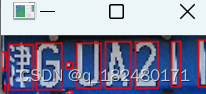
使用包络进行切分
代码:
# -*- coding: utf-8 -*-
import cv2
#=====读取车牌=====
image=cv2.imread("gg.bmp")
o=image.copy() #复制原始图像,用于绘制轮廓用
cv2.imshow("original",image)
#=============图像预处理===============
# -------图像去噪灰度处理F1-------
image = cv2.GaussianBlur(image, (3, 3), 0)
cv2.imshow("GaussianBlur",image)
# -------色彩空间转换F2-------
grayImage = cv2.cvtColor(image, cv2.COLOR_RGB2GRAY)
cv2.imshow("gray",grayImage)
# -------阈值处理(二值化)F3 -------
ret, image = cv2.threshold(grayImage, 0, 255, cv2.THRESH_OTSU)
cv2.imshow("threshold",image)
#-------膨胀处理F4,让一个字构成一个整体(大多数字不是一体的,是分散的)--------
kernel = cv2.getStructuringElement(cv2.MORPH_RECT, (2, 2))
image = cv2.dilate(image, kernel)
cv2.imshow("dilate",image)
#=============拆分车牌,将车牌内各个字符分离===============
# -------查找轮廓F5,各个字符的轮廓及噪声点轮廓---------------
contours, hierarchy = cv2.findContours(image, cv2.RETR_EXTERNAL, cv2.CHAIN_APPROX_SIMPLE)
x = cv2.drawContours(o.copy(), contours, -1, (0, 0, 255), 1)
cv2.imshow("contours",x)
print("共找到轮廓个数:",len(contours)) #测试语句:看看找到多少个轮廓
# -------------遍历所有轮廓,寻找最小包围框F6------------------
chars = []
for item in contours:
rect = cv2.boundingRect(item)
x,y,w,h = cv2.boundingRect(item)
chars.append(rect)
cv2.rectangle(o,(x,y),(x+w,y+h),(0,0,255),1)
cv2.imshow("contours2",o)
# --------------将包围框按照x轴坐标值排序(自左向右排序)--------------
chars = sorted(chars,key=lambda s:s[0],reverse=False)
# --------将字符的轮廓筛选出来F7-------------------
#逐个遍历包围框,高宽比在1.5-8之间,宽度大于3个像素,判定为字符
plateChars = []
for word in chars:
if (word[3] > (word[2] * 1.5)) and (word[3] < (word[2] * 8)) and (word[2] > 3):
plateChar = image[word[1]:word[1] + word[3], word[0]:word[0] + word[2]]
plateChars.append(plateChar)
# --------------测试语句:查看各个字符-------------------
for i,im in enumerate(plateChars):
cv2.imshow("char"+str(i),im)
cv2.waitKey()
cv2.destroyAllWindows()






 扫一扫
扫一扫


 1071
1071

 被折叠的 条评论
为什么被折叠?
被折叠的 条评论
为什么被折叠?
 到【灌水乐园】发言





