


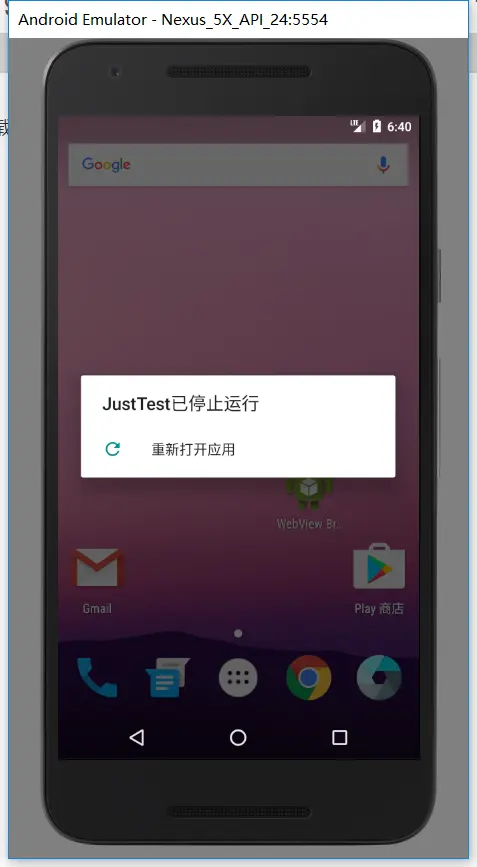
APP中需要实现LayoutInflater布局加载器动态加载布局,然而开启程序一运行就闪退。。。
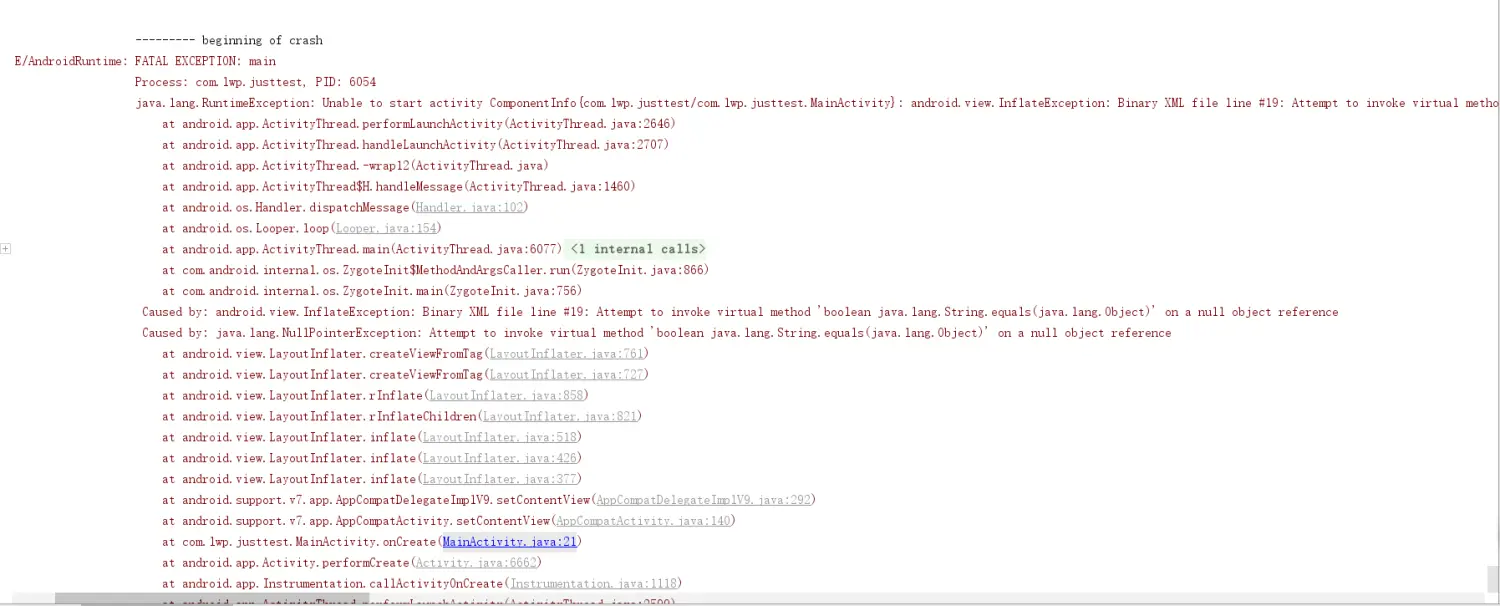
FATAL EXCEPTION: main
                                                 Process: com.lwp.justtest, PID: 6054
                                                 java.lang.RuntimeException: Unable to start activity ComponentInfo{com.lwp.justtest/com.lwp.justtest.MainActivity}: android.view.InflateException: Binary XML file line #19: Attempt to invoke virtual method 'boolean java.lang.String.equals(java.lang.Object)' on a null object reference
                                                     at android.app.ActivityThread.performLaunchActivity(ActivityThread.java:2646)
                                                     at android.app.ActivityThread.handleLaunchActivity(ActivityThread.java:2707)
                                                     at android.app.ActivityThread.-wrap12(ActivityThread.java)
                                                     at android.app.ActivityThread$H.handleMessage(ActivityThread.java:1460)
                                                     at android.os.Handler.dispatchMessage(Handler.java:102)
                                                     at android.os.Looper.loop(Looper.java:154)
                                                     at android.app.ActivityThread.main(ActivityThread.java:6077)
                                                     at java.lang.reflect.Method.invoke(Native Method)
                                                     at com.android.internal.os.ZygoteInit$MethodAndArgsCaller.run(ZygoteInit.java:866)
                                                     at com.android.internal.os.ZygoteInit.main(ZygoteInit.java:756)
                                                  Caused by: android.view.InflateException: Binary XML file line #19: Attempt to invoke virtual method 'boolean java.lang.String.equals(java.lang.Object)' on a null object reference
                                                  Caused by: java.lang.NullPointerException: Attempt to invoke virtual method 'boolean java.lang.String.equals(java.lang.Object)' on a null object reference
                                                     at android.view.LayoutInflater.createViewFromTag(LayoutInflater.java:761)
                                                     at android.view.LayoutInflater.createViewFromTag(LayoutInflater.java:727)
                                                     at android.view.LayoutInflater.rInflate(LayoutInflater.java:858)
                                                     at android.view.LayoutInflater.rInflateChildren(LayoutInflater.java:821)
                                                     at android.view.LayoutInflater.inflate(LayoutInflater.java:518)
                                                     at android.view.LayoutInflater.inflate(LayoutInflater.java:426)
                                                     at android.view.LayoutInflater.inflate(LayoutInflater.java:377)
                                                     at android.support.v7.app.AppCompatDelegateImplV9.setContentView(AppCompatDelegateImplV9.java:292)
                                                     at android.support.v7.app.AppCompatActivity.setContentView(AppCompatActivity.java:140)
                                                     at com.lwp.justtest.MainActivity.onCreate(MainActivity.java:21)
                                                     at android.app.Activity.performCreate(Activity.java:6662)
                                                     at android.app.Instrumentation.callActivityOnCreate(Instrumentation.java:1118)
                                                     at android.app.ActivityThread.performLaunchActivity(ActivityThread.java:2599)
                                                     at android.app.ActivityThread.handleLaunchActivity(ActivityThread.java:2707)
                                                     at android.app.ActivityThread.-wrap12(ActivityThread.java)
                                                     at android.app.ActivityThread$H.handleMessage(ActivityThread.java:1460)
                                                     at android.os.Handler.dispatchMessage(Handler.java:102)
                                                     at android.os.Looper.loop(Looper.java:154)
                                                     at android.app.ActivityThread.main(ActivityThread.java:6077)
                                                     at java.lang.reflect.Method.invoke(Native Method)
                                                     at com.android.internal.os.ZygoteInit$MethodAndArgsCaller.run(ZygoteInit.java:866)
                                                     at com.android.internal.os.ZygoteInit.main(ZygoteInit.java:756)
于是上优快云扒博文(参考:https://blog.youkuaiyun.com/qq_36408196/article/details/79968169),结果发现,这个坑相当有毒。。。
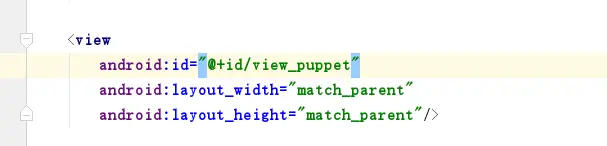
错误示范。。。
问题就在控件View的书写,View的首字母要大写,要大写,大写,写。。
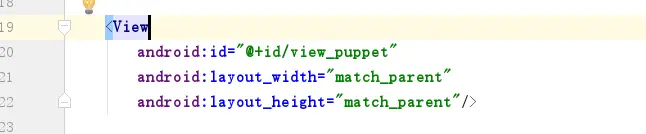
呐,改成上图这样即可了。





 扫一扫
扫一扫


 6377
6377

 被折叠的 条评论
为什么被折叠?
被折叠的 条评论
为什么被折叠?
 到【灌水乐园】发言





