


 本文深入探讨了Android中实现滑动效果的三种主要方法:使用scrollTo/scrollBy方法、应用动画和平移效果,以及调整View的布局参数。每种方法都有其独特的优势和适用场景,如scrollTo/scrollBy直接操作View内容,动画适用于复杂视觉效果,而修改布局参数则利于保持交互性。
滑动在Android开发中具有很重要的作用,
不管一些滑动效果多么绚丽,
归根结底,它们都是由不同的滑动外加一些特效所组成的。
因此,掌握滑动的方法是实现绚丽的自定义控件的基础。
- 常见的实现View的滑动的三种方式:
第一种是通过View本身提供的scrollTo/scrollBy方法来实现滑动;
第二种是通过动画给View施加平移效果来实现滑动;
第三种是通过改变View的LayoutParams使得View重新布局从而实现滑动。
The 1. 使用scrollTo/scrollBy
View提供了专门的方法来实现滑动,
即scrollTo()和scrollBy(),这两个方法的实现如下:
    /**
      * Set the scrolled position of your view. This will cause a call to
      * {@link #onScrollChanged(int,int,int,int)} and the view will be
      * invalidated.
      * @param x the x position to scroll to
      * @param y the y position to scroll to
      */
    public void scrollTo(int x,int y) {
        if (mScrollX != x || mScrollY != y) {
                int oldX = mScrollX;
                int oldY = mScrollY;
                mScrollX = x;
                mScrollY = y;
                invalidateParentCaches();
                onScrollChanged(mScrollX,mScrollY,oldX,oldY);
                if (!awakenScrollBars()) {
                        postInvalidateOnAnimation();
                }
        }
    }
     /**
      * Move the scrolled position of your view. This will cause a call to
      * {@link #onScrollChanged(int,int,int,int)} and the view will be
      * invalidated.
      * @param x the amount of pixels to scroll by horizontally
      * @param y the amount of pixels to scroll by vertically
      */
    public void scrollBy(int x,int y) {
        scrollTo(mScrollX + x,mScrollY + y);
    }
从以上源码可看出,
scrollBy实际上也是调用了scrollTo方法,
它实现了基于当前位置的相对滑动,
而scrollTo则实现了基于所传递参数的绝对滑动。这里要注意
滑动过程中View内部的两个属性mScrollX和mScrollY的改变规则,
这两个属性可以通过getScrollX和getScrollY方法分别得到。在滑动过程中,
mScrollX的值总是
等于View左边缘和View内容左边缘在水平方向的距离,
(即mScrollX = View左边缘的X值 - View内容左边缘的X值)
而mScrollY的值总是
等于View上边缘和View内容上边缘在竖直方向的距离。
(即mScrollY = View上边缘的Y值 - View内容上边缘的Y值)View边缘是指View的位置,由四个顶点组成,
而View内容边缘是指View中的内容的边缘,
【上一篇笔记(事件体系) 说了,顶点即View的位置信息,
不改变View的布局参数LayoutParams,它们的值便不会变动!!!
所以,这里的View边缘
即View在绘制时layout阶段确定了的原始布局位置!!!】scrollTo和scrollBy只能改变View内容的位置
即,本方式实现的是View 内容的滑动!!!
而不能改变View 本身在布局中的位置和顶点坐标!!!
也就是说,不管怎么滑动,
也不可能将当前View滑动到附近View所在的区域;-
mScrollX和mScrollY的单位为像素,
并且当View左边缘在View内容左边缘的右边时,mScrollX为正值,
反之为负值;
当View上边缘在View内容上边缘的下边时,mScrollY为正值,
反之为负值。
换句话说,
如果从左向右滑动,那么mScrollX为负值,反之为正值;
如果从上往下滑动,那么mScrollY为负值,反之为正值。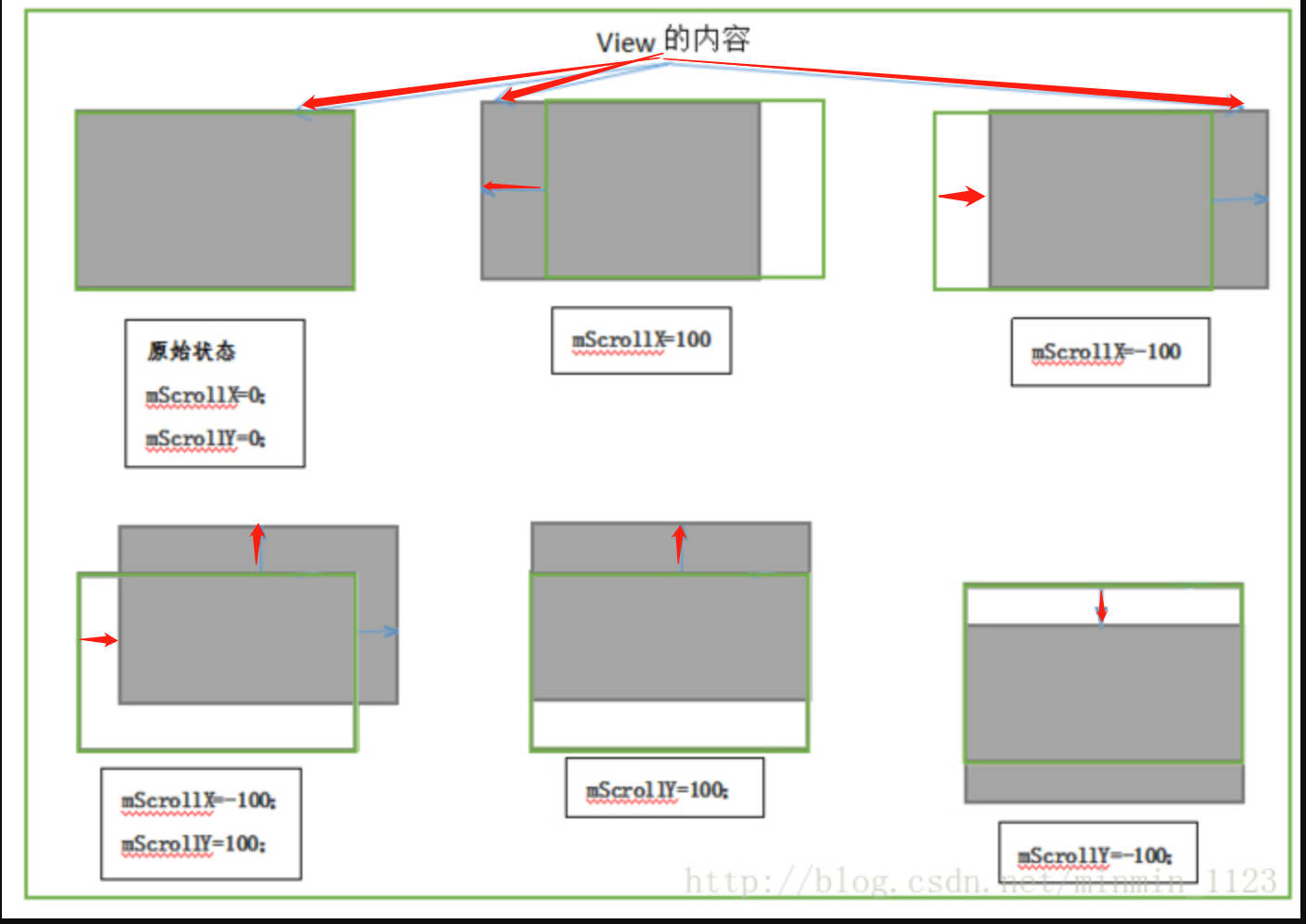 绿色边框代表View在屏幕上对应的矩形区域,灰色阴影代表View的内容
The 2. 使用动画
通过动画可以让一个View进行平移,而平移就是一种滑动。
主要是操作
View的translationX和translationY属性,
既可以采用传统的View动画,也可以采用属性动画;如果采用
属性动画的话,
为了能够兼容3.0以下的版本,需要采用开源动画库nineoldandroids(http://nineoldandroids.com/)。View动画实例,在100ms内将一个View从原始位置向右下角移动100个像素:
    <?xml version="1.0" encoding="utf-8"?>
    <set xmlns:android="http://schemas.android.com/apk/res/android"
         android:fillAfter="true"
         android:zAdjustment="normal" >
         <translate
             android:duration="100"
             android:fromXDelta="0"
             android:fromYDelta="0"
             android:interpolator="@android:anim/linear_interpolator"
             android:toXDelta="100"
             android:toYDelta="100" />
    </set>
- 属性动画示例,将一个View在100ms内从原始位置向右平移100像素。
ObjectAnimator.ofFloat(targetView,"translationX",0,100).setDuration(100).start();
-
注意,
View动画是对View的影像做操作,
并不能真正改变View的位置参数,包括宽/高,
并且如果希望动画后的状态得以保留还必须将fillAfter属性设置为true,
否则动画完成后动画结果会消失。使用属性动画并不会存在上述问题,
但是在Android 3.0以下无法使用属性动画,
需使用动画兼容库nineoldandroids来实现属性动画,
不过,
在Android 3.0以下的手机上通过nineoldandroids来实现的属性动画
本质上仍然是View动画。
同时View动画还有一个很严重的问题,
比如我们通过View动画将一个Button向右移动100px,
并且这个View设置的有单击事件,
这样子单击新位置无法触发onClick事件,
而单击原始位置仍然可以触发onClick事件,
尽管Button已经不在原始位置了。
它的位置信息(四个顶点和宽/高)并不会随着动画而改变,
因此在系统眼里,这个Button并没有发生任何改变,
它的真身仍然在原始位置,
在新位置上只是View的影像而已。
基于这一点,
我们不能简单地给一个View做平移动画
并且还希望它在新位置继续触发事件。
The 3. 改变布局参数
- 改变布局参数,即改变LayoutParams,使View
重新布局。
比如我们想把一个Button向右平移100px,
我们只需要将这个Button的LayoutParams里的marginLeft参数的值增加100px即可,
示例代码:
MarginLayoutParams params = (MarginLayoutParams)mButton1.getLayoutParams();
params.width += 100;
params.leftMargin += 100;
mButton1.requestLayout();//或mButton1.setLayoutParams(params);
各种滑动效果实现方式的对比
The 1. scrollTo/scrollBy:
- View提供的原生方法,专门用于View的滑动,
- 操作简单方便,
- 不影响内部元素的单击事件。
- 缺点:它只能滑动View的内容,并不能滑动View本身。
The 2. 动画:
- 使用动画实现View的滑动,要分情况。
Android 3.0以上并采用属性动画的方式,
没有明显的缺点;
适用于需具有交互性的View;使用View动画或者在Android 3.0以下使用属性动画,
则均不能改变View本身的属性。
适用于View不需要响应交互的情况,
需要交互则不太适合。
- 优点:一些复杂的效果必须要通过动画才能实现。
The 3. 改变布局参数
- 适用于需具有交互性的View;
- 缺点:操作稍微复杂;
实战
- 一三种方式,
我们使用自定义View的方式来实现View的滑动,
主要是配置一下背景颜色,以及在onTouchEvent()中做一下事件处理;
这里贴上关键代码,详细请见GitHub项目地址;
The 1. scrollTo/scrollBy
public class DragView4 extends View {

    private int lastX;
    private int lastY;

    public DragView4(Context context) {
        super(context);
        ininView();
    }

    public DragView4(Context context, AttributeSet attrs) {
        super(context, attrs);
        ininView();
    }

    public DragView4(Context context, AttributeSet attrs, int defStyleAttr) {
        super(context, attrs, defStyleAttr);
        ininView();
    }

    private void ininView() {
        setBackgroundColor(Color.BLUE);
    }

    @Override
    public boolean onTouchEvent(MotionEvent event) {
        int x = (int) event.getX();
        int y = (int) event.getY();
        switch (event.getAction()) {
            case MotionEvent.ACTION_DOWN:
                lastX = (int) event.getX();
                lastY = (int) event.getY();
                break;
            case MotionEvent.ACTION_MOVE:
                int offsetX = x - lastX;
                int offsetY = y - lastY;
                ((View) getParent()).scrollBy(-offsetX, -offsetY);
                break;
        }
        return true;
    }
}
The 2. 动画
- 以上已经对View动画、属性动画分别给过例子;
或参考以下博客:
The 3. 改变布局参数
public class DragView3 extends View {

    private int lastX;
    private int lastY;

    public DragView3(Context context) {
        super(context);
        ininView();
    }
    public DragView3(Context context, AttributeSet attrs) {
        super(context, attrs);
        ininView();
    }
    public DragView3(Context context, AttributeSet attrs, int defStyleAttr) {
        super(context, attrs, defStyleAttr);
        ininView();
    }

    private void ininView() {
        setBackgroundColor(Color.BLUE);
    }

    @Override
    public boolean onTouchEvent(MotionEvent event) {
        int x = (int) event.getX();
        int y = (int) event.getY();
        switch (event.getAction()) {
            case MotionEvent.ACTION_DOWN:
                // 记录触摸点坐标
                lastX = (int) event.getX();
                lastY = (int) event.getY();
                break;
            case MotionEvent.ACTION_MOVE:
                // 计算偏移量
                int offsetX = x - lastX;
                int offsetY = y - lastY;

                ViewGroup.MarginLayoutParams layoutParams = (ViewGroup.MarginLayoutParams) getLayoutParams();
//                LinearLayout.LayoutParams layoutParams = (LinearLayout.LayoutParams) getLayoutParams();
                layoutParams.leftMargin = getLeft() + offsetX;
                layoutParams.topMargin = getTop() + offsetY;
                setLayoutParams(layoutParams);
                break;
        }
        return true;
    }
}





 扫一扫
扫一扫


 1533
1533

 被折叠的 条评论
为什么被折叠?
被折叠的 条评论
为什么被折叠?
 到【灌水乐园】发言





