


 本文介绍使用Instruments工具中的NSZombie功能定位并解决iPhone应用因对象已删除而调用方法导致的BAD_ACCESS内存错误。通过运行'ObjectAllocations'性能工具,启用NSZombie检测和记录引用计数,可在应用崩溃时获取问题对象的完整内存历史。
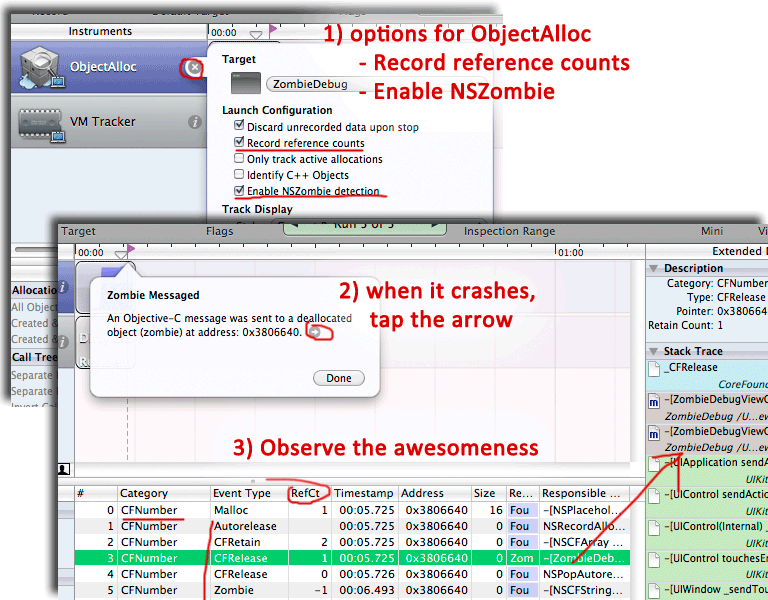
When your iPhone app crashes with ‘BAD ACCESS’ you’re in trouble – a memory bug where you tried to call a method on a object that was already deleted. Instruments has support for NSZombie – a feature that makes it easy to find the source of the bug by showing you a full history of every alloc, retain, release, and autorelease of the object that caused the crash! Wow. Here’s how:
Basic steps are:
- Run in Performance tool ‘Object Allocations’
- Stop running and set options on ObjAllocations instrument: ‘Enable NSZombie’ Detection and ‘Record Reference Counts’
- Re-run from instruments, when it crashes, click the arrow in the popup zombie dialog
- Open up the stack trace view and see the full memory history of the problem object
- Wow, how awesome is that?
- If you love this post, do me a favor and check out our Free app Focus for Facebook
- You might also like my memory management tutorial and other posts under ‘App Development’.
Here’s a link to the demo program: ZombieDebug Demo Project. The code we’re looking at in the video is:
@implementation ZombieDebugViewController

@synthesize objArray;

-(void)rewriteText {
NSMutableString* s = [NSMutableString stringWithCapacity:100];
for (id obj in objArray) {
[s appendFormat:@"%@,\n",obj];
[obj release];
}
label.text = s;
}

- (void)viewDidLoad {
[super viewDidLoad];
self.objArray = [NSMutableArray arrayWithCapacity:10];
[objArray addObject:@"I'm a string object"];
[self rewriteText];
}

-(IBAction) tapButton:(id)button {
NSNumber* n = [NSNumber numberWithLong:random()];
[objArray addObject:n];
[self rewriteText];
}

-(void)dealloc {
[super dealloc];
self.objArray=nil;
}

@end





 扫一扫
扫一扫


 4106
4106

 被折叠的 条评论
为什么被折叠?
被折叠的 条评论
为什么被折叠?
 到【灌水乐园】发言





