



第一次
进程:正在进行中的程序(直译);
线程:就是进程中的一个负责程序执行的控制单元(执行路径);
一个进程中可以有多个线程的执行,称之为多线程;
一个进程当中至少要有一个线程;
开启多个线程是为了同时运行多部分代码;
每一个线程都有自己运行的内容,这个内容可以称之为线程要执行的任务;
多线程的好处:解决了多部分同时运行的问题;
多线程的弊端:线程太多会导致效率的降低;
其实应用程序的执行都是cpu在做着快速的切换完成的。这个切换时随机的;
JVM启动时就启动了多个线程,至少有两个线程可以分析的出来。
1、执行main函数的线程;
该线程的任务代码都定义在main函数中。
2、负责垃圾回收的线程;
第二次
创建线程的目的是为了开启一条执行路径,取运行指定的代码和其他代码实现同时运行,而运行的指定代码就是这个执行路径的任务
jvm创建的主线程的任务都定义在了主函数中,而自定义的线程的任务哪里?在Thread类用户描述线程,线程需要任务的,所以Thread类也对任务的描述,这个任务就通过Thread类中的run方法来体现,也就是说,run方法就是封装自定义线程运行任务的函数。
run方法中定义的就是线程中要运行的任务代码。
开启线程是为了运行指定的代码,所以只有继承Thread类,并复写run方法,将运行的代码定义在run方法中即可。
两种方式:集成Thread类
实现Runable接口
第三次 2020年6月29日19:58:05
可以通过Thread的getName获取线程的名称 Thread-编号
多线程如果开启了一条线程,则开启了一条执行路径,每条线程都已自己的栈,然后压栈弹栈
线程多种状态
创建 就绪 执行 结束 阻塞
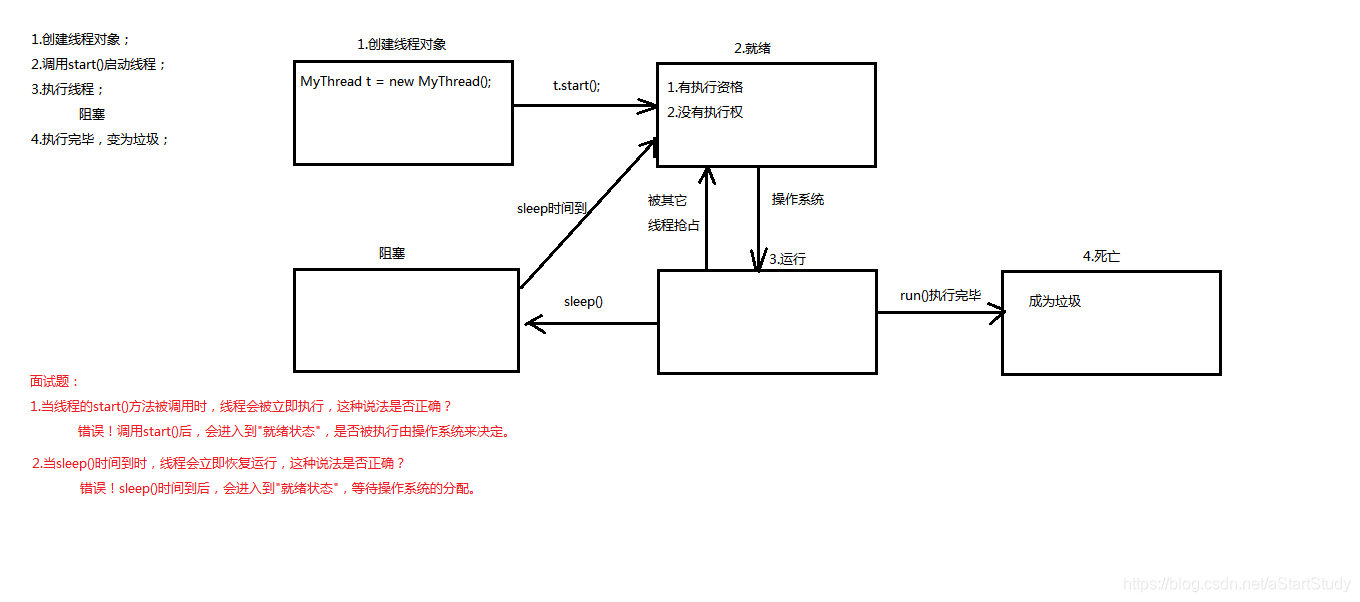
cpu的执行资格:可以被cpu处理,在处理队列中排队
cpu的执行权:正在被cup处理
实现Runnable接口的好处:
1、将线程的任务从线程的子类中分离出来,进行了单独的封装。
2、避免了java单继承的局限性
所以,创建线程的第二种方式较为常用
public
synchronized
void start() {
if (
threadStatus != 0)
throw
new IllegalThreadStateException();
group.add(
this);
boolean
started =
false;
try {
start0();
started =
true;
}
finally {
try {
if (!
started) {
group.threadStartFailed(
this);
}
}
catch (Throwable
ignore) {
}
}
}
private
native
void start0();
这里的start0()用了 native ,这个关键字表示调用本机的操作系统函数,因为多线程需要底层操作系统的支持。
第四次 2020年6月30日20:17:16
线程安全问题:
1、多个线程在操作共享的数据。
2、操作共享数据的线程代码有多条。
当一个线程在执行操作共享数据的多条代码过程中,其他线程参与了运算,就会导致线程安全问题的产生。
解决思路:就是将多条操作共享数据的线程代码封装起来,当有线程在执行这些代码的时候,其他线程不可以参与运算
synchronized
同步的好处:解决了线程的安全问题;
同步的弊端:相对降低了效率,因为同步外的线程都会判断同步锁
同步的前提:同步中必须有多个线程并使用同一个锁;
需求:储户两个,每个都到银行存钱,每次存100 ,共存3次
public
class BankDemo {
public
static
void main(String[]
args) {
Cus
c =
new Cus();
Thread
t1 =
new Thread(
c);
Thread
t2 =
new Thread(
c);
t1.start();
t2.start();
}
}
class Bank{
private
int
sum;
public
synchronized
void add(
int
num) {
//同步函数
sum=
sum+
num;
System.
out.println(
"sum:"+
sum);
}
}
class Cus
implements Runnable{
Bank
b =
new Bank();
@Override
public
void run() {
for (
int
i = 0;
i < 3;
i++) {
b.add(100);
}
}
}
同步函数使用的锁:当前对象 即this
同步函数和同步代码块的区别:
同步函数的锁是固定的this;同步代码块的锁是任意的;
建议使用同步代码块;
静态同步函数锁:不用this,用this.getClass();该函数所属字节码对象 可以用getClass方法获取,可以用当前类名.class表示;
第五次 2020年7月2日20:07:37
多线程下的单例
public
class SingleDemo {
public
static
void main(String[]
args) {
}
}
//饿汉式
class Single{
private
static
final Single
s =
new Single();
private Single() {}
public
static Single getInstance() {
return
s;
}
}
//懒汉式
class Single1{
private
static Single1
s =
null;
private Single1() {}
public
static Single1 getInstance() {
if(
s==
null) {
//解决效率问题
synchronized (Single1.
class) {
//解决安全问题
if(
s==
null) {
s=
new Single1();
}
}
}
return
s ;
}
}
第六次 2020年7月5日08:34:30 等待环唤醒机制的使用
死锁:常见情景之一:同步的嵌套
public
class DeadLoackTest {
public
static
void main(String[]
args) {
Test
a =
new Test();
Thread
t1 =
new Thread(
a);
Thread
t2 =
new Thread(
a);
t1.start();
try {
Thread.
sleep(1);
}
catch (InterruptedException
e) {
e.printStackTrace();
}
a.
flag =
false;
t2.start();
}
}
class Test
implements Runnable {
public
boolean
flag =
true;
private
static
final Object
locka =
new Object();
private
static
final Object
lockb =
new Object();
Test() {
}
@Override
public
void run() {
if (
flag) {
while (
true) {
synchronized (
locka) {
System.
out.println(
"if locka ....");
synchronized (
lockb) {
System.
out.println(
"if lockb ....");
}
}
}
}
else {
while (
true) {
synchronized (
lockb) {
System.
out.println(
"else lockb ....");
synchronized (
locka) {
System.
out.println(
"else locka ....");
}
}
}
}
}
}
线程间通信:多个线程在处理同一资源,但是任务却不同。
等待唤醒机制:涉及的方法 1,wait(); 让线程处于冻结状态,被wait的线程会被存储到线程池中
2,notify(); 唤醒线程池中的一个线程(任意)
3,notifyAll(); 唤醒线程 池中所有线程
这些方法都必须都定义在同步中,因为这些方法是用于操作线程状态的方法,必须要明确到底操作的是哪个锁上的线程;
为什么操作线程的方法wait notify notifyAll 定义在Object类中
因为这些方法都是监视器的方法。监视器其实就是锁,锁可以是任意的对象,任意的对象调用方式一定定义在Object类中;
public
class ResourceDemo {
public
static
void main(String[]
args) {
// 创建资源
Resource
r =
new Resource();
// 创建任务
Input
input =
new Input(
r);
Output
outPut =
new Output(
r);
// 创建线程,执行路径
Thread
t1 =
new Thread(
input);
Thread
t2 =
new Thread(
outPut);
// 开启线程
t1.start();
t2.start();
}
}
class Resource{
String
name;
String
sex;
boolean
flag =
false;
}
class Input
implements Runnable{
Resource
r ;
public Input(Resource
r){
this.
r=
r;
}
@Override
public
void run() {
int
x =0;
while(
true) {
synchronized (
r) {
if(
r.
flag)
try {
r.wait();
}
catch (InterruptedException
e) {
e.printStackTrace();
}
if(
x==0) {
r.
name=
"mike";
r.
sex=
"man";
}
else {
r.
name=
"丽丽";
r.
sex=
"女女女";
}
x=(
x+1)%2;
r.
flag=
true;
r.notify();
//可空唤醒一次
}
}
}
}
class Output
implements Runnable{
Resource
r ;
public Output(Resource
r) {
this.
r=
r;
}
@Override
public
void run() {
int
a =0;
while(
a<=10) {
synchronized (
r) {
if(!
r.
flag)
try {
r.wait();
}
catch (InterruptedException
e) {
e.printStackTrace();
}
System.
out.println(
r.
name+
"...."+
r.
sex);
r.
flag=
false;
r.notify();
}
a++;
}
}
}
代码优化:
package com.mly.test.duoxiancheng;
public
class ResourceDemo {
public
static
void main(String[]
args) {
// 创建资源
Resource
r =
new Resource();
// 创建任务
Input
input =
new Input(
r);
Output
outPut =
new Output(
r);
// 创建线程,执行路径
Thread
t1 =
new Thread(
input);
Thread
t2 =
new Thread(
outPut);
// 开启线程
t1.start();
t2.start();
}
}
class Resource {
private String
name;
private String
sex;
private
boolean
flag =
false;
public
synchronized
void set(String
name, String
sex) {
if (
flag)
try {
this.wait();
}
catch (InterruptedException
e) {
e.printStackTrace();
}
this.
name =
name;
this.
sex =
sex;
flag =
true;
this.notify();
}
public
synchronized
void out() {
if (!
flag)
try {
this.wait();
}
catch (InterruptedException
e) {
//
TODO
Auto-generated catch block
e.printStackTrace();
}
System.
out.println(
name +
"...." +
sex);
flag =
false;
this.notify();
}
}
class Input
implements Runnable {
Resource
r;
public Input(Resource
r) {
this.
r =
r;
}
@Override
public
void run() {
int
x = 0;
while(
true) {
if (
x == 0) {
r.set(
"mike",
"man");
}
else {
r.set(
"丽丽",
"女女女");
}
x = (
x + 1) % 2;
}
}
}
class Output
implements Runnable {
Resource
r;
public Output(Resource
r) {
this.
r =
r;
}
@Override
public
void run() {
int
a = 0;
while (
a <= 10) {
r.out();
a++;
}
}
}
多生产者,多消费者
if判断标记只有一次,会导致不该运行的线程运行了,出现了数据错误的情况;
while判断标记,解决线程获取执行权后,是否要运行;
notify:只能唤醒一个线程,如果本方唤醒本方,没有意义,而且while判断标记+notify会导致死锁
notifyAll解决,本方线程一定会唤醒对方线程的问题。
package com.mly.test.duoxiancheng;
/**
* 生产者,消费者
* 多生产者 多消费者
*
*/
public
class ProducerCustomerDemo {
public
static
void main(String[]
args) {
Resrouce
r =
new Resrouce();
Producer
p =
new Producer(
r);
Customer
c =
new Customer(
r);
Thread
t0 =
new Thread(
p);
Thread
t1 =
new Thread(
p);
Thread
t2 =
new Thread(
c);
Thread
t3 =
new Thread(
c);
t0.start();
t1.start();
t2.start();
t3.start();
}
}
class Producer
implements Runnable{
private Resrouce
r ;
public Producer(Resrouce
r) {
this.
r=
r;
};
@Override
public
void run() {
while(
true) {
r.set(
"烤鸭");
}
}
}
class Customer
implements Runnable{
private Resrouce
r;
public Customer(Resrouce
r) {
this.
r=
r;
}
@Override
public
void run() {
while(
true) {
r.out();
}
}
}
class Resrouce {
private String
name;
private
int
count=1;
private
boolean
flag =
false;
public
synchronized
void set(String
name) {
while(
flag)
try {
this.wait();
}
catch (InterruptedException
e) {
//
TODO
Auto-generated catch block
e.printStackTrace();
}
this.
name=
name+
count;
count++;
System.
out.println(Thread.
currentThread().getName()+
".生产者..."+
this.
name);
flag=
true;
this.notifyAll();
}
public
synchronized
void out() {
while(!
flag)
try {
this.wait();
}
catch (InterruptedException
e) {
e.printStackTrace();
}
System.
out.println(Thread.
currentThread().getName()+
".消费者______"+
this.
name);
this.
flag=
false;
this.notifyAll();
}
}
同步代码块对于锁的操作是隐式的;
Lock lock = new ReentrantLoack(): jdk1.5以后将同步和锁封装成 了对象,并将操作锁的隐式方式定义到了该对象中,将隐式动作变成了显示动作。
Lock接口:出现替代了同步代码块或者同步函数,将同步的隐式锁操作变成现实锁操作,同时更为灵活,可以一个锁上加上多组监视器。
lock()获取锁
unlock()释放锁,通常需要定义在finally代码块中
condition接口:出现替代了Object中的wait notify notifyall方法,讲这些监视器方法单独进行了封装,变成了condition监视器对象,可以任意锁记性组合
使用lock
/**
* 生产者,消费者
* 多生产者 多消费者
*
*/
public
class ProducerCustomerDemo {
public
static
void main(String[]
args) {
Resrouce
r =
new Resrouce();
Producer
p =
new Producer(
r);
Customer
c =
new Customer(
r);
Thread
t0 =
new Thread(
p);
Thread
t1 =
new Thread(
p);
Thread
t2 =
new Thread(
c);
Thread
t3 =
new Thread(
c);
t0.start();
t1.start();
t2.start();
t3.start();
}
}
class Producer
implements Runnable{
private Resrouce
r ;
public Producer(Resrouce
r) {
this.
r=
r;
};
@Override
public
void run() {
while(
true) {
r.set(
"烤鸭");
}
}
}
class Customer
implements Runnable{
private Resrouce
r;
public Customer(Resrouce
r) {
this.
r=
r;
}
@Override
public
void run() {
while(
true) {
r.out();
}
}
}
class Resrouce {
private String
name;
private
int
count=1;
private
boolean
flag =
false;
Lock
lock =
new ReentrantLock();
// 通过已有的锁获取两组监视器 一组生产者监视器,一组消费者监视器
Condition
con1=
lock.newCondition();
Condition
con2=
lock.newCondition();
public
void set(String
name) {
lock.lock();
try {
while(
flag)
try {
con1.await();
}
catch (InterruptedException
e) {
//
TODO
Auto-generated catch block
e.printStackTrace();
}
this.
name=
name+
count;
count++;
System.
out.println(Thread.
currentThread().getName()+
".生产者..."+
this.
name);
flag=
true;
con2.signal();
}
catch (Exception
e) {
}
finally {
lock.unlock();
}
}
public
void out() {
lock.lock();
try {
while(!
flag)
try {
con2.await();
}
catch (InterruptedException
e) {
e.printStackTrace();
}
System.
out.println(Thread.
currentThread().getName()+
".消费者______"+
this.
name);
this.
flag=
false;
con1.signal();
}
catch (Exception
e) {
}
finally {
lock.unlock();
}
}
}
wait和sleep的区别:
1、wait可以指定时间,可以不指定,sleep必须指定时间。
2、在同步中时,对于cpu的执行权和执行锁的处理不同:
wait:释放执行权,释放锁
sleep:释放执行权,不释放锁
void show()
{
synchronized(this){ //t0 t1 t2
wait(); //t0 t1
}
}
void method()
{
synchronized(this){
// wait();
notifyAll();
}
}
停止线程:
1、stop方法;
2、run方法结束;
怎么控制线程的任务结束呢?
任务中都会有循环结构,只要控制住循环就可以结束任务。
控制循环通常用定义标记来完成 while()
但是如果线程处于冻结状态,无法读取标记,如何结束呢?
可以使用interrupt()方法将线程从冻结状态强制恢复到运行状态中来,让线程具备cpu的执行资格,但是强制动作会发生中断异常,记得要处理。
package com.mly.test.duoxiancheng;
public
class StopThreadDemo {
public
static
void main(String[]
args) {
StopThread
stop=
new StopThread();
Thread
t1 =
new Thread(
stop);
Thread
t2 =
new Thread(
stop);
t1.start();
t2.start();
int
num=1;
for(;;) {
if(++
num==50) {
t1.interrupt();
//将线程从冻结状态强制恢复到运行状态中来,让线程具备
cpu
执行资格
t2.interrupt();
break;
}
System.
out.println(
"main...."+
num);
}
System.
out.println(
"over");
}
}
class StopThread
implements Runnable{
private
boolean
flag =
true;
public
void setFlag() {
this.
flag=
false;
}
@Override
public
synchronized
void run() {
while(
flag) {
try {
wait();
}
catch (Exception
e) {
System.
out.println(Thread.
currentThread().getName()+
"----"+
e);
flag=
false;
}
System.
out.println(Thread.
currentThread().getName()+
"----");
}
}
}
守护线程
如果所有前台线程结束,后台线程无论出于任何状态都会结束
join方法 等待该线程终止,主线程等待t1线程执行完之后会再执行。
public
class JoinDemo {
public
static
void main(String[]
args) {
DemoJ
d =
new DemoJ();
Thread
t1 =
new Thread(
d);
Thread
t2 =
new Thread(
d);
t1.start();
t2.start();
try {
t1.join();
//t1线程要申请加入进来,运行;临时加入线程运算时可以使用join方法
}
catch (InterruptedException
e) {
e.printStackTrace();
}
for (
int
i = 0;
i < 50;
i++) {
System.
out.println(Thread.
currentThread().getName()+
"....."+
i);
}
}
}
class DemoJ
implements Runnable{
@Override
public
void run() {
for (
int
i = 0;
i < 100;
i++) {
System.
out.println(Thread.
currentThread().getName()+
"...."+
i);
}
}
}
优先级,暂停方法
package com.mly.test.duoxiancheng;
public
class JoinDemo {
public
static
void main(String[]
args) {
DemoJ
d =
new DemoJ();
Thread
t1 =
new Thread(
d);
Thread
t2 =
new Thread(
d);
t1.start();
t2.start();
// t2.setPriority(Thread.MAX_PRIORITY); //线程设置优先级
try {
t1.join();
//t1线程要申请加入进来,运行;临时加入线程运算时可以使用join方法
}
catch (InterruptedException
e) {
e.printStackTrace();
}
for (
int
i = 0;
i < 50;
i++) {
System.
out.println(Thread.
currentThread().getName()+
"....."+
i);
}
}
}
class DemoJ
implements Runnable{
@Override
public
void run() {
for (
int
i = 0;
i < 100;
i++) {
System.
out.println(Thread.
currentThread().toString()+
"...."+
i);
Thread.
yield();
// 线程暂停
}
}
}
一些题目
1、// 如果错误,错发生在哪一行? 发生在Test1
class
Test1
implements Runnable{
public
void run(Thread
d) {
}
}
2、运行结果?
subThread run 以子类为主
public
class ThreadTest {
public
static
void main(String[]
args) {
new Thread(
new Runnable() {
public
void run() {
System.
out.println(
"runnable run ");
}}) {
public
void run() {
System.
out.println(
"subThread run");
}
}.start();
}
}





 扫一扫
扫一扫


 1049
1049

 被折叠的 条评论
为什么被折叠?
被折叠的 条评论
为什么被折叠?
 到【灌水乐园】发言





