





错误信息:curl: (7) Failed to connect to raw.githubusercontent.com port 443: Connection refused
目前,我解决的方法是:
1.通过
https://www.ipaddress.com
查询
raw.githubusercontent.com
对应ip地址,如图所示: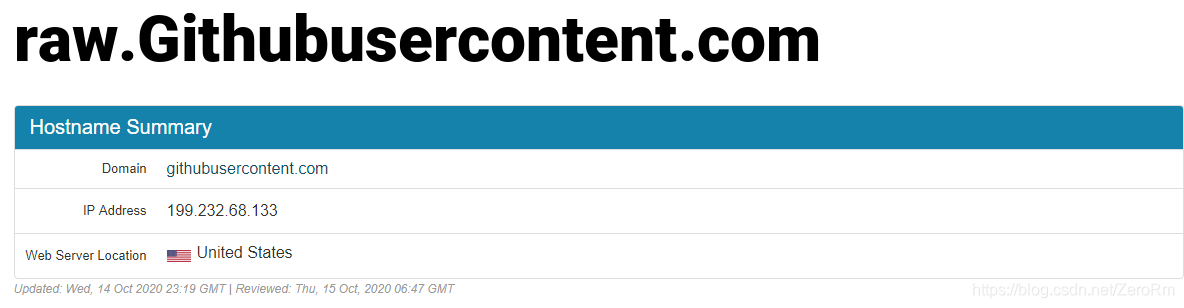
2. 修改host文件,打开访达,shift+command+g 弹出 前往文件夹: 输入 /etc/hosts ,找到 hosts 文件。该文件在etc目录下无法直接修改,需要拷贝到桌面修改完成后,重新拖回etc中,替换源文件,需要将以下内容放入hosts中:
199.232.68.133 raw.githubusercontent.com
199.232.68.133 user-images.githubusercontent.com
199.232.68.133 avatars2.githubusercontent.com
199.232.68.133 avatars1.githubusercontent.com
3.完成host文件修改后,打开终端,输入
/bin/bash -c "$(curl -fsSL https://raw.githubusercontent.com/Homebrew/install/master/install.sh)"
进行安装,安装过程会出现问题如下:
Cloning into '/usr/local/Homebrew/Library/Taps/homebrew/homebrew-core'...
fatal: unable to access 'https://github.com/Homebrew/homebrew-core/': LibreSSL SSL_read: SSL_ERROR_SYSCALL, errno 54
Error: Failure while executing; `git clone https://github.com/Homebrew/homebrew-core /usr/local/Homebrew/Library/Taps/homebrew/homebrew-core` exited with 128.
Error: Failure while executing; `/usr/local/bin/brew tap homebrew/core` exited with 1.
出现该问题后,解决方式:
执行以下命令:
git clone https://github.com/Homebrew/homebrew-core /usr/local/Homebrew/Library/Taps/homebrew/homebrew-core --depth=1
诊断命令
brew doctor
# Your system is ready to brew.
查看版本命令:
brew -v
# Homebrew 2.5.6





 扫一扫
扫一扫


 598
598

 被折叠的 条评论
为什么被折叠?
被折叠的 条评论
为什么被折叠?
 到【灌水乐园】发言





