Alignment of Code
UVA - 1593
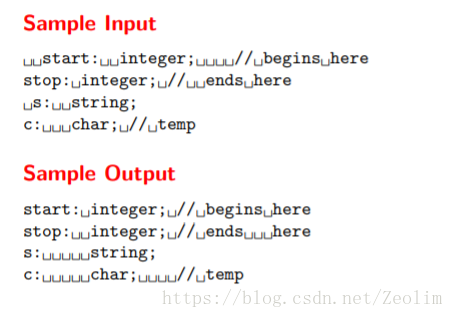
//#pragma GCC optimize(2)
#include <bits/stdc++.h>
using namespace std;
typedef long long ll;

const int MAXN = 1e6 + 10;

int maxlen[185] = {0}, hlen = 0;

string arr[1010][185];

int main()
{
    //ios::sync_with_stdio(false);
    //cin.tie(0);     cout.tie(0);
    //freopen("D://test.in", "r", stdin);
    //freopen("D://test.out", "w", stdout);

    int flag = 0;

    string a;

    while(getline(cin, a))
    {
        int cutf = 0;

        stringstream cutof(a);

        string word;

        while(cutof >> word)
        {
            maxlen[cutf] = max(maxlen[cutf], int(word.length()));
            arr[flag][cutf] = word;
            cutf++;
            hlen = max(hlen, cutf);
        }

        flag++;
    }

    for(int i = 0; i < flag; i++)
    {
        for(int j = 0; j < hlen; j++)
        {
            if(arr[i][j] != "")
            {
            	if(arr[i][j + 1] == "")
            	{
            		cout<<arr[i][j]<<endl;
				}
            	else
            	{
            		cout<<left<<setw(maxlen[j] + 1)<<arr[i][j];
				}
			}

        }
    }

    return 0;
}











 扫一扫
扫一扫


 333
333

 被折叠的 条评论
为什么被折叠?
被折叠的 条评论
为什么被折叠?
 到【灌水乐园】发言





