





前言:在上一篇博客中对CredentialProvider的基本概念与个人理解等做了阐述,其中可知CredentialProvider接口烂,文档不完善、参考资料匮乏、学习门槛高等,但终究还得学习使用,硬着头皮上吧!(查各种资料,找各种样例程序,做各种测试,emo下!)因此,本文对CredentialProvider主要接口类、类方法等的具体用途、调用栈以及登录逻辑进行详细的分析与阐述,一方面强化个人对CredentialProvider的学习,另一方面希望给后来的开发者提供一定的参考!
主要接口类概述:CredentialProvider相关的主要接口类可以简单分为两类,一类是Credential相关类,另一类为Provider相关类。Credential接口类主要包含凭据字段管理、凭据登录验证管理、凭据登录相关事件相应管理等接口,主要包括ICredentialProviderCredential、ICredentialProviderCredential2、ICredentialProviderCredentialWithFieldOptions、IConnectedCredentialProviderCredentialWithFieldOptions几个接口,其中核心接口类为ICredentialProviderCredential,其它凭据类接口均以该核心类为基础类。Provider接口类主要包含验证用户管理、验证用户所对应的登录凭据管理、验证应用场景设定(开机登录、锁屏登录、修改密码、授权验证等)等接口,主要包括ICredentialProvider、ICredentialProviderSetUserArray、ICredentialProviderFilter几个接口(注意:Provider主要管理的是完整的凭据对象,Credential管理的为具体凭据下的UI字段,两者管理的目标不在一个属性层级,Provider管理的是Credential,Credential是Provider的成员对象)。
登录验证调用方法栈获取:CredentialProvider接口相关方法较多,官方文档描述不够完善,各个方法之间的调用顺序仅凭官方文档很难理清楚,此处对样例程序中的各个主要方法中加入OutputDebugStringA(__FUNCTION__)对调用的方法名进行打印,在使用登录插件登录验证过程中使用DebugView进行调试信息捕获,从而得到CredentialProvider在具体登录时的调用方法栈,具体如下图与日志所示(图例非匹配,以日志为主):
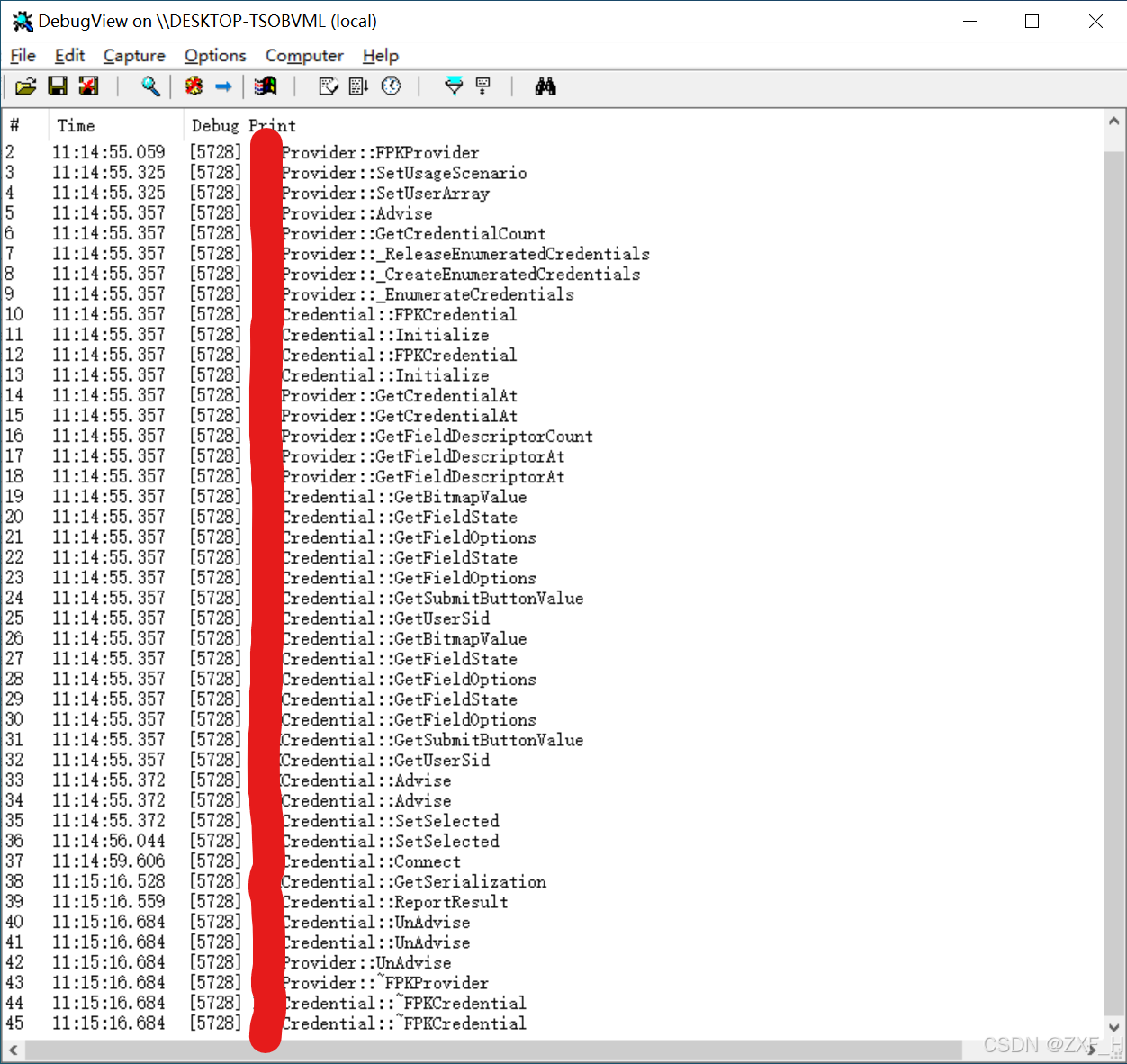
00000001	11:12:45.246	[2432] Test_CreateInstance
00000002	11:12:45.278	[2432] TestProvider::TestProvider
00000003	11:12:45.559	[2432] TestProvider::SetUsageScenario
00000004	11:12:45.559	[2432] TestProvider::SetUserArray
00000005	11:12:45.574	[2432] TestProvider::Advise
00000006	11:12:45.574	[2432] TestProvider::GetCredentialCount
00000007	11:12:45.574	[2432] TestProvider::_ReleaseEnumeratedCredentials
00000008	11:12:45.574	[2432] TestProvider::_CreateEnumeratedCredentials
00000009	11:12:45.574	[2432] TestProvider::_EnumerateCredentials
00000010	11:12:45.574	[2432] TestCredential::TestCredential
00000011	11:12:45.574	[2432] TestCredential::Initialize
00000015	11:12:45.574	[2432] TestProvider::GetCredentialAt
00000016	11:12:45.574	[2432] TestProvider::GetFieldDescriptorCount
00000017	11:12:45.574	[2432] TestProvider::GetFieldDescriptorAt
00000018	11:12:45.574	[2432] TestProvider::GetFieldDescriptorAt
00000026	11:12:45.574	[2432] TestCredential::GetBitmapValue
00000027	11:12:45.574	[2432] TestCredential::GetFieldState
00000028	11:12:45.574	[2432] TestCredential::GetFieldOptions
00000029	11:12:45.574	[2432] TestCredential::GetFieldState
00000030	11:12:45.574	[2432] TestCredential::GetFieldOptions
00000031	11:12:45.574	[2432] TestCredential::GetSubmitButtonValue
00000032	11:12:45.574	[2432] TestCredential::GetUserSid
00000034	11:12:45.621	[2432] TestCredential::Advise
00000035	11:12:48.730	[2432] TestCredential::SetSelected
00000036	11:12:49.949	[2432] TestCredential::Connect
00000037	11:13:06.840	[2432] TestCredential::GetSerialization
00000038	11:13:06.856	[2432] TestCredential::ReportResult
00000040	11:13:06.981	[2432] TestCredential::UnAdvise
00000041	11:13:06.981	[2432] TestProvider::UnAdvise
00000042	11:13:06.981	[2432] TestProvider::~TestProvider
00000043	11:13:06.981	[2432] TestCredential::~TestCredential
主要方法功能详解(按以上调用方法栈顺序为主):
(1)Test_CreateInstance、TestProvider构造函数、~TestProvider析构函数用于创建销毁Provider对象实例,Test_CreateInstance方法为自定义方法而非继承于Provider接口类对象的子方法,具体实现如下:
HRESULT Test_CreateInstance(_In_ REFIID riid, _Outptr_ void **ppv)
{
    OutputDebugStringA(__FUNCTION__);
    HRESULT hr;
    TestProvider *pProvider = new(std::nothrow) TestProvider();
    if (pProvider)
    {
        hr = pProvider->QueryInterface(riid, ppv);
        pProvider->Release();
    }
    else
    {
        hr = E_OUTOFMEMORY;
    }
    return hr;
}
(2)SetUsageScenario方法用于设置凭据应用场景,并保存当前应用场景于成员_cpu以用于当前验证场景的其它操作,如下设置的场景为开机登录与锁屏登录场景(补充说明:开机登录场景于锁屏登录场景一次只能触发一个场景,要么是CPUS_LOGON开机登录,要么是CPUS_UNLOCK_WORKSTATION锁屏登录,开机登录只能在开机时触发,锁屏登录场景只能在开机状态下主动或自动锁屏后触发,毕竟该函数传入的cpus参数只有一个值,_cpus也仅有一个值,cpus/_cpus后加的“s”是指该参数可以接收多种场景值,而不是可以同时接收多种场景值):
HRESULT TestProvider::SetUsageScenario(
    CREDENTIAL_PROVIDER_USAGE_SCENARIO cpus,
    DWORD /*dwFlags*/)
{
    OutputDebugStringA(__FUNCTION__);
    HRESULT hr;

    // Decide which scenarios to support here. Returning E_NOTIMPL simply tells the caller
    // that we're not designed for that scenario.
    switch (cpus)
    {
    case CPUS_LOGON:
    case CPUS_UNLOCK_WORKSTATION:
        _cpus = cpus;
        _fRecreateEnumeratedCredentials = true;
        hr = S_OK;
        break;

    case CPUS_CHANGE_PASSWORD:
    case CPUS_CREDUI:
        hr = E_NOTIMPL;
        break;

    default:
        hr = E_INVALIDARG;
        break;
    }

    return hr;
}
(3)SetUserArray设置验证用户,如下设置的为当前系统中所有开机可选择登录的普通用户(补充说明:不包含Administrator、DefaultAccount、Guest、WDAGUtilityAccount四个特殊场景用户,可以使用net user命令查看所有用户):
HRESULT TestProvider::SetUserArray(_In_ ICredentialProviderUserArray *users)
{
    OutputDebugStringA(__FUNCTION__);
    if (_pCredProviderUserArray)
    {
        _pCredProviderUserArray->Release();
    }
    _pCredProviderUserArray = users;
    _pCredProviderUserArray->AddRef();

    return S_OK;
}
(4)Provider接口下的Advise方法与UnAdvise方法,Advise方法传入Provider事件处理对象pcpe与事件触发判定标记upAdviseContext参数用于特定自定义登录事件响应使用,可以用于自定义触发事件代替点击提交按钮使用,最典型的为自动登录功能实现,但个人尚未相关的测试研究,此处不做详细功能实现方法阐述(如遇到后续再来补充),UnAdvise方法个人亦暂未用到不做详细的阐述,两者具体实现如下:
// Called by LogonUI to give you a callback.  Providers often use the callback if they
// some event would cause them to need to change the set of tiles that they enumerated.
HRESULT TestProvider::Advise(
    _In_ ICredentialProviderEvents * pcpe,
    _In_ UINT_PTR upAdviseContext)
{
    OutputDebugStringA(__FUNCTION__);
    _pcpe = pcpe;
    _upAdviseCxt = upAdviseContext;
    return S_OK;
}

// Called by LogonUI when the ICredentialProviderEvents callback is no longer valid.
HRESULT TestProvider::UnAdvise()
{
    OutputDebugStringA(__FUNCTION__);
    return E_NOTIMPL;
}
(5)_ReleaseEnumeratedCredentials、_CreateEnumeratedCredentials、_EnumerateCredentials、TestCredential、Initialize、~TestCredential用于凭据的枚举、实例化、初始化与资源释放,主要实现如下:
void TestProvider::_CreateEnumeratedCredentials()
{
    OutputDebugStringA(__FUNCTION__);
    switch (_cpus)
    {
    case CPUS_LOGON:
    case CPUS_UNLOCK_WORKSTATION:
        {
            _EnumerateCredentials();
            break;
        }
    default:
        break;
    }
}

void TestProvider::_ReleaseEnumeratedCredentials()
{
    OutputDebugStringA(__FUNCTION__);
    if (_pCredential != nullptr)
    {
        _pCredential->Release();
        _pCredential = nullptr;
    }
}

HRESULT TestProvider::_EnumerateCredentials()
{
    OutputDebugStringA(__FUNCTION__);
    HRESULT hr = E_UNEXPECTED;
    if (_pCredProviderUserArray != nullptr)
    {
        DWORD dwUserCount;
        _pCredProviderUserArray->GetCount(&dwUserCount);
        if (dwUserCount > 0)
        {
            ICredentialProviderUser *pCredUser;
            hr = _pCredProviderUserArray->GetAt(0, &pCredUser);
            if (SUCCEEDED(hr))
            {
                _pCredential = new(std::nothrow) TestCredential();
                if (_pCredential != nullptr)
                {
                    hr = _pCredential->Initialize(_cpus, s_rgCredProvFieldDescriptors, s_rgFieldStatePairs, pCredUser, this->_pcpe, this->_upAdviseCxt);
                    if (FAILED(hr))
                    {
                        _pCredential->Release();
                        _pCredential = nullptr;
                    }
                }
                else
                {
                    hr = E_OUTOFMEMORY;
                }
                pCredUser->Release();
            }
        }
    }
    return hr;
}
(6)GetCredentialAt方法按索引返回具体验证用户所实例化的凭据对象,具体实现如下:
HRESULT TestProvider::GetCredentialAt(
    DWORD dwIndex,
    _Outptr_result_nullonfailure_ ICredentialProviderCredential **ppcpc)
{
    OutputDebugStringA(__FUNCTION__);
    HRESULT hr = E_INVALIDARG;
    *ppcpc = nullptr;

    if ((dwIndex == 0) && ppcpc)
    {
        hr = _pCredential->QueryInterface(IID_PPV_ARGS(ppcpc));
    }

    return hr;
}
(7)GetFieldDescriptorCount方法设置具体场景所对应的凭据对象中UI字段的数量,开发者需根据具体的验证应用场景设置具体的UI字段数量即可(同一个登录插件可能包含多种验证应用场景,不同的验证应用场景所需对应的凭据对象可能不同,而不同的凭据对应所对应的UI字段数量一般也不同),此处应用场景单一,实现中没有使用switch(_cpu)进行区分设置,具体实现如下:
HRESULT TestProvider::GetFieldDescriptorCount(
    _Out_ DWORD *pdwCount)
{
    OutputDebugStringA(__FUNCTION__);
    *pdwCount = SFI_NUM_FIELDS;
    return S_OK;
}
(8)GetFieldDescriptorAt方法获取凭据UI各个字段的值,调试日志中调用了两次是因为自定义凭据中包含两个UI字段,放法第一个传入的dwIndex参数即为UI字段的索引值,具体实现如下:
HRESULT TestProvider::GetFieldDescriptorAt(
    DWORD dwIndex,
    _Outptr_result_nullonfailure_ CREDENTIAL_PROVIDER_FIELD_DESCRIPTOR **ppcpfd)
{
    OutputDebugStringA(__FUNCTION__);
    HRESULT hr;
    *ppcpfd = nullptr;

    // Verify dwIndex is a valid field.
    if ((dwIndex < SFI_NUM_FIELDS) && ppcpfd)
    {
        hr = FieldDescriptorCoAllocCopy(s_rgCredProvFieldDescriptors[dwIndex], ppcpfd);
    }
    else
    {
        hr = E_INVALIDARG;
    }

    return hr;
}
(9)GetBitmapValue、GetFieldState、GetFieldOptions、GetSubmitButtonValue用于凭据UI初始化显示时对各个UI字段值的获取,类似的还有GetCheckboxValue、GetComboBoxValueCount、GetComboBoxValueAt等。此处所用样例程序中定义的字段如下代码所示:
enum SAMPLE_FIELD_ID
{
    SFI_TILEIMAGE         = 0,
    SFI_SUBMIT_BUTTON     = 1,
    SFI_NUM_FIELDS        = 2,  // Note: if new fields are added, keep NUM_FIELDS last.  This is used as a count of the number of fields
};
前四者被DebugView捕获到是因为自定义样例程序中有其对应的凭据UI字段出现,当微软LogonUI.exe程序检测到要显示的具体的UI字段时才会调用这些方法用于相应字段UI的显示。此处以GetBitmapValue方法的具体实现为例,具体实现如下:
HRESULT TestCredential::GetBitmapValue(DWORD dwFieldID, _Outptr_result_nullonfailure_ HBITMAP *phbmp)
{
    OutputDebugStringA(__FUNCTION__);
    HRESULT hr;
    *phbmp = nullptr;

    if ((SFI_TILEIMAGE == dwFieldID))
    {
        HBITMAP hbmp = LoadBitmap(HINST_THISDLL, MAKEINTRESOURCE(IDB_TILE_IMAGE));
        if (hbmp != nullptr)
        {
            hr = S_OK;
            *phbmp = hbmp;
        }
        else
        {
            hr = HRESULT_FROM_WIN32(GetLastError());
        }
    }
    else
    {
        hr = E_INVALIDARG;
    }

    return hr;
}
而后三者没有被DebugView捕获到时因为自定义样例程序中没有对应的UI字段,故没有被调用,一般没有相应UI字段时对应的“初始化字段值获取方法”只需返回E_INVALIDARG即可。此处以GetCheckboxValue为例,具体代码实现如下:
HRESULT TestCredential::GetCheckboxValue(DWORD dwFieldID, _Out_ BOOL *pbChecked, _Outptr_result_nullonfailure_ PWSTR *ppwszLabel)
{
    OutputDebugStringA(__FUNCTION__);
    return E_INVALIDARG;
}
除了以上用于凭据UI初始化显示时调用的方法外,还有部分用于凭据UI交互相应时调用的方法,典型的如CommandLinkClicked方法,其在用户点击CPFT_COMMAND_LINK按钮时触发,又如SetStringValue方法等,此处内容比较简单,看微软的样例程序及官方的接口文档即可理解,故此处不做太多阐述。
(10)GetUserSid获取当前验证认证用户的SID(安全标识符)值(补充说明:安全标识符(SID)是微软Windows系统中用于唯一标识用户、组或计算机的数值。每个账户在创建时由域控制器分配一个唯一的SID,确保在域环境中实现访问控制),表示用户名在微软中也不能重复,也为唯一表示用户的字段,且在进行认证时使用的为用户名,表示不解该SID的具体用途,但该方法在使用时保证返回值为S_FALSE、设置*ppszSid=nullptr时登录凭据会出现在一个空用户上(登录界面显示一个额外的空用户,登录成功后依然进入默认用户系统,用户图标为CPFT_TILE_IMAGE图像,该场景无意义),此处使用微软官方的样例实现,返回的hr值为S_OK,具体代码如下:
HRESULT TestCredential::GetUserSid(_Outptr_result_nullonfailure_ PWSTR *ppszSid)
{
    OutputDebugStringA(__FUNCTION__);

    *ppszSid = nullptr;
    HRESULT hr = E_UNEXPECTED;
    if (_pszUserSid != nullptr)
    {
        hr = SHStrDupW(_pszUserSid, ppszSid);
    }
    // Return S_FALSE with a null SID in ppszSid for the
    // credential to be associated with an empty user tile.

    /**ppszSid = nullptr;
    HRESULT hr = S_FALSE;*/
    return hr;
}
(11)Credential的Advise与UnAdvise方法,Advise传入pcpce事件对象用于相关的事件响应处理,UnAdvise用于事件对象pcpce资源的释放(好像也可以默认不处理),实现如下:
// LogonUI calls this in order to give us a callback in case we need to notify it of anything.
HRESULT TestCredential::Advise(_In_ ICredentialProviderCredentialEvents *pcpce)
{
    OutputDebugStringA(__FUNCTION__);
    if (_pCredProvCredentialEvents != nullptr)
    {
        _pCredProvCredentialEvents->Release();
    }
    return pcpce->QueryInterface(IID_PPV_ARGS(&_pCredProvCredentialEvents));
}

// LogonUI calls this to tell us to release the callback.
HRESULT TestCredential::UnAdvise()
{
    OutputDebugStringA(__FUNCTION__);
    if (_pCredProvCredentialEvents)
    {
        _pCredProvCredentialEvents->Release();
    }
    _pCredProvCredentialEvents = nullptr;
    return S_OK;
}
(12)SetSelected与SetDeselected方法,SetSelected方法在用户点击具体的登录类型图标Logo(CPFT_TILE_IMAGE)时触发,其输出的参数pbAutoLogon可用于设置自动登录(如在输入密码过程中程序自动核验密码正确性,当密码正确时自动登录而无需用户主动按回车键或者鼠标点击登录),正常情况设置*pbAutoLogon=false即可;SetDeselected方法在用户点击其它登录类型图标Logo时触发(当前登录图标logo失去选中焦点时),可用于凭据资源的后处理。此处具体代码示例如下:
HRESULT TestCredential::SetSelected(_Out_ BOOL *pbAutoLogon)
{
    OutputDebugStringA(__FUNCTION__);
    *pbAutoLogon = FALSE;
    //*pbAutoLogon = TRUE;
    return S_OK;
}

// Similarly to SetSelected, LogonUI calls this when your tile was selected
// and now no longer is. The most common thing to do here (which we do below)
// is to clear out the password field.
HRESULT TestCredential::SetDeselected()
{
    OutputDebugStringA(__FUNCTION__);
    HRESULT hr = S_OK;
    /*if (_rgFieldStrings[SFI_PASSWORD])
    {
        size_t lenPassword = wcslen(_rgFieldStrings[SFI_PASSWORD]);
        SecureZeroMemory(_rgFieldStrings[SFI_PASSWORD], lenPassword * sizeof(*_rgFieldStrings[SFI_PASSWORD]));

        CoTaskMemFree(_rgFieldStrings[SFI_PASSWORD]);
        hr = SHStrDupW(L"", &_rgFieldStrings[SFI_PASSWORD]);

        if (SUCCEEDED(hr) && _pCredProvCredentialEvents)
        {
            _pCredProvCredentialEvents->SetFieldString(nullptr, SFI_PASSWORD, _rgFieldStrings[SFI_PASSWORD]);
        }
    }*/

    return hr;
}
(13)Connect与Disconnect方法,Connect方法用于自定义交互验证使用,Disconnect方法用于自定义交互后的资源释放(暂未用到不做示例展示),Connect示例代码如下:
HRESULT TestCredential::Connect(_In_  IQueryContinueWithStatus* pqcws)
{
    OutputDebugStringA(__FUNCTION__);

    IQueryContinueWithStatus* pStatus = pqcws;
    pStatus->SetStatusMessage(L"请按压指纹进行比对验证...");
    Sleep(1000);

    for (int i = 0; i < 10 && pStatus->QueryContinue() == S_OK; i++) {
        Sleep(1000); // 模拟耗时操作
        std::wstring progressMsg = L"进度: " + std::to_wstring((i + 1) * 10) + L"%";
        pStatus->SetStatusMessage(progressMsg.c_str());
    }
    return S_OK;
}
(14)GetSerialization方法用于凭据验证,一般在点击提交按钮时触发,也可自定义方式触发(特别麻烦,此处不做阐述,微软这接口设计的太死板了,此处吐槽下)由核验参数为用户名与用户所对应的登录密码,示例代码如下:
HRESULT TestCredential::GetSerialization(_Out_ CREDENTIAL_PROVIDER_GET_SERIALIZATION_RESPONSE *pcpgsr,
                                            _Out_ CREDENTIAL_PROVIDER_CREDENTIAL_SERIALIZATION *pcpcs,
                                            _Outptr_result_maybenull_ PWSTR *ppwszOptionalStatusText,
                                            _Out_ CREDENTIAL_PROVIDER_STATUS_ICON *pcpsiOptionalStatusIcon)
{
    OutputDebugStringA(__FUNCTION__);
    HRESULT hr = E_UNEXPECTED;
    if (false == m_authStatus)
    {
        return hr;
    }
    *pcpgsr = CPGSR_NO_CREDENTIAL_NOT_FINISHED;
    *ppwszOptionalStatusText = nullptr;
    *pcpsiOptionalStatusIcon = CPSI_NONE;
    ZeroMemory(pcpcs, sizeof(*pcpcs));

    // For local user, the domain and user name can be split from _pszQualifiedUserName (domain\username).
    // CredPackAuthenticationBuffer() cannot be used because it won't work with unlock scenario.
    if (_fIsLocalUser)
    {
        PWSTR pwzProtectedPassword;
        //hr = ProtectIfNecessaryAndCopyPassword(_rgFieldStrings[SFI_PASSWORD], _cpus, &pwzProtectedPassword);
        // 本机用户设置的密码为1
        hr = ProtectIfNecessaryAndCopyPassword(L"1", _cpus, &pwzProtectedPassword);
        if (SUCCEEDED(hr))
        {

            PWSTR pszDomain;
            PWSTR pszUsername;
            hr = SplitDomainAndUsername(_pszQualifiedUserName, &pszDomain, &pszUsername);
            if (SUCCEEDED(hr))
            {
                KERB_INTERACTIVE_UNLOCK_LOGON kiul;
                hr = KerbInteractiveUnlockLogonInit(pszDomain, pszUsername, pwzProtectedPassword, _cpus, &kiul);
                if (SUCCEEDED(hr))
                {
                    // We use KERB_INTERACTIVE_UNLOCK_LOGON in both unlock and logon scenarios.  It contains a
                    // KERB_INTERACTIVE_LOGON to hold the creds plus a LUID that is filled in for us by Winlogon
                    // as necessary.
                    hr = KerbInteractiveUnlockLogonPack(kiul, &pcpcs->rgbSerialization, &pcpcs->cbSerialization);
                    if (SUCCEEDED(hr))
                    {
                        ULONG ulAuthPackage;
                        hr = RetrieveNegotiateAuthPackage(&ulAuthPackage);
                        if (SUCCEEDED(hr))
                        {
                            pcpcs->ulAuthenticationPackage = ulAuthPackage;
                            pcpcs->clsidCredentialProvider = CLSID_Test;
                            // At this point the credential has created the serialized credential used for logon
                            // By setting this to CPGSR_RETURN_CREDENTIAL_FINISHED we are letting logonUI know
                            // that we have all the information we need and it should attempt to submit the
                            // serialized credential.
                            *pcpgsr = CPGSR_RETURN_CREDENTIAL_FINISHED;
                        }
                    }
                }
                CoTaskMemFree(pszDomain);
                CoTaskMemFree(pszUsername);
            }
            CoTaskMemFree(pwzProtectedPassword);
        }
    }

    return hr;
}
(15)ReportResult方法用于GetSerialization方法验证后的结果反馈,示例代码如下:
static const REPORT_RESULT_STATUS_INFO s_rgLogonStatusInfo[] =
{
    { STATUS_LOGON_FAILURE, STATUS_SUCCESS, L"Incorrect password or username.", CPSI_ERROR, },
    { STATUS_ACCOUNT_RESTRICTION, STATUS_ACCOUNT_DISABLED, L"The account is disabled.", CPSI_WARNING },
};

// ReportResult is completely optional.  Its purpose is to allow a credential to customize the string
// and the icon displayed in the case of a logon failure.  For example, we have chosen to
// customize the error shown in the case of bad username/password and in the case of the account
// being disabled.
HRESULT TestCredential::ReportResult(NTSTATUS ntsStatus,
                                        NTSTATUS ntsSubstatus,
                                        _Outptr_result_maybenull_ PWSTR *ppwszOptionalStatusText,
                                        _Out_ CREDENTIAL_PROVIDER_STATUS_ICON *pcpsiOptionalStatusIcon)
{
    OutputDebugStringA(__FUNCTION__);
    *ppwszOptionalStatusText = nullptr;
    *pcpsiOptionalStatusIcon = CPSI_NONE;

    DWORD dwStatusInfo = (DWORD)-1;

    // Look for a match on status and substatus.
    for (DWORD i = 0; i < ARRAYSIZE(s_rgLogonStatusInfo); i++)
    {
        if (s_rgLogonStatusInfo[i].ntsStatus == ntsStatus && s_rgLogonStatusInfo[i].ntsSubstatus == ntsSubstatus)
        {
            dwStatusInfo = i;
            break;
        }
    }

    if ((DWORD)-1 != dwStatusInfo)
    {
        if (SUCCEEDED(SHStrDupW(s_rgLogonStatusInfo[dwStatusInfo].pwzMessage, ppwszOptionalStatusText)))
        {
            *pcpsiOptionalStatusIcon = s_rgLogonStatusInfo[dwStatusInfo].cpsi;
        }
    }

    // If we failed the logon, try to erase the password field.
    /*if (FAILED(HRESULT_FROM_NT(ntsStatus)))
    {
        if (_pCredProvCredentialEvents)
        {
            _pCredProvCredentialEvents->SetFieldString(nullptr, SFI_PASSWORD, L"");
        }
    }*/

    // Since nullptr is a valid value for *ppwszOptionalStatusText and *pcpsiOptionalStatusIcon
    // this function can't fail.
    //_pCredProvCredentialEvents->SetFieldString(nullptr, SFI_PASSWORD, L"");
    return S_OK;
}
整体性验证逻辑分析:基于以上各个核心方法的具体功能与调用顺序栈在结合微软文档可知——凭据提供程序在登录验证时由微软的LogonUI.exe登录程序调用自定义凭据提供程序dll插件,先构建Provider对象再构建Credential对象,然后根据UI字段内容在登录验证用户界面显示自定义凭据提供者程序UI,凭据UI显示完成后用户通过交互输入验证凭据,点击提交按钮后触发登录验证,凭据验证正确则登录成功,以上即为CredentialProvider程序的基本登录验证逻辑。





 扫一扫
扫一扫


 1057
1057

 被折叠的 条评论
为什么被折叠?
被折叠的 条评论
为什么被折叠?
 到【灌水乐园】发言





