iOS 解决Cocopods执行pod install报错433的问题

1、打开WiFi代理,查看服务器和端口,如下:
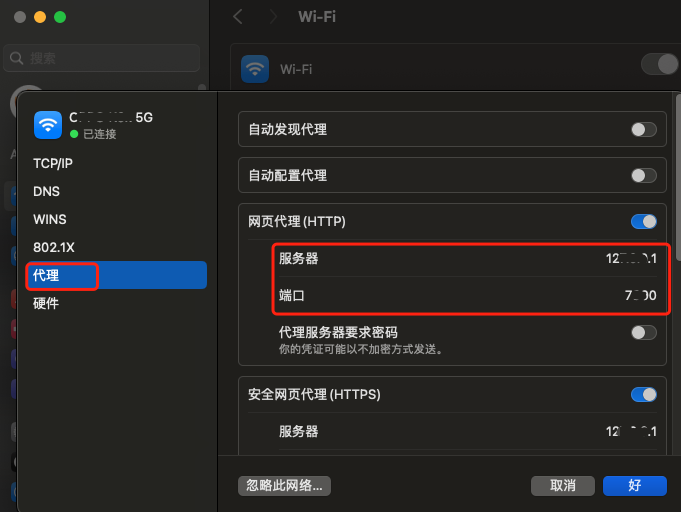
2、终端执行如下操作,替换自己的服务器和端口

git config --global http.proxy http://127.0.0.1:7890
git config --global https.proxy http://127.0.0.1:7890

3、查看配置是否生效

git config --global --edit

4、尝试下载,看看是否还会报错

git clone https://github.com/github/gitignore.git

5、还报错就尝试关闭https的证书验证

git config --global http.sslVerify false

继续尝试4的操作,能下载就说明成功了。

<think>我们正在解决用户提出的新问题:`pod install`报错`missing flutter_post_install(installer) in Podfile post_install block`。 根据引用[1]:这个错误是因为在Podfile的`post_install`块中缺少了`flutter_post_install(installer)`调用。 解决步骤: 1. **修改Podfile**:在Podfile的`post_install`块中加入`flutter_post_install(installer)`。 示例: ```ruby post_install do |installer| # 原有的其他配置 flutter_post_install(installer) # 添加这一行 [!code focus] end ``` 2. **执行清理和重新安装**: ```bash pod deintegrate pod cache clean --all pod install ``` 3. **注意**:`flutter_post_install`方法是在`podhelper.rb`中定义的,所以确保已经正确引入了`podhelper.rb`(参考上一个问题解决方案)。 另外,引用[3]和[4]提到了另一个可能的问题:最低部署目标版本(deployment target)过低。如果遇到类似引用[4]的错误(Specs satisfying the ... required a higher minimum deployment target),则需要将iOS项目的最低部署目标版本提升到至少11.0(因为最新Flutter要求iOS 11+)。 提升部署目标版本的方法: - 在Xcode中修改:Target -> General -> Deployment Info -> iOS Target 设置为11.0或更高。 - 在Podfile中设置: ```ruby platform :ios, '11.0' # 确保这里至少是11.0 [!code focus] ``` 如果问题仍然存在,可以考虑检查插件之间的兼容性(如引用[2]中提到的fijkplayer插件问题)。可以尝试注释掉部分插件,然后逐个放开以排查。 总结步骤: 步骤1:在Podfile的`post_install`块中添加`flutter_post_install(installer)` 步骤2:确保Podfile中设置了正确的平台版本(至少iOS 11.0) 步骤3:清理并重新运行`pod install` 步骤4:如果仍然报错,尝试排查是否有插件冲突(逐个注释插件排查) 生成相关问题如下: </think>### 解决 `pod install` 报错 `missing flutter_post_install(installer)` 的方法 该错误是由于 Flutter 模块集成时缺少必要的后期安装脚本导致的。以下是完整解决方案: #### 🔧 步骤 1:修改 Podfile 添加后期安装脚本 在 Podfile 的 `post_install` 块中加入 `flutter_post_install(installer)`: ```ruby:Podfile post_install do |installer| # 添加这行关键代码 [!code focus] flutter_post_install(installer) # [!code focus] # 其他可能的配置(保持原有代码) installer.pods_project.targets.each do |target| target.build_configurations.each do |config| config.build_settings['IPHONEOS_DEPLOYMENT_TARGET'] = '11.0' # 最低 iOS 版本 end end end ``` #### ⚙️ 步骤 2:验证 Flutter 模块配置 确保 Flutter 模块路径声明在 `post_install` 块之前: ```ruby:Podfile # 声明必须在顶部(不要放在post_install块内) flutter_application_path = '../your_flutter_module' # [!code focus] load File.join(flutter_application_path, '.ios', 'Flutter', 'podhelper.rb') # [!code focus] # 其他依赖声明... target 'YourApp' do use_frameworks! install! 'cocoapods', :deterministic_uuids => false end # 最后是post_install块 post_install do |installer| flutter_post_install(installer) # [!code focus] end ``` #### 🚨 步骤 3:处理版本兼容性问题(常见原因) 若出现 `required a higher minimum deployment target` 错误(引用[3][4]),需统一 iOS 最低版本: 1. **修改 Podfile 全局设置**: ```ruby:Podfile platform :ios, '11.0' # 最低需≥iOS 11 [!code focus] ``` 2. **检查 Flutter 模块配置**: ```bash cd your_flutter_module open .ios/Podfile # 确认此处最低版本也是iOS 11+ ``` #### 步骤 4:清理并重建依赖 ```bash # 清理现有安装 pod deintegrate rm -rf Podfile.lock # 重建依赖 pod install --repo-update ``` #### ⚠️ 排查插件冲突(引用[2]) 若仍失败,可能是插件兼容性问题: ```bash # 1. 注释所有插件依赖 # pod 'FlutterPluginRegistrant', :path => '...' # 2. 逐步放开插件(每次放开1个后运行pod installpod install # 3. 定位冲突插件后更新或寻找替代方案 ``` > **根本原因**:最新 Flutter 版本强制要求 iOS 11+ 部署环境,且 `podhelper.rb` 需要新的后期安装逻辑注入环境变量和构建配置[^1][^3][^4]。插件兼容性问题也可能导致此错误[^2]。
评论
添加红包

请填写红包祝福语或标题

红包个数最小为10个

红包金额最低5元

当前余额3.43前往充值 >
需支付:10.00
成就一亿技术人!
领取后你会自动成为博主和红包主的粉丝 规则
hope_wisdom
发出的红包
实付
使用余额支付
点击重新获取
扫码支付
钱包余额 0

抵扣说明:

1.余额是钱包充值的虚拟货币,按照1:1的比例进行支付金额的抵扣。
2.余额无法直接购买下载,可以购买VIP、付费专栏及课程。

余额充值


