



芋道源码的AI对话中断后目前不支持继续生成
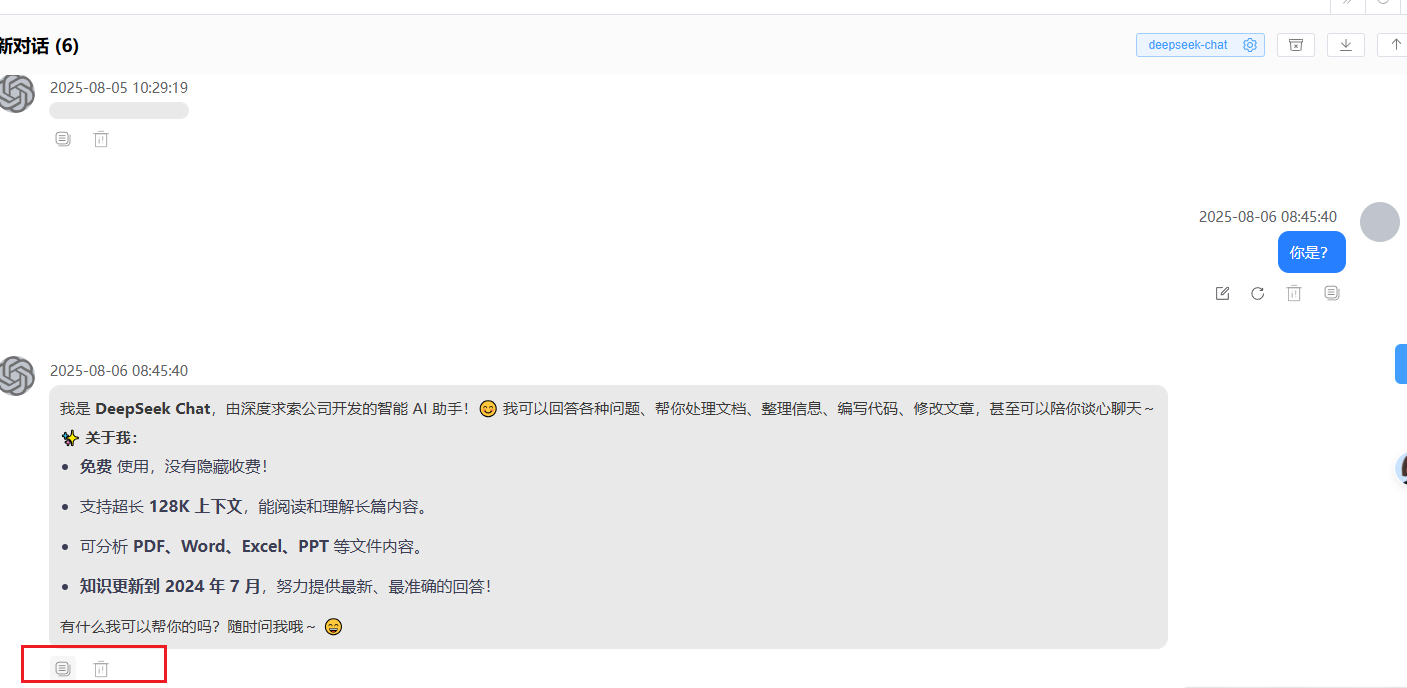
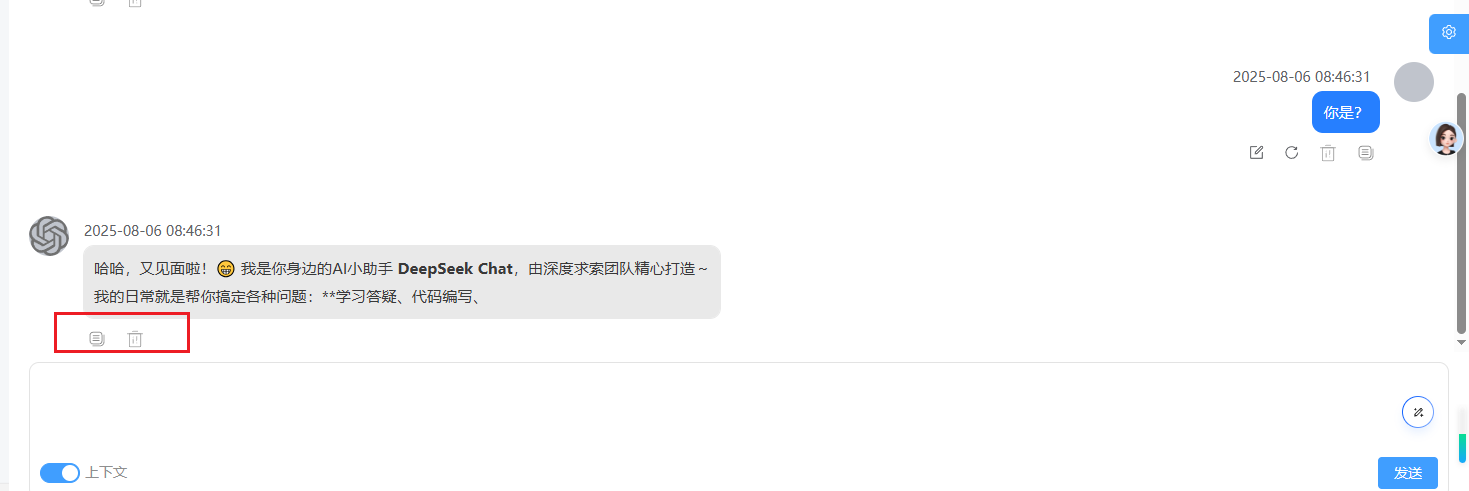
基于此需求开始更改
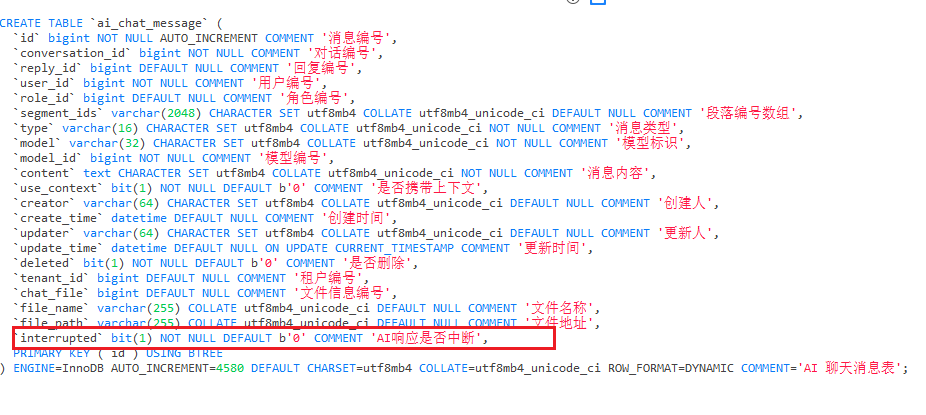
数据库表变更
ai_chat_message表增加字段interrupted
ALTER TABLE `ai_chat_message`
ADD COLUMN `interrupted` BIT(1) NOT NULL DEFAULT b'0' COMMENT 'AI响应是否中断';
实体变更
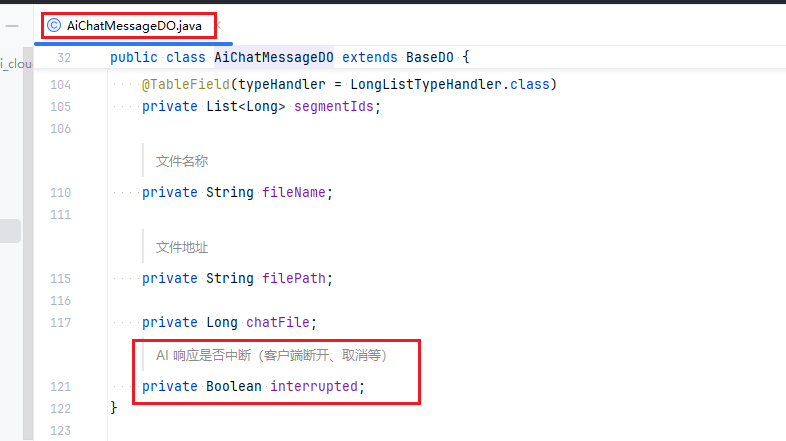
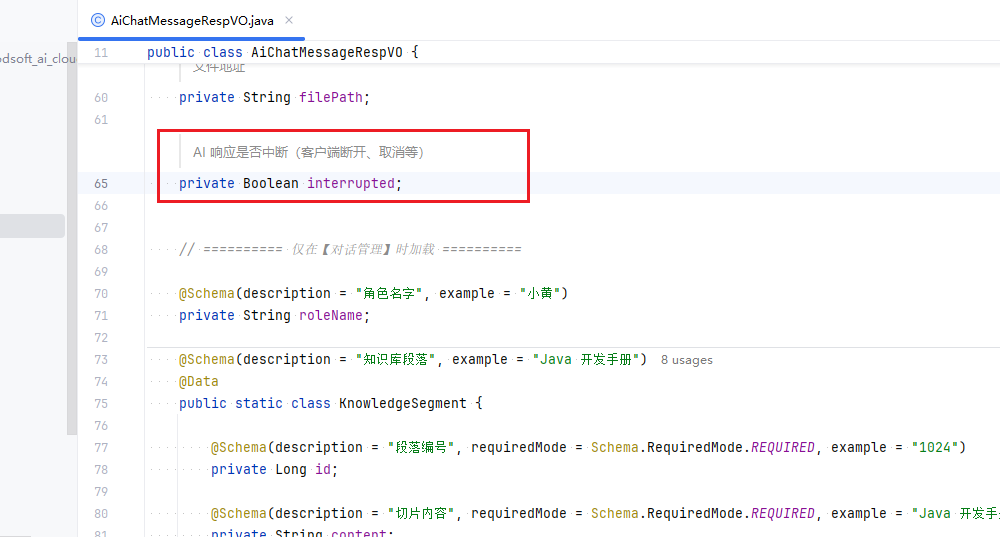
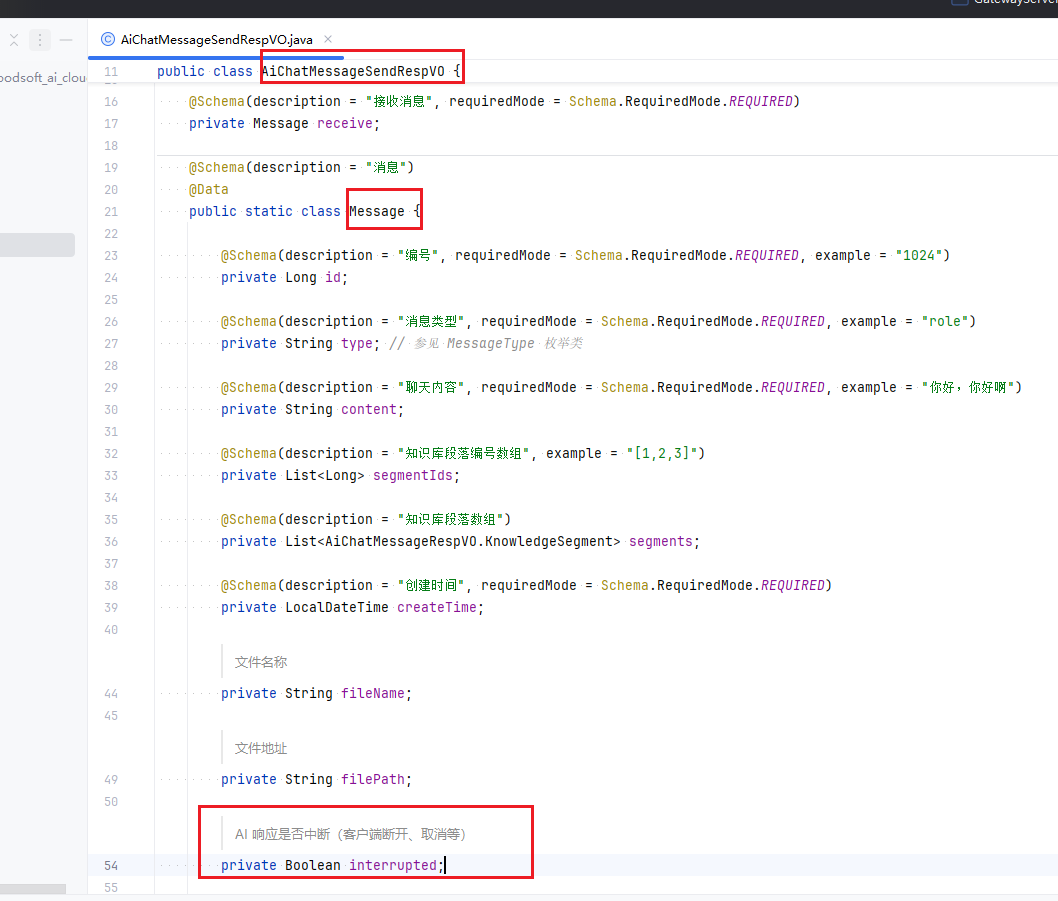
AiChatMessageDO、AiChatMessageRespVO、AiChatMessageSendRespVO.Message增加interrupted属性
    /**
     * AI 响应是否中断(客户端断开、取消等)
     */
    private Boolean interrupted;
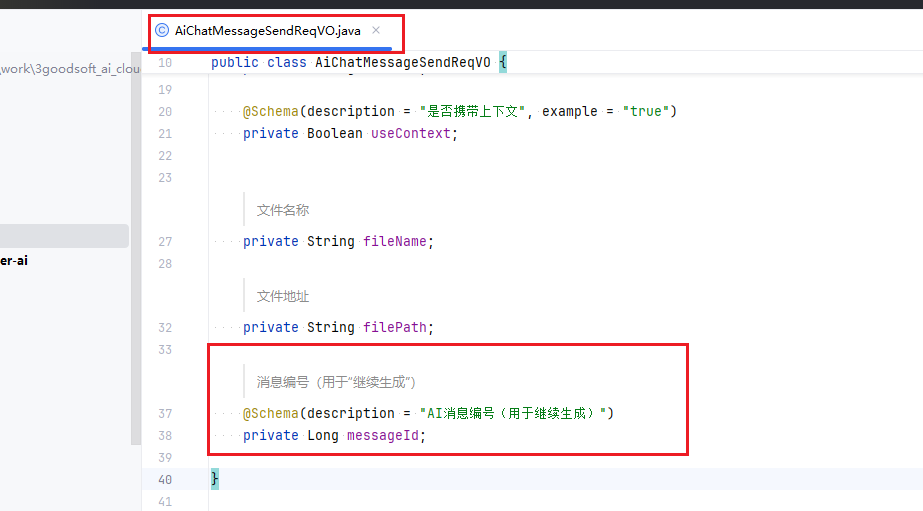
AiChatMessageSendReqVO增加 messageId属性
    /**
     * 消息编号(用于“继续生成”)
     */
    @Schema(description = "AI消息编号(用于继续生成)")
    private Long messageId;
业务代码变更
后端
AiChatMessageServiceImpl 将原流式对话发送信息sendChatMessageStream增加中断标记操作
@Override
    public Flux<CommonResult<AiChatMessageSendRespVO>> sendChatMessageStream(AiChatMessageSendReqVO sendReqVO,
            Long userId) {
        // 1.1 校验对话存在
        AiChatConversationDO conversation = chatConversationService
                .validateChatConversationExists(sendReqVO.getConversationId());
        if (ObjUtil.notEqual(conversation.getUserId(), userId)) {
            throw exception(CHAT_CONVERSATION_NOT_EXISTS);
        }
        List<AiChatMessageDO> historyMessages = chatMessageMapper.selectListByConversationId(conversation.getId());
        // 1.2 校验模型
        AiModelDO model = modalService.validateModel(conversation.getModelId());
        StreamingChatModel chatModel = modalService.getChatModel(model.getId());

        // 2. 知识库找回
        List<AiKnowledgeSegmentSearchRespBO> knowledgeSegments = recallKnowledgeSegment(sendReqVO.getContent(),
                conversation);

        // 3. 插入 user 发送消息
        AiChatMessageDO userMessage = createChatMessage(conversation.getId(), null, model,
                userId, conversation.getRoleId(), MessageType.USER, sendReqVO.getContent(), sendReqVO.getUseContext(),null,sendReqVO.getFilePath(),sendReqVO.getFileName());


        // 4.1 插入 assistant 接收消息
        AiChatMessageDO assistantMessage = createChatMessage(conversation.getId(), userMessage.getId(), model,
                userId, conversation.getRoleId(), MessageType.ASSISTANT, "", sendReqVO.getUseContext(),
                knowledgeSegments,sendReqVO.getFilePath(),sendReqVO.getFileName());
        //记录原始对话内容
        String oldMessage = sendReqVO.getContent();
        sendReqVO.setContent(userMessage.getContent());

        // 4.2 构建 Prompt,并进行调用
        Prompt prompt = buildPrompt(conversation, historyMessages, knowledgeSegments, model, sendReqVO);
        Flux<ChatResponse> streamResponse = chatModel.stream(prompt);


        // 4.3 流式返回
        userMessage.setContent(oldMessage);

        AtomicReference<StringBuffer> contentRef = new AtomicReference<>(new StringBuffer());

        return streamResponse.map(chunk -> {
            // 处理知识库的返回,只有首次才有
                    List<AiChatMessageRespVO.KnowledgeSegment> segments = null;
                    if (contentRef.get().length() == 0) {
                        Map<Long, AiKnowledgeDocumentDO> documentMap = TenantUtils.executeIgnore(() ->
                                knowledgeDocumentService.getKnowledgeDocumentMap(
                                        convertSet(knowledgeSegments, AiKnowledgeSegmentSearchRespBO::getDocumentId)));
                        segments = BeanUtils.toBean(knowledgeSegments, AiChatMessageRespVO.KnowledgeSegment.class, segment -> {
                            AiKnowledgeDocumentDO document = documentMap.get(segment.getDocumentId());
                            segment.setDocumentName(document != null ? document.getName() : null);
                        });
                    }
                    // 处理返回内容
                    String newContent = chunk.getResult() != null ? chunk.getResult().getOutput().getText() : null;
                    newContent = StrUtil.nullToDefault(newContent, "");

                    contentRef.get().append(newContent);

                    // 实时保存到数据库(可加频率控制,如每 200ms 一次)
                    String currentContent = contentRef.get().toString();
                    TenantUtils.executeIgnore(() ->
                            chatMessageMapper.updateById(
                                    new AiChatMessageDO().setId(assistantMessage.getId()).setContent(currentContent)
                            )
                    );

                    return success(new AiChatMessageSendRespVO()
                            .setSend(BeanUtils.toBean(userMessage, AiChatMessageSendRespVO.Message.class))
                            .setReceive(BeanUtils.toBean(assistantMessage, AiChatMessageSendRespVO.Message.class)
                                    .setContent(newContent)
                                    .setSegments(segments)));
                })
                .doOnCancel(() -> {
                    String finalContent = contentRef.get().toString();
                    TenantUtils.executeIgnore(() ->
                            chatMessageMapper.updateById(
                                    new AiChatMessageDO()
                                            .setId(assistantMessage.getId())
                                            .setContent(finalContent)
                                            .setInterrupted(true)  //标记为中断
                            )
                    );
                })
                // 忽略租户,因为 Flux 异步无法透传租户
                .doOnComplete(() -> {
                    String finalContent = contentRef.get().toString();
                    TenantUtils.executeIgnore(() ->
                            chatMessageMapper.updateById(
                                    new AiChatMessageDO().setId(assistantMessage.getId()).setContent(finalContent)
                            )
                    );
                })
                .doOnError(throwable -> {
                    log.error("[sendChatMessageStream][userId({}) sendReqVO({}) 发生异常]", userId, sendReqVO, throwable);
                    // 忽略租户,因为 Flux 异步无法透传租户
                    String partialContent = contentRef.get().toString();
                    String fullContent = partialContent + "\n\n[AI响应中断:服务异常]";
                    TenantUtils.executeIgnore(() ->
                            chatMessageMapper.updateById(
                                    new AiChatMessageDO()
                                            .setId(assistantMessage.getId())
                                            .setContent(fullContent)
                                            .setInterrupted(true)
                            )
                    );
                })
                .onErrorResume(error -> Flux.just(error(ErrorCodeConstants.CHAT_STREAM_ERROR)));
    }
AiChatMessageServiceImpl增加继续生成resumeChatMessageStream 方法
    /**
     * 继续生成 AI 回复(流式)
     *
     * @param sendReqVO 请求参数(包含 messageId)
     * @param userId    用户编号
     * @return 流式响应
     */
    @Override
    @Transactional(rollbackFor = Exception.class)
    public Flux<CommonResult<AiChatMessageSendRespVO>> resumeChatMessageStream(
            AiChatMessageSendReqVO sendReqVO, Long userId) {

        Long messageId = sendReqVO.getMessageId();
        if (messageId == null) {
            throw exception(CHAT_MESSAGE_NOT_EXIST);
        }
        // 1. 查询目标AI消息(必须是assistant类型且被中断)
        AiChatMessageDO assistantMessage = chatMessageMapper.selectById(messageId);
        if (assistantMessage == null || !userId.equals(assistantMessage.getUserId())) {
            throw exception(CHAT_MESSAGE_NOT_EXIST);
        }
        if (!MessageType.ASSISTANT.getValue().equals(assistantMessage.getType())) {
            return Flux.just(success(new AiChatMessageSendRespVO()
                    .setReceive(new AiChatMessageSendRespVO.Message()
                            .setId(assistantMessage.getId())
                            .setContent("")
                            .setInterrupted(false))));
        }
        if (!Boolean.TRUE.equals(assistantMessage.getInterrupted())) {
            return Flux.just(success(new AiChatMessageSendRespVO()
                    .setReceive(new AiChatMessageSendRespVO.Message()
                            .setId(assistantMessage.getId())
                            .setContent("")
                            .setInterrupted(false))));
        }
        // 2. 获取对话
        AiChatConversationDO conversation = chatConversationService.validateChatConversationExists(assistantMessage.getConversationId());
        if (!userId.equals(conversation.getUserId())) {
            throw exception(CHAT_CONVERSATION_NOT_EXISTS);
        }
        // 3. 获取该对话的所有历史消息(按时间升序)
        List<AiChatMessageDO> messages = chatMessageMapper.selectListByConversationId(conversation.getId());
        if (CollUtil.isEmpty(messages)) {
            throw exception(CHAT_MESSAGE_NOT_EXIST);
        }
        // 4. 构建用于AI调用的消息列表 (List<Message>)
        List<Message> chatMessages = new ArrayList<>();
        boolean foundTarget = false;
        for (AiChatMessageDO message : messages) {
            if (message.getId().equals(messageId)) {
                // 找到目标消息,将其内容加入上下文
                chatMessages.add(AiUtils.buildMessage(MessageType.ASSISTANT.getValue(), message.getContent()));
                foundTarget = true;
                break; // 关键:中断后,后续消息不加入
            }
            MessageType messageType = MessageType.fromValue(message.getType());
            chatMessages.add(AiUtils.buildMessage(messageType.getValue(), message.getContent()));
        }
        if (!foundTarget) {
            throw exception(CHAT_MESSAGE_NOT_EXIST);
        }
        // 5. (可选)加入知识库检索逻辑(如果你在 resume 时也需要)
        // List<AiKnowledgeSegmentSearchRespBO> knowledgeSegments = knowledgeService.searchRelevantSegments(sendReqVO.getContent());
        // if (CollUtil.isNotEmpty(knowledgeSegments)) {
        //     String knowledgeContent = buildKnowledgeContent(knowledgeSegments);
        //     chatMessages.add(AiUtils.buildMessage(MessageType.SYSTEM, knowledgeContent));
        // }

        // 6. 添加“继续”指令
        chatMessages.add(AiUtils.buildMessage(MessageType.USER.getValue(), "请继续完成上面未完成的回答,不要重复之前的内容,不要说“好的,我将继续”,直接接着回复内容"));
        // 7. 获取模型和 ChatModel
        AiModelDO model = modalService.validateModel(conversation.getModelId());
        ChatModel chatModel = modalService.getChatModel(model.getId());
        // 8. 构建 ChatOptions(完全复用你原有逻辑)
        Set<String> toolNames = null;
        Map<String, Object> toolContext = Map.of();
        if (conversation.getRoleId() != null) {
            AiChatRoleDO chatRole = chatRoleService.getChatRole(conversation.getRoleId());
            if (chatRole != null && CollUtil.isNotEmpty(chatRole.getToolIds())) {
                toolNames = convertSet(toolService.getToolList(chatRole.getToolIds()), AiToolDO::getName);
                toolContext = AiUtils.buildCommonToolContext();
            }
        }
        AiPlatformEnum platform = AiPlatformEnum.validatePlatform(model.getPlatform());
        ChatOptions chatOptions = AiUtils.buildChatOptions(
                platform, model.getModel(),
                conversation.getTemperature(), conversation.getMaxTokens(),
                toolNames, toolContext);

        // 9. 创建 Prompt
        Prompt prompt = new Prompt(chatMessages, chatOptions);
        // 10. 开始流式调用
        Flux<ChatResponse> streamResponse = chatModel.stream(prompt);
        // 11. 初始化内容缓冲区(包含已生成的部分)
        AtomicReference<StringBuffer> contentRef = new AtomicReference<>(new StringBuffer(assistantMessage.getContent()));
        // 12. 处理流式响应(完全照搬你原始的 .map() 逻辑)
        return streamResponse.map(chunk -> {
                    // 处理知识库的返回(只有首次才有)
                    List<AiChatMessageRespVO.KnowledgeSegment> segments = null;
                    if (contentRef.get().length() == assistantMessage.getContent().length()) { // 判断是否是 resume 后的“首次”
                        // 如果你需要在 resume 时也返回知识库片段,可在此处添加逻辑
                        // 例如:segments = buildKnowledgeSegments(knowledgeSegments);
                    }
                    String newContent = chunk.getResult() != null ? chunk.getResult().getOutput().getText() : null;
                    newContent = StrUtil.nullToDefault(newContent, "");
                    contentRef.get().append(newContent);
                    // 实时保存到数据库
                    String currentContent = contentRef.get().toString();
                    TenantUtils.executeIgnore(() ->
                            chatMessageMapper.updateById(
                                    new AiChatMessageDO()
                                            .setId(assistantMessage.getId())
                                            .setContent(currentContent)
                                            .setInterrupted(false) // 正在生成
                            )
                    );
                    // 构造返回 VO
                    AiChatMessageSendRespVO.Message receive = BeanUtils.toBean(assistantMessage, AiChatMessageSendRespVO.Message.class)
                            .setContent(newContent)
                            .setSegments(segments);

                    return success(new AiChatMessageSendRespVO()
                            .setReceive(receive));
                })
                .doOnCancel(() -> {
                    String finalContent = contentRef.get().toString();
                    TenantUtils.executeIgnore(() ->
                            chatMessageMapper.updateById(
                                    new AiChatMessageDO()
                                            .setId(assistantMessage.getId())
                                            .setContent(finalContent)
                                            .setInterrupted(true)
                            )
                    );
                })
                // 忽略租户,因为 Flux 异步无法透传租户
                .doOnComplete(() -> {
                    String finalContent = contentRef.get().toString();
                    TenantUtils.executeIgnore(() ->
                            chatMessageMapper.updateById(
                                    new AiChatMessageDO().setId(assistantMessage.getId()).setContent(finalContent).setInterrupted(false)
                            )
                    );
                })
                .doOnError(throwable -> {
                    log.error("[sendChatMessageStream][userId({}) sendReqVO({}) 发生异常]", userId, sendReqVO, throwable);
                    // 忽略租户,因为 Flux 异步无法透传租户
                    String partialContent = contentRef.get().toString();
                    String fullContent = partialContent + "\n\n[AI响应中断:服务异常]";
                    TenantUtils.executeIgnore(() ->
                            chatMessageMapper.updateById(
                                    new AiChatMessageDO()
                                            .setId(assistantMessage.getId())
                                            .setContent(fullContent)
                                            .setInterrupted(true)
                            )
                    );
                })
                .onErrorResume(error -> Flux.just(error(ErrorCodeConstants.CHAT_STREAM_ERROR)));
    }
AiChatMessageService 增加 resumeChatMessageStream
    /**
     * 继续生成AI回复(流式)
     * @param sendReqVO
     * @param messageId
     * @return
     */
    Flux<CommonResult<AiChatMessageSendRespVO>> resumeChatMessageStream(AiChatMessageSendReqVO sendReqVO, Long messageId);
AiChatMessageController增加resumeChatMessageStream
    @Operation(summary = "继续生成AI回复(流式)", description = "流式返回,接着上次未完成的内容继续生成")
    @PostMapping(value = "/resume-stream", produces = MediaType.TEXT_EVENT_STREAM_VALUE)
    public Flux<CommonResult<AiChatMessageSendRespVO>> resumeChatMessageStream(
            @Valid @RequestBody AiChatMessageSendReqVO sendReqVO) {
        Long userId = getLoginUserId();
        return chatMessageService.resumeChatMessageStream(sendReqVO, userId);
    }
前端

/src/views/Home/ai/chat/index/index.vue变更
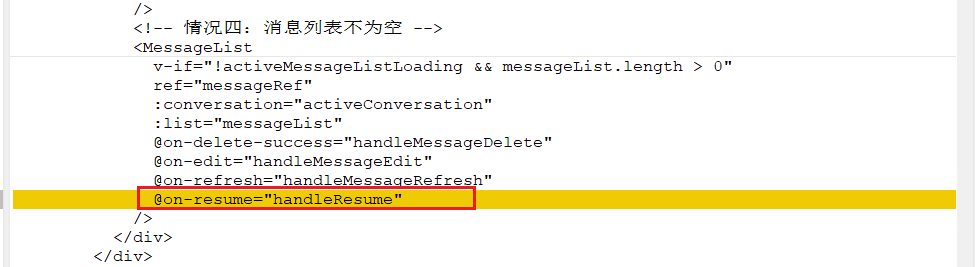
@on-resume="handleResume"
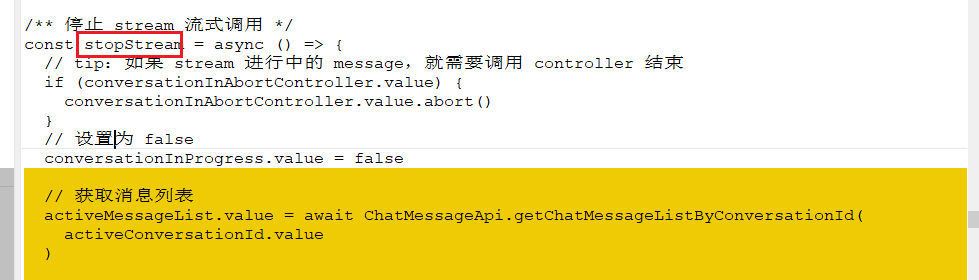
  // 获取消息列表
  activeMessageList.value = await ChatMessageApi.getChatMessageListByConversationId(
    activeConversationId.value
  )
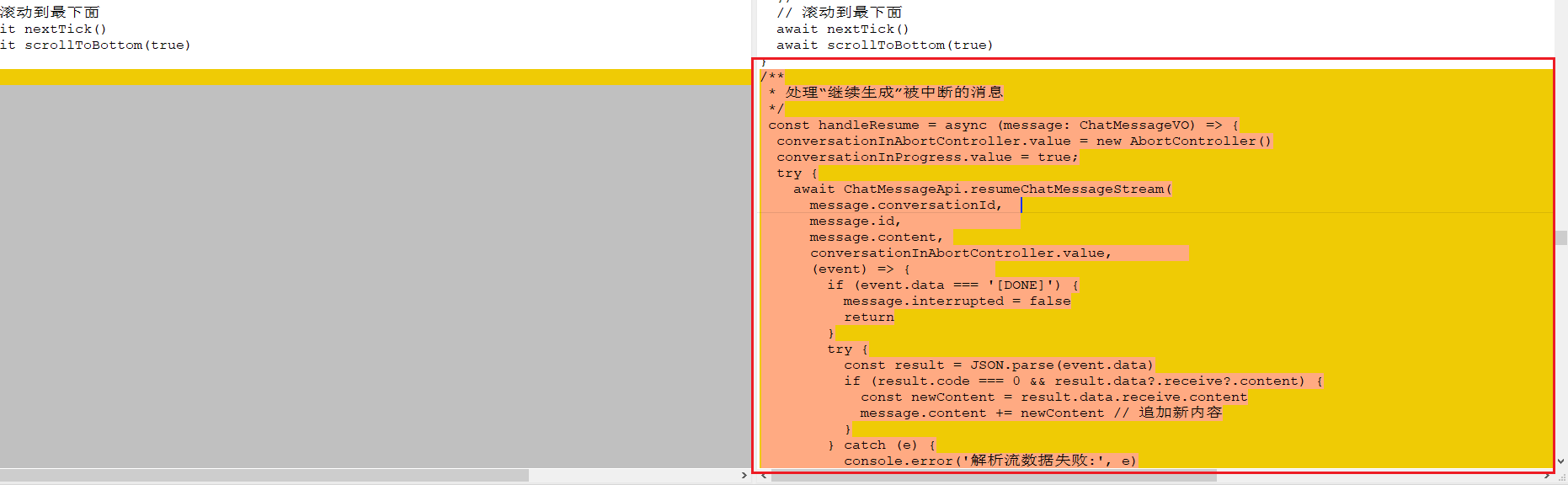
/**
 * 处理“继续生成”被中断的消息
 */
 const handleResume = async (message: ChatMessageVO) => {
  conversationInAbortController.value = new AbortController()
  conversationInProgress.value = true;
  try {
    await ChatMessageApi.resumeChatMessageStream(
      message.conversationId,
      message.id,
      message.content,
      conversationInAbortController.value,
      (event) => {
        if (event.data === '[DONE]') {
          message.interrupted = false
          return
        }
        try {
          const result = JSON.parse(event.data)
          if (result.code === 0 && result.data?.receive?.content) {
            const newContent = result.data.receive.content
            message.content += newContent // 追加新内容
          }
        } catch (e) {
          console.error('解析流数据失败:', e)
        }
      },
      (error) => {
        // message.alert(`对话异常! ${error}`)
        ElMessageBox({
          title: '提示',
          message: h('p', null, [
            h('p', { style: 'color: #303133' }, `对话异常! ${error}`),
          ]),
          confirmButtonText: '确定',
          cancelButtonText: '取消',
          showCancelButton: false,
          dangerouslyUseHTMLString: true,
          customClass: 'commonElMessageBox',
          icon: markRaw(InfoFilled),
          center: true,
        })
        stopStream()
        throw new Error(error);
      },
      () => {
        stopStream()
      }
    )
  } catch (err) {
    console.error('调用 resume API 失败:', err)
    ElMessage.error('网络错误')
  }
}
完整代码:
<template>
<el-container class="ai-layout" v-loading="isLoading">
<!-- 左侧:对话详情 -->
<el-container class="detail-container">
<el-header class="header">
<!-- <div class="title">
{{ activeConversation?.title ? activeConversation?.title : '对话' }}
<span v-if="activeMessageList.length">({{ activeMessageList.length }})</span>
</div>
<div class="btns" v-if="activeConversation">
<el-button type="primary" bg plain size="small" @click="openChatConversationUpdateForm">
<span v-html="activeConversation?.modelName"></span>
<Icon icon="ep:setting" class="ml-10px" />
</el-button>
<el-button size="small" class="btn" @click="handlerMessageClear">
<Icon icon="heroicons-outline:archive-box-x-mark" color="#787878" />
</el-button>
<el-button size="small" class="btn">
<Icon icon="ep:download" color="#787878" />
</el-button>
<el-button size="small" class="btn" @click="handleGoTopMessage">
<Icon icon="ep:top" color="#787878" />
</el-button>
</div> -->
<el-button v-debounce class="btn-new-conversation font-color-FFFFFF" type="primary" size="default" @click="handleConversationCreate">
<Icon icon="ep:plus" class="mr-5px" />
新建对话
</el-button>
</el-header>
<!-- main:消息列表 -->
<el-main class="main-container bg-FFFFFF">
<div>
<div class="message-container">
<!-- 情况一:消息加载中 -->
<MessageLoading v-if="activeMessageListLoading" />
<!-- 情况二:无聊天对话时 -->
<MessageNewConversation
v-if="!activeConversation"
@on-new-conversation="handleConversationCreate"
/>
<!-- 情况三:消息列表为空 -->
<MessageListEmpty
v-if="!activeMessageListLoading && messageList.length === 0 && activeConversation"
@on-prompt="doSendMessage"
/>
<!-- 情况四:消息列表不为空 -->
<MessageList
v-if="!activeMessageListLoading && messageList.length > 0"
ref="messageRef"
:conversation="activeConversation"
:list="messageList"
@on-delete-success="handleMessageDelete"
@on-edit="handleMessageEdit"
@on-refresh="handleMessageRefresh"
@on-resume="handleResume"
/>
</div>
</div>
</el-main>
<!-- 底部 -->
<el-footer class="footer-container bg-FFFFFF">
<!-- <div class="quick-instructions display-flex-top">
<div class="left-box display-flex-left" @click="openQuick()">
<span class="font-size-16 font-color-175DEC margin-r-8">快捷指令</span>
<el-icon :size="14" :color="'#175DEC'" v-if="showQuickList">
<ArrowUp />
</el-icon>
<el-icon :size="14" :color="'#175DEC'" v-else>
<ArrowDown />
</el-icon>
</div>
<div class="flex-1 quick-box" v-if="!showQuickList"></div>
<el-scrollbar height="100%" class="flex-1 quick-box" v-if="showQuickList">
<div
class="quick-list display-flex"
v-for="(item,index) in quickOptions"
:key="index"
>
<el-popover
placement="top-start"
trigger="hover"
popper-class="quick-popover"
:hide-after="10"
:ref="item.type"
>
<template #reference>
<div>
<span class="">{{getDictLabel(DICT_TYPE.AI_INSTRUCTION_TYPE, item.type)}}</span>
<el-icon :size="14" :color="'#175DEC'">
<ArrowDown />
</el-icon>
</div>
</template>
<div
class="quick-children-list"
v-for="(citem,cindex) in item.instructionList"
:key="cindex"
@click="chooseQuickChildren(citem)"
>
<span class="">{{citem.content}}</span>
</div>
</el-popover>
</div>
</el-scrollbar>
</div> -->
<form class="prompt-from">
<el-input
class="prompt-input"
v-model.trim="prompt"
maxlength="5000"
type="textarea"
placeholder="通过Shift+回车换行"
@keyup.enter="handleSendByKeydown($event)"
/>
<!-- <textarea
class="prompt-input"
v-model.trim="prompt"
maxlength="5000"
@keyup.enter="handleSendByKeydown"
@input="handlePromptInput"
@compositionstart="onCompositionstart"
@compositionend="onCompositionend"
placeholder="通过Shift+回车换行"
></textarea> -->
<div class="prompt-btns display-flex">
<!-- <div
class="deep-btn display-flex"
v-for="(item,index) in btnList"
:key="index"
:class="{'active': item.isChecked}"
@click="chooseBtn(item)"
>
<img class="deep-img" :src="item.isChecked ? item.activeImg : item.defImg" />
<span class="deep-text">{{item.title}}</span>
</div> -->
<!-- <div class="flex-1"></div> -->
<div class="flex-1 display-flex overflow-hidden">
<div class="flex-1"></div>
<span class="file-name-text ellipsis" v-if="fileUrls && fileUrls.length > 0">{{fileUrls[fileUrls.length -1].name + '.' +(fileUrls[fileUrls.length -1].url.substring(fileUrls[fileUrls.length -1].url.lastIndexOf('.') + 1))}}</span>
<el-icon class="del-file" :size="14" :color="'#606266'" v-if="fileUrls && fileUrls.length > 0" @click="delFile()">
<Delete />
</el-icon>
</div>
<UploadFile v-model="fileUrls" :isShowTip="false" :limit="1" class="UploadFile" />
<img class="upload-img" v-if="false" src="@/assets/imgs/home/05.png" />
<!-- <div>
<el-switch v-model="enableContext" />
<span class="ml-5px text-14px text-#8f8f8f">上下文</span>
</div> -->
<!-- <el-button
type="primary"
size="default"
class="send-btn"
color="#175DEC"
@click="handleSendByButton"
:loading="conversationInProgress"
v-if="conversationInProgress == false"
>
<img class="message-img" src="@/assets/imgs/home/06.png" />
</el-button> -->
<!-- From Uiverse.io by MikeeMikee -->
<button class="button" type="button" @click="handleSendByButton()" v-if="conversationInProgress == false">
<div class="button__circle">
<svg
viewBox="0 0 100 100"
fill="none"
xmlns="http://www.w3.org/2000/svg"
class="button__icon"
width="25"
>
<path
d="M95,9.9c-1.3-1.1-3.4-1.2-7-0.1c0,0,0,0,0,0c-2.5,0.8-24.7,9.2-44.3,17.3c-17.6,7.3-31.9,13.7-33.6,14.5 c-1.9,0.6-6,2.4-6.2,5.2c-0.1,1.8,1.4,3.4,4.3,4.7c3.1,1.6,16.8,6.2,19.7,7.1c1,3.4,6.9,23.3,7.2,24.5c0.4,1.8,1.6,2.8,2.2,3.2 c0.1,0.1,0.3,0.3,0.5,0.4c0.3,0.2,0.7,0.3,1.2,0.3c0.7,0,1.5-0.3,2.2-0.8c3.7-3,10.1-9.7,11.9-11.6c7.9,6.2,16.5,13.1,17.3,13.9 c0,0,0.1,0.1,0.1,0.1c1.9,1.6,3.9,2.5,5.7,2.5c0.6,0,1.2-0.1,1.8-0.3c2.1-0.7,3.6-2.7,4.1-5.4c0-0.1,0.1-0.5,0.3-1.2 c3.4-14.8,6.1-27.8,8.3-38.7c2.1-10.7,3.8-21.2,4.8-26.8c0.2-1.4,0.4-2.5,0.5-3.2C96.3,13.5,96.5,11.2,95,9.9z M30,58.3l47.7-31.6 c0.1-0.1,0.3-0.2,0.4-0.3c0,0,0,0,0,0c0.1,0,0.1-0.1,0.2-0.1c0.1,0,0.1,0,0.2-0.1c-0.1,0.1-0.2,0.4-0.4,0.6L66,38.1 c-8.4,7.7-19.4,17.8-26.7,24.4c0,0,0,0,0,0.1c0,0-0.1,0.1-0.1,0.1c0,0,0,0.1-0.1,0.1c0,0.1,0,0.1-0.1,0.2c0,0,0,0.1,0,0.1 c0,0,0,0,0,0.1c-0.5,5.6-1.4,15.2-1.8,19.5c0,0,0,0,0-0.1C36.8,81.4,31.2,62.3,30,58.3z"
fill="currentColor"
/>
</svg>
<svg
viewBox="0 0 100 100"
fill="none"
width="25"
xmlns="http://www.w3.org/2000/svg"
class="button__icon button__icon--copy"
>
<path
d="M95,9.9c-1.3-1.1-3.4-1.2-7-0.1c0,0,0,0,0,0c-2.5,0.8-24.7,9.2-44.3,17.3c-17.6,7.3-31.9,13.7-33.6,14.5 c-1.9,0.6-6,2.4-6.2,5.2c-0.1,1.8,1.4,3.4,4.3,4.7c3.1,1.6,16.8,6.2,19.7,7.1c1,3.4,6.9,23.3,7.2,24.5c0.4,1.8,1.6,2.8,2.2,3.2 c0.1,0.1,0.3,0.3,0.5,0.4c0.3,0.2,0.7,0.3,1.2,0.3c0.7,0,1.5-0.3,2.2-0.8c3.7-3,10.1-9.7,11.9-11.6c7.9,6.2,16.5,13.1,17.3,13.9 c0,0,0.1,0.1,0.1,0.1c1.9,1.6,3.9,2.5,5.7,2.5c0.6,0,1.2-0.1,1.8-0.3c2.1-0.7,3.6-2.7,4.1-5.4c0-0.1,0.1-0.5,0.3-1.2 c3.4-14.8,6.1-27.8,8.3-38.7c2.1-10.7,3.8-21.2,4.8-26.8c0.2-1.4,0.4-2.5,0.5-3.2C96.3,13.5,96.5,11.2,95,9.9z M30,58.3l47.7-31.6 c0.1-0.1,0.3-0.2,0.4-0.3c0,0,0,0,0,0c0.1,0,0.1-0.1,0.2-0.1c0.1,0,0.1,0,0.2-0.1c-0.1,0.1-0.2,0.4-0.4,0.6L66,38.1 c-8.4,7.7-19.4,17.8-26.7,24.4c0,0,0,0,0,0.1c0,0-0.1,0.1-0.1,0.1c0,0,0,0.1-0.1,0.1c0,0.1,0,0.1-0.1,0.2c0,0,0,0.1,0,0.1 c0,0,0,0,0,0.1c-0.5,5.6-1.4,15.2-1.8,19.5c0,0,0,0,0-0.1C36.8,81.4,31.2,62.3,30,58.3z"
fill="currentColor"
/>
</svg>
</div>
</button>
<el-button
type="primary"
size="default"
class="send-cancle-btn"
color="#175DEC"
@click="stopStream()"
v-if="conversationInProgress == true"
>
<img class="message-img margin-r-6" src="@/assets/imgs/home/09.png" />
<span style="font-size: 12px">取消生成</span>
</el-button>
</div>
</form>
</el-footer>
</el-container>
<!-- 右侧:对话列表 -->
<ConversationList
:active-id="activeConversationId"
ref="conversationListRef"
@on-conversation-create="handleConversationCreateSuccess"
@on-conversation-click="handleConversationClick"
@on-conversation-clear="handleConversationClear"
@on-conversation-delete="handlerConversationDelete"
/>
<!-- 更新对话 Form -->
<ConversationUpdateForm
ref="conversationUpdateFormRef"
@success="handleConversationUpdateSuccess"
/>
</el-container>
</template>
<script setup lang="ts">
import { ChatMessageApi, ChatMessageVO } from '@/api/ai/chat/message'
import { ChatConversationApi, ChatConversationVO } from '@/api/ai/chat/conversation'
import ConversationList from './components/conversation/ConversationList.vue'
import ConversationUpdateForm from './components/conversation/ConversationUpdateForm.vue'
import MessageList from './components/message/MessageList.vue'
import MessageListEmpty from './components/message/MessageListEmpty.vue'
import MessageLoading from './components/message/MessageLoading.vue'
import MessageNewConversation from './components/message/MessageNewConversation.vue'
import { ArrowDown, ArrowUp, InfoFilled, Delete } from '@element-plus/icons-vue'
import { InstructionApi, InstructionVO } from '@/api/ai/instruction'
import { getDictLabel, DICT_TYPE } from '@/utils/dict'
/** AI 聊天对话 列表 */
// defineOptions({ name: 'AiChat' })
const route = useRoute() // 路由
const message = useMessage() // 消息弹窗
// 聊天对话
const conversationListRef = ref()
const activeConversationId = ref<any | null>(null) // 选中的对话编号
const activeConversation = ref<ChatConversationVO | any>(null) // 选中的 Conversation
const conversationInProgress = ref(false) // 对话是否正在进行中。目前只有【发送】消息时,会更新为 true,避免切换对话、删除对话等操作
// 消息列表
const messageRef = ref()
const activeMessageList = ref<ChatMessageVO[]>([]) // 选中对话的消息列表
const activeMessageListLoading = ref<boolean>(false) // activeMessageList 是否正在加载中
const activeMessageListLoadingTimer = ref<any>() // activeMessageListLoading Timer 定时器。如果加载速度很快,就不进入加载中
// 消息滚动
const textSpeed = ref<number>(50) // Typing speed in milliseconds
const textRoleRunning = ref<boolean>(false) // Typing speed in milliseconds
// 发送消息输入框
const isComposing = ref(false) // 判断用户是否在输入
const conversationInAbortController = ref<any>() // 对话进行中 abort 控制器(控制 stream 对话)
const inputTimeout = ref<any>() // 处理输入中回车的定时器
const prompt = ref<string>() // prompt
const enableContext = ref<boolean>(true) // 是否开启上下文
// 接收 Stream 消息
const receiveMessageFullText = ref('')
const receiveMessageDisplayedText = ref('')
const showQuickList = ref(false);
const quickOptions = reactive <InstructionVO[]>([]);
/** 查询列表 */
const getQuickOptions = async () => {
const res = await InstructionApi.getInstructionGroupPage({
pageNo: 1,
pageSize: 100,
})
quickOptions.length = 0;
res.list.forEach((el: InstructionVO) => {
quickOptions.push(el);
})
}
const { proxy } = getCurrentInstance() as any
const fileUrls = ref([] as any);
/** 选择指令 */
const chooseQuickChildren = (e: any) => {
prompt.value += e.content;
const popNode = proxy.$refs[e.type][0];
popNode.hide();
}
import btnImg1 from '@/assets/imgs/home/04.png'
import btnImg2 from '@/assets/imgs/home/11.png'
import btnImg3 from '@/assets/imgs/home/10.png'
import btnImg4 from '@/assets/imgs/home/03.png'
const btnList = reactive([{
id: '17',
title: '深度思考(R1)',
defImg: btnImg1,
activeImg: btnImg2,
model: "deepseek-chat",
name: "deepseek-chat",
isChecked: true,
},{
id: '21',
title: '联网搜索',
defImg: btnImg3,
activeImg: btnImg4,
model: "deepseek-reasoner",
name: "deepseek-reasoner",
isChecked: false,
}]);
const activeBtnId = ref('17');
const isLoading = ref(false);
// =========== 【聊天对话】相关 ===========
const openQuick = () => {
showQuickList.value = !showQuickList.value;
}
/** btn选择 */
const chooseBtn = async (item) => {
// 对话进行中,不允许切换
if (conversationInProgress.value) {
// message.alert('对话中,不允许切换!')
await ElMessageBox({
title: '提示',
message: h('p', null, [
h('p', { style: 'color: #303133' }, '对话中,不允许切换'),
]),
confirmButtonText: '确定',
cancelButtonText: '取消',
showCancelButton: false,
dangerouslyUseHTMLString: true,
customClass: 'commonElMessageBox',
icon: markRaw(InfoFilled),
center: true,
})
return false
}
if(item.id == activeBtnId.value) return;
let reqData = {
id: activeConversationId.value,
maxContexts: 20, // 上下文数量
maxTokens: 4096, // 回复数 Token 数
modelId: item.id, // 模型
systemMessage: null,
temperature: 1 // 温度参数
}
// 切换模型
submitForm(reqData, item);
}
/** 切换模型 */
const submitForm = async (reqData, item) => {
isLoading.value = true
try {
await ChatConversationApi.updateChatConversationMy(reqData)
message.success('对话配置已更新')
// 对话更新成功,刷新最新信息
await getConversation(activeConversationId.value)
btnList.forEach(element => {
element.isChecked = false;
});
item.isChecked = true;
activeBtnId.value = item.id;
} finally {
isLoading.value = false
}
}
/** 获取对话信息 */
const getConversation = async (id: number | null) => {
if (!id) {
return
}
const conversation: ChatConversationVO = await ChatConversationApi.getChatConversationMy(id)
if (!conversation) {
return
}
activeConversation.value = conversation
activeConversationId.value = conversation.id
}
/**
* 点击某个对话
*
* @param conversation 选中的对话
* @return 是否切换成功
*/
const handleConversationClick = async (conversation: ChatConversationVO) => {
// 对话进行中,不允许切换
if (conversationInProgress.value) {
// message.alert('对话中,不允许切换!')
await ElMessageBox({
title: '提示',
message: h('p', null, [
h('p', { style: 'color: #303133' }, '对话中,不允许切换'),
]),
confirmButtonText: '确定',
cancelButtonText: '取消',
showCancelButton: false,
dangerouslyUseHTMLString: true,
customClass: 'commonElMessageBox',
icon: markRaw(InfoFilled),
center: true,
})
return false
}
// 更新选中的对话 id
activeConversationId.value = conversation.id
activeConversation.value = conversation
// 刷新 message 列表
await getMessageList()
// 滚动底部
scrollToBottom(true)
// 从首页进入到聊天页面自动发送
if(isAutomatic.value) {
handleSendByButton();
isAutomatic.value = false;
}
// 清空输入框
prompt.value = ''
return true
}
/** 删除某个对话*/
const handlerConversationDelete = async (delConversation: ChatConversationVO) => {
// 删除的对话如果是当前选中的,那么就重置
if (activeConversationId.value === delConversation.id) {
await handleConversationClear()
}
}
/** 清空选中的对话 */
const handleConversationClear = async () => {
// 对话进行中,不允许切换
if (conversationInProgress.value) {
// message.alert('对话中,不允许切换!')
await ElMessageBox({
title: '提示',
message: h('p', null, [
h('p', { style: 'color: #303133' }, '对话中,不允许切换'),
]),
confirmButtonText: '确定',
cancelButtonText: '取消',
showCancelButton: false,
dangerouslyUseHTMLString: true,
customClass: 'commonElMessageBox',
icon: markRaw(InfoFilled),
center: true,
})
return false
}
activeConversationId.value = null
activeConversation.value = null
activeMessageList.value = []
}
/** 修改聊天对话 */
const conversationUpdateFormRef = ref()
const openChatConversationUpdateForm = async () => {
conversationUpdateFormRef.value.open(activeConversationId.value)
}
const handleConversationUpdateSuccess = async () => {
// 对话更新成功,刷新最新信息
await getConversation(activeConversationId.value)
}
/** 处理聊天对话的创建成功 */
const handleConversationCreate = async () => {
// 创建对话
await conversationListRef.value.createConversation()
}
/** 处理聊天对话的创建成功 */
const handleConversationCreateSuccess = async () => {
// 创建新的对话,清空输入框
prompt.value = ''
}
// =========== 【消息列表】相关 ===========
/** 获取消息 message 列表 */
const getMessageList = async () => {
try {
if (activeConversationId.value === null) {
return
}
// Timer 定时器,如果加载速度很快,就不进入加载中
activeMessageListLoadingTimer.value = setTimeout(() => {
activeMessageListLoading.value = true
}, 60)
// 获取消息列表
activeMessageList.value = await ChatMessageApi.getChatMessageListByConversationId(
activeConversationId.value
)
// 滚动到最下面
await nextTick()
await scrollToBottom()
} finally {
// time 定时器,如果加载速度很快,就不进入加载中
if (activeMessageListLoadingTimer.value) {
clearTimeout(activeMessageListLoadingTimer.value)
}
// 加载结束
activeMessageListLoading.value = false
}
}
/**
* 消息列表
*
* 和 {@link #getMessageList()} 的差异是,把 systemMessage 考虑进去
*/
const messageList = computed(() => {
if (activeMessageList.value.length > 0) {
return activeMessageList.value
}
// 没有消息时,如果有 systemMessage 则展示它
if (activeConversation.value?.systemMessage) {
return [
{
id: 0,
type: 'system',
content: activeConversation.value.systemMessage
}
]
}
return []
})
/** 处理删除 message 消息 */
const handleMessageDelete = async (e: any) => {
if (conversationInProgress.value) {
await ElMessageBox({
title: '提示',
message: h('p', null, [
h('p', { style: 'color: #303133' }, '回答中,不能删除'),
]),
confirmButtonText: '确定',
cancelButtonText: '取消',
showCancelButton: false,
dangerouslyUseHTMLString: true,
customClass: 'commonElMessageBox',
icon: markRaw(InfoFilled),
center: true,
})
return
}
await ElMessageBox({
title: '提示',
message: h('p', null, [
h('p', { style: 'color: #303133' }, '确认删除吗?'),
]),
confirmButtonText: '确定',
cancelButtonText: '取消',
showCancelButton: true,
dangerouslyUseHTMLString: true,
customClass: 'commonElMessageBox',
icon: markRaw(InfoFilled),
center: true,
})
await ChatMessageApi.deleteChatMessage(e.id)
message.success('删除成功!')
// 刷新 message 列表
// getMessageList()
activeMessageList.value.forEach((element, index) => {
if(element.id == e.id) {
activeMessageList.value.splice(index, 1);
}
});
}
/** 处理 message 清空 */
const handlerMessageClear = async () => {
if (!activeConversationId.value) {
return
}
try {
// 确认提示
await message.delConfirm('确认清空对话消息?')
// 清空对话
await ChatMessageApi.deleteByConversationId(activeConversationId.value)
// 刷新 message 列表
activeMessageList.value = []
} catch {}
}
/** 回到 message 列表的顶部 */
const handleGoTopMessage = () => {
messageRef.value.handlerGoTop()
}
// =========== 【发送消息】相关 ===========
/** 处理来自 keydown 的发送消息 */
const handleSendByKeydown = async (event) => {
// 判断用户是否在输入
// if (isComposing.value) {
// event.preventDefault() // 防止默认的提交行为
// return
// }
// 进行中不允许发送
if (conversationInProgress.value) {
message.error('正在生成内容,请稍后!')
event.preventDefault() // 防止默认的提交行为
return false;
}
const content = prompt.value?.trim() as string
if(!content) {
message.error('请输入内容!')
return false;
}
if (event.key === 'Enter') {
if (event.shiftKey) {
// 插入换行
prompt.value += '\r\n'
event.preventDefault() // 防止默认的换行行为
} else {
// 发送消息
let fileUrl = JSON.parse(JSON.stringify(fileUrls.value));
await doSendMessage({
content: content,
filePath: fileUrl && fileUrl.length > 0 ? fileUrl[0].url : '',
fileName: fileUrl && fileUrl.length > 0 ? fileUrl[0].name : '',
})
event.preventDefault() // 防止默认的提交行为
}
}
}
/** 打开弹窗 */
const isAutomatic = ref(false); // 从首页进入到聊天页面自动发送
const open = async (obj: any) => {
prompt.value = obj.prompt;
fileUrls.value = obj.fileUrls;
isAutomatic.value = true;
// handleSendByButton();
}
/** 跳转至历史对话 */
const hisClick = async (item: any) => {
nextTick(()=>{
activeConversationId.value = item.id;
handleConversationClick(item);
});
}
defineExpose({ open, hisClick })
/** 处理来自【发送】按钮的发送消息 */
const handleSendByButton = () => {
let fileUrl = JSON.parse(JSON.stringify(fileUrls.value));
doSendMessage({
content: prompt.value?.trim() as string,
filePath: fileUrl && fileUrl.length > 0 ? fileUrl[0].url : '',
fileName: fileUrl && fileUrl.length > 0 ? fileUrl[0].name : '',
})
}
/** 处理 prompt 输入变化 */
const handlePromptInput = (event) => {
// 非输入法 输入设置为 true
if (!isComposing.value) {
// 回车 event data 是 null
if (event.data == null) {
return
}
isComposing.value = true
}
// 清理定时器
if (inputTimeout.value) {
clearTimeout(inputTimeout.value)
}
// 重置定时器
inputTimeout.value = setTimeout(() => {
isComposing.value = false
}, 400)
}
// TODO @芋艿:是不是可以通过 @keydown.enter、@keydown.shift.enter 来实现,回车发送、shift+回车换行;主要看看,是不是可以简化 isComposing 相关的逻辑
const onCompositionstart = () => {
isComposing.value = true
}
const onCompositionend = () => {
// console.log('输入结束...')
setTimeout(() => {
isComposing.value = false
}, 200)
}
/** 真正执行【发送】消息操作 */
const doSendMessage = async (msg: any) => {
// 校验
if (msg.content.length < 1) {
message.error('请输入内容!')
return false;
}
if (activeConversationId.value == null) {
message.error('还没创建对话,不能发送!')
return false;
}
// 清空输入框
prompt.value = ''
fileUrls.value = [];
// 执行发送
await doSendMessageStream({
conversationId: activeConversationId.value,
content: msg.content,
filePath: msg.filePath,
fileName: msg.fileName,
} as ChatMessageVO)
}
/** 真正执行【发送】消息操作 */
const doSendMessageStream = async (userMessage: ChatMessageVO) => {
// 创建 AbortController 实例,以便中止请求
conversationInAbortController.value = new AbortController()
// 标记对话进行中
conversationInProgress.value = true
// 设置为空
receiveMessageFullText.value = ''
try {
// 1.1 先添加两个假数据,等 stream 返回再替换
activeMessageList.value.push({
id: -1,
conversationId: activeConversationId.value,
type: 'user',
content: userMessage.content,
createTime: new Date(),
filePath: userMessage.filePath,
fileName: userMessage.fileName
} as ChatMessageVO)
activeMessageList.value.push({
id: -2,
conversationId: activeConversationId.value,
type: 'assistant',
content: '思考中...',
createTime: new Date()
} as ChatMessageVO)
// 修改对话名称
conversationListRef.value.updateConversation(userMessage.content)
// 1.2 滚动到最下面
await nextTick()
await scrollToBottom() // 底部
// 1.3 开始滚动
textRoll()
// 2. 发送 event stream
let isFirstChunk = true // 是否是第一个 chunk 消息段
await ChatMessageApi.sendChatMessageStream(
userMessage.conversationId,
userMessage.content,
userMessage.filePath,
userMessage.fileName,
conversationInAbortController.value,
enableContext.value,
async (res) => {
const { code, data, msg } = JSON.parse(res.data)
if (code !== 0) {
// message.alert(`对话异常! ${msg}`)
await ElMessageBox({
title: '提示',
message: h('p', null, [
h('p', { style: 'color: #303133' }, `对话异常! ${msg}`),
]),
confirmButtonText: '确定',
cancelButtonText: '取消',
showCancelButton: false,
dangerouslyUseHTMLString: true,
customClass: 'commonElMessageBox',
icon: markRaw(InfoFilled),
center: true,
})
return
}
// 如果内容为空,就不处理。
if (data.receive.content === '') {
return
}
// 首次返回需要添加一个 message 到页面,后面的都是更新
if (isFirstChunk) {
isFirstChunk = false
// 弹出两个假数据
activeMessageList.value.pop()
activeMessageList.value.pop()
// 更新返回的数据
activeMessageList.value.push(data.send)
activeMessageList.value.push(data.receive)
}
// debugger
receiveMessageFullText.value = receiveMessageFullText.value + data.receive.content
// 滚动到最下面
await scrollToBottom()
},
(error) => {
// message.alert(`对话异常! ${error}`)
ElMessageBox({
title: '提示',
message: h('p', null, [
h('p', { style: 'color: #303133' }, `对话异常! ${error}`),
]),
confirmButtonText: '确定',
cancelButtonText: '取消',
showCancelButton: false,
dangerouslyUseHTMLString: true,
customClass: 'commonElMessageBox',
icon: markRaw(InfoFilled),
center: true,
})
stopStream()
throw new Error(error);
},
() => {
stopStream()
}
)
} catch {}
}
/** 停止 stream 流式调用 */
const stopStream = async () => {
// tip:如果 stream 进行中的 message,就需要调用 controller 结束
if (conversationInAbortController.value) {
conversationInAbortController.value.abort()
}
// 设置为 false
conversationInProgress.value = false
// 获取消息列表
activeMessageList.value = await ChatMessageApi.getChatMessageListByConversationId(
activeConversationId.value
)
activeMessageList.value = await ChatMessageApi.getChatMessageListByConversationId(
activeConversationId.value
)
}
/** 编辑 message:设置为 prompt,可以再次编辑 */
const handleMessageEdit = (message: ChatMessageVO) => {
prompt.value = message.content
}
/** 刷新 message:基于指定消息,再次发起对话 */
const handleMessageRefresh = async (messageobj: ChatMessageVO) => {
if (conversationInProgress.value) {
message.error('正在生成内容,请稍后!')
return false;
}
doSendMessage({
content: messageobj.content,
filePath: messageobj.filePath,
fileName: messageobj.fileName,
})
// 滚动到最下面
await nextTick()
await scrollToBottom(true)
}
/**
* 处理“继续生成”被中断的消息
*/
const handleResume = async (message: ChatMessageVO) => {
conversationInAbortController.value = new AbortController()
conversationInProgress.value = true;
try {
await ChatMessageApi.resumeChatMessageStream(
message.conversationId,
message.id,
message.content,
conversationInAbortController.value,
(event) => {
if (event.data === '[DONE]') {
message.interrupted = false
return
}
try {
const result = JSON.parse(event.data)
if (result.code === 0 && result.data?.receive?.content) {
const newContent = result.data.receive.content
message.content += newContent // 追加新内容
}
} catch (e) {
console.error('解析流数据失败:', e)
}
},
(error) => {
// message.alert(`对话异常! ${error}`)
ElMessageBox({
title: '提示',
message: h('p', null, [
h('p', { style: 'color: #303133' }, `对话异常! ${error}`),
]),
confirmButtonText: '确定',
cancelButtonText: '取消',
showCancelButton: false,
dangerouslyUseHTMLString: true,
customClass: 'commonElMessageBox',
icon: markRaw(InfoFilled),
center: true,
})
stopStream()
throw new Error(error);
},
() => {
stopStream()
}
)
} catch (err) {
console.error('调用 resume API 失败:', err)
ElMessage.error('网络错误')
}
}
// ============== 【消息滚动】相关 =============
/** 滚动到 message 底部 */
const scrollToBottom = async (isIgnore?: boolean) => {
await nextTick()
if (messageRef.value) {
messageRef.value.scrollToBottom(isIgnore)
}
}
/** 自提滚动效果 */
const textRoll = async () => {
let index = 0
try {
// 只能执行一次
if (textRoleRunning.value) {
return
}
// 设置状态
textRoleRunning.value = true
receiveMessageDisplayedText.value = ''
const task = async () => {
// 调整速度
const diff =
(receiveMessageFullText.value.length - receiveMessageDisplayedText.value.length) / 10
if (diff > 5) {
textSpeed.value = 10
} else if (diff > 2) {
textSpeed.value = 30
} else if (diff > 1.5) {
textSpeed.value = 50
} else {
textSpeed.value = 100
}
// 对话结束,就按 30 的速度
if (!conversationInProgress.value) {
textSpeed.value = 10
}
if (index < receiveMessageFullText.value.length) {
receiveMessageDisplayedText.value += receiveMessageFullText.value[index]
index++
// 更新 message
const lastMessage = activeMessageList.value[activeMessageList.value.length - 1]
lastMessage.content = receiveMessageDisplayedText.value
// 滚动到住下面
await scrollToBottom()
// 重新设置任务
timer = setTimeout(task, textSpeed.value)
} else {
// 不是对话中可以结束
if (!conversationInProgress.value) {
textRoleRunning.value = false
clearTimeout(timer)
} else {
// 重新设置任务
timer = setTimeout(task, textSpeed.value)
}
}
}
let timer = setTimeout(task, textSpeed.value)
} catch {}
}
/** 删除文件 */
const delFile = () => {
fileUrls.value = [];
}
getQuickOptions();
/** 初始化 **/
onMounted(async () => {
// 如果有 conversationId 参数,则默认选中
if (route.query.conversationId) {
const id = route.query.conversationId as unknown as number
activeConversationId.value = id
await getConversation(id)
}
// 获取列表数据
activeMessageListLoading.value = true
await getMessageList()
})
</script>
<style lang="scss" scoped>
.ai-layout {
// position: absolute;
// flex: 1;
// top: 0;
// left: 0;
height: 100%;
width: 100%;
}
.conversation-container {
position: relative;
display: flex;
flex-direction: column;
justify-content: space-between;
padding: 10px 10px 0;
.btn-new-conversation {
padding: 18px 0;
color: #FFFFFF;
}
.search-input {
margin-top: 20px;
}
.conversation-list {
margin-top: 20px;
.conversation {
display: flex;
flex-direction: row;
justify-content: space-between;
flex: 1;
padding: 0 5px;
margin-top: 10px;
cursor: pointer;
border-radius: 5px;
align-items: center;
line-height: 30px;
&.active {
background-color: #e6e6e6;
.button {
display: inline-block;
}
}
.title-wrapper {
display: flex;
flex-direction: row;
align-items: center;
}
.title {
padding: 5px 10px;
max-width: 220px;
font-size: 14px;
overflow: hidden;
white-space: nowrap;
text-overflow: ellipsis;
}
.avatar {
width: 28px;
height: 28px;
display: flex;
flex-direction: row;
justify-items: center;
}
// 对话编辑、删除
.button-wrapper {
right: 2px;
display: flex;
flex-direction: row;
justify-items: center;
color: #606266;
.el-icon {
margin-right: 5px;
}
}
}
}
// 角色仓库、清空未设置对话
.tool-box {
line-height: 35px;
display: flex;
justify-content: space-between;
align-items: center;
color: var(--el-text-color);
> div {
display: flex;
align-items: center;
color: #606266;
padding: 0;
margin: 0;
cursor: pointer;
> span {
margin-left: 5px;
}
}
}
}
// 头部
.detail-container {
// background: #ffffff;
.header {
display: flex;
// flex-direction: row;
align-items: center;
justify-content: right;
background: #FFFFFF;
// box-shadow: 0 0 0 0 #dcdfe6;
border-bottom: 1px solid #dcdfe6;
border-radius: 7px 7px 7px 7px;
margin-bottom: 10px;
.title {
font-size: 18px;
font-weight: bold;
}
.btns {
display: flex;
width: 300px;
flex-direction: row;
justify-content: flex-end;
//justify-content: space-between;
.btn {
padding: 10px;
}
}
}
}
// main 容器
.main-container {
margin: 0;
padding: 0;
position: relative;
height: 100%;
width: 100%;
border-radius: 7px 7px 7px 7px;
.message-container {
position: absolute;
top: 0;
bottom: 0;
left: 0;
right: 0;
overflow-y: hidden;
padding: 0;
margin: 0;
padding: 3px;
}
}
// 底部
.footer-container {
display: flex;
flex-direction: column;
height: auto;
margin: 0;
padding: 0;
margin-top: 12px;
.quick-instructions {
width: 100%;
padding: 6px 27px;
border-bottom: 1px solid #D8D8D8;
box-sizing: border-box;
.left-box {
cursor: pointer;
height: 30px;
padding: 0 10px;
margin: 6px 0 6px 0;
line-height: 30px;
}
.quick-box {
max-height: 96px;
::v-deep .el-scrollbar__view {
display: flex;
flex-wrap: wrap;
justify-content: flex-start;
}
.quick-list {
height: 30px;
padding: 0 10px;
margin: 6px 18px 6px 0;
line-height: 30px;
border-radius: 8px 8px 8px 8px;
border: 1px solid #175DEC;
box-sizing: border-box;
font-weight: 400;
font-size: 14px;
color: #175DEC;
cursor: pointer;
.el-icon {
margin-left: 5px;
position: relative;
top: 2px;
}
}
.quick-list:hover {
background: #175DEC;
color: #FFFFFF;
.el-icon {
color: #FFFFFF;
transform: rotate(180deg);
transition: .3s;
}
}
}
}
.prompt-from {
display: flex;
flex-direction: column;
height: auto;
border-radius: 11px 11px 11px 11px;
border: 1px solid #D8D8D8;
margin: 12px 32px 7px 23px;
padding: 11px 11px 4 13px;
::v-deep {
.el-textarea__inner {
padding: 0;
box-shadow: none;
resize:none;
border:0;
}
/* 隐藏滚动条 */
.el-textarea__inner::-webkit-scrollbar {
display: none; /* Chrome, Safari, Opera*/
}
.el-textarea__inner {
-ms-overflow-style: none; /* IE and Edge */
scrollbar-width: none; /* Firefox */
}
}
}
.prompt-input {
// height: 50px;
//box-shadow: none;
border: none;
box-sizing: border-box;
resize: none;
padding: 5px;
overflow: auto;
::v-deep {
textarea {
font-size: 18px;
letter-spacing: 2px;
color: #595959;
}
textarea::placeholder {
font-weight: 400;
font-size: 18px;
color: #BBBBBB;
}
}
}
.prompt-input:focus {
outline: none;
}
.prompt-btns {
// display: flex;
// justify-content: space-between;
padding: 5px;
.deep-btn {
height: 28px;
padding: 0 12px;
background: #FFFFFF;
border-radius: 46px 46px 46px 46px;
border: 1px solid #999999;
margin-right: 8px;
cursor: pointer;
.deep-img {
height: 17px;
width: 17px;
}
.deep-text {
font-weight: 400;
font-size: 12px;
color: #999999;
line-height: 17px;
margin-left: 6px;
}
}
.deep-btn.active {
background: #175DEC;
border: 1px solid #175DEC;
.deep-text {
color: #FFFFFF;
}
}
.upload-img {
height: 26px;
width: 26px;
margin-right: 17px;
cursor: pointer;
}
::v-deep .upload-file {
margin-right: 20px;
margin-top: 4px;
}
.file-name-text {
font-weight: 400;
font-size: 14px;
color: #666;
}
::v-deep {
.del-file {
margin: 0 10px;
cursor: pointer;
}
.del-file:hover {
color: #3D3D3D;
}
}
.send-btn {
width: 55px;
height: 38px;
border-radius: 46px 46px 46px 46px;
.message-img {
height: 28px;
width: 26px;
}
}
.send-cancle-btn {
width: 90px;
height: 28px;
border-radius: 46px 46px 46px 46px;
font-weight: 400;
font-size: 16px;
color: #FFFFFF;
}
/* From Uiverse.io by MikeeMikee */
.button {
cursor: pointer;
border: none;
// background: trans;
color: #fff;
width: 28px;
height: 28px;
border-radius: 50%;
overflow: hidden;
position: relative;
display: grid;
place-content: center;
transition:
background 300ms,
transform 200ms;
font-weight: 600;
}
.button__text {
position: absolute;
inset: 0;
animation: text-rotation 8s linear infinite;
> span {
position: absolute;
transform: rotate(calc(20deg * var(--index)));
inset: 7px;
}
}
.button__circle {
position: relative;
width: 28px;
height: 28px;
overflow: hidden;
background: #E6EFF7;
color: #175DEC;
border-radius: 50%;
display: flex;
align-items: center;
justify-content: center;
svg {
width: 18px;
height: 16px;
}
}
.button__icon--copy {
position: absolute;
transform: translate(-150%, 150%);
}
.button:hover {
background: transparent;
transform: scale(1.05);
}
.button:hover .button__icon {
}
.button:hover .button__icon:first-child {
transition: transform 0.3s ease-in-out;
transform: translate(150%, -150%);
}
.button:hover .button__icon--copy {
transition: transform 0.3s ease-in-out 0.1s;
transform: translate(0);
}
@keyframes text-rotation {
to {
rotate: 360deg;
}
}
.button:active {
transform: scale(0.95);
}
}
}
</style>
<style lang="scss">
.quick-popover {
width: auto !important;
max-width: 720px !important;
background: transparent !important;
box-shadow: none !important;
border: none !important;
padding: 0 !important;
display: flex;
flex-wrap: wrap;
justify-content: flex-start;
.quick-children-list {
height: 25px;
padding: 0 8px;
margin: 5px 2px 0 0;
line-height: 25px;
border-radius: 4px 4px 4px 4px;
border: 1px solid #175DEC;
box-sizing: border-box;
font-weight: 400;
font-size: 14px;
color: #175DEC;
background: #FFFFFF;
cursor: pointer;
}
.quick-children-list:hover {
background: #E6EEF7 !important;
color: #359EFF !important;
}
.el-popper__arrow {
display: none;
}
}
</style>
/src/views/Home/ai/chat/index/components/message/MessageList.vue变更
增加继续按钮
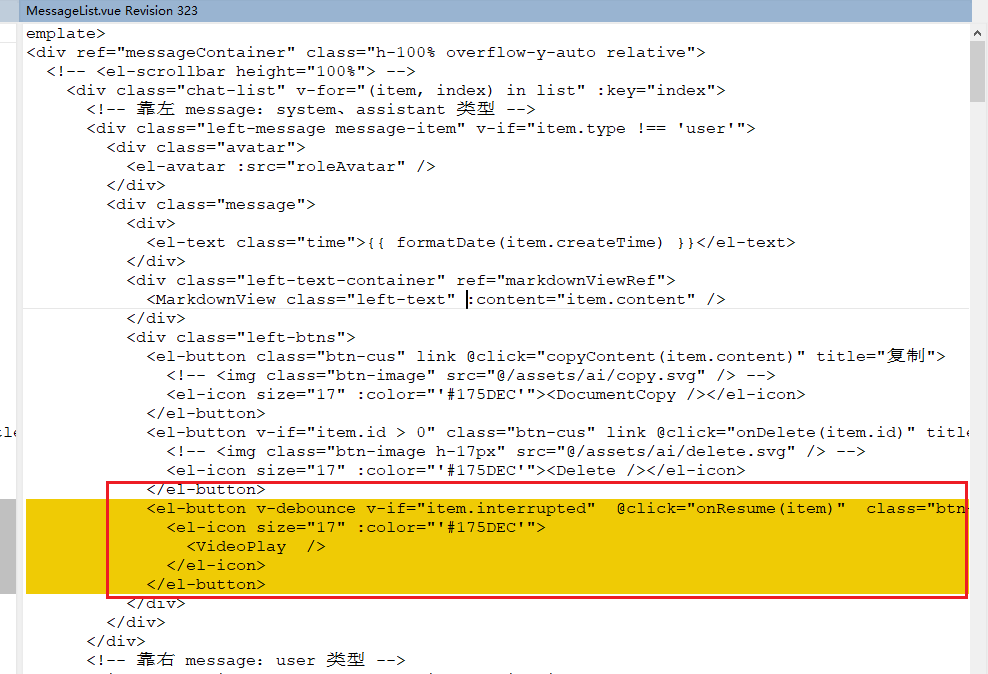
           <el-button v-debounce v-if="item.interrupted"  @click="onResume(item)"  class="btn-cus"  link  title="继续">
                <el-icon size="17" :color="'#175DEC'">
                  <VideoPlay  />
                </el-icon>
              </el-button>
继续按钮的样式
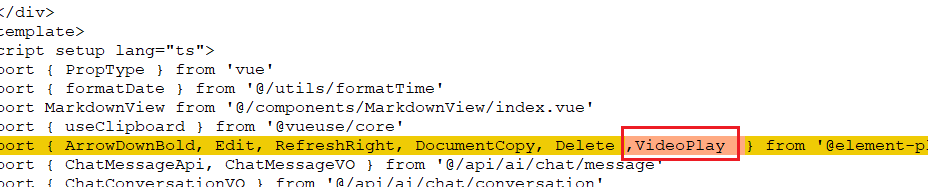
VideoPlay
继续的emits
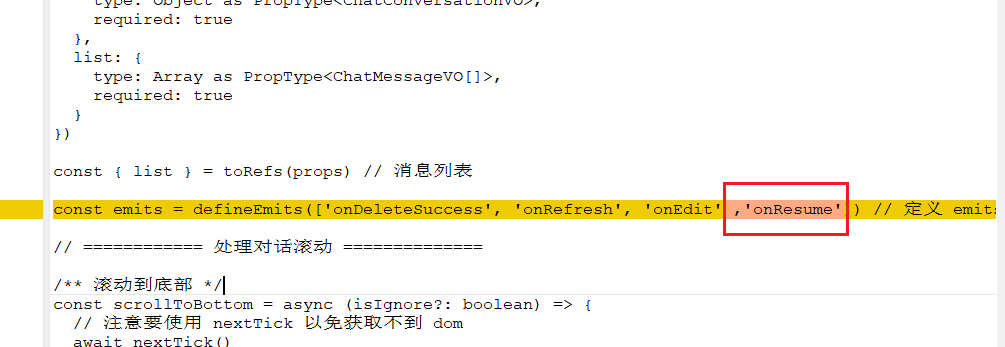
onResume
统一格式定义继续方法
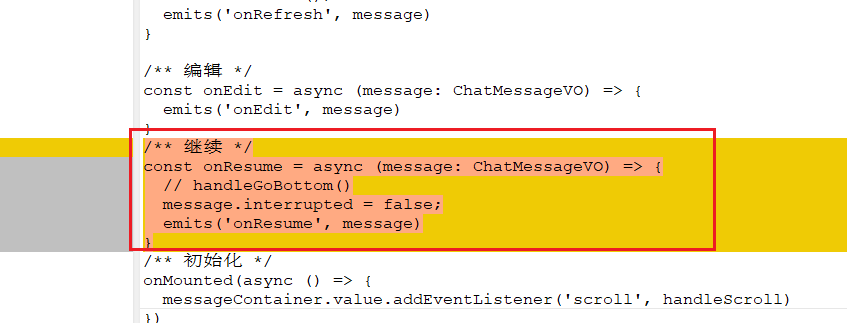
/** 继续 */
const onResume = async (message: ChatMessageVO) => {
  // handleGoBottom()
  message.interrupted = false;
  emits('onResume', message)
}
完整代码:
<template>
  <div ref="messageContainer" class="h-100% overflow-y-auto relative">
    <!-- <el-scrollbar height="100%"> -->
      <div class="chat-list" v-for="(item, index) in list" :key="index">
        <!-- 靠左 message:system、assistant 类型 -->
        <div class="left-message message-item" v-if="item.type !== 'user'">
          <div class="avatar">
            <el-avatar :src="roleAvatar" />
          </div>
          <div class="message">
            <div>
              <el-text class="time">{{ formatDate(item.createTime) }}</el-text>
            </div>
            <div class="left-text-container" ref="markdownViewRef">
              <MarkdownView class="left-text" :content="item.content" />
            </div>
            <div class="left-btns">
              <el-button class="btn-cus" link @click="copyContent(item.content)" title="复制">
                <!-- <img class="btn-image" src="@/assets/ai/copy.svg" /> -->
                <el-icon size="17" :color="'#175DEC'"><DocumentCopy /></el-icon>
              </el-button>
              <el-button v-if="item.id > 0" class="btn-cus" link @click="onDelete(item.id)" title="删除">
                <!-- <img class="btn-image h-17px" src="@/assets/ai/delete.svg" /> -->
                <el-icon size="17" :color="'#175DEC'"><Delete /></el-icon>
              </el-button>
              <el-button v-debounce v-if="item.interrupted"  @click="onResume(item)"  class="btn-cus"  link  title="继续">
                <el-icon size="17" :color="'#175DEC'">
                  <VideoPlay  />
                </el-icon>
              </el-button>
            </div>
          </div>
        </div>
        <!-- 靠右 message:user 类型 -->
        <div class="right-message message-item" v-if="item.type === 'user'">
          <div class="avatar">
            <el-avatar :src="userAvatar" />
          </div>
          <div class="message">
            <div class="display-flex-right">
              <el-text class="time">{{ formatDate(item.createTime) }}</el-text>
            </div>
            <div class="right-text-container" v-if="item.fileName && item.filePath">
              <div class="file-box display-flex">
                <img v-if="item.filePath.split('.')[1]=='pdf'" src="@/assets/imgs/courseDesign/pdfPng.png" />
                <img v-else-if="item.filePath.split('.')[1]=='doc'" src="@/assets/imgs/courseDesign/doc.png" />
                <img v-else src="@/assets/imgs/courseDesign/docPng.png" />
                <span class="ellipsis" style="margin-left: 13px;">{{item.fileName}}.{{item.filePath.split('.')[1]}}</span>
              </div>
            </div>
            <div class="right-text-container">
              <div class="right-text">{{ item.content }}</div>
            </div>
            <div class="right-btns">
              <el-button class="btn-cus margin-l-12" link @click="copyContent(item.content)" title="复制">
                <!-- <img class="btn-image" src="@/assets/ai/copy.svg" /> -->
                <el-icon size="17" :color="'#175DEC'"><DocumentCopy /></el-icon>
              </el-button>
              <el-button class="btn-cus" link @click="onDelete(item.id)" title="删除">
                <!-- <img class="btn-image h-17px mr-12px" src="@/assets/ai/delete.svg" /> -->
                <el-icon size="17" :color="'#175DEC'"><Delete /></el-icon>
              </el-button>
              <el-button class="btn-cus" link @click="onRefresh(item)" title="再次提问">
                <el-icon size="17" :color="'#175DEC'"><RefreshRight /></el-icon>
              </el-button>
              <!-- <el-button class="btn-cus" link @click="onEdit(item)">
                <el-icon size="17"><Edit /></el-icon>
              </el-button> -->
            </div>
          </div>
        </div>
      </div>
    <!-- </el-scrollbar> -->
  </div>
  <!-- 回到底部 -->
  <div v-if="isScrolling" class="to-bottom" @click="handleGoBottom">
    <el-button :icon="ArrowDownBold" circle />
  </div>
</template>
<script setup lang="ts">
import { PropType } from 'vue'
import { formatDate } from '@/utils/formatTime'
import MarkdownView from '@/components/MarkdownView/index.vue'
import { useClipboard } from '@vueuse/core'
import { ArrowDownBold, Edit, RefreshRight, DocumentCopy, Delete ,VideoPlay  } from '@element-plus/icons-vue'
import { ChatMessageApi, ChatMessageVO } from '@/api/ai/chat/message'
import { ChatConversationVO } from '@/api/ai/chat/conversation'
import { useUserStore } from '@/store/modules/user'
import userAvatarDefaultImg from '@/assets/imgs/home/25.png'
import roleAvatarDefaultImg from '@/assets/imgs/home/19.png'

const message = useMessage() // 消息弹窗
const { copy } = useClipboard() // 初始化 copy 到粘贴板
const userStore = useUserStore()

// 判断“消息列表”滚动的位置(用于判断是否需要滚动到消息最下方)
const messageContainer: any = ref(null)
const isScrolling = ref(false) //用于判断用户是否在滚动

const userAvatar = computed(() => userStore.user.avatar || userAvatarDefaultImg)
const roleAvatar = computed(() => props.conversation.roleAvatar ?? roleAvatarDefaultImg)

// 定义 props
const props = defineProps({
  conversation: {
    type: Object as PropType<ChatConversationVO>,
    required: true
  },
  list: {
    type: Array as PropType<ChatMessageVO[]>,
    required: true
  }
})

const { list } = toRefs(props) // 消息列表

const emits = defineEmits(['onDeleteSuccess', 'onRefresh', 'onEdit' ,'onResume']) // 定义 emits

// ============ 处理对话滚动 ==============

/** 滚动到底部 */
const scrollToBottom = async (isIgnore?: boolean) => {
  // 注意要使用 nextTick 以免获取不到 dom
  await nextTick()
  if (isIgnore || !isScrolling.value) {
    messageContainer.value.scrollTop =
      messageContainer.value.scrollHeight - messageContainer.value.offsetHeight
  }
}

function handleScroll() {
  const scrollContainer = messageContainer.value
  const scrollTop = scrollContainer.scrollTop
  const scrollHeight = scrollContainer.scrollHeight
  const offsetHeight = scrollContainer.offsetHeight
  if (scrollTop + offsetHeight < scrollHeight - 100) {
    // 用户开始滚动并在最底部之上,取消保持在最底部的效果
    isScrolling.value = true
  } else {
    // 用户停止滚动并滚动到最底部,开启保持到最底部的效果
    isScrolling.value = false
  }
}

/** 回到底部 */
const handleGoBottom = async () => {
  const scrollContainer = messageContainer.value
  scrollContainer.scrollTop = scrollContainer.scrollHeight
}

/** 回到顶部 */
const handlerGoTop = async () => {
  const scrollContainer = messageContainer.value
  scrollContainer.scrollTop = 0
}

defineExpose({ scrollToBottom, handlerGoTop }) // 提供方法给 parent 调用

// ============ 处理消息操作 ==============

/** 复制 */
const copyContent = async (content) => {
  // 先判断当前有没有clipboard实例,如果有,则使用useClipboard;如果没有,则使用js原生方法
  if (navigator.clipboard) {
    await copy(content)
  } else {
    const input = document.createElement('input');
    input.setAttribute('value', content);
    document.body.appendChild(input);
    input.select();
    document.execCommand('copy');
    document.body.removeChild(input);
  }
  message.success('复制成功!')
}

/** 删除 */
const onDelete = async (id) => {
  // 删除 message
  // await ChatMessageApi.deleteChatMessage(id)
  // message.success('删除成功!')
  // 回调
  emits('onDeleteSuccess', {
    id: id
  })
}

/** 刷新 */
const onRefresh = async (message: ChatMessageVO) => {
  handleGoBottom();
  emits('onRefresh', message)
}

/** 编辑 */
const onEdit = async (message: ChatMessageVO) => {
  emits('onEdit', message)
}
/** 继续 */
const onResume = async (message: ChatMessageVO) => {
  // handleGoBottom()
  message.interrupted = false;
  emits('onResume', message)
}
/** 初始化 */
onMounted(async () => {
  messageContainer.value.addEventListener('scroll', handleScroll)
})
</script>

<style scoped lang="scss">
.message-container {
  position: relative;
  overflow-y: scroll;
}

// 中间
.chat-list {
  display: flex;
  flex-direction: column;
  overflow-y: hidden;
  padding: 0 20px;
  .message-item {
    margin-top: 50px;
  }

  .left-message {
    display: flex;
    flex-direction: row;
    .el-avatar--circle {
      background-color: transparent;
    }
  }

  .right-message {
    display: flex;
    flex-direction: row-reverse;
    justify-content: flex-start;
    .el-avatar--circle {
      background-color: transparent;
    }
  }

  .message {
    display: flex;
    flex-direction: column;
    text-align: left;
    margin: 0 15px;
    width: 100%;
    overflow: hidden;

    .time {
      text-align: left;
      line-height: 30px;
    }

    .left-text-container {
      position: relative;
      display: flex;
      flex-direction: column;
      overflow-wrap: break-word;
      background: #E7F2FF;
      border-radius: 7px 7px 7px 7px;
      padding: 10px 10px 5px 10px;
      margin-right: 45px;

      .left-text {
        font-weight: 400;
        font-size: 16px;
        color: #3D3D3D;
      }
    }

    .file-box {
      max-width: 100%;
      font-weight: 400;
      font-size: 16px;
      color: #3D3D3D;
      background: #E7F2FF;
      border-radius: 7px 7px 7px 7px;
      border-radius: 10px;
      padding: 10px;
      margin-bottom: 15px;
      border: 1px solid #175DEC;
      img {
        width: 21px;
        height: 24px;
      }
    }

    .right-text-container {
      display: flex;
      flex-direction: row-reverse;
      margin-left: 45px;

      .right-text {
        font-size: 0.95rem;
        font-weight: 400;
        font-size: 16px;
        color: #3D3D3D;
        display: inline;
        background: #E7F2FF;
        border-radius: 7px 7px 7px 7px;
        border-radius: 10px;
        padding: 10px;
        width: auto;
        overflow-wrap: anywhere;
        white-space: pre-wrap;
      }
    }

    .left-btns {
      display: flex;
      flex-direction: row;
      margin-top: 8px;
    }

    .right-btns {
      display: flex;
      flex-direction: row-reverse;
      margin-top: 8px;
    }
  }

  // 复制、删除按钮
  .btn-cus {
    display: flex;
    background-color: transparent;
    align-items: center;

    .btn-image {
      height: 20px;
    }
  }

  .btn-cus:hover {
    cursor: pointer;
    background-color: #f6f6f6;
  }
}

// 回到底部
.to-bottom {
  position: absolute;
  z-index: 1000;
  bottom: 0;
  right: 50%;
}

</style>
/src/api/ai/chat/message/index.ts变更
聊天VO 增加是否被中断
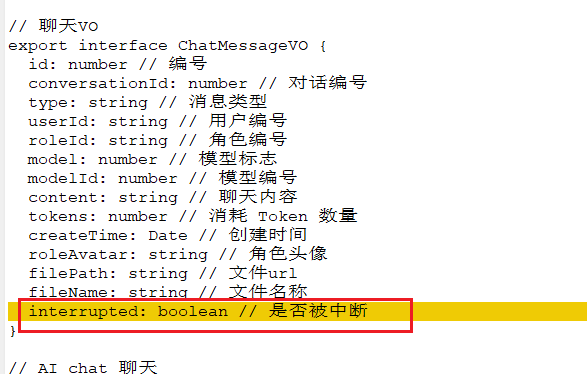
interrupted: boolean // 是否被中断
继续未完成的消息流 API调用
// 继续未完成的消息流
resumeChatMessageStream: async (
  conversationId: number,
  messageId:number,
  content: string,
  ctrl,
  onMessage,
  onError,
  onClose
) => {
  const token = getAccessToken()
  return fetchEventSource(`${config.base_url}/ai/chat/message/resume-stream`, {
      method: 'post',
      headers: {
          'Content-Type': 'application/json',
          Authorization: `Bearer ${token}`
      },
      openWhenHidden: true,
      body: JSON.stringify({
        conversationId,
        messageId,
        content
      }),
      onmessage: onMessage,
      onerror: onError,
      onclose: onClose,
      signal: ctrl.signal
  })
},
完整代码:
import request from '@/config/axios'
import { fetchEventSource } from '@microsoft/fetch-event-source'
import { getAccessToken } from '@/utils/auth'
import { config } from '@/config/axios/config'

// 聊天VO
export interface ChatMessageVO {
  id: number // 编号
  conversationId: number // 对话编号
  type: string // 消息类型
  userId: string // 用户编号
  roleId: string // 角色编号
  model: number // 模型标志
  modelId: number // 模型编号
  content: string // 聊天内容
  tokens: number // 消耗 Token 数量
  createTime: Date // 创建时间
  roleAvatar: string // 角色头像
  filePath: string // 文件url
  fileName: string // 文件名称
  interrupted: boolean // 是否被中断
}

// AI chat 聊天
export const ChatMessageApi = {
  // 消息列表
  getChatMessageListByConversationId: async (conversationId: number | null) => {
    return await request.get({
      url: `/ai/chat/message/list-by-conversation-id?conversationId=${conversationId}`
    })
  },

  // 发送 Stream 消息
  // 为什么不用 axios 呢?因为它不支持 SSE 调用
  sendChatMessageStream: async (
    conversationId: number,
    content: string,
    filePath: string,
    fileName: string,
    ctrl,
    enableContext: boolean,
    onMessage,
    onError,
    onClose
  ) => {
    const token = getAccessToken()
    return fetchEventSource(`${config.base_url}/ai/chat/message/send-stream`, {
      method: 'post',
      headers: {
        'Content-Type': 'application/json',
        Authorization: `Bearer ${token}`
      },
      openWhenHidden: true,
      body: JSON.stringify({
        conversationId,
        content,
        filePath,
        fileName,
        useContext: enableContext
      }),
      onmessage: onMessage,
      onerror: onError,
      onclose: onClose,
      signal: ctrl.signal
    })
  },

// 继续未完成的消息流
resumeChatMessageStream: async (
  conversationId: number,
  messageId:number,
  content: string,
  ctrl,
  onMessage,
  onError,
  onClose
) => {
  const token = getAccessToken()
  return fetchEventSource(`${config.base_url}/ai/chat/message/resume-stream`, {
      method: 'post',
      headers: {
          'Content-Type': 'application/json',
          Authorization: `Bearer ${token}`
      },
      openWhenHidden: true,
      body: JSON.stringify({
        conversationId,
        messageId,
        content
      }),
      onmessage: onMessage,
      onerror: onError,
      onclose: onClose,
      signal: ctrl.signal
  })
},

  // 删除消息
  deleteChatMessage: async (id: string) => {
    return await request.delete({ url: `/ai/chat/message/delete?id=${id}` })
  },

  // 删除指定对话的消息
  deleteByConversationId: async (conversationId: number) => {
    return await request.delete({
      url: `/ai/chat/message/delete-by-conversation-id?conversationId=${conversationId}`
    })
  },

  // 获得消息分页
  getChatMessagePage: async (params: any) => {
    return await request.get({ url: '/ai/chat/message/page', params })
  },

  // 管理员删除消息
  deleteChatMessageByAdmin: async (id: number) => {
    return await request.delete({ url: `/ai/chat/message/delete-by-admin?id=${id}` })
  }
}





 扫一扫
扫一扫


 720
720

 被折叠的 条评论
为什么被折叠?
被折叠的 条评论
为什么被折叠?
 到【灌水乐园】发言





