


 博客介绍了poi-tl的官网及依赖版本,指出poi需高于4.1.1,这里用4.1.2,poi-tl用1.8.2。还提到图片格式,重点说明在本地使用正常,但打成jar包在服务器上找不到模板,原因是使用ClassPathResource获取classpath下文件失败,最后给出解决方案。
https://gitee.com/hffs/poi-tl
官网:http://deepoove.com/poi-tl/
依赖
poi-tl需要poi版本高于4.1.1,但是poi版本4.1.1没有XWPFTemplate,所以这里用的poi版本是4.1.2
poi-tl版本1.0.0 不能new PictureRenderData获取图片,所以这里用的1.8.2
	<!-- excel工具 -->
		<poi.version>4.1.2</poi.version>
		<poi-tl.version>1.8.2</poi-tl.version>
		<dependency>
			<groupId>org.apache.poi</groupId>
			<artifactId>poi-ooxml</artifactId>
			<version>${poi.version}</version>
		</dependency>
		<!-- world工具 -->
		<dependency>
			<groupId>com.deepoove</groupId>
			<artifactId>poi-tl</artifactId>
			<version>${poi-tl.version}</version>
		</dependency>
FileUtil
public class FileUtil   {
/**
     * 下载文件到浏览器
     * @param request
     * @param response
     * @param filename 要下载的文件名
     * @param file     需要下载的文件对象
     * @throws IOException
     */
    public static void downFile(HttpServletRequest request, HttpServletResponse response, String filename, File file) throws IOException {
        //  文件存在才下载
        if (file.exists()) {
            OutputStream out = null;
            FileInputStream in = null;
            try {
                // 1.读取要下载的内容
                in = new FileInputStream(file);

                // 2. 告诉浏览器下载的方式以及一些设置
                // 解决文件名乱码问题,获取浏览器类型,转换对应文件名编码格式,IE要求文件名必须是utf-8, firefo要求是iso-8859-1编码
                String agent = request.getHeader("user-agent");
                if (agent.contains("FireFox")) {
                    filename = new String(filename.getBytes("UTF-8"), "iso-8859-1");
                } else {
                    filename = URLEncoder.encode(filename, "UTF-8");
                }
                // 设置下载文件的mineType,告诉浏览器下载文件类型
                String mineType = request.getServletContext().getMimeType(filename);
                response.setContentType(mineType);
                // 设置一个响应头,无论是否被浏览器解析,都下载
                response.setHeader("Content-disposition", "attachment; filename=" + filename);
                // 将要下载的文件内容通过输出流写到浏览器
                out = response.getOutputStream();
                int len = 0;
                byte[] buffer = new byte[1024];
                while ((len = in.read(buffer)) > 0) {
                    out.write(buffer, 0, len);
                }
            } catch (IOException e) {
                e.printStackTrace();
            } finally {
                if (out != null) {
                    out.close();
                }
                if (in != null) {
                    in.close();
                }
            }
        }
    }
/**
     * 递归删除目录下的所有文件及子目录下所有文件
     *
     * @param filePath 将要删除的文件目录路径
     * @return boolean Returns "true" if all deletions were successful.
     * If a deletion fails, the method stops attempting to
     * delete and returns "false".
     */
    public static boolean deleteDir(String filePath) {
        File dir = new File(filePath);
        if (dir.isDirectory()) {
            String[] children = dir.list();
            //递归删除目录中的子目录下
            for (int i = 0; i < children.length; i++) {
                boolean success = deleteDir(filePath + File.separator + children[i]);
                if (!success) {
                    return false;
                }
            }
        }
        // 目录此时为空,可以删除
        return dir.delete();
    }
}
测试

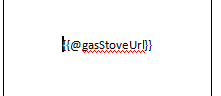
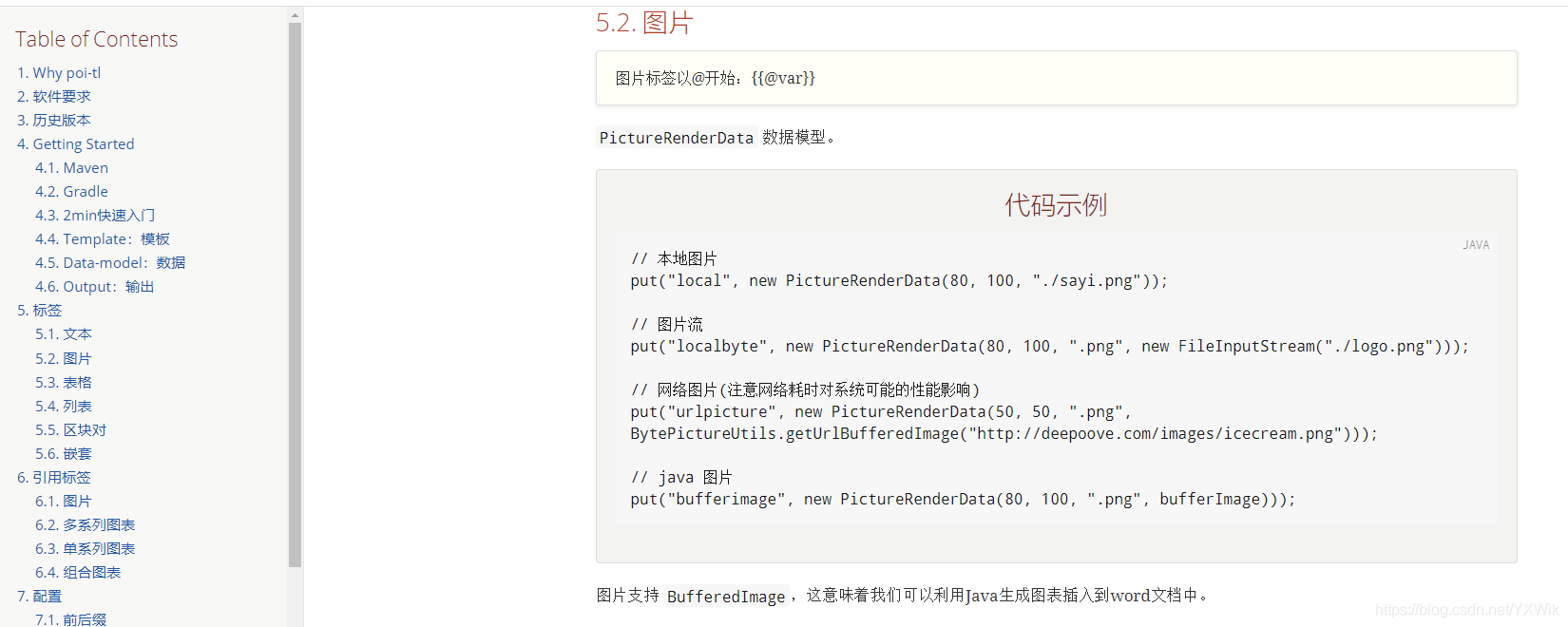
图片格式(最上面官网中)如下:
		Map<String, Object> data = new HashMap<String, Object>();
		// 安检人员
		data.put("execUser", "值");
		// 安检结果
		data.put("status", "值");
		// gasStoveUrl 为图片的地址
		 data.put("gasStoveUrl", new PictureRenderData(125, 125, ".png", BytePictureUtils.getUrlBufferedImage(gasStoveUrl)))
// 其他属性代码都省略
// 写入word输出

        try {
        	//模板位置
            ClassPathResource template = new ClassPathResource("模板文件.docx");
            String filePath = template.getFile().getPath();
            XWPFTemplate xwpfTemplate = XWPFTemplate.compile(filePath)
                    .render(data);
        //文件名
        String docName = DateUtil.DateToString(new Date(), DateStyle.YYYYMMDDHHMMSS) + 		".docx";            File targetFile = new File(docName);
            FileOutputStream out = new FileOutputStream(targetFile);
            xwpfTemplate.write(out);
            out.flush();
            out.close();
            xwpfTemplate.close();
            // 下载输出到浏览器
            FileUtil.downFile(request,response,docName,targetFile);
            FileUtil.deleteDir(targetFile.getPath());
        } catch (Exception e) {
            log.info("文件生成失败:"+e.getMessage());
            throw new DataNotFoundException("文件生成失败:"+e.getMessage());
        }
以上在本地没问题,打成jar包在服务器上就找不到模板
本来以为是路径的问题,但是测试后发现绝对路径和相对路径都访问不到模板
原来是使用ClassPathResource获取classpath下文件失败了
返回的是一个Jar协议地址:jar:file:/xxx/xx.jar!/xxxx。
参考自:https://www.renfei.net/posts/1003293
解决方案如下图
昨边为之前的只能在本地的
右边为更改后

InputStream is = getClass().getClassLoader().getResourceAsStream(url);
            XWPFTemplate xwpfTemplate = XWPFTemplate.compile(is).render(data);





 扫一扫
扫一扫


 3968
3968

 被折叠的 条评论
为什么被折叠?
被折叠的 条评论
为什么被折叠?
 到【灌水乐园】发言





