



[root@ansible ~]# ansible wsr -m file -a ‘path=/data/2339 state=directory’
192.168.100.20 | CHANGED => {
“ansible_facts”: {
“discovered_interpreter_python”: “/usr/bin/python”
},
“changed”: true,
“gid”: 0,
“group”: “root”,
“mode”: “0755”,
“owner”: “root”,
“path”: “/data/2339”,
“size”: 6,
“state”: “directory”,
“uid”: 0
}
192.168.100.10 | CHANGED => {
“ansible_facts”: {
“discovered_interpreter_python”: “/usr/bin/python”
},
“changed”: true,
“gid”: 0,
“group”: “root”,
“mode”: “0755”,
“owner”: “root”,
“path”: “/data/2339”,
“size”: 6,
“state”: “directory”,
“uid”: 0
}
创建链接文件
[root@ansible ~]# ansible wsr -m file -a ‘path=/data/2340 src=2339 state=link’
192.168.100.10 | CHANGED => {
“ansible_facts”: {
“discovered_interpreter_python”: “/usr/bin/python”
},
“changed”: true,
“dest”: “/data/2340”,
“gid”: 0,
“group”: “root”,
“mode”: “0777”,
“owner”: “root”,
“size”: 4,
“src”: “2339”,
“state”: “link”,
“uid”: 0
}
192.168.100.20 | CHANGED => {
“ansible_facts”: {
“discovered_interpreter_python”: “/usr/bin/python”
},
“changed”: true,
“dest”: “/data/2340”,
“gid”: 0,
“group”: “root”,
“mode”: “0777”,
“owner”: “root”,
“size”: 4,
“src”: “2339”,
“state”: “link”,
“uid”: 0
}
测试
[root@ansible ~]# ansible wsr -a ‘ls -l /data’
192.168.100.20 | CHANGED | rc=0 >>
total 32
-rw-rw-rw- 1 root root 13 Jul 10 11:32 2021710
-rw-r–r-- 1 root root 0 Jul 10 11:31 2021710.11427.2021-07-10@11:32:39~
drwxr-xr-x 2 root root 6 Jul 10 11:40 2339
lrwxrwxrwx 1 root root 4 Jul 10 11:42 2340 -> 2339
-rw-rw-rw- 1 root root 21 Jul 10 11:20 a.sh
-rw-r–r-- 1 root root 0 Jul 3 23:14 file1
-rw-r–r-- 1 root root 0 Jul 3 23:14 file2
-rw-r–r-- 1 root root 0 Jul 3 23:14 file3
-rw-r–r-- 1 root root 63 Jul 4 11:51 for1.conf
-rw-r–r-- 1 root root 267 Jul 4 12:06 for2.conf
-rw-r–r-- 1 root root 171 Jul 5 04:05 for3.conf
-rw-r–r-- 1 apache root 11753 Jul 10 03:21 httpd.conf
192.168.100.10 | CHANGED | rc=0 >>
total 32
-rw-rw-rw- 1 root root 13 Jul 10 11:32 2021710
-rw-r–r-- 1 root root 0 Jul 10 11:31 2021710.11493.2021-07-10@11:32:39~
drwxr-xr-x 2 root root 6 Jul 10 11:40 2339
lrwxrwxrwx 1 root root 4 Jul 10 11:42 2340 -> 2339
-rw-rw-rw- 1 root root 21 Jul 10 11:20 a.sh
-rw-r–r-- 1 root root 0 Jul 3 23:14 file1
-rw-r–r-- 1 root root 0 Jul 3 23:14 file2
-rw-r–r-- 1 root root 0 Jul 3 23:14 file3
-rw-r–r-- 1 root root 63 Jul 4 11:51 for1.conf
-rw-r–r-- 1 root root 267 Jul 4 12:06 for2.conf
-rw-r–r-- 1 root root 171 Jul 5 04:05 for3.conf
-rw-r–r-- 1 apache root 11753 Jul 10 03:21 httpd.conf
删除文件
只需把state改为absent即可
[root@ansible ~]# ansible wsr -m file -a ‘path=/data/2339 state=absent’
**该模块适用于管理cron计划任务的。
其使用的语法跟我们的crontab文件中的语法一致**
-
day= #日应该运行的工作( 1-31, *, */2, )
-
hour= # 小时 ( 0-23, *, */2, )
-
minute= #分钟( 0-59, *, */2, )
-
month= # 月( 1-12, *, /2, )
-
weekday= # 周 ( 0-6 for Sunday-Saturday, )
-
job= #指明运行的命令是什么
-
name= #定时任务描述
-
reboot # 任务在重启时运行,不建议使用,建议使用special_time
-
special_time
#特殊的时间范围,参数:reboot(重启时),annually(每年),monthly(每月),weekly(每周),daily(每天),hourly(每小时)
-
state #指定状态,present表示添加定时任务,也是默认设置,absent表示删除定时任务
-
user # 以哪个用户的身份执行
[root@ansible ~]# ansible wsr -m cron -a ‘name=“echo words” minute=*/5 job=“echo hello world”’
192.168.100.10 | CHANGED => {
“ansible_facts”: {
“discovered_interpreter_python”: “/usr/bin/python”
},
“changed”: true,
“envs”: [],
“jobs”: [
“warningcron”,
“None”,
“echo words”
]
}
192.168.100.20 | CHANGED => {
“ansible_facts”: {
“discovered_interpreter_python”: “/usr/bin/python”
},
“changed”: true,
“envs”: [],
“jobs”: [
“warningcron”,
“None”,
“echo words”
]
}
测试结果
[root@ansible ~]# ansible wsr -a ‘crontab -l’
192.168.100.10 | CHANGED | rc=0 >>
#Ansible: warningcron
#* * * * 1,3,5 /usr/bin/wall FBI warning
#Ansible: None
#* * * * * /usr/bin/wall FBI warning
#Ansible: echo words
*/5 * * * * echo hello world
192.168.100.20 | CHANGED | rc=0 >>
#Ansible: warningcron
#* * * * 1,3,5 /usr/bin/wall FBI warning
#Ansible: None
#* * * * * /usr/bin/wall FBI warning
#Ansible: echo words
*/5 * * * * echo hello world
mission completely!!!
该模块主要是用来管理账户的
-
comment # 用户的描述信息
-
createhome # 是否创建家目录
-
force # 在使用state=absent时, 行为与userdel –force一致.
-
group # 指定基本组
-
groups # 指定附加组,如果指定为(groups=)表示删除所有组
-
home # 指定用户家目录
-
move_home # 如果设置为home=时, 试图将用户主目录移动到指定的目录
-
name # 指定用户名
-
non_unique # 该选项允许改变非唯一的用户ID值
-
password # 指定用户密码
-
remove # 在使用state=absent时, 行为是与userdel –remove一致
-
shell # 指定默认shell
-
state # 设置帐号状态,不指定为创建,指定值为absent表示删除
-
system # 当创建一个用户,设置这个用户是系统用户。这个设置不能更改现有用户
-
uid # 指定用户的uid
添加一个用户并指定 uid
[root@ansible ~]# ansible wsr -m user -a ‘name=zs uid=66666’
192.168.100.10 | CHANGED => {
“ansible_facts”: {
“discovered_interpreter_python”: “/usr/bin/python”
},
“changed”: true,
“comment”: “”,
“create_home”: true,
“group”: 1005,
“home”: “/home/zs”,
“name”: “zs”,
“shell”: “/bin/bash”,
“state”: “present”,
“system”: false,
“uid”: 66666
}
192.168.100.20 | CHANGED => {
“ansible_facts”: {
“discovered_interpreter_python”: “/usr/bin/python”
},
“changed”: true,
“comment”: “”,
“create_home”: true,
“group”: 1005,
“home”: “/home/zs”,
“name”: “zs”,
“shell”: “/bin/bash”,
“state”: “present”,
“system”: false,
“uid”: 66666
}
[root@ansible ~]# ansible wsr -m shell -a ‘getent passwd|grep zs’
192.168.100.10 | CHANGED | rc=0 >>
zs❌66666:1005::/home/zs:/bin/bash
192.168.100.20 | CHANGED | rc=0 >>
zs❌66666:1005::/home/zs:/bin/bash
删除用户
指定状态为absent即可
[root@ansible ~]# ansible wsr -m user -a ‘name=zs uid=66666 state=absent’
192.168.100.10 | CHANGED => {
“ansible_facts”: {
“discovered_interpreter_python”: “/usr/bin/python”
},
“changed”: true,
“force”: false,
“name”: “zs”,
“remove”: false,
“state”: “absent”
}
192.168.100.20 | CHANGED => {
“ansible_facts”: {
“discovered_interpreter_python”: “/usr/bin/python”
},
“changed”: true,
“force”: false,
“name”: “zs”,
“remove”: false,
“state”: “absent”
}
[root@ansible ~]# ansible wsr -m shell -a ‘getent passwd|grep zs’
192.168.100.10 | FAILED | rc=1 >>
non-zero return code
192.168.100.20 | FAILED | rc=1 >>
non-zero return code
该模块主要用于添加或删除组。
常用的选项如下:
-
gid= #设置组的GID号
-
name= #指定组的名称
-
state= #指定组的状态,默认为创建,设置值为absent为删除
-
system= #设置值为yes,表示创建为系统组
建立组并指定gid
[root@ansible ~]# ansible wsr -m group -a ‘name=ls gid=888888’
192.168.100.20 | CHANGED => {
“ansible_facts”: {
“discovered_interpreter_python”: “/usr/bin/python”
},
“changed”: true,
“gid”: 888888,
“name”: “ls”,
“state”: “present”,
“system”: false
}
192.168.100.10 | CHANGED => {
“ansible_facts”: {
“discovered_interpreter_python”: “/usr/bin/python”
},
“changed”: true,
“gid”: 888888,
“name”: “ls”,
“state”: “present”,
“system”: false
}
[root@ansible ~]# ansible wsr -m shell -a ‘cat /etc/group |grep 888888’
192.168.100.10 | CHANGED | rc=0 >>
ls❌888888:
192.168.100.20 | CHANGED | rc=0 >>
ls❌888888:
删除组
指定state为absent即可删除
[root@ansible ~]# ansible wsr -m group -a ‘name=ls state=absent’
192.168.100.20 | CHANGED => {
“ansible_facts”: {
“discovered_interpreter_python”: “/usr/bin/python”
},
“changed”: true,
“name”: “ls”,
“state”: “absent”
}
192.168.100.10 | CHANGED => {
“ansible_facts”: {
“discovered_interpreter_python”: “/usr/bin/python”
},
“changed”: true,
“name”: “ls”,
“state”: “absent”
}
该模块用于将本机的脚本在被管理端的机器上运行。
[root@ansible tmp]# cat df.sh
#!/bin/bash
date >> /tmp/disk_total.log
df -lh >> /tmp/disk_total.log
[root@ansible tmp]# ansible wsr -m script -a ‘/tmp/df.sh’
192.168.100.10 | CHANGED => {
“changed”: true,
“rc”: 0,
“stderr”: “Shared connection to 192.168.100.10 closed.\r\n”,
“stderr_lines”: [
“Shared connection to 192.168.100.10 closed.”
],
“stdout”: “”,
“stdout_lines”: []
}
192.168.100.20 | CHANGED => {
“changed”: true,
“rc”: 0,
“stderr”: “Shared connection to 192.168.100.20 closed.\r\n”,
“stderr_lines”: [
“Shared connection to 192.168.100.20 closed.”
],
“stdout”: “”,
“stdout_lines”: []
}
测试
[root@ansible tmp]# ansible wsr -a ‘cat /tmp/disk_total.log’
192.168.100.10 | CHANGED | rc=0 >>
Sat Jul 10 21:24:51 EDT 2021
Filesystem Size Used Avail Use% Mounted on
devtmpfs 475M 0 475M 0% /dev
tmpfs 487M 0 487M 0% /dev/shm
tmpfs 487M 7.6M 479M 2% /run
tmpfs 487M 0 487M 0% /sys/fs/cgroup
/dev/mapper/centos-root 8.0G 1.5G 6.6G 18% /
/dev/sr0 4.4G 4.4G 0 100% /mnt/centos
/dev/sda1 1014M 136M 879M 14% /boot
tmpfs 98M 0 98M 0% /run/user/0
192.168.100.20 | CHANGED | rc=0 >>
Sat Jul 10 21:24:51 EDT 2021
Filesystem Size Used Avail Use% Mounted on
devtmpfs 475M 0 475M 0% /dev
tmpfs 487M 0 487M 0% /dev/shm
tmpfs 487M 7.6M 479M 2% /run
tmpfs 487M 0 487M 0% /sys/fs/cgroup
/dev/mapper/centos-root 8.0G 1.5G 6.6G 18% /
/dev/sr0 4.4G 4.4G 0 100% /mnt/centos
/dev/sda1 1014M 136M 879M 14% /boot
tmpfs 98M 0 98M 0% /run/user/0
通过调用facts(facts就是变量,内建变量)组件来收集主机信息,如vcpu个数,内存大小等…
可以使用filter来查看指定信息,调用后返回很多对应主机的信息,在后面的操作中可以根据不同的信息来做不同的操作
如redhat系列用yum安装,而debian系列用apt来安装软件。
[root@ansible tmp]# ansible wsr -m setup -a ‘filter=cpu’
192.168.100.20 | SUCCESS => {
“ansible_facts”: {
“ansible_processor_vcpus”: 2,
“discovered_interpreter_python”: “/usr/bin/python”
},
“changed”: false
}
192.168.100.10 | SUCCESS => {
“ansible_facts”: {
“ansible_processor_vcpus”: 2,
“discovered_interpreter_python”: “/usr/bin/python”
},
“changed”: false
}
该模块用于服务程序的管理。
其主要选项如下:
-
arguments #命令行提供额外的参数
-
enabled #设置开机启动。
-
name= #服务名称
-
runlevel #开机启动的级别,一般不用指定。
-
sleep #在重启服务的过程中,是否等待。如在服务关闭以后等待2秒再启动。(定义在剧本中。)
-
state #有四种状态,分别为:started—>启动服务, stopped—>停止服务,
-
restarted—>重启服务, reloaded—>重载配置
[root@ansible tmp]# ansible wsr -m service -a ‘name=httpd state=restarted enabled=true’
192.168.100.20 | CHANGED => {
“ansible_facts”: {
“discovered_interpreter_python”: “/usr/bin/python”
},
“changed”: true,
“enabled”: true,
“name”: “httpd”,
“state”: “started”,
“status”: {
“ActiveEnterTimestampMonotonic”: “0”,
“ActiveExitTimestampMonotonic”: “0”,
“ActiveState”: “inactive”,
“After”: “basic.target remote-fs.target system.slice systemd-journald.socket network.target tmp.mount nss-lookup.target -.mount”,
“AllowIsolate”: “no”,
“AmbientCapabilities”: “0”,
“AssertResult”: “no”,
“AssertTimestampMonotonic”: “0”,
“Before”: “shutdown.target”,
“BlockIOAccounting”: “no”,
“BlockIOWeight”: “18446744073709551615”,
“CPUAccounting”: “no”,
“CPUQuotaPerSecUSec”: “infinity”,
“CPUSchedulingPolicy”: “0”,
“CPUSchedulingPriority”: “0”,
“CPUSchedulingResetOnFork”: “no”,
“CPUShares”: “18446744073709551615”,
“CanIsolate”: “no”,
“CanReload”: “yes”,
“CanStart”: “yes”,
“CanStop”: “yes”,
“CapabilityBoundingSet”: “18446744073709551615”,
“ConditionResult”: “no”,
“ConditionTimestampMonotonic”: “0”,
“Conflicts”: “shutdown.target”,
“ControlPID”: “0”,
“DefaultDependencies”: “yes”,
“Delegate”: “no”,
“Description”: “The Apache HTTP Server”,
“DevicePolicy”: “auto”,
“Documentation”: “man:httpd(8) man:apachectl(8)”,
“EnvironmentFile”: “/etc/sysconfig/httpd (ignore_errors=no)”,
“ExecMainCode”: “0”,
“ExecMainExitTimestampMonotonic”: “0”,
“ExecMainPID”: “0”,
“ExecMainStartTimestampMonotonic”: “0”,
“ExecMainStatus”: “0”,
“ExecReload”: “{ path=/usr/sbin/httpd ; argv[]=/usr/sbin/httpd $OPTIONS -k graceful ; ignore_errors=no ; start_time=[n/a] ; stop_time=[n/a] ; pid=0 ; code=(null) ; status=0/0 }”,
“ExecStart”: “{ path=/usr/sbin/httpd ; argv[]=/usr/sbin/httpd $OPTIONS -DFOREGROUND ; ignore_errors=no ; start_time=[n/a] ; stop_time=[n/a] ; pid=0 ; code=(null) ; status=0/0 }”,
“ExecStop”: “{ path=/bin/kill ; argv[]=/bin/kill -WINCH ${MAINPID} ; ignore_errors=no ; start_time=[n/a] ; stop_time=[n/a] ; pid=0 ; code=(null) ; status=0/0 }”,
“FailureAction”: “none”,
“FileDescriptorStoreMax”: “0”,
“FragmentPath”: “/usr/lib/systemd/system/httpd.service”,
“GuessMainPID”: “yes”,
“IOScheduling”: “0”,
“Id”: “httpd.service”,
“IgnoreOnIsolate”: “no”,
“IgnoreOnSnapshot”: “no”,
“IgnoreSIGPIPE”: “yes”,
“InactiveEnterTimestampMonotonic”: “0”,
“InactiveExitTimestampMonotonic”: “0”,
“JobTimeoutAction”: “none”,
“JobTimeoutUSec”: “0”,
“KillMode”: “control-group”,
“KillSignal”: “18”,
“LimitAS”: “18446744073709551615”,
“LimitCORE”: “18446744073709551615”,
“LimitCPU”: “18446744073709551615”,
“LimitDATA”: “18446744073709551615”,
“LimitFSIZE”: “18446744073709551615”,
“LimitLOCKS”: “18446744073709551615”,
“LimitMEMLOCK”: “65536”,
“LimitMSGQUEUE”: “819200”,
“LimitNICE”: “0”,
“LimitNOFILE”: “4096”,
“LimitNPROC”: “3795”,
“LimitRSS”: “18446744073709551615”,
“LimitRTPRIO”: “0”,
“LimitRTTIME”: “18446744073709551615”,
“LimitSIGPENDING”: “3795”,
“LimitSTACK”: “18446744073709551615”,
“LoadState”: “loaded”,
“MainPID”: “0”,
“MemoryAccounting”: “no”,
“MemoryCurrent”: “18446744073709551615”,
“MemoryLimit”: “18446744073709551615”,
“MountFlags”: “0”,
“Names”: “httpd.service”,
“NeedDaemonReload”: “no”,
“Nice”: “0”,
“NoNewPrivileges”: “no”,
“NonBlocking”: “no”,
“NotifyAccess”: “main”,
“OOMScoreAdjust”: “0”,
“OnFailureJobMode”: “replace”,
“PermissionsStartOnly”: “no”,
“PrivateDevices”: “no”,
“PrivateNetwork”: “no”,
“PrivateTmp”: “yes”,
“ProtectHome”: “no”,
“ProtectSystem”: “no”,
“RefuseManualStart”: “no”,
“RefuseManualStop”: “no”,
“RemainAfterExit”: “no”,
“Requires”: “-.mount basic.target”,
“RequiresMountsFor”: “/var/tmp”,
“Restart”: “no”,
“RestartUSec”: “100ms”,
“Result”: “success”,
“RootDirectoryStartOnly”: “no”,
“RuntimeDirectoryMode”: “0755”,
“SameProcessGroup”: “no”,
“SecureBits”: “0”,
“SendSIGHUP”: “no”,
“SendSIGKILL”: “yes”,
“Slice”: “system.slice”,
“StandardError”: “inherit”,
“StandardInput”: “null”,
“StandardOutput”: “journal”,
“StartLimitAction”: “none”,
“StartLimitBurst”: “5”,
“StartLimitInterval”: “10000000”,
“StartupBlockIOWeight”: “18446744073709551615”,
“StartupCPUShares”: “18446744073709551615”,
“StatusErrno”: “0”,
“StopWhenUnneeded”: “no”,
“SubState”: “dead”,
“SyslogLevelPrefix”: “yes”,
“SyslogPriority”: “30”,
“SystemCallErrorNumber”: “0”,
“TTYReset”: “no”,
“TTYVHangup”: “no”,
“TTYVTDisallocate”: “no”,
“TasksAccounting”: “no”,
“TasksCurrent”: “18446744073709551615”,
“TasksMax”: “18446744073709551615”,
“TimeoutStartUSec”: “1min 30s”,
“TimeoutStopUSec”: “1min 30s”,
“TimerSlackNSec”: “50000”,
“Transient”: “no”,
“Type”: “notify”,
“UMask”: “0022”,
“UnitFilePreset”: “disabled”,
“UnitFileState”: “disabled”,
“Wants”: “system.slice”,
“WatchdogTimestampMonotonic”: “0”,
“WatchdogUSec”: “0”
}
}
192.168.100.10 | CHANGED => {
“ansible_facts”: {
“discovered_interpreter_python”: “/usr/bin/python”
},
“changed”: true,
“enabled”: true,
“name”: “httpd”,
“state”: “started”,
“status”: {
“ActiveEnterTimestampMonotonic”: “0”,
“ActiveExitTimestampMonotonic”: “0”,
“ActiveState”: “inactive”,
“After”: “remote-fs.target nss-lookup.target tmp.mount basic.target -.mount systemd-journald.socket system.slice network.target”,
“AllowIsolate”: “no”,
“AmbientCapabilities”: “0”,
“AssertResult”: “no”,
“AssertTimestampMonotonic”: “0”,
“Before”: “shutdown.target”,
“BlockIOAccounting”: “no”,
“BlockIOWeight”: “18446744073709551615”,
“CPUAccounting”: “no”,
“CPUQuotaPerSecUSec”: “infinity”,
“CPUSchedulingPolicy”: “0”,
“CPUSchedulingPriority”: “0”,
“CPUSchedulingResetOnFork”: “no”,
“CPUShares”: “18446744073709551615”,
“CanIsolate”: “no”,
“CanReload”: “yes”,
“CanStart”: “yes”,
“CanStop”: “yes”,
“CapabilityBoundingSet”: “18446744073709551615”,
“ConditionResult”: “no”,
“ConditionTimestampMonotonic”: “0”,
“Conflicts”: “shutdown.target”,
“ControlPID”: “0”,
“DefaultDependencies”: “yes”,
“Delegate”: “no”,
“Description”: “The Apache HTTP Server”,
“DevicePolicy”: “auto”,
“Documentation”: “man:httpd(8) man:apachectl(8)”,
“EnvironmentFile”: “/etc/sysconfig/httpd (ignore_errors=no)”,
“ExecMainCode”: “0”,
“ExecMainExitTimestampMonotonic”: “0”,
“ExecMainPID”: “0”,
“ExecMainStartTimestampMonotonic”: “0”,
“ExecMainStatus”: “0”,
“ExecReload”: “{ path=/usr/sbin/httpd ; argv[]=/usr/sbin/httpd $OPTIONS -k graceful ; ignore_errors=no ; start_time=[n/a] ; stop_time=[n/a] ; pid=0 ; code=(null) ; status=0/0 }”,
“ExecStart”: “{ path=/usr/sbin/httpd ; argv[]=/usr/sbin/httpd $OPTIONS -DFOREGROUND ; ignore_errors=no ; start_time=[n/a] ; stop_time=[n/a] ; pid=0 ; code=(null) ; status=0/0 }”,
“ExecStop”: “{ path=/bin/kill ; argv[]=/bin/kill -WINCH ${MAINPID} ; ignore_errors=no ; start_time=[n/a] ; stop_time=[n/a] ; pid=0 ; code=(null) ; status=0/0 }”,
“FailureAction”: “none”,
“FileDescriptorStoreMax”: “0”,
“FragmentPath”: “/usr/lib/systemd/system/httpd.service”,
“GuessMainPID”: “yes”,
“IOScheduling”: “0”,
“Id”: “httpd.service”,
“IgnoreOnIsolate”: “no”,
“IgnoreOnSnapshot”: “no”,
“IgnoreSIGPIPE”: “yes”,
“InactiveEnterTimestampMonotonic”: “0”,
“InactiveExitTimestampMonotonic”: “0”,
“JobTimeoutAction”: “none”,
“JobTimeoutUSec”: “0”,
“KillMode”: “control-group”,
“KillSignal”: “18”,
“LimitAS”: “18446744073709551615”,
“LimitCORE”: “18446744073709551615”,
“LimitCPU”: “18446744073709551615”,
“LimitDATA”: “18446744073709551615”,
“LimitFSIZE”: “18446744073709551615”,
“LimitLOCKS”: “18446744073709551615”,
“LimitMEMLOCK”: “65536”,
“LimitMSGQUEUE”: “819200”,
“LimitNICE”: “0”,
“LimitNOFILE”: “4096”,
“LimitNPROC”: “3795”,
“LimitRSS”: “18446744073709551615”,
“LimitRTPRIO”: “0”,
“LimitRTTIME”: “18446744073709551615”,
“LimitSIGPENDING”: “3795”,
“LimitSTACK”: “18446744073709551615”,
“LoadState”: “loaded”,
“MainPID”: “0”,
“MemoryAccounting”: “no”,
“MemoryCurrent”: “18446744073709551615”,
“MemoryLimit”: “18446744073709551615”,
“MountFlags”: “0”,
“Names”: “httpd.service”,
“NeedDaemonReload”: “no”,
“Nice”: “0”,
“NoNewPrivileges”: “no”,
“NonBlocking”: “no”,
“NotifyAccess”: “main”,
“OOMScoreAdjust”: “0”,
“OnFailureJobMode”: “replace”,
“PermissionsStartOnly”: “no”,
自我介绍一下,小编13年上海交大毕业,曾经在小公司待过,也去过华为、OPPO等大厂,18年进入阿里一直到现在。
深知大多数Java工程师,想要提升技能,往往是自己摸索成长或者是报班学习,但对于培训机构动则几千的学费,着实压力不小。自己不成体系的自学效果低效又漫长,而且极易碰到天花板技术停滞不前!
因此收集整理了一份《2024年Java开发全套学习资料》,初衷也很简单,就是希望能够帮助到想自学提升又不知道该从何学起的朋友,同时减轻大家的负担。


既有适合小白学习的零基础资料,也有适合3年以上经验的小伙伴深入学习提升的进阶课程,基本涵盖了95%以上Java开发知识点,真正体系化!
由于文件比较大,这里只是将部分目录截图出来,每个节点里面都包含大厂面经、学习笔记、源码讲义、实战项目、讲解视频,并且会持续更新!
如果你觉得这些内容对你有帮助,可以扫码获取!!(备注Java获取)

总结
面试前的“练手”还是很重要的,所以开始面试之前一定要准备好啊,不然也是耽搁面试官和自己的时间。
我自己是刷了不少面试题的,所以在面试过程中才能够做到心中有数,基本上会清楚面试过程中会问到哪些知识点,高频题又有哪些,所以刷题是面试前期准备过程中非常重要的一点。
面试题及解析总结

大厂面试场景
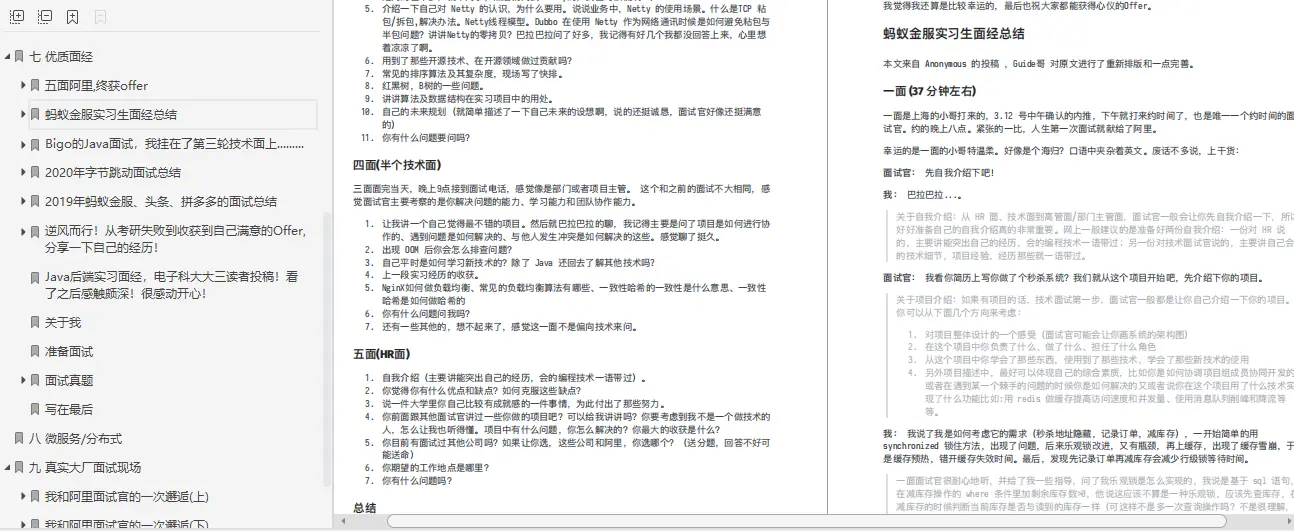
知识点总结
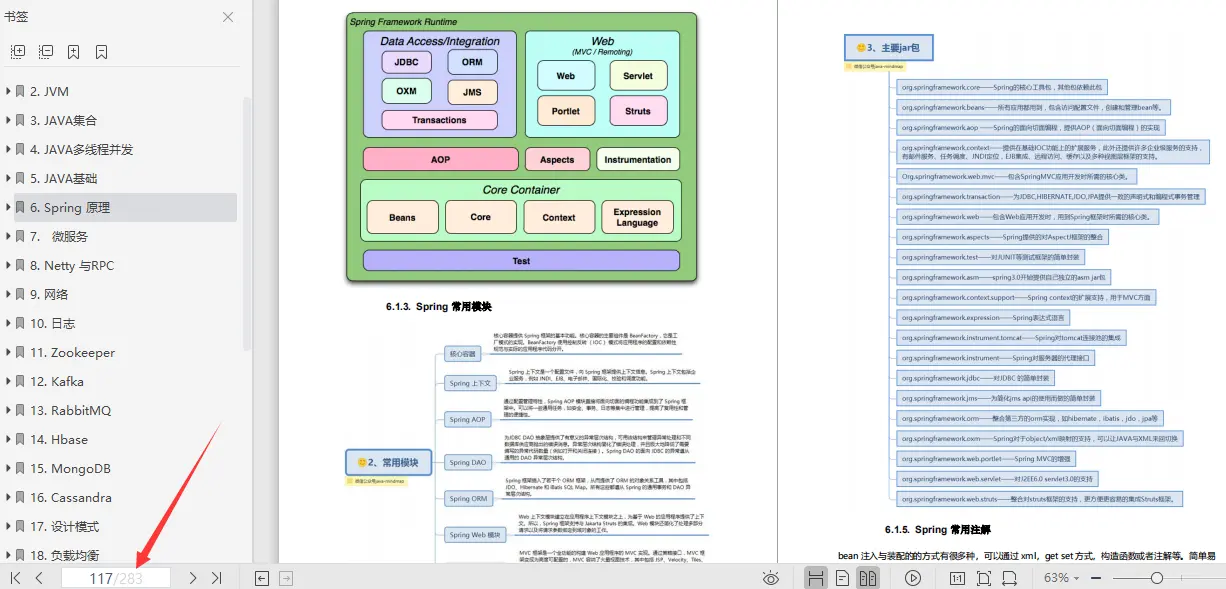
《互联网大厂面试真题解析、进阶开发核心学习笔记、全套讲解视频、实战项目源码讲义》点击传送门即可获取!
“MemoryLimit”: “18446744073709551615”,
“MountFlags”: “0”,
“Names”: “httpd.service”,
“NeedDaemonReload”: “no”,
“Nice”: “0”,
“NoNewPrivileges”: “no”,
“NonBlocking”: “no”,
“NotifyAccess”: “main”,
“OOMScoreAdjust”: “0”,
“OnFailureJobMode”: “replace”,
“PermissionsStartOnly”: “no”,
自我介绍一下,小编13年上海交大毕业,曾经在小公司待过,也去过华为、OPPO等大厂,18年进入阿里一直到现在。
深知大多数Java工程师,想要提升技能,往往是自己摸索成长或者是报班学习,但对于培训机构动则几千的学费,着实压力不小。自己不成体系的自学效果低效又漫长,而且极易碰到天花板技术停滞不前!
因此收集整理了一份《2024年Java开发全套学习资料》,初衷也很简单,就是希望能够帮助到想自学提升又不知道该从何学起的朋友,同时减轻大家的负担。[外链图片转存中…(img-fP4Y3W5Z-1712988340816)]
[外链图片转存中…(img-RTIfI2uo-1712988340817)]
[外链图片转存中…(img-HYG0EVwW-1712988340817)]
既有适合小白学习的零基础资料,也有适合3年以上经验的小伙伴深入学习提升的进阶课程,基本涵盖了95%以上Java开发知识点,真正体系化!
由于文件比较大,这里只是将部分目录截图出来,每个节点里面都包含大厂面经、学习笔记、源码讲义、实战项目、讲解视频,并且会持续更新!
如果你觉得这些内容对你有帮助,可以扫码获取!!(备注Java获取)
总结
面试前的“练手”还是很重要的,所以开始面试之前一定要准备好啊,不然也是耽搁面试官和自己的时间。
我自己是刷了不少面试题的,所以在面试过程中才能够做到心中有数,基本上会清楚面试过程中会问到哪些知识点,高频题又有哪些,所以刷题是面试前期准备过程中非常重要的一点。
面试题及解析总结
[外链图片转存中…(img-Kd2AZxkL-1712988340817)]
大厂面试场景
[外链图片转存中…(img-LQsd2Any-1712988340818)]
知识点总结
[外链图片转存中…(img-wbfDa4i4-1712988340818)]
《互联网大厂面试真题解析、进阶开发核心学习笔记、全套讲解视频、实战项目源码讲义》点击传送门即可获取!





 扫一扫
扫一扫


 785
785

 被折叠的 条评论
为什么被折叠?
被折叠的 条评论
为什么被折叠?
 到【灌水乐园】发言





