



 本文解决了一个常见的GitHub问题:当尝试推送项目到远程仓库时遇到拒绝更新的错误。问题源于远程仓库与本地仓库不同步,特别是在远程仓库创建了本地未有的README.md文件。通过git pull --rebase origin master命令合并远程更改,再使用git push -u origin master完成推送。
一天,有勇气的想使用github新建项目,结果不顺畅,还好解决了
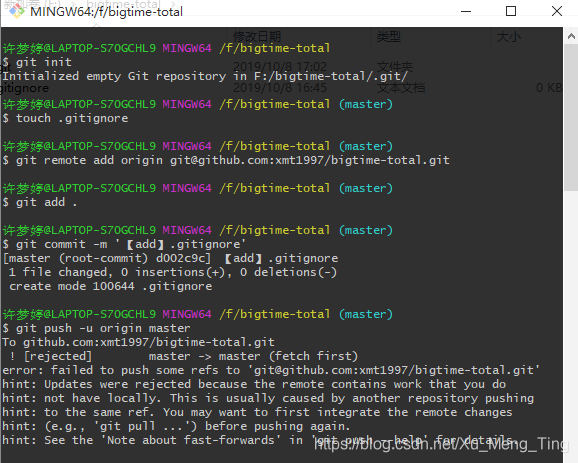
报错如下:
$ git push origin master
To github.com:smartBBer/LeetCode.git
 ! [rejected]        master -> master (fetch first)
error: failed to push some refs to 'git@github.com:smartBBer/LeetCode.git'
hint: Updates were rejected because the remote contains work that you do
hint: not have locally. This is usually caused by another repository pushing
hint: to the same ref. You may want to first integrate the remote changes
hint: (e.g., 'git pull ...') before pushing again.
hint: See the 'Note about fast-forwards' in 'git push --help' for details.
报错原因:
本地库和GitHub中的库不同步
嘻嘻:在创建远程创库时创建了README.md文件 ,本地库中没有
解决办法:
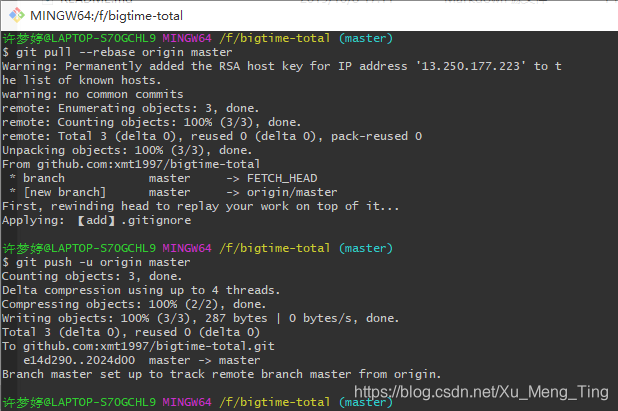
使用git pull --rebase origin master合并 GitHub 和 本地 的库,本地会多出之前不同步的文件,在使用 git push -u origin master 推送到 GitHub 库中。
回顾具体操作过程截图如下:





 扫一扫
扫一扫


 598
598

 被折叠的 条评论
为什么被折叠?
被折叠的 条评论
为什么被折叠?
 到【灌水乐园】发言





