





解析配置文件 redis.conf
它在哪
地址
cd /opt/redis-3.0.4
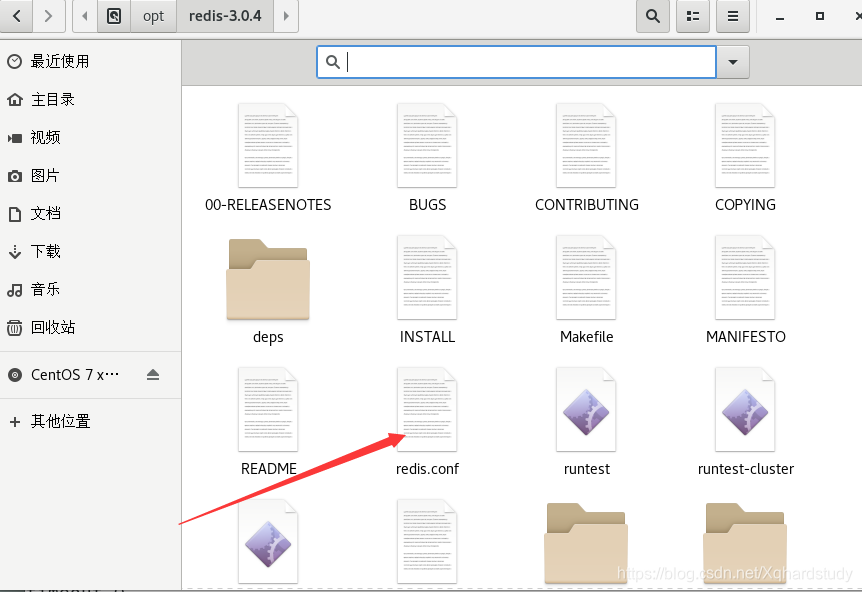
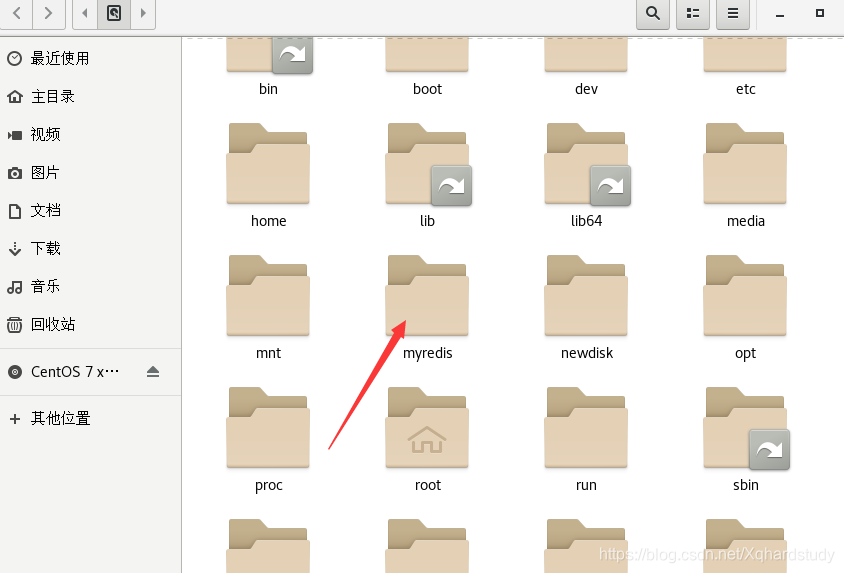
拷贝出来单独备份
Units单位
# Redis configuration file example

# Note on units: when memory size is needed, it is possible to specify
# it in the usual form of 1k 5GB 4M and so forth:
#
# 1k => 1000 bytes
# 1kb => 1024 bytes
# 1m => 1000000 bytes
# 1mb => 1024*1024 bytes
# 1g => 1000000000 bytes
# 1gb => 1024*1024*1024 bytes
#
# units are case insensitive so 1GB 1Gb 1gB are all the same.
- 配置大小单位,开头定义了一些基本的度量单位,只支持bytes,不支持bit
- 对大小写不敏感
INCLUDES包含
################################## INCLUDES ###################################

# Include one or more other config files here.  This is useful if you
# have a standard template that goes to all Redis servers but also need
# to customize a few per-server settings.  Include files can include
# other files, so use this wisely.
#
# Notice option "include" won't be rewritten by command "CONFIG REWRITE"
# from admin or Redis Sentinel. Since Redis always uses the last processed
# line as value of a configuration directive, you'd better put includes
# at the beginning of this file to avoid overwriting config change at runtime.
#
# If instead you are interested in using includes to override configuration
# options, it is better to use include as the last line.
#
# include /path/to/local.conf
# include /path/to/other.conf
和Struts2配置文件类似,可以通过includes包含,redis.conf可以作为总闸,包含其他
General通用
################################ GENERAL  #####################################

# By default Redis does not run as a daemon. Use 'yes' if you need it.
# Note that Redis will write a pid file in /var/run/redis.pid when daemonized.
daemonize yes
#守护进程模式

# When running daemonized, Redis writes a pid file in /var/run/redis.pid by
# default. You can specify a custom pid file location here.
pidfile /var/run/redis.pid

# Accept connections on the specified port, default is 6379.
# If port 0 is specified Redis will not listen on a TCP socket.
port 6379

# TCP listen() backlog.
#
# In high requests-per-second environments you need an high backlog in order
# to avoid slow clients connections issues. Note that the Linux kernel
# will silently truncate it to the value of /proc/sys/net/core/somaxconn so
# make sure to raise both the value of somaxconn and tcp_max_syn_backlog
# in order to get the desired effect.
tcp-backlog 511
#设置tcp的backlog,backlog其实是一个连接队列,backlog队列总和=未完成三次握手队列+已经完成三次握手队列
#在高并发环境下你需要一个高backlog值来避免慢客户端的连接问题,注意Linux内核会将这个值减小到/proc/sys/net/core/somaxconn的值,所以所以需要确认增大somaxconn和tcp_max_syn_backlog两个值来达到想要的效果

# By default Redis listens for connections from all the network interfaces
# available on the server. It is possible to listen to just one or multiple
# interfaces using the "bind" configuration directive, followed by one or
# more IP addresses.
#端口绑定
#
# Examples:
#
# bind 192.168.1.100 10.0.0.1
# bind 127.0.0.1

# Specify the path for the Unix socket that will be used to listen for
# incoming connections. There is no default, so Redis will not listen
# on a unix socket when not specified.
#
# unixsocket /tmp/redis.sock
# unixsocketperm 700

# Close the connection after a client is idle for N seconds (0 to disable)
timeout 0
#关闭连接时间
# TCP keepalive.
#
# If non-zero, use SO_KEEPALIVE to send TCP ACKs to clients in absence
# of communication. This is useful for two reasons:
#
# 1) Detect dead peers.
# 2) Take the connection alive from the point of view of network
#    equipment in the middle.
#
# On Linux, the specified value (in seconds) is the period used to send ACKs.
# Note that to close the connection the double of the time is needed.
# On other kernels the period depends on the kernel configuration.
#
# A reasonable value for this option is 60 seconds.
tcp-keepalive 0
# 单位为秒,如果设置为0,则不会进行Keepalive检测,建议设置成60

# Specify the server verbosity level.
# This can be one of:
# debug (a lot of information, useful for development/testing)
# verbose (many rarely useful info, but not a mess like the debug level)
# notice (moderately verbose, what you want in production probably)
# warning (only very important / critical messages are logged)
loglevel notice
# 日志等级
# Specify the log file name. Also the empty string can be used to force
# Redis to log on the standard output. Note that if you use standard
# output for logging but daemonize, logs will be sent to /dev/null
logfile ""

# To enable logging to the system logger, just set 'syslog-enabled' to yes,
# and optionally update the other syslog parameters to suit your needs.
# syslog-enabled no
#系统日志默认关闭


# Specify the syslog identity.
# syslog-ident redis
#指定syslog里的日志标识

# Specify the syslog facility. Must be USER or between LOCAL0-LOCAL7.
# syslog-facility local0
#指定syslog设备,值可以是USER或LOCAL0-LOCAL7
# Set the number of databases. The default database is DB 0, you can select
# a different one on a per-connection basis using SELECT <dbid> where
# dbid is a number between 0 and 'databases'-1
databases 16
SNAPSHOTTING快照
################################ SNAPSHOTTING  ################################
#
# Save the DB on disk:
#
#   save <seconds> <changes>
#
#   Will save the DB if both the given number of seconds and the given
#   number of write operations against the DB occurred.
#
#   In the example below the behaviour will be to save:
#   after 900 sec (15 min) if at least 1 key changed
#   after 300 sec (5 min) if at least 10 keys changed
#   after 60 sec if at least 10000 keys changed
#
#   Note: you can disable saving completely by commenting out all "save" lines.
#
#   It is also possible to remove all the previously configured save
#   points by adding a save directive with a single empty string argument
#   like in the following example:
#
#   save ""

save 900 1
save 300 10
save 60 10000

# By default Redis will stop accepting writes if RDB snapshots are enabled
# (at least one save point) and the latest background save failed.
# This will make the user aware (in a hard way) that data is not persisting
# on disk properly, otherwise chances are that no one will notice and some
# disaster will happen.
#
# If the background saving process will start working again Redis will
# automatically allow writes again.
#
# However if you have setup your proper monitoring of the Redis server
# and persistence, you may want to disable this feature so that Redis will
# continue to work as usual even if there are problems with disk,
# permissions, and so forth.
stop-writes-on-bgsave-error yes

# Compress string objects using LZF when dump .rdb databases?
# For default that's set to 'yes' as it's almost always a win.
# If you want to save some CPU in the saving child set it to 'no' but
# the dataset will likely be bigger if you have compressible values or keys.
rdbcompression yes

# Since version 5 of RDB a CRC64 checksum is placed at the end of the file.
# This makes the format more resistant to corruption but there is a performance
# hit to pay (around 10%) when saving and loading RDB files, so you can disable it
# for maximum performances.
#
# RDB files created with checksum disabled have a checksum of zero that will
# tell the loading code to skip the check.
rdbchecksum yes

# The filename where to dump the DB
dbfilename dump.rdb

# The working directory.
#
# The DB will be written inside this directory, with the filename specified
# above using the 'dbfilename' configuration directive.
#
# The Append Only File will also be created inside this directory.
#
# Note that you must specify a directory here, not a file name.
dir ./
save
save秒钟 写操作次数
RDB是整个内存压缩过的Snapshot,RDB的数据结构,可以配置复合的快照出发条件
禁用
如果想禁用RDB持久化的策略,只要不设置任何save指令,或者给save传入一个空字符串参数也可以
Stop-writes-on-bgsave-error
如果配置成no,表示你不在乎数据不一致或者有其他的手段发现和控制
rdbcompression
对于存储到磁盘中的快照,可以设置是否进行压缩,如果是的话,redis会采用LZF算法进行压缩,如果你不想消耗CPU来进行压缩的话,可以设置为关闭此功能.
rdbchecksum
在存储快照后,还可以让redis使用CRC64算法来进行数据校验,但是这样做会增加大约10%的性能消耗,如果希望获取到最大的性能提升,可以关闭此功能
REPLICATION复制
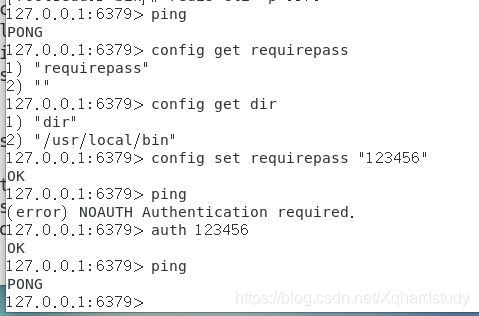
SECURITY安全
################################## SECURITY ###################################

# Require clients to issue AUTH <PASSWORD> before processing any other
# commands.  This might be useful in environments in which you do not trust
# others with access to the host running redis-server.
#
# This should stay commented out for backward compatibility and because most
# people do not need auth (e.g. they run their own servers).
#
# Warning: since Redis is pretty fast an outside user can try up to
# 150k passwords per second against a good box. This means that you should
# use a very strong password otherwise it will be very easy to break.
#
# requirepass foobared

# Command renaming.
#
# It is possible to change the name of dangerous commands in a shared
# environment. For instance the CONFIG command may be renamed into something
# hard to guess so that it will still be available for internal-use tools
# but not available for general clients.
#
# Example:
#
# rename-command CONFIG b840fc02d524045429941cc15f59e41cb7be6c52
#
# It is also possible to completely kill a command by renaming it into
# an empty string:
#
# rename-command CONFIG ""
#
# Please note that changing the name of commands that are logged into the
# AOF file or transmitted to slaves may cause problems.
LIMITS限制
################################### LIMITS ####################################

# Set the max number of connected clients at the same time. By default
# this limit is set to 10000 clients, however if the Redis server is not
# able to configure the process file limit to allow for the specified limit
# the max number of allowed clients is set to the current file limit
# minus 32 (as Redis reserves a few file descriptors for internal uses).
#
# Once the limit is reached Redis will close all the new connections sending
# an error 'max number of clients reached'.
#
# maxclients 10000

# Don't use more memory than the specified amount of bytes.
# When the memory limit is reached Redis will try to remove keys
# according to the eviction policy selected (see maxmemory-policy).
#
# If Redis can't remove keys according to the policy, or if the policy is
# set to 'noeviction', Redis will start to reply with errors to commands
# that would use more memory, like SET, LPUSH, and so on, and will continue
# to reply to read-only commands like GET.
#
# This option is usually useful when using Redis as an LRU cache, or to set
# a hard memory limit for an instance (using the 'noeviction' policy).
#
# WARNING: If you have slaves attached to an instance with maxmemory on,
# the size of the output buffers needed to feed the slaves are subtracted
# from the used memory count, so that network problems / resyncs will
# not trigger a loop where keys are evicted, and in turn the output
# buffer of slaves is full with DELs of keys evicted triggering the deletion
# of more keys, and so forth until the database is completely emptied.
#
# In short... if you have slaves attached it is suggested that you set a lower
# limit for maxmemory so that there is some free RAM on the system for slave
# output buffers (but this is not needed if the policy is 'noeviction').
#
# maxmemory <bytes>

# MAXMEMORY POLICY: how Redis will select what to remove when maxmemory
# is reached. You can select among five behaviors:
# 从下面五个策略中选择一个作为移除策略
#
# volatile-lru -> remove the key with an expire set using an LRU algorithm
# allkeys-lru -> remove any key according to the LRU algorithm
# volatile-random -> remove a random key with an expire set
# allkeys-random -> remove a random key, any key
# volatile-ttl -> remove the key with the nearest expire time (minor TTL)
# 永不过期
# noeviction -> don't expire at all, just return an error on write operations
#
# Note: with any of the above policies, Redis will return an error on write
#       operations, when there are no suitable keys for eviction.
#
#       At the date of writing these commands are: set setnx setex append
#       incr decr rpush lpush rpushx lpushx linsert lset rpoplpush sadd
#       sinter sinterstore sunion sunionstore sdiff sdiffstore zadd zincrby
#       zunionstore zinterstore hset hsetnx hmset hincrby incrby decrby
#       getset mset msetnx exec sort
#
# The default is:
#	默认是永不过期
# maxmemory-policy noeviction

# LRU and minimal TTL algorithms are not precise algorithms but approximated
# algorithms (in order to save memory), so you can tune it for speed or
# accuracy. For default Redis will check five keys and pick the one that was
# used less recently, you can change the sample size using the following
# configuration directive.
#
# The default of 5 produces good enough results. 10 Approximates very closely
# true LRU but costs a bit more CPU. 3 is very fast but not very accurate.
#
# maxmemory-samples 5
Maxmemory-policy
- volatile-lru: 使用LRU算法移除key,只对设置了过期时间的键
- allkeys-lru:使用LRU算法移除key
- volatile-random: 在过期集合中移除随机的key,只对设置了过期时间的键
- allkeys-random:移除随机的key
- volatile-ttl: 移除那些TTL值最小的key,即那些最近要过期的key
- noeviction: 不进行移除,针对写操作,只是返回错误信息
Maxmemory-samples
设置样本数量:LRU算法和最小TTL算法都并非是精确的算法,而是估算值,所以你可以设置样本的大小.
redis默认会检查这么多个key并选择其中LRU的那个
APPEND ONLY MODE追加
| 配置项 | 说明 |
|---|---|
| appendonly | aof开启与关闭,默认为no |
| appendfilename | 文件名,默认为appendonly.aof |
| appendfsync everysec | 指定更新日志条件,共有 3 个可选值:no:表示等操作系统进行数据缓存同步到磁盘(快) always:表示每次更新操作后手动调用 fsync() 将数据写到磁盘(慢,安全) everysec:表示每秒同步一次(折中,默认值) |
| No-appendsync-on-rewrite | 重写时是否可以运用Appendsync,用默认no即可,保证数据安全性 |
| Auto-aof-rewrite-min-size | 设置重写的基准值 |
| Auto-aof-rewrite-percentage | 设置重写的基准值 |
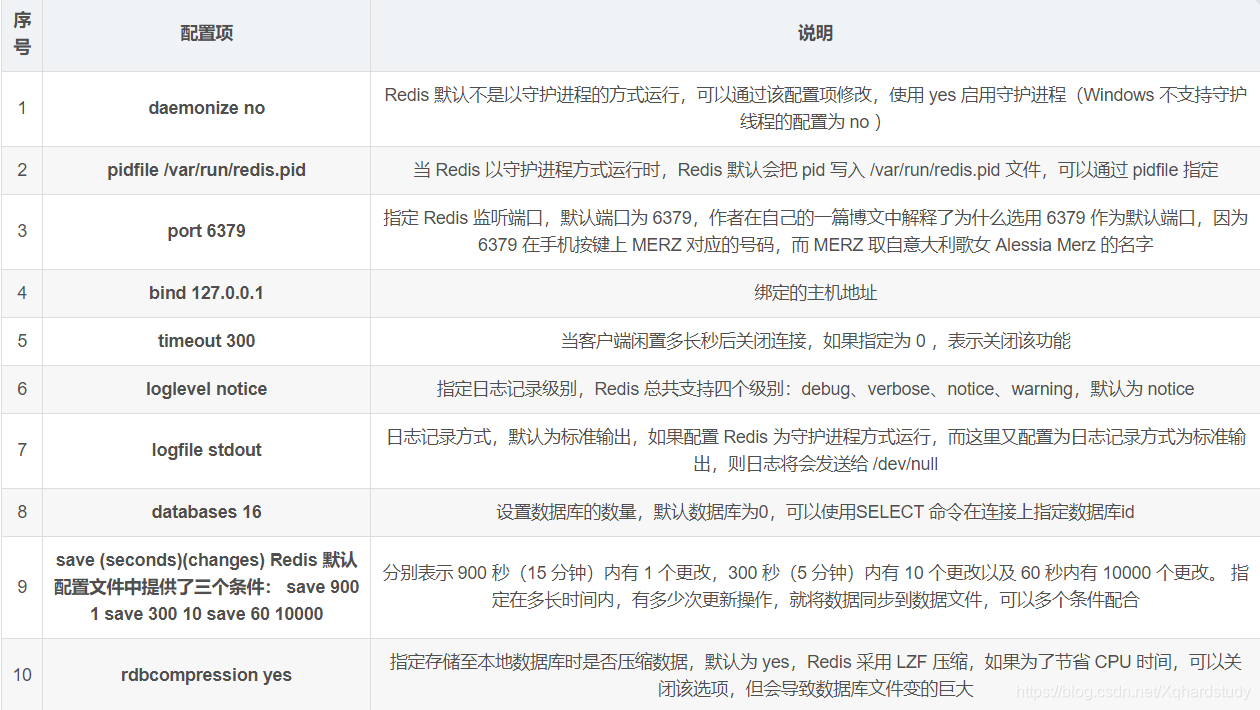
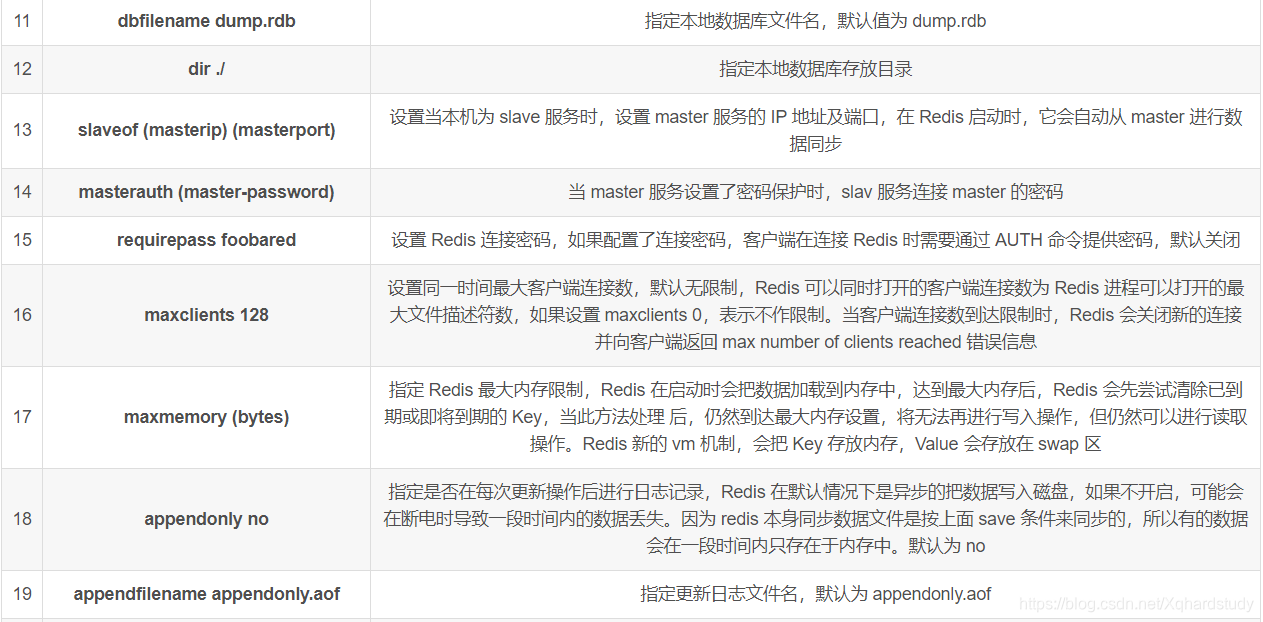
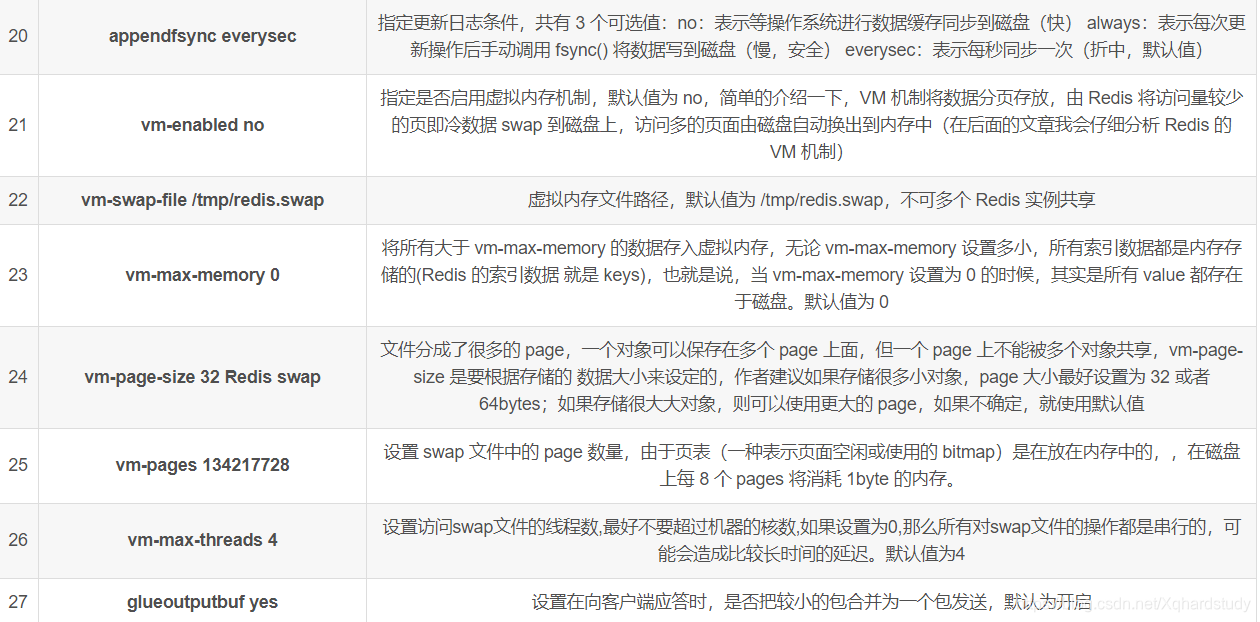
常见配置redis.conf介绍
参数说明:






 扫一扫
扫一扫


 2034
2034

 被折叠的 条评论
为什么被折叠?
被折叠的 条评论
为什么被折叠?
 到【灌水乐园】发言





