



 本文介绍了如何在PowerDesigner中管理数据表的注释,包括显示和设置Comment,避免自动填充code,以及Name与Comment的转换。同时,提供了将Comment内容作为SQLServer注释脚本的方法,以便在数据库中应用这些注释。
1.显示数据注释
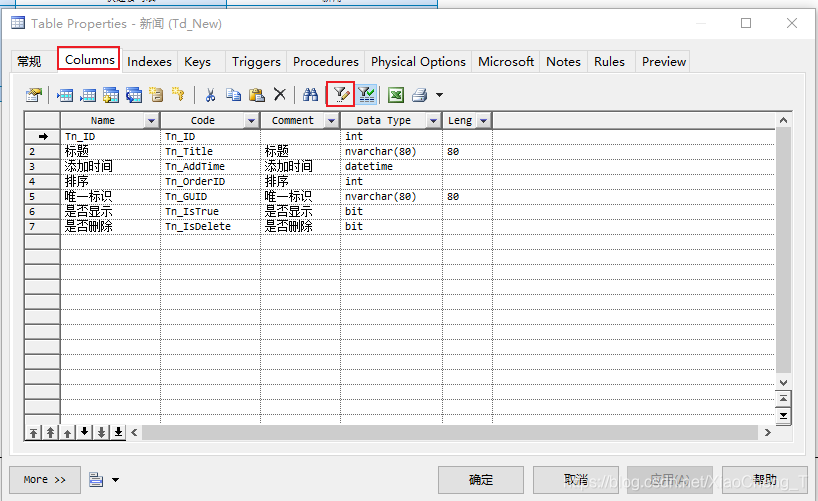
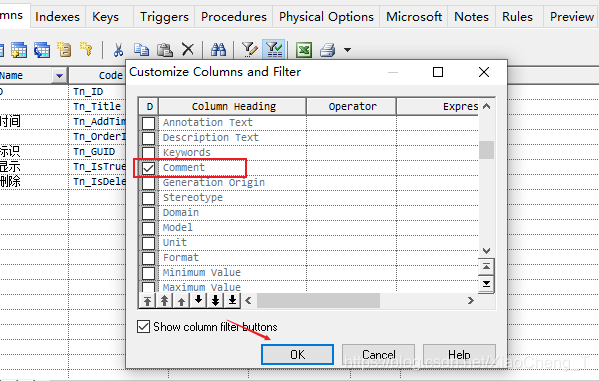
双击表,弹出表属性对话框,切到Columns,默认是没显示Comment的,要显示Comment列,如下图所示:
2.设置不自动根据name填充code值
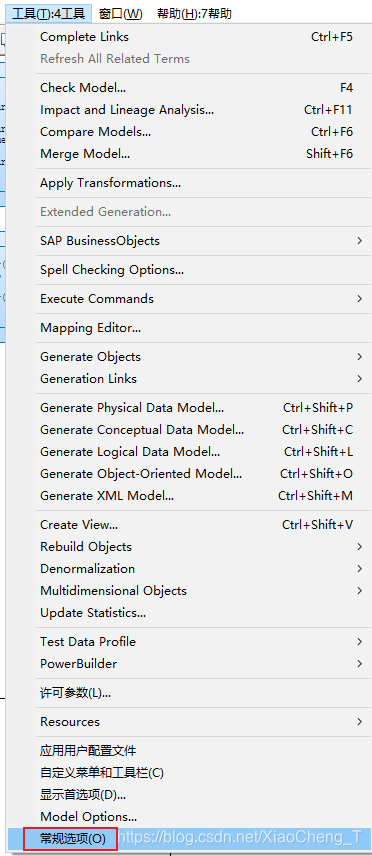
选择tools(g工具)->general Options(常规选项)
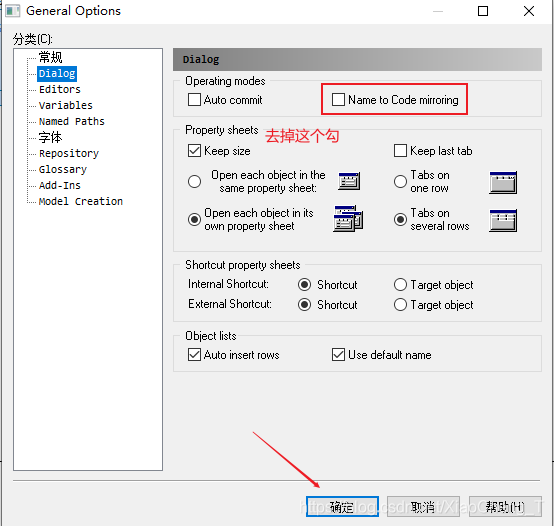
打开窗口,选择Dialog去掉Name to Code mirroring 上的钩去掉
3.设计Name和注释相互替换
PowerDesigner表设计中各个字段的代表为:Name是名称(字段描述),Code是字段名称,Comment是注释名称,数据库中只能写成注释模式,没有Name(描述),这时候我们需要做一下转换。具体方法如下:
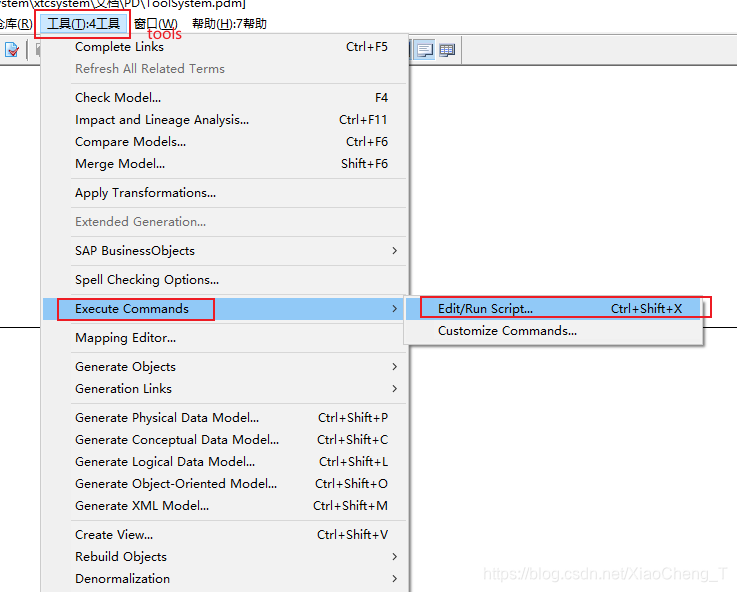
**首先Tools(工具) => Execute Commands => Edit/Run Script…**如下图所示
然后我们把下面展示的代码复制进去,如图所示:
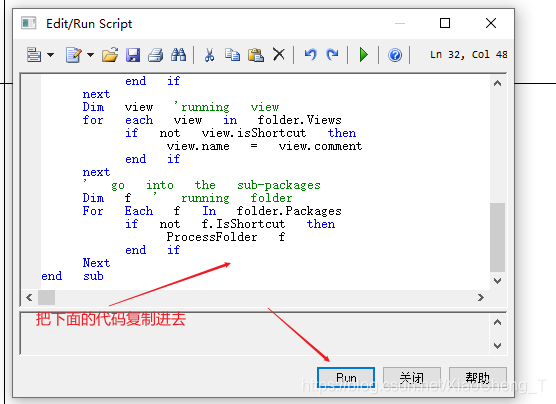
(1).将comment覆盖name
Option   Explicit
ValidationMode   =   True
InteractiveMode   =   im_Batch
Dim   mdl   '   the   current   model
'   get   the   current   active   model
Set   mdl   =   ActiveModel
If   (mdl   Is   Nothing)   Then
      MsgBox   "There   is   no   current   Model "
ElseIf   Not   mdl.IsKindOf(PdPDM.cls_Model)   Then
      MsgBox   "The   current   model   is   not   an   Physical   Data   model. "
Else
      ProcessFolder   mdl
End   If
Private   sub   ProcessFolder(folder)
On Error Resume Next
      Dim   Tab   'running     table
      for   each   Tab   in   folder.tables
            if   not   tab.isShortcut   then
                  tab.name   =   tab.comment
                  Dim   col   '   running   column
                  for   each   col   in   tab.columns
                  if col.comment="" then
                  else
                        col.name=   col.comment
                  end if
                  next
            end   if
      next
      Dim   view   'running   view
      for   each   view   in   folder.Views
            if   not   view.isShortcut   then
                  view.name   =   view.comment
            end   if
      next
      '   go   into   the   sub-packages
      Dim   f   '   running   folder
      For   Each   f   In   folder.Packages
            if   not   f.IsShortcut   then
                  ProcessFolder   f
            end   if
      Next
end   sub
(2).将name覆盖comment
Option   Explicit
ValidationMode   =   True
InteractiveMode   =   im_Batch
Dim   mdl   '   the   current   model
'   get   the   current   active   model
Set   mdl   =   ActiveModel
If   (mdl   Is   Nothing)   Then
      MsgBox   "There   is   no   current   Model "
ElseIf   Not   mdl.IsKindOf(PdPDM.cls_Model)   Then
      MsgBox   "The   current   model   is   not   an   Physical   Data   model. "
Else
      ProcessFolder   mdl
End   If
'   This   routine   copy   name   into   comment   for   each   table,   each   column   and   each   view
'   of   the   current   folder
Private   sub   ProcessFolder(folder)
      Dim   Tab   'running     table
      for   each   Tab   in   folder.tables
            if   not   tab.isShortcut   then
                  tab.comment   =   tab.name
                  Dim   col   '   running   column
                  for   each   col   in   tab.columns
                        col.comment=   col.name
                  next
            end   if
      next
      Dim   view   'running   view
      for   each   view   in   folder.Views
            if   not   view.isShortcut   then
                  view.comment   =   view.name
            end   if
      next
      '   go   into   the   sub-packages
      Dim   f   '   running   folder
      For   Each   f   In   folder.Packages
            if   not   f.IsShortcut   then
                  ProcessFolder   f
            end   if
      Next
end   sub
(3).code内容替换为注释内容
'******************************************************************************
'* File:     comment2code.vbs
'* Purpose: 在PowerDesigner的PDM图形窗口中显示数据列的中文注释
'* Title:    将字段的comment赋值到字段的code中
'* Category: 打开物理模型,运行本脚本(Ctrl+Shift+X)
'* Copyright:foxzz@163.com,2006/07/25 .
'* Author:   foxzz
'* Created:
'* Modified:
'* Version: 1.0
'* Comment: 遍历物理模型中的所有表,将字段的comment赋值到字段的code中。
'            在将code置换为comment过程中,需要考虑的问题
'            1、code必须唯一,而comment有可能不唯一。
'               处理办法是如果字段的comment重复,则字段的code=comment+1、2、3...
'            2、comment值有可能为空,这种情况下对字段的code不处理。
'               针对oracle数据库,将comment on column 字段名称 is '';添加到C:\pdcomment.txt文件中。
'               在补充comment完毕后,便于在数据库中执行
'******************************************************************************

Option Explicit
ValidationMode = True
InteractiveMode = im_Batch

Dim system, file
Set system = CreateObject("Scripting.FileSystemObject")
Dim ForReading, ForWriting, ForAppending   '打开文件选项
ForReading   = 1 ' 只读
ForWriting   = 2 ' 可写
ForAppending = 8 ' 可写并追加
'打开文本文件
Set file = system.OpenTextFile("C:\pdcomment.txt", ForWriting, true)


'判断当前model是否物理数据模型
Dim mdl
Set mdl = ActiveModel
If (mdl Is Nothing) Then
   MsgBox "处理对象无模型"
ElseIf Not mdl.IsKindOf(PdPDM.cls_Model) Then
   MsgBox "当前模型不是物理数据模型"
Else
   ProcessFolder mdl,file
End If
file.Close


'******************************************************************************
Private sub ProcessFolder(folder,file)

Dim i,j,k
i=0:j=0:k=0

'列数组,记录字段里不重复的comment
Dim ColumnComment()
Dim ColumnCommentNumber()
ReDim Preserve ColumnComment(i)
ReDim Preserve ColumnCommentNumber(i)

Dim tbl   '当前表
Dim col   '当前字段
dim curComment '当前字段comment

'处理模型中的表
for each tbl in folder.tables
    if not tbl.isShortcut then
       if len(trim(tbl.comment))<>0 then
          '可以在这里显示table的comment
          'tbl.code = tbl.code+"("+trim(tbl.comment)+")"
       end if

       '处理表中的列
       for each col in tbl.columns
           k = 0
           curComment = trim(col.comment)
           if len(curComment)<>0 then
              '遍历相异的comment数组
              for j = 0 to i
                  if ColumnComment(j) = curComment then
                     '如果找到相同的comment,则相关计数器加1
                     ColumnCommentNumber(j) = ColumnCommentNumber(j) + 1
                     k = j
                  end if
              Next
              '如果没有相同的comment,则k=0,此时ColumnCommentNumber(0)也为0
              '否则ColumnCommentNumber(k)不为0
              if ColumnCommentNumber(k) <> 0 then
                 col.code = curComment & cstr(ColumnCommentNumber(k))
              else
                 col.code = curComment
                 'ColumnComment(0)、ColumnCommentNumber(0)永远为空
                 '将相异的comment记录添加到数组中
                 i = i + 1
                 ReDim Preserve ColumnComment(i)
                 ReDim Preserve ColumnCommentNumber(i)
                 ColumnComment(i) = curComment
                 ColumnCommentNumber(i) = 0
              end if
           else
              '写入文件中
              file.WriteLine "comment on column "+ tbl.code+"."+col.code+" is '';"
           end if
       next
    end if
    '由于不同表的code允许相同,因此此时重新初始化。
    '因为ColumnComment(0)、ColumnCommentNumber(0)为空,可以保留
    ReDim Preserve ColumnComment(0)
    ReDim Preserve ColumnCommentNumber(0)
    i=0:j=0:k=0

next

Dim view '当前视图
for each view in folder.Views
    if not view.isShortcut then
       '可以在这里显示view的comment
       'view.code = view.comment
    end if
next

'对子目录进行递归
Dim subpackage 'folder
For Each subpackage In folder.Packages
    if not subpackage.IsShortcut then
       ProcessFolder subpackage , file
    end if
Next

end sub
4.PowerDesigner 生成SQL Server 注释脚本
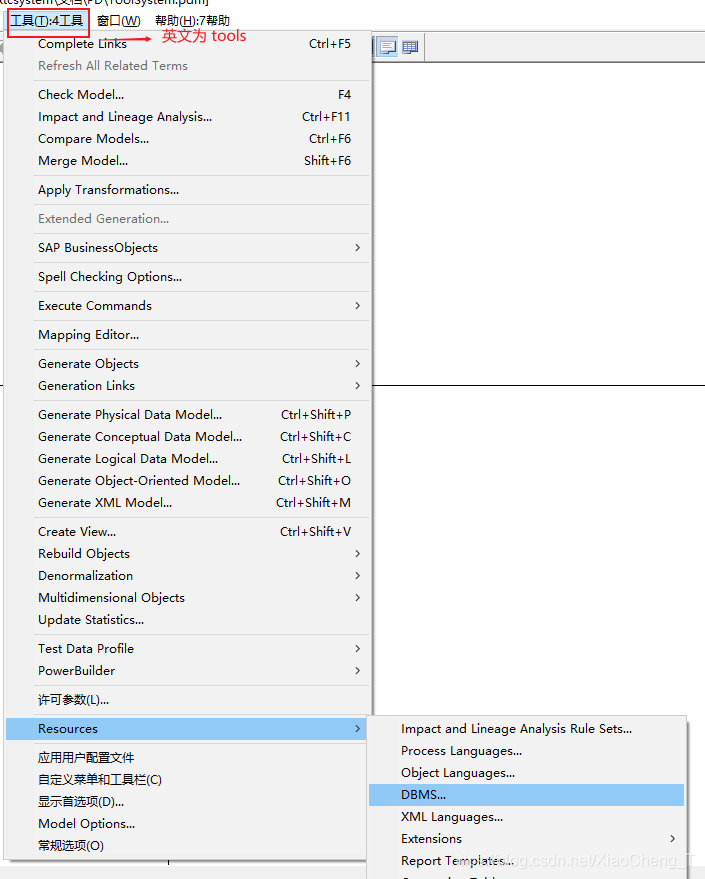
首先我们打开Tools(工具) => Resources => DBMS…
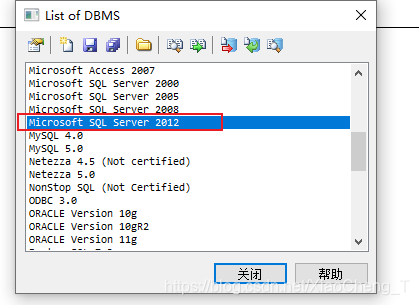
这里我们选择 Microsoft SQL SERVER 2012 然后双击进去
(1).生成表注释
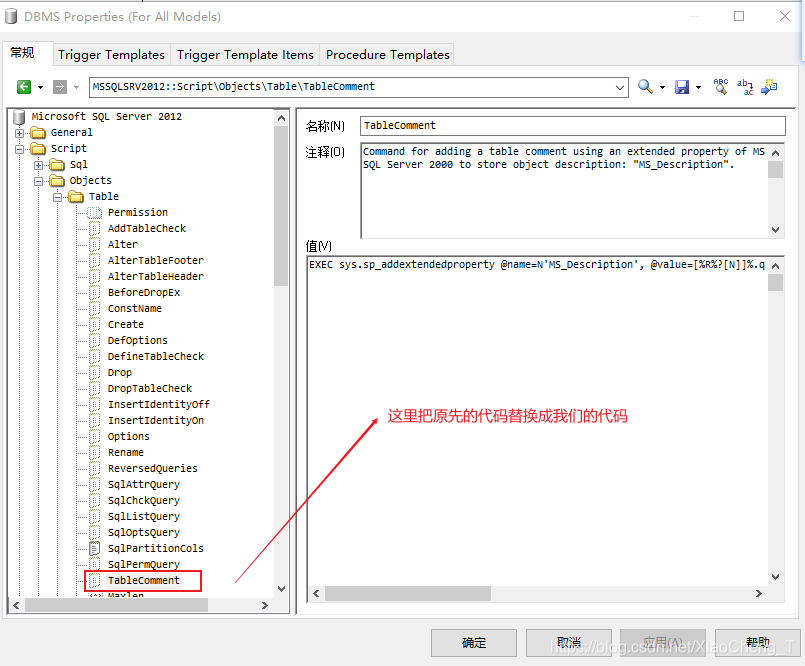
在Script => Objects => Table => TableComment : Value(值)输入框中输入以下代码
EXEC sys.sp_addextendedproperty @name=N'MS_Description', @value=N'%COMMENT%' , @level0type=N'SCHEMA',@level0name=N'dbo', @level1type=N'TABLE',@level1name=N'%TABLE%'
把原先里面的代码替换为上面的,如图所示:
(2).生成数据列的注释
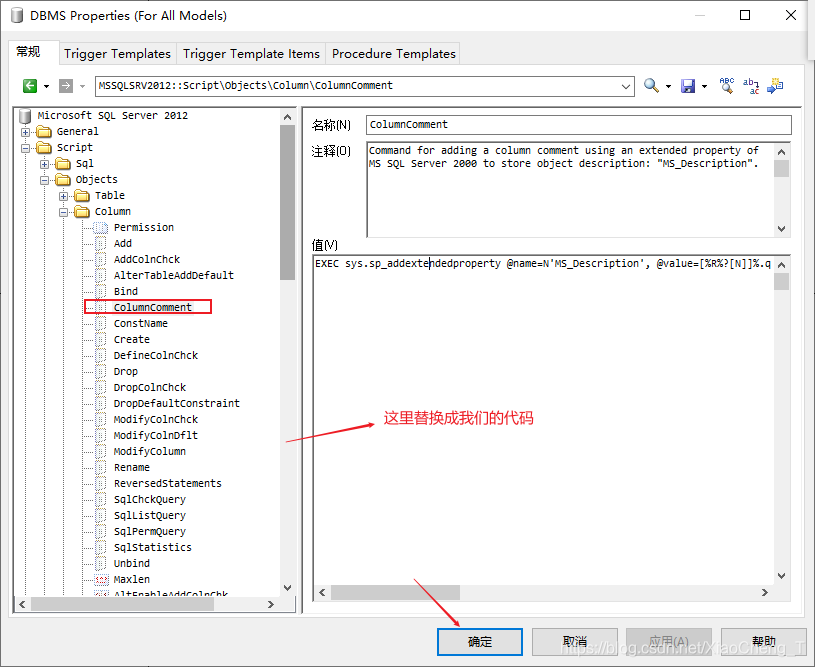
在Script->Objects->Column->ColumnComment: Value(值)文本框输入以下代码:
EXEC sys.sp_addextendedproperty @name=N'MS_Description', @value=N'%COMMENT%', @level0type=N'SCHEMA',@level0name=N'dbo', @level1type=N'TABLE',@level1name=N'%TABLE%',@level2type=N'COLUMN',@level2name=N'%COLUMN%'
把原先里面的代码替换为上面的,如图所示:
这里就先介绍到这里,后续在补上.





 扫一扫
扫一扫


 8606
8606

 被折叠的 条评论
为什么被折叠?
被折叠的 条评论
为什么被折叠?
 到【灌水乐园】发言





