





本学习系列将以Cesium + Vue3 + Vite +Typescript+elementplus作为主要技术栈展开,后续会循序渐进,持续探索Cesium的高级功能,相关源码全部免费公开。
之前的几篇文章分别介绍了态势标绘(也叫军事标绘)中不同攻击箭头燕尾攻击箭头、钳击箭头等的绘制和编辑方法。写不同箭头类的过程中,发现各个Polygon类型的箭头类写法基本相似。看看下面的钳击箭头类和燕尾箭头类的代码。
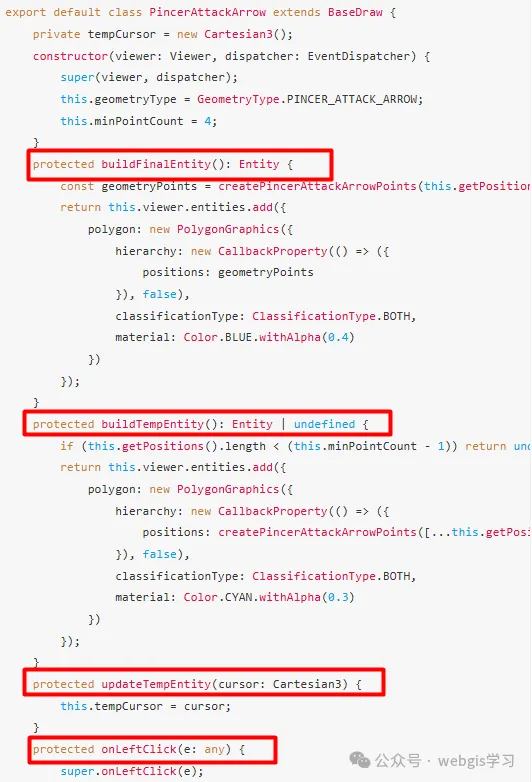
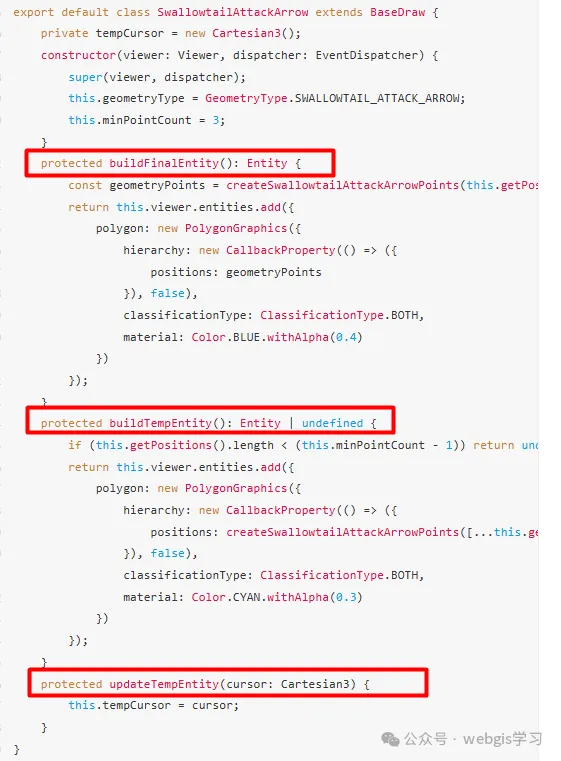
可以发现,箭头类中的绘制临时箭头(buildTempEntity)、最终箭头(buildFinalEntity)以及获取鼠标位置(tempCursor)以及onLeftClick判断结束绘制等都基本相似,当箭头类越来越多时,代码就稍显臃肿了。下面给出优化方法。
1、新建BaseArrowArrow,继承BaseDraw。
import { CallbackProperty, Cartesian3, ClassificationType, Color, Entity, PolygonGraphics, Viewer } from "cesium";
import { BaseDraw} from "../BaseDraw";
import EventDispatcher from "@/system/EventDispatcher/EventDispatcher";
export default abstract class BaseArrowArrow extends BaseDraw {
    /** 临时点,用来实时跟随鼠标 */
    private tempCursor = new Cartesian3();
    /** 算法函数,子类注入 */
    protected abstract createArrowPoints(pos: Cartesian3[]): Cartesian3[];
    /** 达到几个点自动结束(StraightArrow=2,Pincer=5…) */
    protected abstract get maxPointCount(): number;
    constructor(viewer: Viewer, dispatcher: EventDispatcher) {
        super(viewer, dispatcher);
    }
    protected buildFinalEntity(): Entity {
        const geometryPoints = this.createArrowPoints(this.getPositions())
        return this.viewer.entities.add({
            polygon: new PolygonGraphics({
                hierarchy: new CallbackProperty(() => ({
                    positions: geometryPoints
                }), false),
                classificationType: ClassificationType.BOTH,
                material: Color.BLUE.withAlpha(0.4)
            })
        });
    }
    protected buildTempEntity(): Entity | undefined {
        if (this.getPositions().length < (this.minPointCount - 1)) return undefined;
        return this.viewer.entities.add({
            polygon: new PolygonGraphics({
                hierarchy: new CallbackProperty(
                    () => ({
                        positions: this.createArrowPoints([
                            ...this.getPositions(),
                            this.tempCursor,
                        ]),
                    }),
                    false
                ),
                classificationType: ClassificationType.BOTH,
                material: Color.CYAN.withAlpha(0.3),
            }),
        });
    }
    protected updateTempEntity(cursor: Cartesian3): void {
    this.tempCursor = cursor;
  }
  /* -------------------- 鼠标事件 -------------------- */
  protected onLeftClick(e: any): void {
    super.onLeftClick(e);
    if (this.getPositions().length === this.maxPointCount) {
      this.finish();
    }
  }
}
在BaseArrowArrow新增createArrowPoints虚函数用于获取每个子箭头类的几何形态坐标,新增maxPointCount用于控制结束绘制时机。
2、然后将攻击箭头类(AttackArrow)、钳击箭头类(PincerAttackArrow)、直箭头类(StraightArrow)以及燕尾箭头类(SwallowtailAttackArrow)分别继承BaseArrowArrow类。
import EventDispatcher from "@/system/EventDispatcher/EventDispatcher";
import { Viewer } from "cesium";
import { GeometryType } from "../BaseDraw";
import { createAttackArrowPoints } from "@/system/Utils/SituationUtils/SituationUtil";
import BaseArrowDraw from "./BaseArrowDraw";
export default class AttackArrow extends BaseArrowDraw {
    constructor(viewer: Viewer, dispatcher: EventDispatcher) {
        super(viewer, dispatcher);
        this.geometryType = GeometryType.ATTACK_ARROW;
        this.minPointCount = 3;

    }
    protected get maxPointCount() { return 20; }
    protected createArrowPoints = createAttackArrowPoints;

}
import { Viewer } from "cesium";
import { GeometryType } from "../BaseDraw";
import EventDispatcher from "@/system/EventDispatcher/EventDispatcher";
import { createPincerAttackArrowPoints } from "@/system/Utils/SituationUtils/SituationUtil";
import BaseArrowDraw from "./BaseArrowDraw";
export default class PincerAttackArrow extends BaseArrowDraw {
    constructor(viewer: Viewer, dispatcher: EventDispatcher) {
        super(viewer, dispatcher);
        this.geometryType = GeometryType.PINCER_ATTACK_ARROW;
        this.minPointCount = 4;
    }
    protected get maxPointCount() { return 5; }
    protected createArrowPoints = createPincerAttackArrowPoints;
}
import { GeometryType } from "../BaseDraw";
import { Viewer } from "cesium";
import { createStraightArrowPoints } from "@/system/Utils/SituationUtils/SituationUtil";
import EventDispatcher from "@/system/EventDispatcher/EventDispatcher";
import BaseArrowDraw from "./BaseArrowDraw";
export default class StraightArrow extends BaseArrowDraw {

    constructor(viewer: Viewer, dispatcher: EventDispatcher) {
        super(viewer, dispatcher);
        this.geometryType = GeometryType.STRAIGHT_ARROW;
        this.minPointCount = 2;
    }
    protected get maxPointCount() { return 2; }
    protected createArrowPoints = createStraightArrowPoints;
}
import { Viewer } from "cesium";
import { GeometryType } from "../BaseDraw";
import EventDispatcher from "@/system/EventDispatcher/EventDispatcher";
import { createSwallowtailAttackArrowPoints } from "@/system/Utils/SituationUtils/SituationUtil";
import BaseArrowDraw from "./BaseArrowDraw";
export default class SwallowtailAttackArrow extends BaseArrowDraw {
    constructor(viewer: Viewer, dispatcher: EventDispatcher) {
        super(viewer, dispatcher);
        this.geometryType = GeometryType.SWALLOWTAIL_ATTACK_ARROW;
        this.minPointCount = 3;
    }
    protected get maxPointCount() { return 20; }
    protected createArrowPoints = createSwallowtailAttackArrowPoints;
}
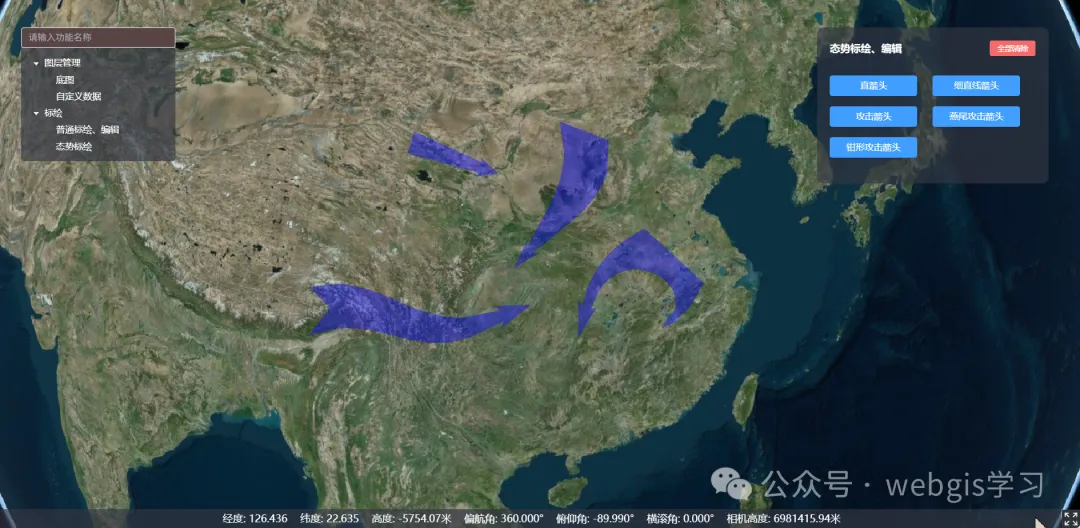
3、以上便完成了Polygon类型的箭头的代码优化,由于本学习系列里的Polyline类型的箭头只写了细直线箭头(StraightLineArrow)一种,就暂时不优化了。完成以上操作后,代码是不是精简了许多!
4、更多详细代码,请关注微信公众号“webgis学习”,回复“Cesium学习系列源码”,即可看到本系列全部代码。





 扫一扫
扫一扫


 349
349

 被折叠的 条评论
为什么被折叠?
被折叠的 条评论
为什么被折叠?
 到【灌水乐园】发言





