





本学习系列将以Cesium + Vue3 + Vite +Typescript+elementplus作为主要技术栈展开,后续会循序渐进,持续探索Cesium的高级功能,相关源码全部免费公开。 请关注微信公众号 “webgis学习”或扫描下方二维码,关注后,在公众号里输入“Cesium学习系列源码”,即可看到全部代码。

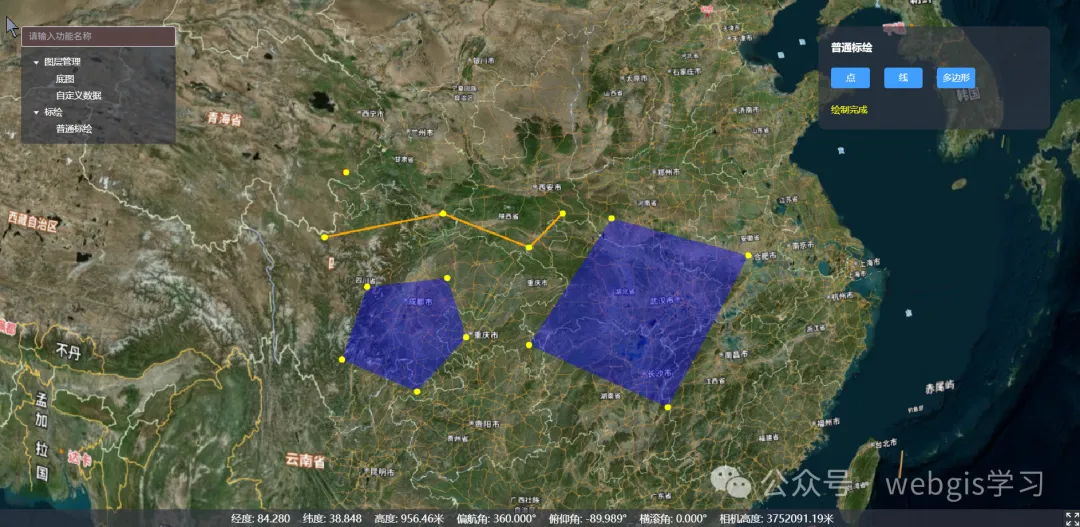
本篇主要介绍如何使用Cesium标绘简单的点、线以及多边形。
1、新建BaseDraw类,作为点、线、多边形的基类,在构造函数中注入事件分发器,用于回调标绘数据信息。
import { ScreenSpaceEventHandler, ScreenSpaceEventType, Viewer, Entity, HeightReference, Cartesian3, Color, JulianDate, Cartesian2 } from 'cesium';
import EventDispatcher from '../EventDispatcher/EventDispatcher';
export abstract class BaseDraw {
    protected viewer: Viewer;
    protected dispatcher: EventDispatcher;
    protected handler: ScreenSpaceEventHandler;
    protected active = false;          // 是否处于绘制状态
    protected finished = false;        // 是否已结束
    protected tempEntity?: Entity;     // 绘制过程中跟随鼠标的临时实体
    protected pointEntities: Entity[] = []; // 已落点的实体(可用于回退、编辑)
    constructor(viewer: Viewer, dispatcher: EventDispatcher) {
        this.viewer = viewer;
        this.dispatcher = dispatcher;
        this.handler = new ScreenSpaceEventHandler(viewer.canvas);
    }
    /** 子类必须实现:根据当前点序列生成最终实体 */
    protected abstract buildFinalEntity(): Entity;
    /** 子类可实现:生成跟随鼠标的临时图形 */
    protected abstract buildTempEntity(): Entity | undefined;
    /** 开始绘制 */
    start() {
        if (this.active || this.finished) return;
        this.active = true;
        this.finished = false;
        // 左键落点
        this.handler.setInputAction((e: any) => this.onLeftClick(e), ScreenSpaceEventType.LEFT_CLICK);
        // 鼠标移动
        this.handler.setInputAction((e: any) => this.onMouseMove(e), ScreenSpaceEventType.MOUSE_MOVE);
        // 右键结束
        this.handler.setInputAction(() => this.finish(), ScreenSpaceEventType.RIGHT_CLICK);
        this.dispatcher.dispatchEvent('DRAWSTART', { type: this.constructor.name,text:"开始绘制" });
    }
    protected onLeftClick(e: any) {
        const cartesian = this.safePick(e.position || e.endPosition);
        if (!cartesian) return;
        this.addPoint(cartesian);
        this.dispatcher.dispatchEvent('DRAWUPDATE', { type: this.constructor.name, points: this.getPositions() });
    }
    protected onMouseMove(e: any) {
        const cartesian = this.safePick(e.position || e.endPosition);
        if (!cartesian) return;
        // 更新临时图形
        if (!this.tempEntity) {
            this.tempEntity = this.buildTempEntity();
        }
        this.updateTempEntity(cartesian);
        this.dispatcher.dispatchEvent('MOUSEMOVE', { type: this.constructor.name, points: this.getPositions(), cursor: cartesian,text:"添加下一个点" });
    }
    protected addPoint(position: Cartesian3) {
        // 落点显示
        const point = this.viewer.entities.add({
            position,
            point: {
                pixelSize: 10,
                color: Color.YELLOW,
                heightReference: HeightReference.CLAMP_TO_GROUND,
                disableDepthTestDistance: Number.POSITIVE_INFINITY  // 始终不被地形遮挡
            }
        });
        this.pointEntities.push(point);
    }
    /** 安全地拾取贴地点;失败返回 undefined */
    private safePick(windowPos: Cartesian2): Cartesian3 | undefined {
        const ray = this.viewer.camera.getPickRay(windowPos);
        if (!ray) return undefined;
        return this.viewer.scene.globe.pick(ray, this.viewer.scene)
            ?? this.viewer.scene.globe.ellipsoid.scaleToGeodeticSurface(ray.origin);
    }
    /** 当前可用于成面的点数 */
    protected get validPositions(): Cartesian3[] {
        const pts = this.getPositions();
        return pts.length >= 2 ? pts : [];
    }
    /** 结束绘制 */
    finish() {
        if (!this.active) return;
        this.active = false;
        this.finished = true;
        this.handler.removeInputAction(ScreenSpaceEventType.LEFT_CLICK);
        this.handler.removeInputAction(ScreenSpaceEventType.MOUSE_MOVE);
        this.handler.removeInputAction(ScreenSpaceEventType.RIGHT_CLICK);
        // 移除临时
        if (this.tempEntity) {
            this.viewer.entities.remove(this.tempEntity);
            this.tempEntity = undefined;
        }
        const final = this.buildFinalEntity();
        this.dispatcher.dispatchEvent('DRAWEND', { type: this.constructor.name, entity: final, points: this.getPositions(),text:"绘制完成"});
    }
    /** 清理 */
    destroy() {
        this.finish();
        this.pointEntities.forEach(p => this.viewer.entities.remove(p));
        this.pointEntities = [];
        this.handler.destroy();
    }
    /** 子类可重写:返回当前已有点序列 */
    protected getPositions(): Cartesian3[] {
        return this.pointEntities.map(e => e.position!.getValue(JulianDate.now())!);
    }
    /** 更新临时图形(子类可重写) */
    protected updateTempEntity(cursor: Cartesian3) {
        // 默认空实现
    }
}
调用start函数开始绘制。onLeftClick函数响应左键落点。onMouseMove用于处理鼠标移动,移动过程中会有临时图形存放在buildTempEntity里,buildTempEntity是抽象函数,子类里会有具体实现。调用finish完成绘制。绘制的最终实体放在buildFinalEntity里,也是个抽象函数,子类具体实现。
2、新建CommonPoint类继承BaseDraw。实现buildTempEntity与buildFinalEntity。点图形不需要鼠标临时跟随,只需左键点击一次即可绘制。
import { Color, Entity, HeightReference, Viewer } from "cesium";
import { BaseDraw } from "../BaseDraw";
import EventDispatcher from "@/system/EventDispatcher/EventDispatcher";
export default class CommonPoint extends BaseDraw {
    constructor(viewer: Viewer, dispatcher: EventDispatcher) {
        super(viewer, dispatcher);
    }
    protected buildFinalEntity(): Entity {
        const pos = this.getPositions()[0];
        return this.viewer.entities.add({
            position: pos,
            point: { pixelSize: 12, color: Color.RED, heightReference: HeightReference.CLAMP_TO_GROUND }
        });
    }
    protected buildTempEntity(): Entity | undefined {
        return undefined; // 点绘制无需临时跟随
    }
    protected onLeftClick(e: any) {
        super.onLeftClick(e);
        // 点只需要 1 次点击即可结束
        this.finish();
    }
}
3、新建CommonLine类继承BaseDraw。实现buildTempEntity与buildFinalEntity。tempCursor用于记录鼠标位置。
import { CallbackProperty, Cartesian3, Color, Entity, PolylineGraphics } from "cesium"
import { BaseDraw } from "../BaseDraw";
export default class CommonLine extends BaseDraw {
    private tempCursor?: Cartesian3;
    protected buildFinalEntity(): Entity {
        return this.viewer.entities.add({
            polyline: new PolylineGraphics({
                positions: new CallbackProperty(() => this.getPositions(), false),
                width: 3,
                material: Color.ORANGE,
                clampToGround: true
            })
        });
    }
    protected buildTempEntity(): Entity | undefined {
        return this.viewer.entities.add({
            polyline: new PolylineGraphics({
                positions: new CallbackProperty(() => [...this.getPositions(), this.tempCursor || new Cartesian3()], false),
                width: 2,
                material: Color.YELLOW.withAlpha(0.6),
                clampToGround: true
            })
        });
    }
    protected updateTempEntity(cursor: Cartesian3) {
        this.tempCursor = cursor;
    }
}
4、新建PolygonDraw继承BaseDraw。实现buildTempEntity与buildFinalEntity生成临时多边形Entity与最终Entity。tempCursor用于记录鼠标位置。
import { Entity, PolygonGraphics, CallbackProperty, Color, Cartesian3, ClassificationType } from 'cesium';
import { BaseDraw } from '../BaseDraw';
export default class CommonPolygon extends BaseDraw {
    protected buildFinalEntity(): Entity {
        return this.viewer.entities.add({
            polygon: new PolygonGraphics({
                hierarchy: new CallbackProperty(() => ({
                    positions: [...this.validPositions || new Cartesian3()]
                }), false),
                classificationType: ClassificationType.BOTH,
                material: Color.BLUE.withAlpha(0.4)
            })
        });
    }
    protected buildTempEntity(): Entity | undefined {
        if (this.validPositions.length === 0) return undefined;   // 不创建
        return this.viewer.entities.add({
            polygon: new PolygonGraphics({
                hierarchy: new CallbackProperty(() => ({
                    positions: [...this.validPositions, this.tempCursor || new Cartesian3()]
                }), false),
                classificationType: ClassificationType.BOTH,
                material: Color.CYAN.withAlpha(0.3)
            })
        });
    }
    private tempCursor = new Cartesian3();
    protected updateTempEntity(cursor: Cartesian3) {
        this.tempCursor = cursor;
    }
}
5、前端页面,新建CommonDraw.vue。调用图形对象相应的start函数即可。利用事件总线回调的数据,显示标绘信息。
<template>
    <div class="common-draw-container">
        <span class="common-draw-title"> 普通标绘 </span>
        <div class="draw-btns">
            <el-button type="primary" @click="DrawPointOnScene">点</el-button>
            <el-button type="primary" @click="DrawLineOnScene">线</el-button>
            <el-button type="primary" @click="DrawPolygonOnScene">多边形</el-button>
        </div>
        <el-text>{{ drawInfo }}</el-text>
    </div>
</template>
<script lang="ts" setup>
import CommonLine from '@/system/Draw/Lines/CommonLine'
import CommonPoint from '@/system/Draw/Points/CommonPoint'
import CommonPolygon from '@/system/Draw/Polygons/CommonPolygon'
import EventDispatcher from '@/system/EventDispatcher/EventDispatcher'
import CesiumViewer from '@/Viewer/CesiumViewer'
const drawInfo = ref('')
let viewer = CesiumViewer.viewer
const dispatcher = new EventDispatcher();
// 监听绘制结果
dispatcher.on('DRAWEND', (payload:any) => {
    drawInfo.value = payload.text;
});
dispatcher.on('DRAWSTART', (payload:any) => {
    drawInfo.value = payload.text;
});
dispatcher.on('MOUSEMOVE', (payload:any) => {
    drawInfo.value = payload.text;
});
const DrawPointOnScene = () => {
    const pointTool = new CommonPoint(viewer!, dispatcher);
    pointTool.start();
}
const DrawLineOnScene = () => {
    const lineTool = new CommonLine(viewer!, dispatcher);
    lineTool.start();
}
const DrawPolygonOnScene = () => {
    const polygonTool = new CommonPolygon(viewer!, dispatcher);
    polygonTool.start();
}
</script>
<style lang="scss" scoped>
.common-draw-container {
    padding: 20px;
    text-align: left;
    .common-draw-title {
        font-size: 16px;
        font-weight: bold;
        margin-bottom: 10px;
    }
    .draw-btns {
        margin-top: 20px;
        margin-bottom: 20px;
        .el-button {
            margin-right: 10px;
            width: 60px;
        }
    }
    .el-text {
        color: yellow
    }
}
</style>
6、实现效果





 扫一扫
扫一扫


 774
774

 被折叠的 条评论
为什么被折叠?
被折叠的 条评论
为什么被折叠?
 到【灌水乐园】发言





