
2018-07-12 第六十七天 EsayUI

本文详细介绍如何使用EasyUI框架快速构建美观且功能丰富的后台管理系统界面,包括登录页面与主页面的设计,以及实现树状菜单、选项卡等交互元素。

EasyUI

一、简介

1.EasuyUI介绍:

EasyUI:简单的界面设计框架,作用主要是用来设计网站的后台管理系统。帮助程序员快速的构建网站界面。


2EasyUI官网:http://www.jeasyui.com


3EasyUI使用目录介绍:

demo: easui的效果示例;

localeeasyui的语言文件;

plugins:easyUI的案例切割的js文件;

src:源码;

themes:easyUI提供的css样式;

jquery.easyui.min.js:easyUI的插件;

jquery.min.jseasyUI依赖额jquery文件。

EasyUI的使用:

1 导入EasyUI的支持

2 将要使用的EasyUI加入到项目中

导入css文件

导入js文件

3 EasyUI是通过class类选择器方式进行样式添加的

HTML标签上使用class属性直接引入EasyUI提供的样式支持

4 使用data-options指定一些样式效果,例如:小图标

使用此属性对样式的一些特效进行自定义修改

5 同时可以使用style属性自定义

示例:

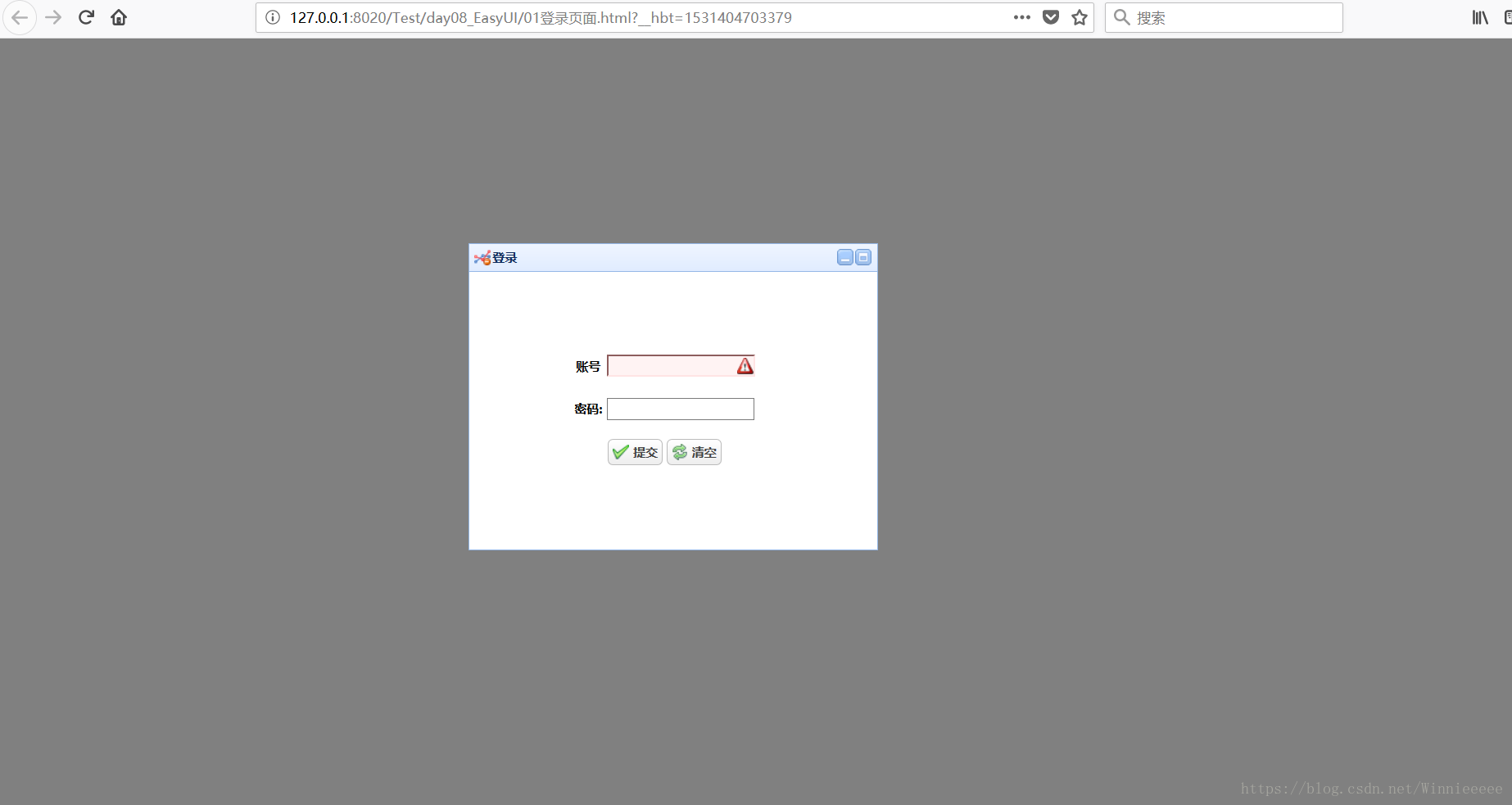
form登录

EasyUI登录界面:

1 优化登录页面:

登录界面居中;

form表单居中显示;

给登录和重置添加功能;

jQuery校验弹窗。

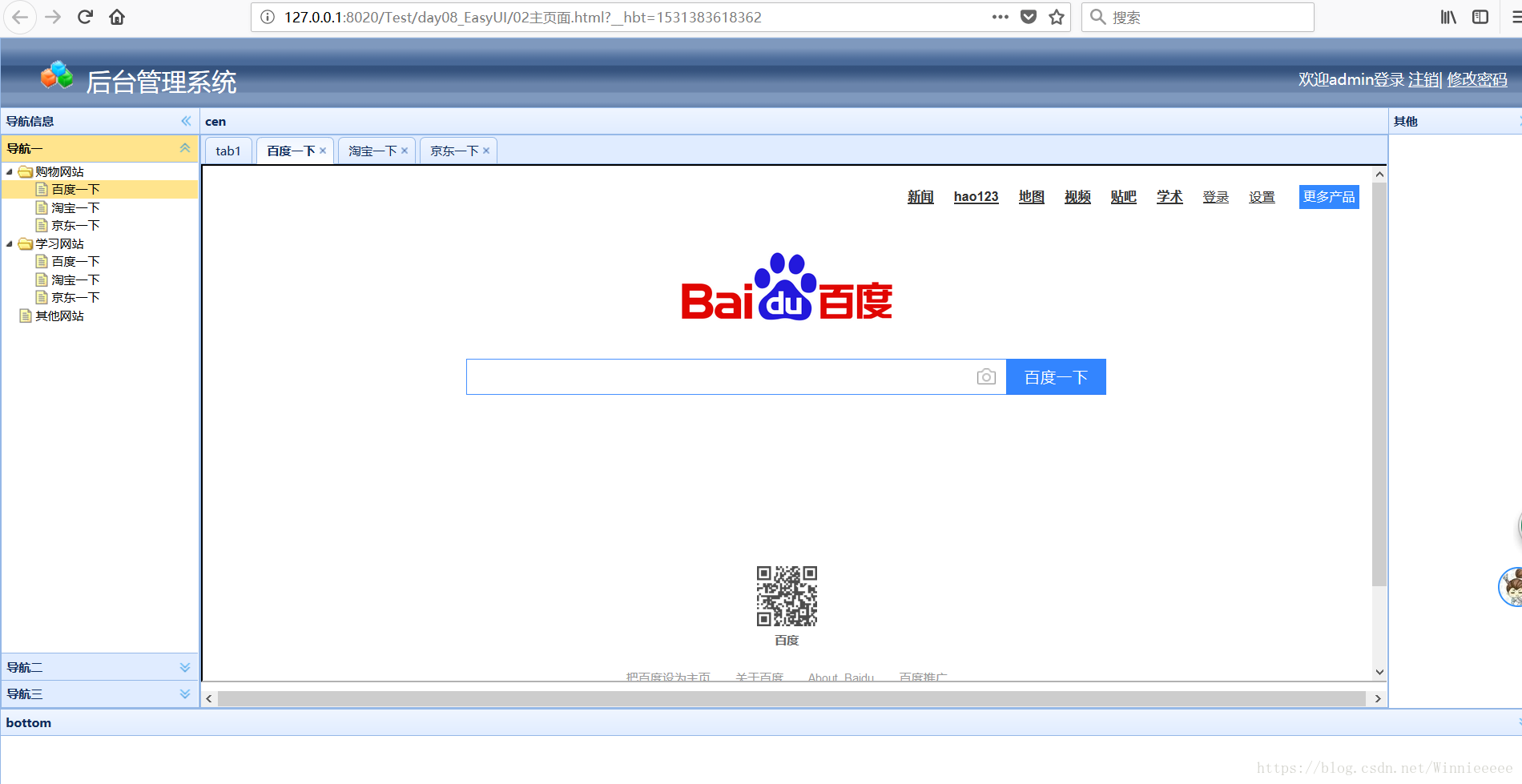
EasyUI主页面布局:

注意:先引入EasyUI相关组件。

1 body使用布局样式;

2 使用div进行东南西北的布局;

3 设置可以手动调节大小。

EasyUI主页布局(2):

1 设置底部网站声明;

2 设置头部网站logo

3 设置顶部用户退出提示框;

4 设置用户修改密码window窗口;

5 校验密码修改。

EasyUI主页布局(3):设置树状菜单和选项卡:

1 设置divclass样式为easyui-accordion(分类)

2 设置ulclass样式为easyui-tree

3 ul中创建树菜单即可;

4 在布局的中间部分创建并设置divclass属性为easyui-tabs

5 div下创建选项卡面板即可;

EasyUI主页布局 (4)   :设置菜单和选项卡的联动操作:

 使用jQuery进行操作即可。


二、EasyUI实现登录页面

1 EasyUI提供的js文件和主题(themes)样式存放到项目的指定位置

2 Html文档中引入EasyUI的插件

3HTML文档标签上遵循EasyUI的文档规则使用EasyUI完成页面的开发

面板使用(panel)

创建面板:

在创建一个div标签,并class属性值为:"easyui-panel"

面板属性:

title:添加面板标题。

data-options:给面板添加常用的操作。具体参照API

添加按钮。

信息提示。

注意:

EasyUI的使用。

通过标签的class属性添加基本EasyUI功能,包括样式和jQuery操作。

data-options属性对标签的基本功能进行修改操作。


<!DOCTYPE html>

<html>


<head>

<meta charset="utf-8">

<title></title>


<!--引入CSS文件 主题css文件-->

<link rel="stylesheet" type="text/css" href="themes/default/easyui.css" />

<!--引入css的图标样式文件-->

<link rel="stylesheet" type="text/css" href="themes/icon.css" />


<!--引入js文件   两个js的顺序是不可以互换的-->

<!--引入 jQuery中的核心文件-->

<script src="js/jquery.min.js" type="text/javascript" charset="utf-8"></script>

<!--引入easyui的核心js文件-->

<script src="js/jquery.easyui.min.js" type="text/javascript" charset="utf-8"></script>


<!--引入语言包-->

<script src="js/easyui-lang-zh_CN.js" type="text/javascript" charset="utf-8"></script>

<style>

body {

background-color: gray;

}

table {

margin-top: 70px;

margin-left: 100px;

}

tr {

height: 40px;

text-align: center;

}

</style>

<script type="text/javascript">

$(function() {


$("#sub").click(function() {

if($(":text").val() == "") {

$.messager.alert('警告', '账号不能为空', 'warning');

} else if($(":password").val() == "") {

$.messager.alert('警告', '密码不能为空', 'warning');

} else {

//表单的提交

$("form").submit();

}

})


$("#res").click(function() {

//清空使用js的对象

$("form")[0].reset();

})

})

</script>

</head>


<body>

<div style="margin-top: 200px; margin-left: 450px;">

<div style="width: 400px; height: 300px;" class="easyui-panel" title="登录" data-options="iconCls:'icon-liu',closable:false,    

                collapsible:false,minimizable:true,maximizable:true">

<form action="02主页面.html">

<table>

<tr>

<th>账号</th>

<th>

<input type="text" name="" id="" value="" class="easyui-validatebox" data-options="required:true" />

</th>

</tr>

<tr>

<th>密码:</th>

<th>

<input type="password" name="" id="" value="" />


</th>

</tr>

<tr>

<th colspan="2">

<a href="#" class="easyui-linkbutton" data-options="iconCls:'icon-ok'" id="sub">提交</a>

<a href="#" class="easyui-linkbutton" data-options="iconCls:'icon-reload'" id="res">清空</a>

</th>

</tr>

</table>

</form>

</div>

</div>

</body>

</html>
 

三、EasyUI实现后台主页面

<!DOCTYPE html>

<html>


<head>

<meta charset="utf-8">

<title></title>

<link rel="stylesheet" type="text/css" href="themes/default/easyui.css" />

<link rel="stylesheet" type="text/css" href="themes/icon.css" />

<script src="js/jquery.min.js" type="text/javascript" charset="utf-8"></script>

<script src="js/jquery.easyui.min.js" type="text/javascript" charset="utf-8"></script>

<style>

#top {

background-image: url(img/layout-browser-hd-bg.gif);

}

#top img {

margin-top: 20px;

margin-left: 40px;

}

#top>span {

font-size: 25px;

color: #FFFFFF;

margin-left: 10px;

}

#div1 {

float: right;

margin-top: 30px;

margin-right: 30px;

color: #FFFFFF;

font-size: 15px;

}

#div1 a {

color: #FFFFFF;

}

table {

margin: 0px auto;

margin-top: 40px;

}

tr {

height: 40px;

text-align: center;

}

</style>


<script type="text/javascript">

$(function() {

/*****退出操作************/

$("#zx").click(function() {

$.messager.confirm("提示", "是否确认退出?", function(f) {

if(f) {

//进行页面的跳转

window.location.href = "01登录页面.html";

}

})

})

/*******修改密码***************/

$("#changepwd").click(function() {

$("#update").window("open");

})


/*****确认提交*********/

$("#sub").click(function() {

if($(":text").val() == "") {

$.messager.alert('警告', '旧密码不能为空', 'error');

} else if($(":password").eq(0).val() == "") {

$.messager.alert('警告', '新密码不能为空', 'error');

} else if($(":password").eq(1).val() == "") {

$.messager.alert('警告', '确认密码不能为空', 'error');

} else if($(":password").eq(0).val() != $(":password").eq(1).val()) {

$.messager.alert('警告', '两次比较不一致', 'error');

} else {

//修改成功

$("#update").window("close");

$.messager.show({

title: '提示',

msg: '密码修改成功',

timeout: 5000,

showType: 'show'

});

}

})


/******树形展示***********/

$('#tt').tree({

onClick: function(node) {

console.log(node);

var flag = $("#tab").tabs('exists', node.text);

if(flag) {

//证明该选项卡已经存在

$("#tab").tabs('select', node.text);

} else {

//建立新的选项卡

$('#tab').tabs('add', {

title: node.text,

content: "<iframe src='" + node.attributes.url + "' width='100%' height='98%'></iframe>",

closable: true

});

}

}

});

})

</script>


</head>


<body class="easyui-layout">


<!--布局:上-->

<div data-options="region:'north'" style="height: 70px;" id="top">

<img src="img/blocks.gif" />

<span>后台管理系统</span>

<div id="div1">

<span>欢迎admin登录</span>

<a href="javascript:void(0)" id="zx">注销</a>|

<a href="#" id="changepwd">修改密码</a>

</div>

</div>

<!--布局:下-->

<div data-options="region:'south'" title="bottom" style="height: 80px;"></div>

<!--布局:左-->

<div data-options="region:'west'" title="导航信息" style="width: 200px;">

<div class="easyui-accordion" data-options="fit:true,animate:true">

<div title="导航一">

<ul class="easyui-tree" id="tt">

<li>

<span>购物网站</span>

<ul>

<li data-options="attributes:{url:'http://www.baidu.com'}">百度一下</li>

<li data-options="attributes:{url:'http://www.taobao.com'}">淘宝一下</li>

<li data-options="attributes:{url:'http://www.jd.com'}">京东一下</li>

</ul>


</li>

<li>

<span>学习网站</span>

<ul>

<li>百度一下</li>

<li>淘宝一下</li>

<li>京东一下</li>

</ul>

</li>

<li>其他网站</li>

</ul>

</div>


<div title="导航二">

导航二

</div>


<div title="导航三">

导航三

</div>

</div>


</div>

<!--布局:右-->

<div data-options="region:'east'" title="其他" style="width: 150px;"></div>

<!--布局:中-->

<div data-options="region:'center'" title="cen">

<div class="easyui-tabs" data-options="fit:true" id="tab">

<div title="tab1">123</div>

</div>

</div>


<!--修改密码的窗口-->

<div id="update" class="easyui-window" style="width: 400px; height: 300px;" title="修改密码" data-options="iconCls:'icon-save',modal:true,closed:true">

<table>

<tr>

<th>旧密码:</th>

<th>

<input type="text" name="" id="" value="" />

</th>

</tr>

<tr>

<th>新密码:</th>

<th>

<input type="password" name="" id="" value="" />

</th>

</tr>

<tr>

<th>确认密码:</th>

<th>

<input type="password" name="" id="" value="" />

</th>

</tr>

<tr>

<th colspan="2">

<a href="#" class="easyui-linkbutton" data-options="iconCls:'icon-ok'" id="sub">提交</a>

<a href="#" class="easyui-linkbutton" data-options="iconCls:'icon-reload'" id="res">清空</a>

</th>

</tr>

</table>

</div>

</body>

</html>


注:缺少资源素材文件的可以私聊索取

 

<body class="easyui-layout"> <div data-options="region:'north',border:false" style="height: 120px; background-color: #F5F5F5; padding: 10px; font-size: x-large;background-image:url('../Images/loginbg_00.jpg');background-size:100% 100% ;"> <div style="background-image:url('../Images/logo_short_new.png');background-size:contain;background-repeat:no-repeat;height:80px;text-align:center;vertical-align:middle;line-height:80px;"> @*<span style="font-size:30px;font-weight:bolder;color: #000080;">可靠性实验室管理平台</span>*@ <div style="background-image: url('../Images/head.png'); background-repeat: no-repeat; height: 60px; width: 582px; margin-left: 38%; margin-top: 2px; margin-bottom: 2px;"> @*<div style="background-image:url('../Images/head1.png');background-repeat:no-repeat;height:70px;width:472px;margin-left:38%;margin-top:20px;margin-bottom:20px"></div> transform: scale(1.3); /* 放大1.5倍 */ transform-origin: top left;*@ </div> </div> <div style="position: absolute; right: 30px; top: 10px;color:white;"> <label id="Time"></label>   @*<img src="~/Images/cn.gif" style="height:15px;" onclick="SetLanguage('CN')" />*@ <a href="javascript:void(0)" onclick="SetLanguage('CN')" style="color:white;">中文</a> <span style="width:30px;">|</span> @*<img src="~/Images/um.gif" style="height:15px;" onclick="SetLanguage('EN')" />*@ <a href="javascript:void(0)" onclick="SetLanguage('EN')" style="color:white;">English</a> </div> <div style="position:absolute;right:30px;top:30px;color:white;"> 欢迎您:<span style="color: #0082ff;font-weight:100;color:white;">@ViewData["RealName"]</span>    </div> <div style="position:absolute;right:30px;top:50px;color:white;"> 当前FAB:@ViewData["LoginFab"]             <a id="show_fabinfo" href="javascript:void(0);" style="color:white;" data-options="iconCls:'icon-stop'" onclick="ChangeFab();"> 切换Fab </a> @*<a href="javascript:void(0);" style="color:white;" class="easyui-linkbutton" data-options="plain:true,iconCls:'icon-stop'" onclick="ChangeFab();"> 切换Fab </a>*@ </div> <div style="position: absolute; right: 30px; bottom: 13px; "> <a href="../Template/可靠性实验室管理系统RLMS操作手册.pptx" style="color:white;width:100px;height:30px;border:1px;border-color:#0065D4">操作手册</a> @*<a href="../Template/PFA预约系统用户操作手册-V3.pdf" style="color:white;width:100px;height:30px;border:1px;border-color:#0065D4">手册文件2</a>*@ <a href="javascript:void(0);" style="color:white;background:#0089F4;height:30px;border:1px;border-color:#0065D4" class="easyui-linkbutton" iconCls="icon-set1" onclick="changePwd();"> 修改密码 </a> <a href="javascript:void(0);" style="color:white;background:#FD3D3B;height:30px;border:1px;border-color:#E20000" class="easyui-linkbutton" iconCls="icon-stop" onclick="loginOut();"> 退出系统 </a> </div> <div style="position: absolute; left: 0; right: 0; bottom: 3px; color: white; text-align: center; "> <span id="dutyDisplay" style="color: #0082ff;font-weight:100;color:white;">@ViewData["DutySchedule"]</span> </div> </div> @*旧版 菜单树 保留不使用*@ @*<div data-options="region:'west',split:true,title:'功能导航'" style="width: 180px; padding: 10px; background-color: white;"> <div> <ul id="LeftMenuTree"></ul> </div> </div>*@ <div data-options="region:'west',split:true,title:'功能菜单'" id="dv_menu" style="width: 280px;padding-right:10px; background-color: #0B67DE;"> @Html.Raw(ViewData["MenuHtml"]) </div> <div data-options="region:'center'"> <div id="tabs" class="easyui-tabs" fit="true" border="false" data-options="tools:'#tab-tools'"> @*<div id="home" title="我的主页" data-options="iconCls:'icon-home',closable:false" style="padding:10px;padding-left:0px;background-image:url('../Images/divbg.jpg');background-repeat:no-repeat;background-size:100% ; height:auto;"> <iframe id="frmWorkArea" width="99.5%" height="99%" style="padding:1px;" frameborder="0" scrolling="yes" src="/Home/View_KB"></iframe> </div>*@ <div id="home" title="我的主页" data-options="iconCls:'icon-home',closable:false" style="padding:10px;padding-left:0px; height:auto;"> <iframe id="frmWorkArea" width="99.5%" height="99%" style="padding:1px;" frameborder="0" scrolling="yes" src="/Home/View_KB"></iframe> </div> </div> </div> <div id="tab-tools"> <a href="#" class="easyui-linkbutton" iconCls="icon-reload" plain="true" onclick="refreshTab()" style="color:#2192E9;">刷新</a> <a href="#" class="easyui-linkbutton" iconCls="icon-Close" plain="true" onclick="closeTab()" style="color:#2192E9;">关闭全部</a> </div> <div id="dlg_changepsd" class="easyui-dialog" style="width:300px;" closed="true" buttons="#dlg-buttons"> <form id="fm_password" method="post" novalidate style="margin:0;padding:20px 50px"> <div style="margin-bottom:10px"> 原密码:<br /><input id="oldpassword" name="oldpassword" class="easyui-validatebox" required="true" type="password" value="" data-options="validateOnCreate:false,validateOnBlur:true" /> </div> <div style="margin-bottom:10px"> 新密码:<br /><input id="password" name="password" validType="length[4,32]" invalidMessage="密码长度需4位以上" class="easyui-validatebox" required="true" type="password" value="" /> </div> <div style="margin-bottom:10px"> 新密码:<br /><input type="password" name="repassword" id="repassword" required="true" class="easyui-validatebox" validType="equalTo['#password']" invalidMessage="两次输入密码不匹配" /> </div> </form> </div> <div id="dlg-buttons"> <a href="javascript:void(0)" class="easyui-linkbutton l-btn-blue" id="btn_submit" onclick="btn_changePSD()" style="width:90px">提交</a> <a href="javascript:void(0)" class="easyui-linkbutton l-btn-Red" onclick="javascript: $('#dlg_changepsd').dialog('close')" style="width:90px">取消</a> </div> <div id="dlg_changeFab" class="easyui-dialog" style="width:700px" closed="true" buttons="#dlg-changeFab-buttons"> <table class="easyui-datagrid" id="dg_changefab" data-options="url:'/Login/GetFactory',singleSelect:true,nowrap:false"> <thead> <tr> <th data-options="field:'ConfigValue',width:80">Fab</th> <th data-options="field:'Extend1',width:300">中文</th> <th data-options="field:'Extend2',width:300">English</th> </tr> </thead> </table> </div> <div id="dlg-changeFab-buttons"> <a href="javascript:void(0)" class="easyui-linkbutton l-btn-blue" onclick="btn_changeFab()" style="width:90px">切换</a> <a href="javascript:void(0)" class="easyui-linkbutton l-btn-Red" onclick="javascript: $('#dlg_changeFab').dialog('close')" style="width:90px">取消</a> </div> @*第一次登陆未修改密码执行*@ <div id="dlg_firstpsd" class="easyui-dialog" style="width:300px;" closable="false" data-options="modal:'true'," closed="true" buttons="#dlg-first-buttons"> <form id="fm_firstpassword" method="post" novalidate style="margin:0;padding:20px 50px"> <div style="margin-bottom:10px"> 原密码<br /><input id="first_oldpassword" name="oldpassword" validType="length[2,32]" invalidMessage="密码长度需4位以上" class="easyui-validatebox" type="password" value="" /> </div> <div style="margin-bottom:10px"> 新密码<br /><input id="first_password" name="password" validType="length[2,32]" invalidMessage="密码长度需4位以上" class="easyui-validatebox" type="password" value="" /> </div> <div style="margin-bottom:10px"> 密码确认<br /><input type="password" name="repassword" id="first_repassword" required="true" class="easyui-validatebox" data-options="validateOnCreate:false,validateOnBlur:true" validType="equalTo['#first_password']" invalidMessage="两次输入密码不匹配" /> </div> </form> </div> <div id="dlg-first-buttons"> <a href="javascript:void(0)" class="easyui-linkbutton l-btn-blue" id="btn_firstsubmit" onclick="btn_firstPSD()" style="width:90px">提交</a> <a href="javascript:void(0)" class="easyui-linkbutton c6" iconCls="icon-back" id="btn_firstsubmit" onclick="btn_returnLogin()" style="width:90px">取消</a> </div>B页面就是在tab里可以调用这页面的function吗
12-02
评论
成就一亿技术人!
拼手气红包6.0元
还能输入1000个字符
 
红包 添加红包
表情包 插入表情
 条评论被折叠 查看
添加红包

请填写红包祝福语或标题

红包个数最小为10个

红包金额最低5元

当前余额3.43前往充值 >
需支付:10.00
成就一亿技术人!
领取后你会自动成为博主和红包主的粉丝 规则
hope_wisdom
发出的红包
实付
使用余额支付
点击重新获取
扫码支付
钱包余额 0

抵扣说明:

1.余额是钱包充值的虚拟货币,按照1:1的比例进行支付金额的抵扣。
2.余额无法直接购买下载,可以购买VIP、付费专栏及课程。

余额充值


