



 本文介绍了如何在微信小程序的app.js中实现自动更新功能,包括检查新版本、提示用户并处理更新失败情况。通过wx.getUpdateManager API,确保用户及时获取并应用最新版本。
在app.js的onlaunch里面添加下面代码
    // 强制用户更新=============begin==================================
    const updateManager = wx.getUpdateManager()
		    updateManager.onCheckForUpdate(function (res) {
		      // 请求完新版本信息的回调
		      console.log(res.hasUpdate)
		    })
		    updateManager.onUpdateReady(function () {
		      wx.showModal({
		        title: '更新提示',
		        content: '新版本已经准备好,是否重启应用?',
		        success: function (res) {
		          if (res.confirm) {
		            // 新的版本已经下载好,调用 applyUpdate 应用新版本并重启
		            updateManager.applyUpdate()
		          }
		        }
		      })
		    })
		    updateManager.onUpdateFailed(function () {
		      // 新的版本下载失败
		      wx.showModal({
		        title: '更新提示',
		        content: '新版本下载失败',
		        showCancel: false
		      })
        })
     // 强制用户更新=============end==================================
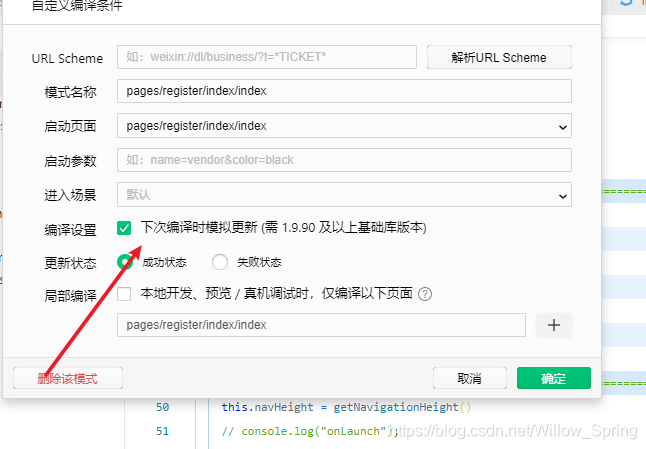
模拟时勾选下面的选框





 扫一扫
扫一扫


 被折叠的 条评论
为什么被折叠?
被折叠的 条评论
为什么被折叠?
 到【灌水乐园】发言





