FragmentStateAdapter 导致内存泄露的问题记录

在开发过程中使用FragmentStateAdapter + ViewPager2来实现了页面切换

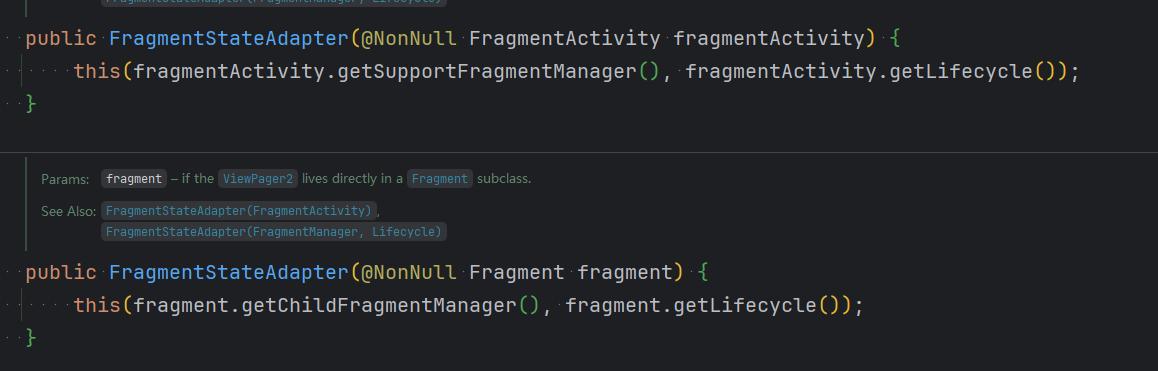
当时在Framgent 初始化时候传入了Activity 结果Leakcanary一直提示Framgent对象内存泄露。但是退出Activity时垃圾就被清理了。这里看了下源码里面使用了Lifecycle。恍然大悟。在创建FragmentStateAdapter 一定要传递使用的Activity 还是 Fragment
public class ViewPagerAdapter extends FragmentStateAdapter { public ViewPagerAdapter(@NonNull FragmentActivity fragmentActivity) { super(fragmentActivity); } @NonNull @Override public Fragment createFragment(int position) { switch (position) { case 0: return MainNetworkFragment.newInstance(); case 1: return GuestNetworkFragment.newInstance(); default: throw new IllegalArgumentException(); } } @Override public int getItemCount() { return 2; } }和public class ClientActivity extends BaseMvvmActivity<ActivityClientBinding> { @Nullable @Override protected ActivityClientBinding bindContentView(@Nullable Bundle bundle) { return ActivityClientBinding.inflate(getLayoutInflater()); } @Override protected void subscribeViewModel(@Nullable Bundle bundle) { // 设置适配器 ViewPagerAdapter adapter = new ViewPagerAdapter(this); viewBinding.viewPager.setAdapter(adapter); // 启用嵌套滚动 View child = viewBinding.viewPager.getChildAt(0); if (child instanceof RecyclerView) { RecyclerView recyclerView = (RecyclerView) child; recyclerView.setNestedScrollingEnabled(true); } // 关联TabLayout和ViewPager2 new TabLayoutMediator(viewBinding.tabLayout, viewBinding.viewPager, (tab, position) -> { if (position == 0) { tab.setText("Main"); } else { tab.setText("Guest"); } }).attach(); } private void showListPopupWindow(View v) { // 创建菜单项列表 List<TPSimplePopupMenuItem> menuItems = new ArrayList<>(); menuItems.add(new TPSimplePopupMenuItem("Block", R.drawable.ic_block_black)); menuItems.add(new TPSimplePopupMenuItem("Delete", R.drawable.ic_delete_24)); // 创建并配置弹窗 TPListPopupWindow popupWindow = new TPListPopupWindow(this, v); popupWindow.setAdapter(new TPSimplePopupAdapter(this, menuItems)); popupWindow.setDropDownGravity(Gravity.END); popupWindow.show(); } } 应该怎么修改呢
09-16
<?xml version="1.0" encoding="utf-8"?> <RelativeLayout xmlns:android="http://schemas.android.com/apk/res/android" android:layout_width="match_parent" android:layout_height="match_parent"> <ImageView android:id="@+id/show_pictures" android:layout_width="match_parent" android:layout_height="match_parent"/> </RelativeLayout> <?xml version="1.0" encoding="utf-8"?> <RelativeLayout xmlns:android="http://schemas.android.com/apk/res/android" android:layout_width="match_parent" android:layout_height="match_parent"> <androidx.viewpager.widget.ViewPager android:id="@+id/change_page" android:layout_width="wrap_content" android:layout_height="wrap_content"> </androidx.viewpager.widget.ViewPager> </RelativeLayout> <?xml version="1.0" encoding="utf-8"?> <RelativeLayout xmlns:android="http://schemas.android.com/apk/res/android" android:layout_width="match_parent" android:layout_height="match_parent"> <TextureView android:id="@+id/textureView" android:layout_width="match_parent" android:layout_height="match_parent" /> <ImageButton android:id="@+id/recording" android:layout_width="50dp" android:layout_height="50dp" android:src="@drawable/ic_launcher_background" android:layout_alignParentBottom="true" android:layout_centerHorizontal="true" android:layout_marginBottom="50dp" /> <ImageView android:id="@+id/image_show" android:layout_width="50dp" android:layout_height="50dp" android:layout_alignParentBottom="true" android:layout_marginBottom="50dp" android:layout_marginStart="50dp" /> <ImageButton android:id="@+id/change" android:layout_width="wrap_content" android:layout_height="wrap_content" android:layout_alignParentBottom="true" android:layout_marginEnd="50dp" android:layout_marginBottom="50dp" android:layout_alignParentEnd="true" /> <Chronometer android:id="@+id/timer" android:textColor="#f00" android:layout_width="match_parent" android:layout_height="wrap_content" android:format="%s" android:gravity="center" android:textSize="40sp" /> </RelativeLayout> <?xml version="1.0" encoding="utf-8"?> <RelativeLayout xmlns:android="http://schemas.android.com/apk/res/android" android:layout_width="match_parent" android:layout_height="match_parent"> <TextView android:id="@+id/textView" android:layout_width="wrap_content" android:layout_height="wrap_content" android:text="pemission" /> <TextureView android:id="@+id/textureView" android:layout_width="match_parent" android:layout_height="match_parent" /> <ImageButton android:id="@+id/takePicture" android:layout_width="50dp" android:layout_height="50dp" android:src="@drawable/ic_launcher_foreground" android:layout_alignParentBottom="true" android:layout_centerHorizontal="true" android:layout_marginBottom="50dp" /> <ImageView android:id="@+id/image_show" android:layout_width="50dp" android:layout_height="50dp" android:layout_alignParentBottom="true" android:layout_marginLeft="50dp" android:layout_marginBottom="50dp" /> <ImageButton android:id="@+id/change" android:layout_width="30dp" android:layout_height="30dp" android:layout_alignParentRight="true" android:layout_alignParentBottom="true" android:layout_marginRight="50dp" android:layout_marginBottom="50dp" android:src="@drawable/ic_launcher_foreground" /> </RelativeLayout> 可以分析
最新发布
11-27
评论
添加红包

请填写红包祝福语或标题

红包个数最小为10个

红包金额最低5元

当前余额3.43前往充值 >
需支付:10.00
成就一亿技术人!
领取后你会自动成为博主和红包主的粉丝 规则
hope_wisdom
发出的红包
实付
使用余额支付
点击重新获取
扫码支付
钱包余额 0

抵扣说明:

1.余额是钱包充值的虚拟货币,按照1:1的比例进行支付金额的抵扣。
2.余额无法直接购买下载,可以购买VIP、付费专栏及课程。

余额充值


