



 本文介绍了一种在数据库中实现列表项排序和移动的方法,通过增加一个sort字段来控制列表项的位置,并提供了SpringBoot+MyBatis的代码实现,包括置顶、上移和下移功能的实现。
实现思路:
- 在数据库中对要进行排序那张表新增一个sort字段用于排序。
- 列表向上移动的时候通过列表下标index查询出当前数据的上一条数据的sort值,两者交换sort值,同理向下移动的时候,查询出下一条数据的sort值,两者交换。
springboot+mybatis代码实现:
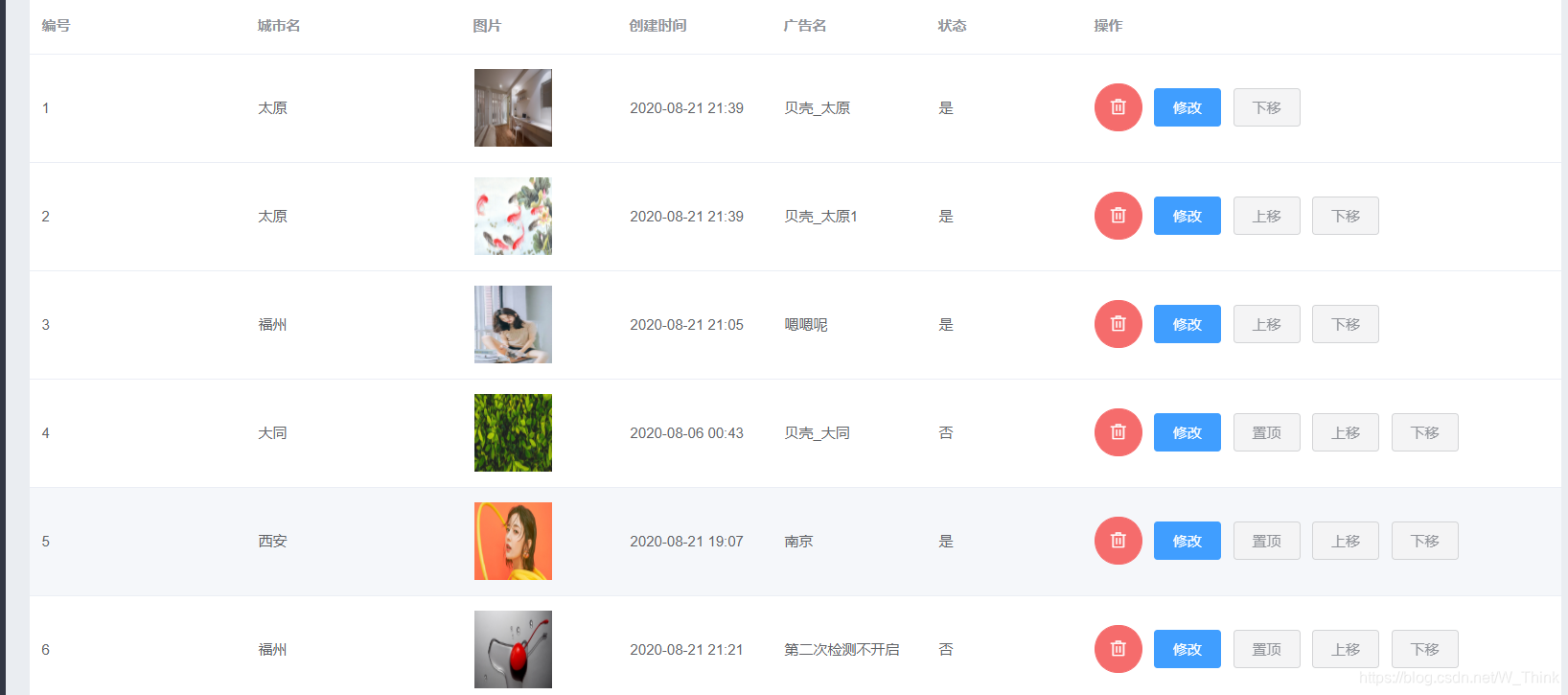
(一)java后台实现置顶 上下移
<el-button size="small"  plain  type="info" @click="setTop(scope.row)" v-if="scope.row.sort!=1">置顶</el-button>
<el-button size="small"  plain  type="info" @click="seton(scope.row.id,scope.$index)" v-if="scope.$index!=0">上移</el-button>
<el-button size="small"  plain  type="info" @click="setunder(scope.row.id,scope.$index)" v-if="scope.$index!=bannertable.length-1">下移</el-button>


//置顶
            setTop:function (row) {
                if (row.state==0){
                    this.$http.post("/banner/top/"+row.id).then((res)=>{
                        if(res.data.code == 20000){
                            this.$message.success(res.data.message)
                            this.bannersearch();
                        }else{
                            this.$message.error(res.data.message);
                        }
                    })
                }else {
                    this.$message.error("该状态不能置顶,请修改其状态")
                }
            },
            //上移
            seton(id,index){
                let banner = this.bannertable[index-1]
                this.$http.post("/banner/setPosition/"+id,banner).then((res)=>{
                    if(res.data.code == 20000){
                        this.$message.success(res.data.message)
                        this.bannersearch();
                    }else{
                        this.$message.error(res.data.message);
                    }
                })
            },
            //下移
            setunder(id,index){
                let banner = this.bannertable[index+1]
                this.$http.post("/banner/setPosition/"+id,banner).then((res)=>{
                    if(res.data.code == 20000){
                        this.$message.success(res.data.message)
                        this.bannersearch();
                    }else{
                        this.$message.error(res.data.message);
                    }
                })
            },
@PostMapping("/setPosition/{id}")
    public Result setPosition(@PathVariable("id")String id,@RequestBody HsBanner hsBanner){
        int i = bannerService.setPosition(id,hsBanner);
        if(i>0){
            return new Result(true, StatusCode.OK,"移动成功");
        }else{
            return new Result(false, StatusCode.ERROR,"移动失败");
        }
    }


@Transactional
    public int setPosition(String id, HsBanner hsBanner) {
        HsBanner banner = bannerMapper.selectByPrimaryKey(id);
        String sort = banner.getSort();
        banner.setSort(hsBanner.getSort());
        hsBanner.setSort(sort);
        int j=0;
        j = bannerMapper.updateByPrimaryKeySelective(hsBanner);
        if(j>0){
            j = bannerMapper.updateByPrimaryKeySelective(banner);
        }
        return j;
    }
(二)vue前台实现上下移
<el-button size="small"  plain type='info' @click.stop="sortUp(scope.$index)">向上↑ </el-button>
<el-button size="small"  plain type='info'  @click.stop="sortDown(scope.$index)">向下↓</el-button>
// 上移按钮
            sortUp (index) {
                if (index === 0) {
                    this.$message({
                        message: '已经是列表中第一个素材!',
                        type: 'warning'
                    })
                } else {
                    let temp = this.bannertable[index - 1]
                    Vue.set(this.bannertable, index - 1, this.bannertable[index])
                    Vue.set(this.bannertable, index, temp)
                }
            },
            // 下移按钮
            sortDown (index) {
                if (index === (this.bannertable.length - 1)) {
                    this.$message({
                        message: '已经是列表中最后一个素材!',
                        type: 'warning'
                    })
                } else {
                    let i = this.bannertable[index + 1]
                    Vue.set(this.bannertable, index + 1, this.bannertable[index])
                    Vue.set(this.bannertable, index, i)
                }
            },






 扫一扫
扫一扫


 1247
1247

 被折叠的 条评论
为什么被折叠?
被折叠的 条评论
为什么被折叠?
 到【灌水乐园】发言





