



在项目开发中,会遇到文件/模板下载的需求。现列举利用利用ResponseEntity<T>方式下载的样例。
下面列出的java代码不同之处只是针对模板存放位置获取方式的不同
先附上前台请求示例(导出Excel文件):
// 下载导入模板
function downloadImportExcel() {
	var url = api + "/fileDownLoadController/downloadContactExcel.do?fileName="+encodeURI(encodeURI("通讯录导入模板")) + "&token=" + $.cookie("token");
	window.open(url, '_blank');
}
后台文件模板存放位置:
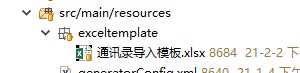
1、方式一
@RequestMapping(value="downloadContactExcel", method=RequestMethod.GET)
	public ResponseEntity<byte[]> download(@RequestParam(value = "fileName", required = true) String fileName,
			@RequestParam(value = "token", required = true) String token, HttpServletRequest request)
			throws IOException {

	//设置缓存
    byte[] body = null;
	ResponseEntity<byte[]> entity = null;

    File file = null;
	try {
		// 前台 fileName="+encodeURI(encodeURI("通讯录导入模板"))
		String decodeName = URLDecoder.decode(fileName, "UTF-8");

		String filePath = "exceltemplate" + File.separator + decodeName  + ".xlsx";
		ClassPathResource classPathResource = new ClassPathResource(filePath);
		file = classPathResource.getFile();

		InputStream is = new FileInputStream(file);
		body = new byte[is.available()];
	    is.read(body);

		// 下载显示的文件名,解决中文名称乱码问题
	    decodeName = decodeName + Instant.now().toEpochMilli() + ".xlsx";
		String file_name = new String(decodeName.getBytes("UTF-8"), "iso-8859-1");

		//设置请求头
		HttpHeaders headers = new HttpHeaders();
		headers.add("Content-Disposition", "attchement;filename=" + file_name);

		// 通知浏览器以attachment(下载方式)打开
		headers.setContentDispositionFormData("attachment", file_name);
		// application/octet-stream : 二进制流数据(最常见的文件下载)。
		headers.setContentType(MediaType.APPLICATION_OCTET_STREAM);

		entity = new ResponseEntity<>(body, headers, HttpStatus.OK);
		is.close();
	} catch (Exception e) {
		e.printStackTrace();
	}

	 return entity;
}
2、方式二:针对项目打包到war包,部署在tomcat中的情况
@RequestMapping(value="downloadContactExcel1", method=RequestMethod.GET)
	public ResponseEntity<byte[]> download1(@RequestParam(value = "fileName", required = true) String fileName,
			@RequestParam(value = "token", required = true) String token, HttpServletRequest request)
			throws IOException {

	//设置缓存
    byte[] body = null;
	ResponseEntity<byte[]> entity = null;

	try {
		fileName = URLDecoder.decode(fileName, "UTF-8");

		String path = request.getSession().getServletContext().getRealPath("");
		// 获得完整的路径
		String str = path + File.separator + "WEB-INF" + File.separator + "classes" + File.separator+ "exceltemplate" + File.separator + fileName  + ".xlsx";
		// 输出路径
		System.err.println(str);

		// 下载显示的文件名,解决中文名称乱码问题
		fileName = fileName + Instant.now().toEpochMilli() + ".xlsx";
		String file_name = new String(fileName.getBytes("UTF-8"), "iso-8859-1");

		//设置请求头
		HttpHeaders headers = new HttpHeaders();
		headers.add("Content-Disposition", "attchement;filename=" + file_name);

		// 通知浏览器以attachment(下载方式)打开
		headers.setContentDispositionFormData("attachment", file_name);
		// application/octet-stream : 二进制流数据(最常见的文件下载)。
		headers.setContentType(MediaType.APPLICATION_OCTET_STREAM);

		body = FileUtils.readFileToByteArray(new File(str));
		entity = new ResponseEntity<>(body, headers, HttpStatus.CREATED);

	} catch (Exception e) {
		e.printStackTrace();
	}

	return entity;
}





 扫一扫
扫一扫


 4208
4208

 被折叠的 条评论
为什么被折叠?
被折叠的 条评论
为什么被折叠?
 到【灌水乐园】发言





