


1.pom.xml文件需要导入的依赖:
<!--阿里云短信服务-->
        <dependency>
            <groupId>com.aliyun</groupId>
            <artifactId>aliyun-java-sdk-core</artifactId>
            <version>4.1.0</version>
        </dependency>

        <dependency>
            <groupId>com.alibaba</groupId>
            <artifactId>fastjson</artifactId>
            <version>1.2.61</version>
        </dependency>
2.SmsService类
package ydj.plugins.pojo;
public interface SmsService {
    boolean sendSms(String phoneNumber); // 接收验证码手机号
}
3.SmsServiceImpl 实现类
package ydj.plugins.pojo;
import com.alibaba.fastjson.JSONObject;
import com.aliyuncs.CommonRequest;
import com.aliyuncs.CommonResponse;
import com.aliyuncs.DefaultAcsClient;
import com.aliyuncs.IAcsClient;
import com.aliyuncs.http.MethodType;
import com.aliyuncs.profile.DefaultProfile;
import lombok.extern.slf4j.Slf4j;
import org.springframework.stereotype.Service;
import java.util.Date;
import java.util.Random;

@Service
@Slf4j
public class SmsServiceImpl implements SmsService{

	//todo 此处四个参数也可以在 application.yml 中配置
    private String accessKeyId ="LTAISdYBrOBuwGSp"; //todo key
    private String accessSecret = "VdFEqmy88uesZEQPjj8BhB8LodAEeX"; //todo 密钥
    private String signName = "网星商城"; //todo 签名名称
    private String templateCode = "SMS_161360134"; //todo 模板

    @Override
    public boolean sendSms(String phoneNumber) {
        DefaultProfile profile = DefaultProfile.getProfile("cn-xian", accessKeyId, accessSecret);
        IAcsClient client = new DefaultAcsClient(profile);
        CommonRequest request = new CommonRequest();
        request.setMethod(MethodType.POST);
        request.setDomain("dysmsapi.aliyuncs.com");
        request.setVersion("2017-05-25");
        request.setAction("SendSms");
        request.putQueryParameter("RegionId", "cn-xian");
        request.putQueryParameter("PhoneNumbers", "18562224222");
        request.putQueryParameter("SignName", signName);
        request.putQueryParameter("TemplateCode", templateCode);
        JSONObject object=new JSONObject();
        String randCode=getRandCode(6);
        log.info("验证码为:{}",randCode);
        System.out.println("验证码为:"+randCode);
        object.put("code",randCode);
        request.putQueryParameter("TemplateParam", object.toJSONString());
        try {
            CommonResponse response = client.getCommonResponse(request);
            log.info(response.getData());
            return true;
        } catch (Exception e) {
            log.error("{}",e);
        }
        return false;
    }

    //todo 生成随机验证码
    public static String getRandCode(int digits) {
        StringBuilder sBuilder = new StringBuilder();
        Random rd = new Random((new Date()).getTime());
        for(int i = 0; i < digits; ++i) {
            sBuilder.append((rd.nextInt(9)));
        }
        return sBuilder.toString();
    }
}
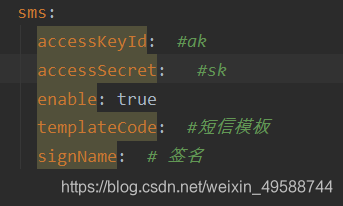
上面必须传递的四个参数也可以在 application.yml 中配置
4.SmsController 控制器类
package ydj.plugins.pojo;
import org.apache.ibatis.annotations.Param;
import org.springframework.web.bind.annotation.GetMapping;
import org.springframework.web.bind.annotation.RequestMapping;
import org.springframework.web.bind.annotation.RestController;
import ydj.commons.pojo.CommonResultPojo;
import javax.annotation.Resource;

@RestController
@RequestMapping("/smsController")
public class SmsController {

    @Resource
    private SmsService smsService;

    @GetMapping("/sendSms")
    public CommonResultPojo sendSms(@Param(value = "userName") String userName){
        boolean i=smsService.sendSms(userName); //todo 接收验证码手机号
        if(i == true){
            return new CommonResultPojo(200,"发送成功",i);
        }else {
            return new CommonResultPojo(444,"发送失败",i);
        }
    }
}
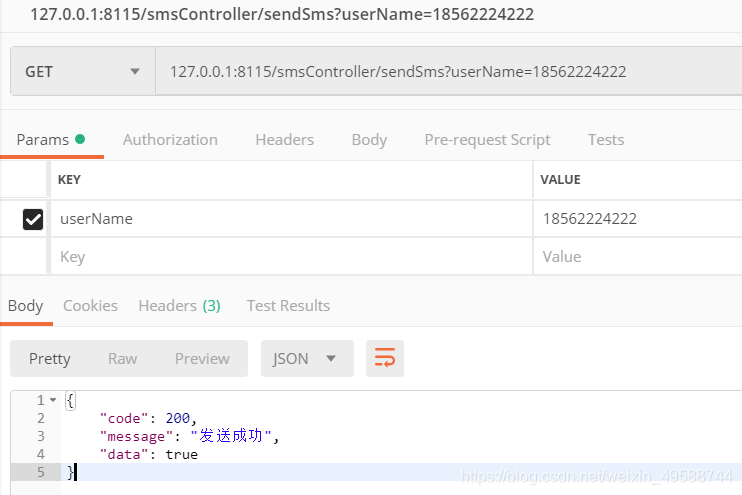
postman测试:





 扫一扫
扫一扫


 376
376

 被折叠的 条评论
为什么被折叠?
被折叠的 条评论
为什么被折叠?
 到【灌水乐园】发言





