



 本文介绍如何使用JBPM定义并执行一个简单的邮件发送流程。主要包括:定义jpdl流程文件实现邮件发送功能,配置邮件属性,以及通过Java代码部署和启动流程。
1. jpdl定义
当任务到期后VerRanLiu 给 dove 发一封邮件,默认格式可以指定。
<?xml version="1.0" encoding="UTF-8"?>

<process name="InlineMail" xmlns="http://jbpm.org/4.4/jpdl">

	<start g="20,25,80,40">
		<transition to="send rectify note" />
	</start>

	<mail g="99,25,115,45" name="send rectify note">
		<to addresses="dove@localhost" />
		<subject>rectify</subject>
		<html>
		<table><tr><td>${newspaper}</td><td>${date}</td>
			<td>reporting bb dayorder doubleplusungood refs unpersons rewrite fullwise upsub antefiling</td> </tr></table>
		</html>
		<transition to="wait" />
	</mail>

	<state g="240,25,98,45" name="wait" />

</process>
2. 修改jbpm.mail.properties 文件,设置默认发件人
mail.smtp.host	localhost
mail.smtp.port	25
mail.from		VerRanLiu@localhost
3. 执行此流程
package com.spring.mail;

import java.util.Date;
import java.util.HashMap;
import java.util.Map;

import org.jbpm.api.Configuration;
import org.jbpm.api.ProcessEngine;
import org.jbpm.api.ProcessInstance;

public class ProcessEngineLearn {

	public static String deployProcess(ProcessEngine pe, String jpdlPath) {
		return pe.getRepositoryService().createDeployment()
				.addResourceFromClasspath(jpdlPath).deploy();
	}

	public static void deleteProcessInst(ProcessEngine pe, String processInstId) {
		pe.getRepositoryService().deleteDeployment(processInstId);
	}

	public static ProcessInstance excuteProcess(ProcessEngine pe, String key,
			Map<String, Object> variables) {
		return pe.getExecutionService().startProcessInstanceByKey(key,
				variables);
	}

	/**
	 * @param args
	 * @throws InterruptedException
	 */
	public static void main(String[] args) throws InterruptedException {
		ProcessEngine pe = new Configuration().buildProcessEngine();
		deployProcess(pe, "com\\spring\\mail\\mail.jpdl.xml");
		Map<String, Object> variables = new HashMap<String, Object>();
		variables.put("newspaper", "Hello");
		variables.put("date", new Date().toLocaleString());
		excuteProcess(pe, "InlineMail", variables);
		System.out.println(variables.get("newspaper"));
	}

}
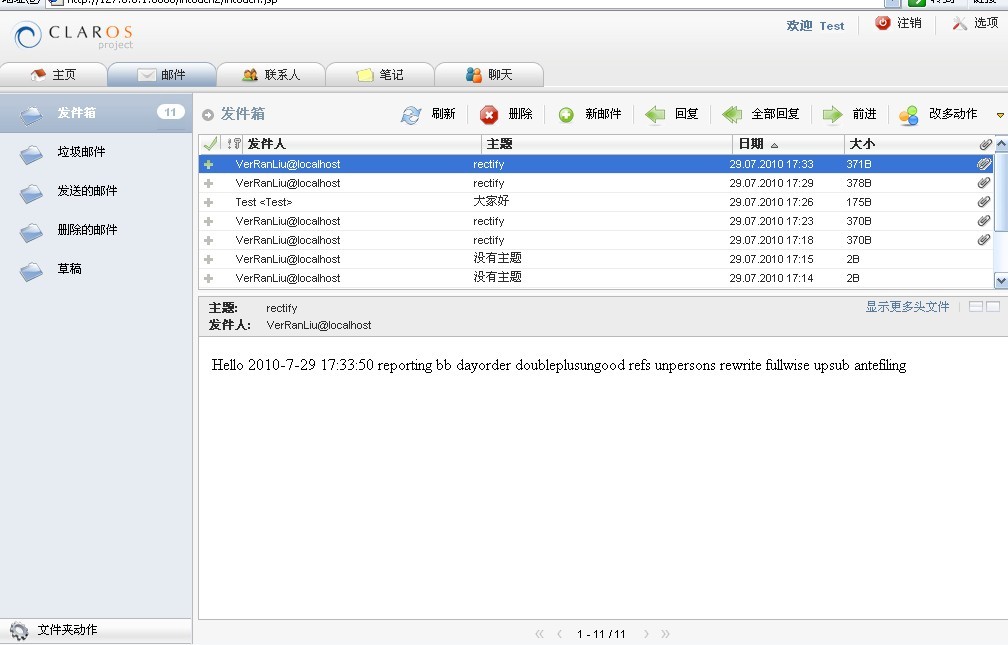
4. 通过上节部署的claors webmail应用查看邮件





 扫一扫
扫一扫


 6146
6146

 被折叠的 条评论
为什么被折叠?
被折叠的 条评论
为什么被折叠?
 到【灌水乐园】发言





