


 本文介绍了如何添加短信验证码登录模式,包括发送验证码接口、新增授权模式、自定义AuthenticationToken、AuthenticationProvider以及TokenGranter。流程涉及手机号和验证码的验证,以及数据库用户信息的查询。此外,还展示了WebSecurityConfigurerAdapter中配置认证管理器的部分。
1 添加短信验证码登陆模式概述
整体步骤
- 添加发送短信验证码接口(各位自行实现,就是去生成一个验证码,然后手机号作为key,验证码作为value存到redis并设置过期时间,并且利用短信api将验证码以手机短信的形式发送出去)
- 添加新的授权模式
- 添加新的认证信息类型
- 添加新的授权模式提供者
- 配置新的授权模式
- 修改默认AuthenticationManager(认证管理器)添加新的授权模式提供者
登陆的大致流程
获取短信验证码 -> 调用登陆接口/oauth/token(认证模式类型grant_type传自定义的mobile_phone)-> AuthenticationManager根据grant_type找到对应的授权模式提供者 -> 生成未认证的token信息 -> 根据未认证的token信息类型找到对应的认证提供者provider -> 根据手机号和传入的验证码去redis中校验是否存在并且正确 -> 生成认证后的token信息
2 添加新的AuthenticationToken(认证信息类型)
- 自定义一个MobilePhoneAuthenticationToken类继承AbstractAuthenticationToken类
- 类里面添加principal和credentials两个Object类型的成员属性,principal为手机号,credentials为短信验证码
- 写两个构造方法,一个是未进行认证时候生成认证信息,另一个是认证成功后生成认证信息
package com.hui.auth.granter.phone;

import org.springframework.security.authentication.AbstractAuthenticationToken;
import org.springframework.security.core.GrantedAuthority;

import java.util.Collection;

/**
 * 手机验证码登陆认证信息
 * @author DengYingHui
 */
public class MobilePhoneAuthenticationToken extends AbstractAuthenticationToken {
    private final Object principal;

    private final Object credentials;

    public MobilePhoneAuthenticationToken(String mobilePhone, String code) {
        super(null);
        // 第一次在Granter的createAuthenticationToken中创建,这时传入的是手机号
        this.principal = mobilePhone;

        this.credentials = code;
        // 第一次未认证
        this.setAuthenticated(false);
    }

    /**
     * 认证通过后走这个构造
     * @param principal 认证后的对象
     * @param authorities 认证后查询到的权限
     */
    public MobilePhoneAuthenticationToken(Object principal, Object credentials, Collection<? extends GrantedAuthority> authorities) {
        super(authorities);
        this.principal = principal;
        this.credentials = credentials;
        // 设置已经认证
        super.setAuthenticated(true);
    }

    @Override
    public Object getCredentials() {
        return this.credentials;
    }

    @Override
    public Object getPrincipal() {
        return this.principal;
    }
}
3 添加新的AuthenticationProvider(授权模式认证提供者)
- 自定义MobilePhoneAuthenticationProvider类实现AuthenticationProvider接口
- supports方法指定当前自定义的provider是哪个认证信息token(MobilePhoneAuthenticationToken)的提供者
- authenticate方法根据未认证的token信息去进行身份认证,这里就是去redis中比对手机号对应的手机验证码是否正确,然后生成认证后的token信息
package com.hui.auth.granter.phone;

import com.hui.auth.exception.CloudAuthenticationException;
import com.hui.common.core.exception.CustomExceptionUtil;
import com.hui.common.redis.constant.RedisPrefix;
import com.hui.common.security.pojo.LoginUser;
import com.hui.common.security.service.UserDetailServiceImpl;
import org.springframework.beans.factory.annotation.Autowired;
import org.springframework.data.redis.core.RedisTemplate;
import org.springframework.security.core.Authentication;
import org.springframework.security.core.AuthenticationException;
import org.springframework.stereotype.Component;

/**
 * 手机验证码登陆业务校验
 * @author DengYingHui
 */
@Component
public class MobilePhoneAuthenticationProvider implements AuthenticationProvider {

    @Autowired
    private UserDetailServiceImpl userDetailService;

    @Autowired
    private RedisTemplate<String, String> redisTemplate;


    @Override
    public Authentication authenticate(Authentication authentication) throws AuthenticationException {
        MobilePhoneAuthenticationToken authToken = (MobilePhoneAuthenticationToken) authentication;
        // 手机号
        String mobilePhone = (String) authToken.getPrincipal();
        CustomExceptionUtil.isBlank(mobilePhone,"手机号不能为空");
        // 登陆接口传来的验证码
        String code = (String) authToken.getCredentials();
        CustomExceptionUtil.isBlank(code,"手机验证码不能为空");
        String redisKey = RedisPrefix.MOBILE_LOGIN_CODE + mobilePhone;
        String redisValidateCode = redisTemplate.opsForValue().get(redisKey);
        if (!code.equals(redisValidateCode)) {
            throw new CloudAuthenticationException("验证码错误");
        }
        // 根据手机号去数据库查找用户信息
        LoginUser loginUser = (LoginUser) userDetailService.loadUserByMobilePhone(mobilePhone);
        //认证成功后构造一个新的AuthenticationToken,传入认证好的用户信息和权限信息等
        MobilePhoneAuthenticationToken authenticationResult = new MobilePhoneAuthenticationToken(loginUser,null,loginUser.getAuthorities());
        authenticationResult.setDetails(authToken.getDetails());
        return authenticationResult;
    }

    @Override
    public boolean supports(Class<?> aClass) {
        return MobilePhoneAuthenticationToken.class.isAssignableFrom(aClass);
    }
}
4 添加新的TokenGranter(授权模式)
- 自定义一个MobilePhoneGranter 类继承AbstractTokenGranter 类
- 写一个构造方法调用父类的构造方法将自定义的授权模式mobile_phone传给父类
- 重写里面的getOAuth2Authentication方法(这个方法主要是根据登陆接口传入的信息进行认证信息的生成),ClientDetails为客户端信息,TokenRequest为登陆接口请求参数,根据传入的手机号和短信验证码生成未认证的AuthenticationToken,然后调用authenticationManager(认证管理器)的身份认证方法authenticate,然后在authenticate方法中,认证管理器会根据传入的未认证的token的class类型找到对应的provider,并调用provider中的authentication方法进行身份认证
package com.hui.auth.granter.phone;

import org.springframework.security.authentication.AbstractAuthenticationToken;
import org.springframework.security.authentication.AuthenticationManager;
import org.springframework.security.core.Authentication;
import org.springframework.security.oauth2.provider.*;
import org.springframework.security.oauth2.provider.token.AbstractTokenGranter;
import org.springframework.security.oauth2.provider.token.AuthorizationServerTokenServices;

import java.util.LinkedHashMap;
import java.util.Map;

/**
 * 手机验证码登陆授权模式
 * @author DengYingHui
 */
public class MobilePhoneGranter extends AbstractTokenGranter {

    private static final String GRANT_TYPE = "mobile_phone";

    private final AuthenticationManager authenticationManager;

    public MobilePhoneGranter(AuthorizationServerTokenServices tokenServices, ClientDetailsService clientDetailsService,
                              OAuth2RequestFactory requestFactory, AuthenticationManager authenticationManager) {
        super(tokenServices, clientDetailsService, requestFactory, GRANT_TYPE);
        this.authenticationManager = authenticationManager;
    }

    @Override
    protected OAuth2Authentication getOAuth2Authentication(ClientDetails client, TokenRequest tokenRequest) {
        Map<String, String> parameters = new LinkedHashMap<String, String>(tokenRequest.getRequestParameters());
        // 获取传入的参数
        String mobilePhone = parameters.get("tel");

        String code = parameters.get("code");
        // 创建未认证的Authentication 子类实现
        Authentication userAuth = new MobilePhoneAuthenticationToken(mobilePhone,code);
        ((AbstractAuthenticationToken) userAuth).setDetails(parameters);

        // 调用认证管理器中Authentication对象所对应的provider
        userAuth = authenticationManager.authenticate(userAuth);
        // 创建token
        OAuth2Request storedOAuth2Request = getRequestFactory().createOAuth2Request(client, tokenRequest);
        return new OAuth2Authentication(storedOAuth2Request, userAuth);
    }
}
5 配置授权模式
- 注入一个TokenGranter类型的bean,添加自定义的授权模式(MobilePhoneGranter)
- 注入一个AuthenticationManager类型的bean,去添加新的授权模式认证提供者(AuthenticationProvider)
package com.hui.auth.config;

import com.hui.auth.granter.password.PasswordCodeGranter;
import com.hui.auth.granter.phone.MobilePhoneGranter;
import org.springframework.beans.factory.annotation.Autowired;
import org.springframework.context.annotation.Bean;
import org.springframework.context.annotation.Configuration;
import org.springframework.security.authentication.AuthenticationManager;
import org.springframework.security.authentication.ProviderManager;
import org.springframework.security.core.userdetails.UserDetailsByNameServiceWrapper;
import org.springframework.security.core.userdetails.UserDetailsService;
import org.springframework.security.oauth2.provider.ClientDetailsService;
import org.springframework.security.oauth2.provider.CompositeTokenGranter;
import org.springframework.security.oauth2.provider.OAuth2RequestFactory;
import org.springframework.security.oauth2.provider.TokenGranter;
import org.springframework.security.oauth2.provider.client.ClientCredentialsTokenGranter;
import org.springframework.security.oauth2.provider.code.AuthorizationCodeServices;
import org.springframework.security.oauth2.provider.code.AuthorizationCodeTokenGranter;
import org.springframework.security.oauth2.provider.code.InMemoryAuthorizationCodeServices;
import org.springframework.security.oauth2.provider.code.RandomValueAuthorizationCodeServices;
import org.springframework.security.oauth2.provider.implicit.ImplicitTokenGranter;
import org.springframework.security.oauth2.provider.refresh.RefreshTokenGranter;
import org.springframework.security.oauth2.provider.request.DefaultOAuth2RequestFactory;
import org.springframework.security.oauth2.provider.token.*;
import org.springframework.security.web.authentication.preauth.PreAuthenticatedAuthenticationProvider;

import javax.annotation.Resource;
import java.util.ArrayList;
import java.util.Collections;
import java.util.List;

/**
 * 配置自定义的grant type
 * @author DengYingHui
 */
@Configuration
public class TokenGranterConfig {

    @Resource
    private ClientDetailsService clientDetailsService;

    @Resource
    private UserDetailsService userDetailsService;

    @Autowired
    private AuthenticationManager authenticationManager;

    @Autowired
    private TokenStore tokenStore;

    @Autowired
    private List<TokenEnhancer> tokenEnhancer;

    private RandomValueAuthorizationCodeServices authorizationCodeServices;

    /** 是否重复使用refresh_token */
    private static final boolean reuseRefreshToken = false;

    private AuthorizationServerTokenServices tokenServices;

    private TokenGranter tokenGranter;

    /**
     * 授权模式
     */
    @Bean
    public TokenGranter tokenGranter() {
        if (tokenGranter == null) {
            tokenGranter = new CompositeTokenGranter(getAllTokenGranters());
        }
        return tokenGranter;
    }

    /**
     * 所有授权模式:默认的5种模式 + 自定义的模式
     */
    private List<TokenGranter> getAllTokenGranters() {
        AuthorizationServerTokenServices tokenServices = tokenServices();
        AuthorizationCodeServices authorizationCodeServices = authorizationCodeServices();
        OAuth2RequestFactory requestFactory = requestFactory();
        //获取默认的授权模式
        List<TokenGranter> tokenGranters = getDefaultTokenGranters(tokenServices, authorizationCodeServices, requestFactory);
        if (authenticationManager != null) {
            // 添加自定义的一些TokenGranter

            // 手机验证码登陆
            tokenGranters.add(new MobilePhoneGranter(tokenServices, clientDetailsService, requestFactory, authenticationManager));

        }
        return tokenGranters;
    }

    /**
     * 默认的授权模式
     */
    private List<TokenGranter> getDefaultTokenGranters(AuthorizationServerTokenServices tokenServices
            , AuthorizationCodeServices authorizationCodeServices, OAuth2RequestFactory requestFactory) {
        List<TokenGranter> tokenGranters = new ArrayList<>();
        // 添加授权码模式
        tokenGranters.add(new AuthorizationCodeTokenGranter(tokenServices, authorizationCodeServices, clientDetailsService, requestFactory));
        // 添加刷新令牌的模式
        tokenGranters.add(new RefreshTokenGranter(tokenServices, clientDetailsService, requestFactory));
        // 添加隐式授权模式
        tokenGranters.add(new ImplicitTokenGranter(tokenServices, clientDetailsService, requestFactory));
        // 添加客户端模式
        tokenGranters.add(new ClientCredentialsTokenGranter(tokenServices, clientDetailsService, requestFactory));
        return tokenGranters;
    }

    private AuthorizationServerTokenServices tokenServices() {
        if (tokenServices != null) {
            return tokenServices;
        }
        this.tokenServices = createDefaultTokenServices();
        return tokenServices;
    }

    private AuthorizationCodeServices authorizationCodeServices() {
        if (authorizationCodeServices == null) {
            authorizationCodeServices = new InMemoryAuthorizationCodeServices();
        }
        return authorizationCodeServices;
    }

    private OAuth2RequestFactory requestFactory() {
        return new DefaultOAuth2RequestFactory(clientDetailsService);
    }

    private DefaultTokenServices createDefaultTokenServices() {
        DefaultTokenServices tokenServices = new DefaultTokenServices();
        tokenServices.setTokenStore(tokenStore);
        tokenServices.setSupportRefreshToken(true);
        tokenServices.setReuseRefreshToken(reuseRefreshToken);
        tokenServices.setClientDetailsService(clientDetailsService);
        tokenServices.setTokenEnhancer(tokenEnhancer());
        addUserDetailsService(tokenServices, this.userDetailsService);
        return tokenServices;
    }

    private TokenEnhancer tokenEnhancer() {
        if (tokenEnhancer != null) {
            TokenEnhancerChain tokenEnhancerChain = new TokenEnhancerChain();
            tokenEnhancerChain.setTokenEnhancers(tokenEnhancer);
            return tokenEnhancerChain;
        }
        return null;
    }

    private void addUserDetailsService(DefaultTokenServices tokenServices, UserDetailsService userDetailsService) {
        if (userDetailsService != null) {
            PreAuthenticatedAuthenticationProvider provider = new PreAuthenticatedAuthenticationProvider();
            provider.setPreAuthenticatedUserDetailsService(new UserDetailsByNameServiceWrapper<>(userDetailsService));
            tokenServices.setAuthenticationManager(new ProviderManager(Collections.singletonList(provider)));
        }
    }
}
WebSecurityConfigurerAdapter的实现类中添加新的认证管理器
package com.hui.auth.config;

import com.hui.auth.granter.phone.MobilePhoneAuthenticationProvider;
import org.springframework.beans.factory.annotation.Autowired;
import org.springframework.context.annotation.Bean;
import org.springframework.context.annotation.Configuration;
import org.springframework.core.annotation.Order;
import org.springframework.security.authentication.AuthenticationManager;
import org.springframework.security.authentication.AuthenticationProvider;
import org.springframework.security.authentication.ProviderManager;
import org.springframework.security.authentication.dao.DaoAuthenticationProvider;
import org.springframework.security.config.annotation.authentication.builders.AuthenticationManagerBuilder;
import org.springframework.security.config.annotation.web.builders.HttpSecurity;
import org.springframework.security.config.annotation.web.configuration.WebSecurityConfigurerAdapter;
import org.springframework.security.core.userdetails.UserDetailsService;
import org.springframework.security.crypto.bcrypt.BCryptPasswordEncoder;
import org.springframework.security.crypto.password.PasswordEncoder;

import javax.annotation.Resource;
import java.util.ArrayList;
import java.util.List;

/**
 * @author DengYingHui
 */
@Order(1)
@Configuration
public class WebSecurityConfig extends WebSecurityConfigurerAdapter {

    @Resource
    private UserDetailsService userDetailsService;

	// 注入自定义的认证模式认证提供者
    @Autowired
    private MobilePhoneAuthenticationProvider mobilePhoneAuthenticationProvider;

    @Bean
    public PasswordEncoder passwordEncoder(){
        return new BCryptPasswordEncoder();
    }

    /*@Bean
    @Override
    public AuthenticationManager authenticationManagerBean() throws Exception {
        return super.authenticationManagerBean();
    }*/

    public DaoAuthenticationProvider daoAuthenticationProvider() {
        DaoAuthenticationProvider daoAuthenticationProvider = new DaoAuthenticationProvider();
        daoAuthenticationProvider.setUserDetailsService(userDetailsService);
        daoAuthenticationProvider.setPasswordEncoder(passwordEncoder());
        return daoAuthenticationProvider;
    }

    /**
     * 由于自定义授权模式,所以这里不能用父类的authenticationManagerBean()方法生成认证管理器,
     * 要自己生成,并且设置要添加的provider进去
     */
    @Bean
    @Override
    public AuthenticationManager authenticationManagerBean() throws Exception {
        // 认证管理器中只提供我需要的两个第一个是自定义认证,第二个是数据库认证,需要经过两层认证才能通过,默认的
        // 构造函数不提供自定义认证Provider,那么默认提供DaoAuthenticationProvider
        List<AuthenticationProvider> providers = new ArrayList<>();
        // 手机验证码登陆
        providers.add(mobilePhoneAuthenticationProvider);
        providers.add(daoAuthenticationProvider());
        ProviderManager authenticationManager = new ProviderManager(providers);
        // 不擦除认证密码,擦除会导致TokenBasedRememberMeServices因为找不到Credentials再调用UserDetailsService而抛出UsernameNotFoundException
        authenticationManager.setEraseCredentialsAfterAuthentication(false);
        return authenticationManager;
    }

    /**
     * 允许匿名访问所有接口 主要是 oauth 接口
     * @param http
     * @throws Exception
     */
    @Override
    protected void configure(HttpSecurity http) throws Exception {
        http.cors().disable().csrf().disable().authorizeRequests()
                .antMatchers("/token/**").permitAll()
                .antMatchers("/oauth/*").permitAll()
                .anyRequest().authenticated();
    }

    /**
     * 指定认证管理器,加密方式
     * @param auth
     * @throws Exception
     */
    @Override
    protected void configure(AuthenticationManagerBuilder auth) throws Exception {
        auth.userDetailsService(userDetailsService).passwordEncoder(passwordEncoder());
    }

}
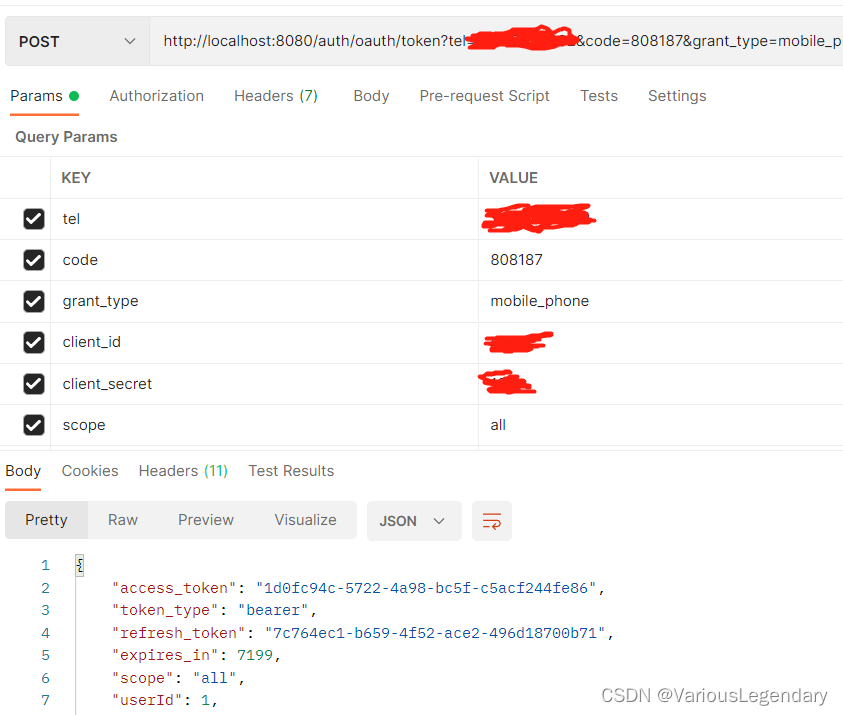
6测试





 扫一扫
扫一扫


 3018
3018

 被折叠的 条评论
为什么被折叠?
被折叠的 条评论
为什么被折叠?
 到【灌水乐园】发言





