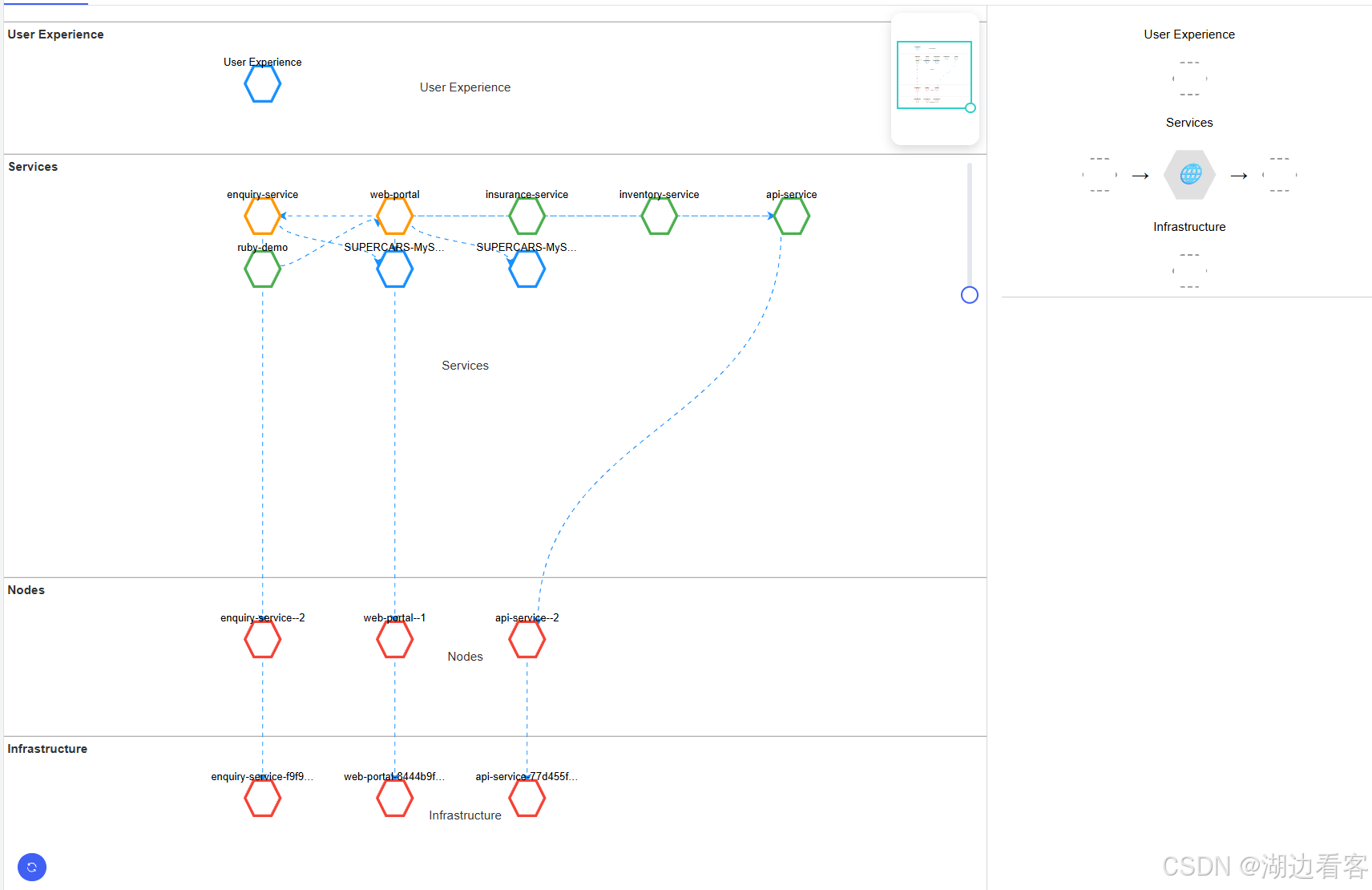
<template>
<div class="w-full h-full relative" v-loading="loading">
<!-- 画布外层容器(自适应) -->
<div class="absolute top-0 left-0 right-[460px] bottom-0" ref="leftRef">
<div ref="container" class="w-full h-full" style="background:#f5f5f5;"></div>
<!-- 画布 overlay:放区域名称 -->
<div ref="areaLabels" class="absolute top-0 left-0 pointer-events-none w-full h-full"></div>
<!-- 右上角 MiniMap -->
<div id="minimap" class="absolute top-2 right-2" style="
width:100px;
height:150px;
z-index:10;
border-radius:12px;
background: rgba(255,255,255,0.2);
backdrop-filter: blur(6px);
box-shadow: 0 4px 12px rgba(0,0,0,0.15);
overflow:hidden;
"></div>
<div class="absolute top-[178px] right-[0px]"
style="height:150px; z-index: 11; display:flex; align-items:center;">
<el-slider v-model="zoomLevel" :min="1" :max="5" :step="0.01" @input="onZoomChange" size="small"
vertical />
</div>
<!-- 重新渲染按钮,固定在画布左下角 -->
<el-button class="absolute left-4 bottom-4 z-20" type="primary" circle @click="refreshGraph">
<el-icon>
<Refresh />
</el-icon>
</el-button>
</div>
<!-- 右侧面板 -->
<div class="absolute top-0 right-0 bottom-0 w-[460px] bg-pink border-l border-gray-300">
<ServiceMapRight :mapJson="mapJson" :nowNode="nowNodeData" ref="rightRef" />
</div>
</div>
</template>
<script setup lang="ts">
import { ref, onMounted, onBeforeUnmount, nextTick } from 'vue'
import { Graph, Path } from '@antv/x6'
import { MiniMap } from '@antv/x6-plugin-minimap'
import ServicesMap from '@/generated/com/appdcn/ui/common/api/events/ServicesMap'
import { useRoute, useRouter } from 'vue-router'
import ServiceMapRight from '@/views/serviceMap/components/service_map_right.vue'
import { DagreLayout } from '@antv/layout'
import {
Refresh,
} from '@element-plus/icons-vue'
import { Console } from 'console'
const container = ref<HTMLDivElement | null>(null)
const leftRef = ref<HTMLDivElement | null>(null)
let graph: any
let lastSize = { w: 0, h: 0 }
interface Area {
id: string
x: number
y: number
width: number
height: number
}
interface TopologyGroup {
label: string
value: {
id: any
rowId: any
name: string | null
baselineReasonText: any
nodes: any[]
edges: any[]
properties: any
}
}
interface FlattenedGroup {
label: string
value: {
id: any
rowId: any
name: string | null
baselineReasonText: any
nodes: any[]
edges: any[]
properties: any
}
}
const loading = ref(false)
const mapJson = ref({
bottom_nodes: [],
right_outgoing: [],
top_nodes: [],
left_incoming: [],
targetNode: null,
})
const rightRef = ref<HTMLDivElement | any>(null)
const route = useRoute()
const router = useRouter()
const areaLabels = ref<HTMLDivElement | null>(null)
const zoomLevel = ref(1)
const nowNodeData: any = ref(null)
let roLeft: ResizeObserver | null = null
let areas: Record<string, Area> = {
'User Experience': { id: 'User Experience', x: 0, y: 50, width: 600, height: 150 },
'Services': { id: 'Services', x: 0, y: 250, width: 600, height: 150 },
'Nodes': { id: 'Nodes', x: 0, y: 450, width: 600, height: 150 },
'Infrastructure': { id: 'Infrastructure', x: 0, y: 650, width: 600, height: 150 },
}
let areasOrigin: Record<string, Area> = JSON.parse(JSON.stringify(areas))
const nodeMap: Record<string, any> = {}
let flattened = ref<FlattenedGroup[]>([])
Graph.registerEdge(
'dag-edge',
{
inherit: 'edge',
attrs: {
line: {
stroke: '#C2C8D5',
strokeWidth: 1,
targetMarker: null,
},
},
},
true,
)
Graph.registerConnector(
'algo-offset-connector',
(source, target) => {
const deltaY = target.y - source.y
const deltaX = target.x - source.x
const control = Math.abs(deltaY) / 2
// 多条边偏移(这里假设传了 edgeIndex 和 totalEdges)
// 如果没有,可在 addEdge 时通过 edge.data 存储 offset
const offset = target?.data?.offset ?? 0
const v1 = { x: source.x, y: source.y + control + offset }
const v2 = { x: target.x, y: target.y - control + offset }
return Path.normalize(
`M ${source.x} ${source.y}
C ${v1.x} ${v1.y} ${v2.x} ${v2.y} ${target.x} ${target.y}`
)
},
true
)
function renderAreaLabels() {
if (!areaLabels.value || !graph) return
areaLabels.value.innerHTML = ''
let prevBottom = 0 // 用于防止重叠
Object.values(areas).forEach(area => {
// 获取区域左上角在画布中的实际显示位置
const point = graph.localToClient({ x: area.x, y: area.y })
let labelY = Math.max(0, point.y) - 130 // 向上偏移
if (labelY < prevBottom) labelY = prevBottom
const div = document.createElement('div')
div.textContent = area.id
div.style.position = 'absolute'
div.style.left = `0px` // X固定
div.style.top = `${labelY}px`
div.style.width = `${area.width}px`
div.style.fontSize = '14px'
div.style.fontWeight = 'bold'
div.style.color = '#333'
div.style.pointerEvents = 'none'
div.style.background = 'rgba(255,255,255,0.08)'
div.style.padding = '2px 4px'
div.style.borderRadius = '4px'
areaLabels.value!.appendChild(div)
prevBottom = labelY + div.offsetHeight
})
}
onMounted(() => {
getServiceMapData()
renderAreaLabels()
})
function updateAreasHeightByFlattened(
areasOrigin: Record<string, Area>,
flattened: FlattenedGroup[]
) {
const newAreas: Record<string, Area> = {}
// 1. 先计算每个区域新的 height
Object.keys(areasOrigin).forEach(key => {
const area = areasOrigin[key]
// 找对应分类
const group = flattened.find(f => f.label === area.id)
const dynamicHeight =
group ? Math.max(150, group.value.nodes.length * 60) : area.height
newAreas[key] = {
...area,
height: dynamicHeight // 仅更新高度
}
})
// 2. 再统一计算 y(根据顺序累加)
const order = [
'User Experience',
'Services',
'Nodes',
'Infrastructure'
]
let currentY = 50 // 第一个区域的起始 y
const gap = 0 // 区域之间的间距
order.forEach(key => {
const area = newAreas[key]
newAreas[key] = {
...area,
y: currentY
}
currentY += area.height + gap
})
return newAreas
}
function flattenToFourCategories(data: TopologyGroup[]): FlattenedGroup[] {
// 初始化四类
const categories: Record<string, FlattenedGroup> = {
'User Experience': { label: 'User Experience', value: { id: null, rowId: null, name: null, baselineReasonText: null, nodes: [], edges: [], properties: null } },
'Services': { label: 'Services', value: { id: null, rowId: null, name: null, baselineReasonText: null, nodes: [], edges: [], properties: null } },
'Nodes': { label: 'Nodes', value: { id: null, rowId: null, name: null, baselineReasonText: null, nodes: [], edges: [], properties: null } },
'Infrastructure': { label: "Infrastructure", value: { id: null, rowId: null, name: null, baselineReasonText: null, nodes: [], edges: [], properties: null } },
}
data.forEach(group => {
const key = group.label in categories ? group.label : null
if (!key) return // 不在四类中,忽略
const cat = categories[key]
// 如果 value.name 为空,用 group.value.name 否则保留原名
if (group.value.name) {
cat.value.name = group.value.name
}
// 合并节点
group.value.nodes.forEach(node => {
// 避免重复节点
if (!cat.value.nodes.find(n => n.id === node.id)) {
cat.value.nodes.push(node)
}
})
// 合并边
group.value.edges.forEach(edge => {
// 避免重复边(可根据 source+target判定)
if (!cat.value.edges.find(e => e.sourceNode === edge.sourceNode && e.targetNode === edge.targetNode)) {
cat.value.edges.push(edge)
}
})
})
// 返回四类数组
return Object.values(categories)
}
function getServiceMapData() {
loading.value = true
let timeRange = route.query.timeRange as string
let appId = Number(route.query.application) as number
let mapId = Number(route.query.mapId ?? -1) as number
let baselineId = Number(route.query.baselineId ?? -1) as number
const serviceMap = ServicesMap.instance()
serviceMap.getFlowMapData(appId, timeRange, mapId, baselineId)
.then(async (res: any) => {
console.log(res, "------------------------当前的service_map数据------------------------")
flattened.value = flattenToFourCategories(res)
areas = updateAreasHeightByFlattened(areasOrigin, flattened.value)
console.log(areas, "------------------------更新后的areas------------------------")
await nextTick()
renderGraph(flattened.value)
setupObserver()
setupWindowResize()
// applyForceLayout()
console.log(flattened, "------------------------flattened------------------------")
loading.value = false
})
.catch((error: any) => {
console.log(error)
loading.value = false
})
}
function getColor(stats: any) {
if (!stats) return '#1890ff' // 默认灰色
const nodesCount: Record<string, number> = {
criticalNodes: stats.criticalNodes || 0,
warningNodes: stats.warningNodes || 0,
unknownNodes: stats.unknownNodes || 0,
normalNodes: stats.normalNodes || 0,
}
const maxValue = Math.max(...Object.values(nodesCount))
if (maxValue > 0) {
// 找出最大值对应的类别
const maxKeys = Object.keys(nodesCount).filter(k => nodesCount[k] === maxValue)
const key = maxKeys[0]
const colorMap: Record<string, string> = {
criticalNodes: '#f44336', // 红
warningNodes: '#ff9800', // 橙
unknownNodes: '#ffeb3b', // 黄
normalNodes: '#4caf50', // 绿
}
return colorMap[key] || '#1890ff'
}
// 如果没有节点数量,则根据 healthy 判断
if (stats.healthy === false) return '#f44336' // 红色
if (stats.healthy === true) return '#4caf50' // 绿色
return '#1890ff' // 默认灰色
}
// 添加每个区域内部的节点(flattened 数据)
function renderFlattened(flattened: FlattenedGroup[]) {
flattened.forEach(group => {
const area = areas[group.label]
if (!area) return
const nodes = group.value.nodes
nodes.forEach((node, i) => {
const nodeId = `node-${node.id}`
if (!graph.getCellById(nodeId)) {
const strokeColor = getColor(node.componentHealthStats) // 根据健康状态获取颜色
const nodea = graph.addNode({
id: nodeId,
x: area.x + 50 + (i % 5) * 150, // 简单网格布局
y: area.y + 50 + Math.floor(i / 5) * 60,
width: 40,
height: 40,
shape: 'polygon',
attrs: {
body: {
refPoints: '0,10 10,0 30,0 40,10 30,20 10,20', // 六边形路径
fill: '#fff',
stroke: strokeColor,
strokeWidth: 3,
},
label: {
text: node.name || ' ',
fontSize: 12,
fill: '#000',
refX: 0.5,
refY: 1,
textAnchor: 'middle',
textVerticalAnchor: 'bottom',
y: 2,
pointerEvents: 'none',
textWrap: {
width: 120, // 最大宽度 px
height: 20, // 最大高度 px
ellipsis: true, // 超出显示省略号
},
},
},
data: { area: group.label, isArea: false, raw: node },
zIndex: 1,
})
nodeMap[node.id] = nodea
}
})
// 添加边
group.value.edges.forEach(edge => {
const s = nodeMap[edge.sourceNode]
const t = nodeMap[edge.targetNode]
if (!s || !t) return
const sourceId = `node-${edge.sourceNode}`
const targetId = `node-${edge.targetNode}`
if (!graph.getCellById(sourceId) || !graph.getCellById(targetId)) return
if (!graph.getEdges().find(e => e.getSourceCellId() === sourceId && e.getTargetCellId() === targetId)) {
const strokeColor = getColor(s?.data?.componentHealthStats || t?.data?.componentHealthStats)
graph.addEdge({
shape: 'dag-edge', // 默认 edge 可以加 ant-line 样式
connector: { name: 'algo-offset-connector' },
source: { cell: sourceId },
target: { cell: targetId },
attrs: {
line: {
stroke: strokeColor, strokeWidth: 1,
targetMarker: { name: 'classic', width: 8, height: 8, offset: 0 },
strokeDasharray: '5 5',
class: 'ant-line', // 动态虚线关键
},
},
zIndex: 0,
})
}
})
})
}
function renderGraph(flattened:any) {
const c = container.value
const l = leftRef.value
if (!c || !l) return
const rect = l.getBoundingClientRect()
const w = rect.width
const h = rect.height
lastSize = { w, h }
if (!graph) {
graph = new Graph({
container: container.value!,
width: w,
height: h,
grid: false,
panning: true,
background: { color: '#ffffff' },
interacting: (cellView) => {
const cell = cellView.cell
return {
nodeMovable: !cell.data?.isArea, // 区域不可拖,其他可拖
}
},
mousewheel: {
enabled: true,
zoomAtMousePosition: true,
minScale: 1,
maxScale: 5,
},
})
graph.use(
new MiniMap({
container: document.getElementById('minimap')!,
width: 100,
height: 150,
padding: 10,
graphOptions: {
async: true,
background: { color: 'transparent' },
grid: false,
},
viewportStyle: {
stroke: '#1890ff',
strokeWidth: 1,
fill: 'rgba(24, 144, 255, 0.08)',
},
}),
)
} else {
graph.resize(w, h)
return
}
// 添加区域节点(不可拖动)
Object.values(areas).forEach((area, index) => {
const hasTopLine = index === 0; // 第一个区域有上边框
const node = graph?.addNode({
id: `area-${area.id}`,
shape: 'rect',
x: area.x,
y: area.y,
width: area.width,
height: area.height,
attrs: {
body: { fill: 'none', stroke: 'none' }, // 去掉背景和边框
label: { text: `${area.id}`, fill: '#333', fontSize: 14 },
topLine: hasTopLine
? {
stroke: '#999',
strokeWidth: 1,
fill: 'none',
d: `M-100000,0 L100000,0`, // 上边框路径
}
: undefined,
bottomLine: {
stroke: '#999',
strokeWidth: 1,
fill: 'none',
d: `M-100000,${area.height} L100000,${area.height}`, // 下边框路径
},
},
markup: [
{ tagName: 'rect', selector: 'body' },
...(hasTopLine ? [{ tagName: 'path', selector: 'topLine' }] : []),
{ tagName: 'path', selector: 'bottomLine' },
{ tagName: 'text', selector: 'label' },
],
data: { isArea: true, areaId: area.id },
zIndex: 0,
})
})
graph?.on('node:change:size', ({ node, options }) => {
console.log(node, options, "--------------------node:change:size")
if (options.skipParentHandler) {
return
}
if (node.data?.isArea) {
const bbox = node.getBBox()
node.attr('bottomLine/d', `M-100000,${bbox.height} L100000,${bbox.height}`)
}
})
// 阻止区域节点拖动
graph?.on('node:dragstart', ({ node, e }) => {
console.log(node, "===============node:dragstart")
if (node.data?.isArea) {
e.stopPropagation() // 阻止默认事件
node.stopAnimate() // 停止拖动
}
})
// 内部节点拖动逻辑
graph?.on('node:mousemove', ({ node }) => {
console.log(node, node.data.isArea, "===============node:mousemove")
if (!node.data?.area || node.data.isArea) {
return // 跳过区域节点
}
const areaKey = node.data.area
const area = areas[areaKey]
const box = node.getBBox()
let { x, y } = node.getPosition()
// =============== 左右撑 ===============
const rightOver = x + box.width + 10 - (area.x + area.width)
if (rightOver > 0) {
area.width += rightOver
graph?.getCellById(`area-${areaKey}`)?.resize(area.width, area.height)
}
const leftOver = area.x + 10 - x
if (leftOver > 0) {
area.x -= leftOver
area.width += leftOver
const areaCell = graph?.getCellById(`area-${areaKey}`)
areaCell?.position(area.x, area.y)
areaCell?.resize(area.width, area.height)
x += leftOver
}
// 最终锁定
x = Math.max(area.x + 10, Math.min(x, area.x + area.width - box.width - 10))
// ---------------- 往下顶 ----------------
const bottomOver = y + box.height + 10 - (area.y + area.height)
if (bottomOver > 0) {
area.height += bottomOver
graph?.getCellById(`area-${areaKey}`)?.resize(area.width, area.height)
pushDownAreas(areaKey, bottomOver)
renderAreaLabels() // 更新 label
}
// ---------------- 往上顶 ----------------
const topOver = area.y + 10 - y
if (topOver > 0) {
area.y -= topOver
area.height += topOver
graph?.getCellById(`area-${areaKey}`)?.position(area.x, area.y)
graph?.getCellById(`area-${areaKey}`)?.resize(area.width, area.height)
pushUpAreas(areaKey, topOver)
renderAreaLabels() // 更新 label
}
// 锁定在区域内
y = Math.max(area.y + 10, Math.min(y, area.y + area.height - box.height - 10))
node.setPosition(x, y)
})
// 点击事件
graph.on('node:click', ({ node, e }) => {
e.stopPropagation()
// 如果是群组
if (node.data?.isGroup) {
console.log('点击了群组:', node)
return
}
rightRef.value?.refreshMap(true)
nowNodeData.value = node.data.raw
console.log(node.data, "----------------当前点击的node节点")
const groupNode: any = node.data.raw
let timeRange = route.query.timeRange as string
let appId = Number(route.query.application) as number
let mapId = Number(route.query.mapId ?? -1) as number
let baselineId = Number(route.query.baselineId ?? -1) as number
ServicesMap.instance().getNeighbors(
appId,
timeRange,
mapId,
baselineId,
groupNode?.idNum,
node.data?.area
).then((res: any) => {
rightRef.value?.refreshMap(false)
console.log('获取到的邻居节点数据:', res)
mapJson.value = {
bottom_nodes: res.bottom_nodes || [],
right_outgoing: res.right_outgoing || [],
top_nodes: res.top_nodes || [],
left_incoming: res.left_incoming || [],
targetNode: res.targetNode || null,
}
// 这里可以处理邻居节点数据,比如高亮显示或弹出详情
}).catch((error: any) => {
rightRef.value?.refreshMap(false)
console.error('获取邻居节点失败:', error)
})
// 普通节点
console.log('点击了节点:', node)
console.log('节点数据:', node.getData())
})
graph?.on('scale', ({ sx }) => {
console.log("===============scale ")
zoomLevel.value = Number(sx.toFixed(2))
renderAreaLabels()
})
graph.on('translate', () => {
console.log("===============translate ")
renderAreaLabels()
})
renderFlattened(flattened)
graph.centerContent()
}
// 下方区域移动
function pushDownAreas(areaKey: string, delta: number) {
console.log(areaKey, delta, "===============pushDownAreas")
const keys = Object.keys(areas)
const idx = keys.indexOf(areaKey)
for (let i = idx + 1; i < keys.length; i++) {
const key = keys[i]
areas[key].y += delta
graph?.getCellById(`area-${key}`)?.position(areas[key].x, areas[key].y)
// 区域内节点同步移动
graph?.getNodes().forEach(node => {
if (node.data.area === key) {
const pos = node.getPosition()
node.setPosition(pos.x, pos.y + delta)
}
})
}
}
// 上方区域移动
function pushUpAreas(areaKey: string, delta: number) {
console.log(areaKey, delta, "===============pushUpAreas")
const keys = Object.keys(areas)
const idx = keys.indexOf(areaKey)
if (idx > 0) {
for (let i = idx - 1; i >= 0; i--) {
const key = keys[i]
areas[key].y -= delta
graph?.getCellById(`area-${key}`)?.position(areas[key].x, areas[key].y)
// 上方区域的节点也跟随
graph?.getNodes().forEach(node => {
if (node.data.area === key) {
const pos = node.getPosition()
node.setPosition(pos.x, pos.y - delta)
}
})
}
}
}
function onZoomChange(val: number) {
if (graph) {
graph?.zoomTo(val)
graph?.centerContent()
}
}
async function refreshGraph() {
loading.value = true
mapJson.value = {
bottom_nodes: [],
right_outgoing: [],
top_nodes: [],
left_incoming: [],
targetNode: null,
}
nowNodeData.value = null
if (graph) {
destroy()
graph.dispose()
graph = null
}
try {
await getServiceMapData() // 确保接口返回后再渲染
} catch (e) {
console.error(e)
loading.value = false
}
}
function setupObserver() {
const l = leftRef.value
if (!l) return
roLeft = new ResizeObserver(() => {
renderGraph(flattened.value)
})
roLeft.observe(l)
}
function destroy() {
if (roLeft && leftRef.value) { try { roLeft.unobserve(leftRef.value) } catch { } roLeft.disconnect() }
if (graph) graph.dispose()
window.removeEventListener('resize', renderGraph)
}
function setupWindowResize() {
window.addEventListener('resize', renderGraph)
}
onBeforeUnmount(() => {
destroy()
})
</script>
<style lang="scss" scoped>
:deep(.ant-line) {
animation: ant-line 1.5s infinite linear;
}
@keyframes ant-line {
to {
stroke-dashoffset: -20;
}
}
</style>





 扫一扫
扫一扫


 1469
1469

 被折叠的 条评论
为什么被折叠?
被折叠的 条评论
为什么被折叠?
 到【灌水乐园】发言





