


1.准备工作
1.使用itextpdf直接修改PDF
2.准备一份模板pdf
3.使用Adobe Acrobat DC打开
4.选择工具->准备表单
5.在PDF中添加文本域
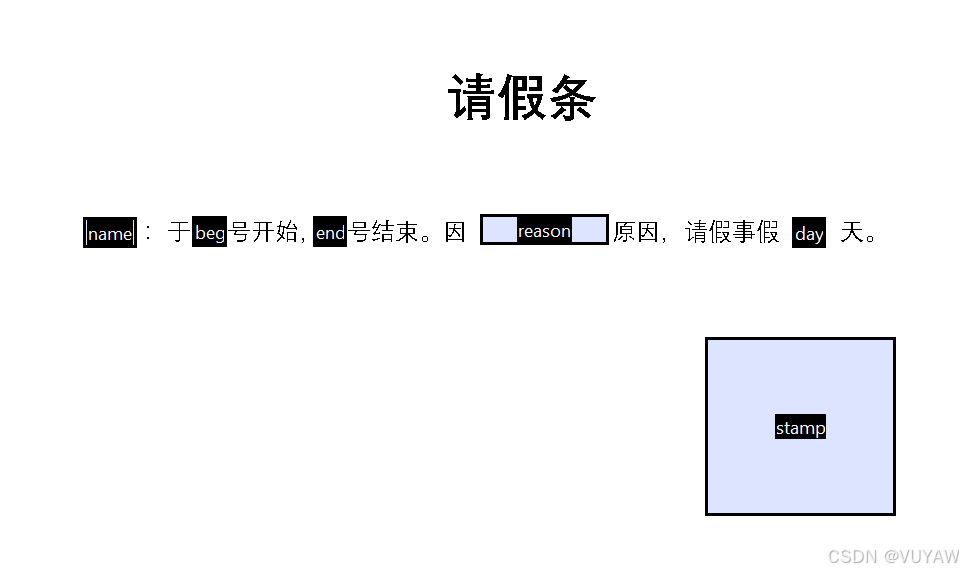
2.引入依赖
<!--引入itextpdf依赖-->
<dependency>
    <groupId>com.itextpdf</groupId>
    <artifactId>itextpdf</artifactId>
    <version>5.5.13</version>
</dependency>
<!--此依赖中包含中文字体-->
<dependency>
    <groupId>com.itextpdf</groupId>
    <artifactId>itext-asian</artifactId>
    <version>5.2.0</version>
</dependency>
3.测试代码
import com.itextpdf.text.DocumentException;
import com.itextpdf.text.Image;
import com.itextpdf.text.Rectangle;
import com.itextpdf.text.pdf.*;
import org.junit.jupiter.api.Test;

import java.io.ByteArrayOutputStream;
import java.io.FileOutputStream;
import java.io.IOException;
import java.util.*;

//@SpringBootTest
class PdfDemoApplicationTests {

    @Test
    void contextLoads() throws Exception {

        // pdf文件
        String fileName = "src/main/resources/stu.pdf";

        // 读取pdf文件
        PdfReader pdfReader = new PdfReader(fileName);

        // 输出内存流
        ByteArrayOutputStream bos = new ByteArrayOutputStream();

        // pdf签章
        PdfStamper pdfStamper = new PdfStamper(pdfReader, bos);

        // 获取表单域
        AcroFields fields = pdfStamper.getAcroFields();

        // 设置中文字体
        ArrayList<BaseFont> fonts = new ArrayList<>();
        fonts.add(BaseFont.createFont("STSong-Light", "UniGB-UCS2-H", BaseFont.NOT_EMBEDDED));
        fields.setSubstitutionFonts(fonts);

        // 添加文本
        fillData(fields);

        // 添加图片
        List<AcroFields.FieldPosition> list = fields.getFieldPositions("stamp");
        Rectangle rectangle = list.get(0).position;
        Image image = Image.getInstance("src/main/resources/logo.png");
        image.scaleToFit(rectangle.getWidth(), rectangle.getHeight());
        image.setBorder(2);
        image.setAbsolutePosition(
                list.get(0).position.getLeft() + (rectangle.getWidth() - image.getScaledWidth() )
                , list.get(0).position.getTop() - (rectangle.getHeight()));
        PdfContentByte cb = pdfStamper.getOverContent((int)list.get(0).page);
        cb.addImage(image);

        // 关闭pdf签章
        pdfStamper.close();

        // 生成结果pdf
        FileOutputStream fileOutputStream = new FileOutputStream("res.pdf");
        fileOutputStream.write(bos.toByteArray());
        fileOutputStream.close();
        bos.close();

    }

    private void fillData(AcroFields fields) throws DocumentException, IOException {
        Map<String,String> data = new HashMap<>();
        data.put("name", "张三");
        data.put("begin", "01");
        data.put("end", "05");
        data.put("reason", "班长要结婚了");
        data.put("day", "4");

        Set<Map.Entry<String, String>> entries = data.entrySet();
        for (Map.Entry<String, String> entry : entries) {
            fields.setFieldProperty(entry.getKey(), "textsize", 9.3f, null);
            fields.setField(entry.getKey(), entry.getValue());

        }
    }

}





 扫一扫
扫一扫


 524
524

 被折叠的 条评论
为什么被折叠?
被折叠的 条评论
为什么被折叠?
 到【灌水乐园】发言





