


 本文解决了尝试从本地实例或远程位置/网络驱动器备份或还原SQL数据库时遇到的错误消息问题。通常是因为路径不存在或当前登录账户没有访问权限导致。文章提供了检查网络设置和SQL Server服务配置的方法。
form: http://deepindera.blogspot.sg/2010/10/database-engine-service-could-not.html
ave you encountered this error message while trying to back up or restore a sql database from or to your local instance from/to remote location or network drive ??
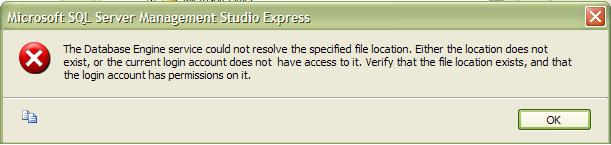
The message specified here is quite clear that
- Either location does not exist (I know you can see the drive folder open, just make sure path spellings you are entering into sql backup/restore wizard are correct)
- Current login account does not have access to it. (yea, i know you can access the remote network folder (where you want restore or back up from) in windows explorer using the same login (generally windows login and you are connected to local sql server instance using same windows login)
If your network protocols are enabled liek TCP/IP then check
Go to control panel -> services OR open run command and type services.msc
This brings you list of all the services running on your current machine. Look for SQL Server in that list and right click and open properties
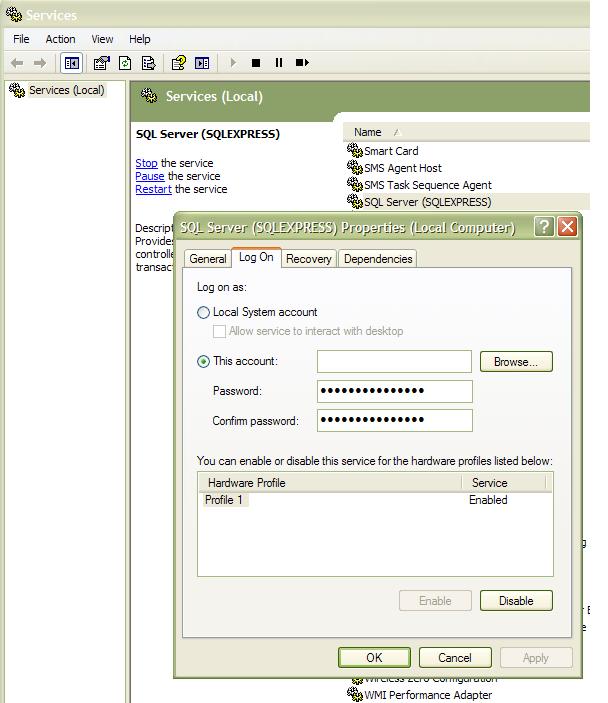
Now make sure that you have same account/credentials specified here (which have access to network folder). Restart sql server using same dialog here (under general).





 扫一扫
扫一扫


 7240
7240

 被折叠的 条评论
为什么被折叠?
被折叠的 条评论
为什么被折叠?
 到【灌水乐园】发言





