





 本文介绍如何使用Neo4j嵌入式数据库,包括项目配置、节点和关系的创建、查询、更新及删除操作。通过具体示例,演示了如何在Neo4j中进行数据管理。
项目的创建及配置
因为Neo4j依赖的jar包比较多,所以推荐使用Maven来管理。
首先创建一个Maven Project,添加依赖:

<dependency>
    <groupId>org.neo4j</groupId>
    <artifactId>neo4j</artifactId>
    <version>3.2.6</version>
</dependency>
使用的是3.2.6版本,对应版本的Neo4j安装地址摸我。
使用嵌入式数据库
配置好之后,就可以开始了,第一步是学习开启和关闭数据库。
无论是创建一个新的数据库,还是打开一个已有的数据库,首先都需要创建一个GraphDatabaseService实例。
graphDb = new GraphDatabaseFactory().newEmbeddedDatabase( DB_PATH );
GraphDatabaseService实例可以被多个线程共享,但是一个数据库只允许有一个Service实例。
关闭数据库可以调用shutdown()方法。
为了确保数据库正确地关闭,可以添加一个ShutdownHook来实现关闭数据库的动作。
private static void registerShutdownHook(final GraphDatabaseService graphDb) {
        Runtime.getRuntime().addShutdownHook(new Thread() {
            @Override
            public void run() {
                graphDb.shutdown();
            }
        });
    }
还可以通过API对数据库的一些配置进行设置。
一种方法是加载.conf配置文件。
GraphDatabaseService graphDb = new GraphDatabaseFactory()
    .newEmbeddedDatabaseBuilder( testDirectory.graphDbDir() )
    .loadPropertiesFromFile( pathToConfig + "neo4j.conf" )
    .newGraphDatabase();
另一种方法就是通过方法来添加。
GraphDatabaseService graphDb = new GraphDatabaseFactory()
    .newEmbeddedDatabaseBuilder( testDirectory.graphDbDir() )
    .setConfig( GraphDatabaseSettings.pagecache_memory, "512M" )
    .setConfig( GraphDatabaseSettings.string_block_size, "60" )
    .setConfig( GraphDatabaseSettings.array_block_size, "300" )
    .newGraphDatabase();
创建一个只读的数据库,数据库必须已经存在。
graphDb = new GraphDatabaseFactory().newEmbeddedDatabaseBuilder( dir )
        .setConfig( GraphDatabaseSettings.read_only, "true" )
        .newGraphDatabase();
更多配置信息可以看GraphDatabaseSettings类的文档。
创建节点和关系
图数据库是一个有向图,由通过关系Relationships连接的节点Nodes构成,节点和关系可以有自己的属性Properties。
关系的类型可以通过枚举enum创建(Label也可以):
private static enum RelTypes implements RelationshipType
{
    RELEASED;
}
在Neo4j中,对于数据库的操作需要在一个事务transaction中执行。
try ( Transaction tx = graphDb.beginTx() )
{
    // 数据库操作写在事务提交之前
    tx.success();
}
下面是一个简单的实例,实现了节点和关系的创建。
try (Transaction tx = graphDb.beginTx()) {
            // 创建标签
            label1 = Label.label("Musician");
            label2 = Label.label("Album");
            // 创建节点
            node1 = graphDb.createNode(label1);
            node1.setProperty("name", "Jay Chou");
            node2 = graphDb.createNode(label2);
            node2.setProperty("name", "Fantasy");
            // 创建关系及属性
            relationship = node1.createRelationshipTo(node2, RelTypes.RELEASED);
            relationship.setProperty("date", "2001-09-14");
            // 结果输出
            System.out.println("created node name is" + node1.getProperty("name"));
            System.out.println(relationship.getProperty("date"));
            System.out.println("created node name is" + node2.getProperty("name"));
            // 提交事务
            tx.success();
        }
对于节点,除了设置属性,还可以添加标签Labels。添加标签之后就相当于对节点进行了分组,使节点的查询和管理更加清晰和方便,并且提高了查询的性能。标签是一个可选项,没有标签也是可以的。
与关系数据库相比,标签相当于表名。一个节点相当于表中的一行数据,节点的属性就是字段。区别是,一个节点可以有多个标签。
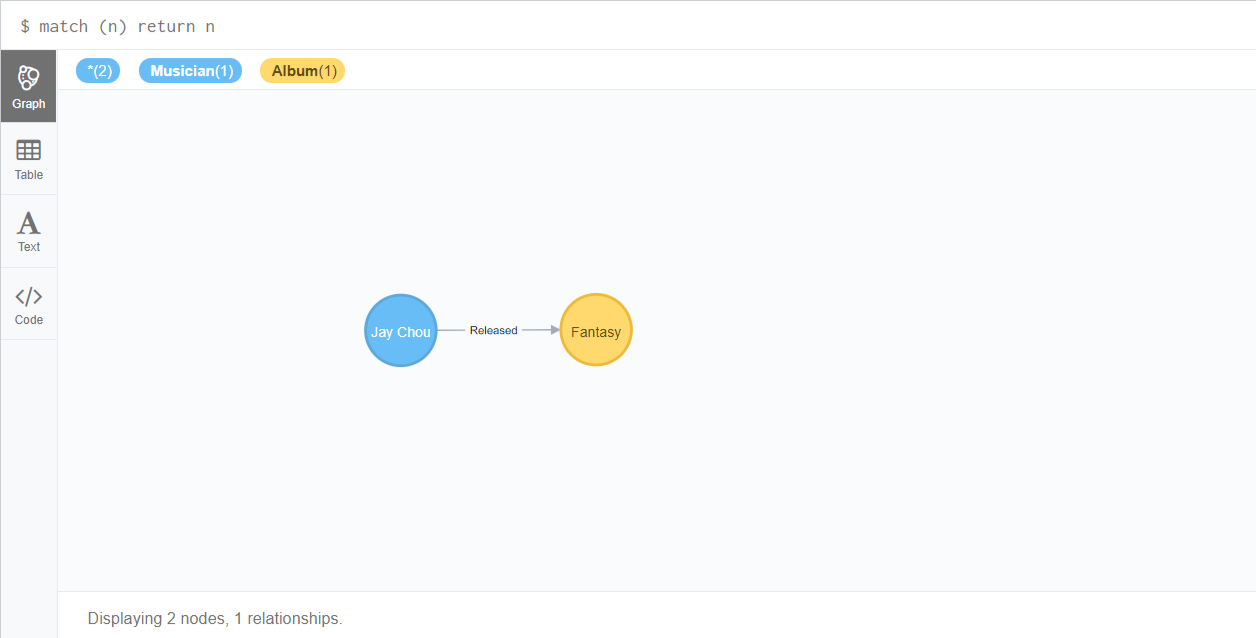
可以看到我们创建了两个节点,名字是“周杰伦”和“《范特西》”,对应的标签分别是音乐家和专辑。
他们之间通过“发行”这个关系连接,其中发行的属性为发行日期。
打开Neo4j数据库,输入查询语句match (n) return n,可以看到数据被写入了进来。
查询及更新
知道了节点的标签和一条属性,就可以通过findNode()方法查询节点。
然后使用setProperty()方法来更新和添加属性。
try (Transaction tx = graphDb.beginTx()) {
            // 查询节点
            Label label = Label.label("Musician");
            Node node = graphDb.findNode(label, "name", "Jay Chou");
            System.out.println("query node name is " + node.getProperty("name"));
            // 更新节点
            node.setProperty("birthday", "1979-01-18");
            System.out.println(node.getProperty("name") + "'s birthday is " + node.getProperty("birthday", new String()));
            // 提交事务
            tx.success();
        }
打开Neo4j查看结果:

删除关系和节点
删除数据时,只需要执行相关实体对应的delete()方法即可。
执行删除操作时,需要遵守如下规则:删除节点时,如果该节点存在关系,则必须先删除关系。这么做的目的是保证一条关系永远有起始和结束节点。
try (Transaction tx = graphDb.beginTx()) {
            // 获得节点
            Label label = Label.label("Album");
            Node node = graphDb.findNode(label, "name", "Fantasy");
            // 获得关系
            Relationship relationship = node.getSingleRelationship(RelTypes.Released, Direction.INCOMING);
            // 删除关系和节点
            relationship.delete();
            relationship.getStartNode().delete();
            node.delete();
            tx.success();
        }
完整代码
  1 package edu.heu.kg.graphdb;
  2
  3 import java.io.File;
  4
  5 import org.neo4j.graphdb.Direction;
  6 import org.neo4j.graphdb.GraphDatabaseService;
  7 import org.neo4j.graphdb.Label;
  8 import org.neo4j.graphdb.Node;
  9 import org.neo4j.graphdb.Relationship;
 10 import org.neo4j.graphdb.RelationshipType;
 11 import org.neo4j.graphdb.Transaction;
 12 import org.neo4j.graphdb.factory.GraphDatabaseFactory;
 13
 14 /**
 15  * @ClassName: GraphDatabaseHelloWorld
 16  * @Description: TODO
 17  * @author LJH
 18  * @date 2017年12月22日 下午4:09:33
 19  */
 20 public class GraphDatabaseHelloWorld {
 21
 22     private static final File DB_PATH = new File("D:\\Neo4jDb");
 23     private static GraphDatabaseService graphDb;
 24
 25     private static void registerShutdownHook(final GraphDatabaseService graphDb) {
 26         Runtime.getRuntime().addShutdownHook(new Thread() {
 27             @Override
 28             public void run() {
 29                 graphDb.shutdown();
 30             }
 31         });
 32     }
 33
 34     private static enum RelTypes implements RelationshipType {
 35         RELEASED;
 36     }
 37
 38     @SuppressWarnings("unused")
 39     private static void addData() {
 40         Node node1;
 41         Node node2;
 42         Label label1;
 43         Label label2;
 44         Relationship relationship;
 45
 46         try (Transaction tx = graphDb.beginTx()) {
 47             // 创建标签
 48             label1 = Label.label("Musician");
 49             label2 = Label.label("Album");
 50             // 创建节点
 51             node1 = graphDb.createNode(label1);
 52             node1.setProperty("name", "Jay Chou");
 53             node2 = graphDb.createNode(label2);
 54             node2.setProperty("name", "Fantasy");
 55             // 创建关系及属性
 56             relationship = node1.createRelationshipTo(node2, RelTypes.Released);
 57             relationship.setProperty("date", "2001-09-14");
 58             // 结果输出
 59             System.out.println("created node name is " + node1.getProperty("name"));
 60             System.out.println(relationship.getProperty("date"));
 61             System.out.println("created node name is " + node2.getProperty("name"));
 62             // 提交事务
 63             tx.success();
 64         }
 65         graphDb.shutdown();
 66     }
 67
 68     @SuppressWarnings("unused")
 69     private static void queryAndUpdate() {
 70         try (Transaction tx = graphDb.beginTx()) {
 71             // 查询节点
 72             Label label = Label.label("Musician");
 73             Node node = graphDb.findNode(label, "name", "Jay Chou");
 74             System.out.println("query node name is " + node.getProperty("name"));
 75             // 更新节点
 76             node.setProperty("birthday", "1979-01-18");
 77             System.out
 78                     .println(node.getProperty("name") + "'s birthday is " + node.getProperty("birthday", new String()));
 79             // 提交事务
 80             tx.success();
 81         }
 82         graphDb.shutdown();
 83     }
 84
 85     @SuppressWarnings("unused")
 86     private static void delete() {
 87         try (Transaction tx = graphDb.beginTx()) {
 88             // 获得节点
 89             Label label = Label.label("Album");
 90             Node node = graphDb.findNode(label, "name", "Fantasy");
 91             // 获得关系
 92             Relationship relationship = node.getSingleRelationship(RelTypes.RELEASED, Direction.INCOMING);
 93             // 删除关系和节点
 94             relationship.delete();
 95             relationship.getStartNode().delete();
 96             node.delete();
 97             tx.success();
 98         }
 99         graphDb.shutdown();
100     }
101
102     public static void main(String[] args) {
103         graphDb = new GraphDatabaseFactory().newEmbeddedDatabase(DB_PATH);
104         registerShutdownHook(graphDb);
105         addData();
106         // queryAndUpdate();
107         // delete();
108
109     }
110
111 }
原文链接:http://www.cnblogs.com/justcooooode/p/8179202.html
参考资料
https://neo4j.com/docs/java-reference/3.2
《Neo4j 实战》





 扫一扫
扫一扫


 5710
5710

 被折叠的 条评论
为什么被折叠?
被折叠的 条评论
为什么被折叠?
 到【灌水乐园】发言





