





 本文介绍了Subversion(SVN)版本控制系统的概念及应用,详细阐述了SVNChina作为服务器的功能,包括项目提交、下载、更新及冲突解决等操作。同时,展示了如何在Android项目中配置SVN,实现组件化开发。
SVN介绍以及SVN China介绍
SVN是subversion的缩写,是一个开放源代码的版本控制系统,通过采用分支管理系统的高效管理,简而言之就是用于多个人共同开发同一个项目,实现共享资源,实现最终集中式的管理
SVN China相当于服务器,可以将项目提交上去,也可以通过版本库URL下载项目,修改了项目再提交(可以文件右击提交,也可以Studio里提交),下载的更新最新版本(先更新最新版本再修改提交,不然冲突)
SVN插件安装,SVN China账号创建

SVN提交同步,冲突解决
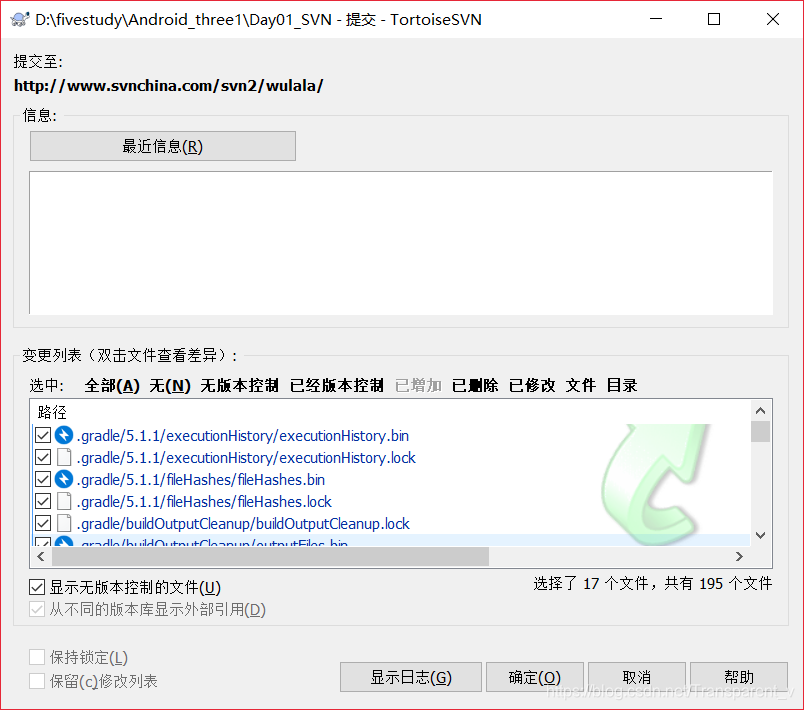
SVN回滚,组件化配置
创建两个Modle 分别配置
app
 //apply plugin: 'com.android.application'
apply plugin: 'calces.modules'

android {
    compileSdkVersion 28
    buildToolsVersion "28.0.3"
    defaultConfig {
        applicationId "com.example.day1"
        minSdkVersion 24
        targetSdkVersion 28
        versionCode 1
        versionName "1.0"
        testInstrumentationRunner "androidx.test.runner.AndroidJUnitRunner"
        javaCompileOptions {
            annotationProcessorOptions {
                arguments = [AROUTER_MODULE_NAME: project.getName()]
            }
        }
    }
    buildTypes {
        release {
            minifyEnabled false
            proguardFiles getDefaultProguardFile('proguard-android-optimize.txt'), 'proguard-rules.pro'
        }
    }
}

dependencies {
    implementation fileTree(dir: 'libs', include: ['*.jar'])
    implementation 'androidx.appcompat:appcompat:1.0.2'
    implementation 'androidx.constraintlayout:constraintlayout:1.1.3'
    testImplementation 'junit:junit:4.12'
    androidTestImplementation 'androidx.test:runner:1.2.0'
    androidTestImplementation 'androidx.test.espresso:espresso-core:3.2.0'
    implementation 'com.alibaba:arouter-api:1.5.0'
    annotationProcessor 'com.alibaba:arouter-compiler:1.2.2'
    implementation project(path: ':app1')
    implementation project(path: ':app2')
}
app1
//apply plugin: 'com.android.application'
apply plugin: 'calces.modules'

android {
    compileSdkVersion 28
    buildToolsVersion "28.0.3"


    defaultConfig {
        applicationId "com.example.app1"
        minSdkVersion 24
        targetSdkVersion 28
        versionCode 1
        versionName "1.0"

        testInstrumentationRunner "androidx.test.runner.AndroidJUnitRunner"

    }

    buildTypes {
        release {
            minifyEnabled false
            proguardFiles getDefaultProguardFile('proguard-android-optimize.txt'), 'proguard-rules.pro'
        }
    }

}

dependencies {
    implementation fileTree(dir: 'libs', include: ['*.jar'])

    implementation 'androidx.appcompat:appcompat:1.0.2'
    implementation 'androidx.constraintlayout:constraintlayout:1.1.3'
    testImplementation 'junit:junit:4.12'
    androidTestImplementation 'androidx.test:runner:1.2.0'
    androidTestImplementation 'androidx.test.espresso:espresso-core:3.2.0'
}
app2
//apply plugin: 'com.android.application'
apply plugin: 'calces.modules'

android {
    compileSdkVersion 28
    buildToolsVersion "28.0.3"


    defaultConfig {
        applicationId "com.example.app2"
        minSdkVersion 24
        targetSdkVersion 28
        versionCode 1
        versionName "1.0"

        testInstrumentationRunner "androidx.test.runner.AndroidJUnitRunner"

    }

    buildTypes {
        release {
            minifyEnabled false
            proguardFiles getDefaultProguardFile('proguard-android-optimize.txt'), 'proguard-rules.pro'
        }
    }

}

dependencies {
    implementation fileTree(dir: 'libs', include: ['*.jar'])

    implementation 'androidx.appcompat:appcompat:1.0.2'
    implementation 'androidx.constraintlayout:constraintlayout:1.1.3'
    testImplementation 'junit:junit:4.12'
    androidTestImplementation 'androidx.test:runner:1.2.0'
    androidTestImplementation 'androidx.test.espresso:espresso-core:3.2.0'
}
Activity
package com.example.day1;

import androidx.annotation.Nullable;
import androidx.appcompat.app.AppCompatActivity;
import androidx.fragment.app.Fragment;

import android.content.Intent;
import android.os.Bundle;
import android.util.Log;
import android.view.View;
import android.widget.Toast;

import com.alibaba.android.arouter.launcher.ARouter;

public class MainActivity extends AppCompatActivity {

    private static final String TAG = "MainActivity";

    @Override
    protected void onCreate(Bundle savedInstanceState) {
        super.onCreate(savedInstanceState);
        setContentView(R.layout.activity_main);

    }

    @Override
    protected void onActivityResult(int requestCode, int resultCode, @Nullable Intent data) {
        super.onActivityResult(requestCode, resultCode, data);
        if (requestCode == 100 & resultCode == RESULT_OK){
            Bundle bundle = data.getExtras();
            String message1 = (String) bundle.get("message");
            Log.i(TAG, "onActivityResult: 回传的值"+message1);
            Toast.makeText(this, message1, Toast.LENGTH_SHORT).show();
        }
    }

    //跳Module
    public void jump1(View view) {
        ARouter.getInstance().build("/app1/OneActivity","app1").withString("name","你好").navigation();
    }

    public void jump2(View view) {
        ARouter.getInstance().build("/app2/TwoActivity").navigation();
    }

    //跳Activity
    public void jump3(View view) {
        ARouter.getInstance().build("/app/Main2Activity","app").withString("message","你好").navigation();
    }

    //跳fragment
    public void jump4(View view) {
        Fragment fragment = (Fragment) ARouter.getInstance().build("/app/MyFragment").withString("message","你好").navigation();
        getSupportFragmentManager().beginTransaction().add(R.id.liner_id,fragment).commit();
    }
}





 扫一扫
扫一扫


 454
454

 被折叠的 条评论
为什么被折叠?
被折叠的 条评论
为什么被折叠?
 到【灌水乐园】发言





