


vaadin flow工程的项目结构简介
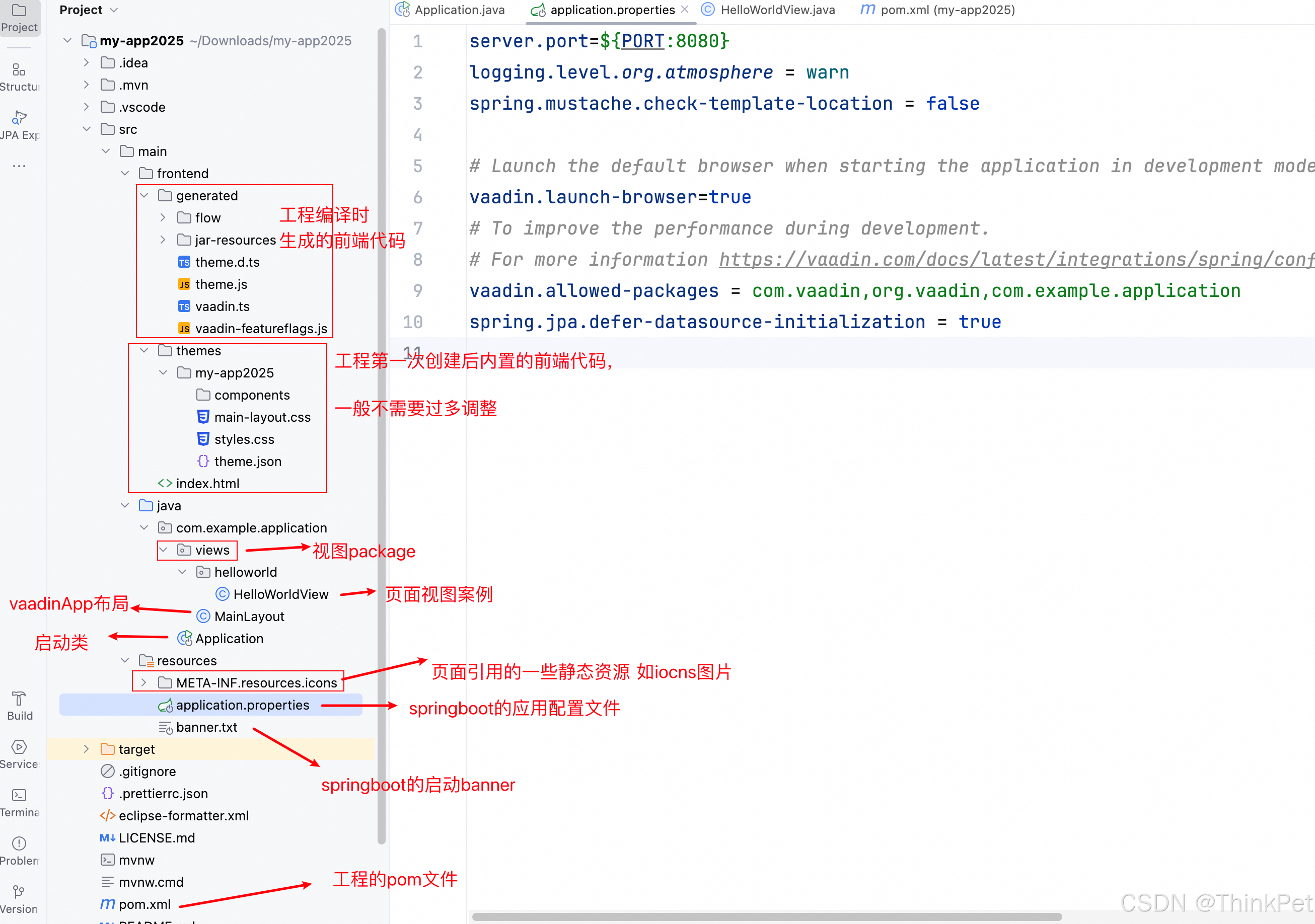
如图所示,vaadin flow工程的项目结构与传统maven工程有一个不同点就是,在src/main下有3个平级目录 frontend、java和resources;
-
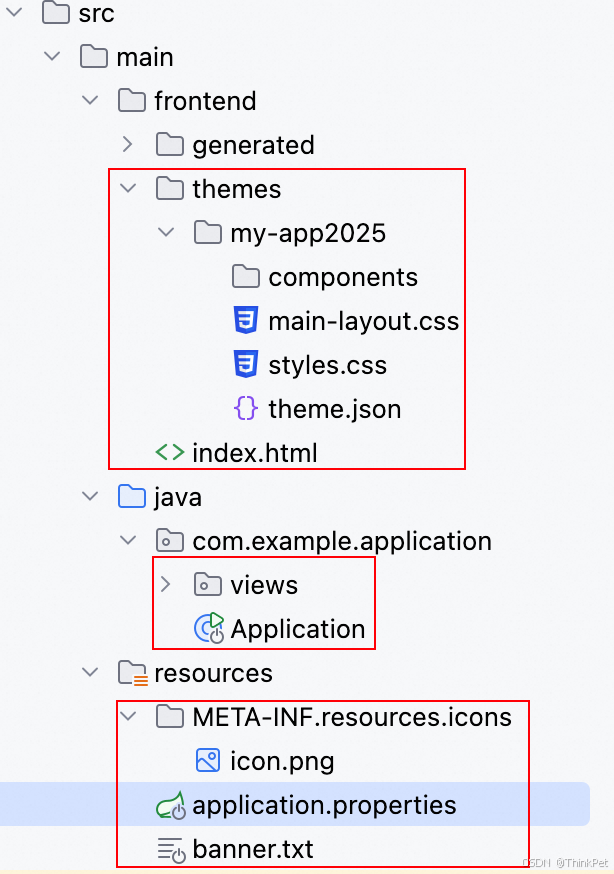
首先,当你从vaadin官方提供的start网站创建并下载到本地一个vaadin flow工程,这个工程代码里就已经包含了 src/main/frontend/themes目录 、src/main/frontend/index.html文件、src/main/java目录、src/main/resources目录
-
在工程的启动类中会有如下的默认代码,其中Theme注解是配置vaadinApp使用的主题,它的value值需要和src/main/frontend/themes目录中的主题包名保持一致,这里填的是my-app2025,则src/main/frontend/themes目录下也会有my-app2025主题包;
另外,工程默认的主题包是提供2中主题颜色的,配置Theme注解的variant属性即可发现变化,Lumo.DARK 是黑色模式 ,默认是白色模式(或者配置Lumo.LIGHT也行)
package com.example.application;

import com.vaadin.flow.component.page.AppShellConfigurator;
import com.vaadin.flow.theme.Theme;
import org.springframework.boot.SpringApplication;
import org.springframework.boot.autoconfigure.SpringBootApplication;

/**
 * The entry point of the Spring Boot application.
 *
 * Use the @PWA annotation make the application installable on phones, tablets
 * and some desktop browsers.
 *
 */
@SpringBootApplication
@Theme(value = "my-app2025") //不配置variant则默认白色主题色
//@Theme(value = "my-app2025",variant= Lumo.DARK)
public class Application implements AppShellConfigurator {


    public static void main(String[] args) {


        SpringApplication.run(Application.class, args);
    }
}
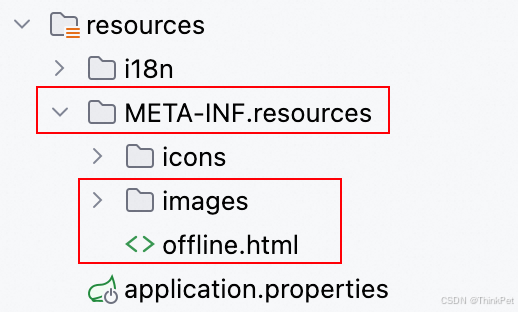
默认是不需要配置PWA注解的,但是如果你希望你的app能作为PWA在本地PC桌面使用(类似于vscode客户端) 或手机上使用(类似于快应用),那么你应该添加配置如下的代码和静态资源
@PWA(
        name = "Vaadin CRM",    //pwa名称
        shortName = "CRM",       //短名称
        offlinePath="/offline.html",    //无网络时展示的页面内容
        offlineResources = {

    "images/offline.png" }  //无网络时展示的静态资源
)
- 在工程的application.properties中会有如下的默认配置
# 配置项目启动端口号默认8080,
# 支持外部指定如 通过Java -jar app.jar --server.port=9090方式来传递参数
server.port=${

   PORT:8080}
# vaadin使用了atmosphere,默认日志级别是warn, 一般不用改动
logging.level.org.atmosphere = warn
# 是否检查静态模板文件存放位置-false是指启动时不检测
spring.mustache.check-template-location = false

# 工程启动完成后-是否打开电脑默认浏览器 true-打开
# Launch the default browser when starting the application in development mode
vaadin.launch-browser=true

# To improve the performance during development.
# For more information https://vaadin.com/docs/latest/integrations/spring/configuration#special-configuration-parameters

# vaadin需要扫描的代码包,默认会有以下3个包路径
vaadin.allowed-packages = com.vaadin,org.vaadin,com.example.application

# Spring Boot应用程序中的一个配置属性,用于延迟数据源的初始化。
# 当设置为 true 时,它将延迟数据源的初始化,直到实际需要连接池和数据库连接时。
# 这通常用于启动速度更快的场景,因为它不需要在启动时建立所有的数据库连接
spring.jpa.defer-datasource-initialization = true
- 工程的pom文件内容
<?xml version="1.0" encoding="UTF-8"?>
<project xmlns="http://maven.apache.org/POM/4.0.0"
xmlns:xsi="http://www.w3.org/2001/XMLSchema-instance"
xsi:schemaLocation="http://maven.apache.org/POM/4.0.0 http://maven.apache.org/xsd/maven-4.0.0.xsd">
<modelVersion>4.0.0</modelVersion>
<!-- Project from https://start.vaadin.com/project/3ad2a749-d1fb-423b-8c8b-e684877f64b8 -->
<groupId>com.example.application</groupId>
<artifactId>my-app2025</artifactId>
<name>my-app2025</name>
<version>1.0-SNAPSHOT</version>
<packaging>jar</packaging>
<properties>
<java.version>17</java.version>
<vaadin.version>24.6.0</vaadin.version>
</properties>
<parent>
<groupId>org.springframework.boot</groupId>
<artifactId>spring-boot-starter-parent</artifactId>
<version>3.4.1</version>
</parent>
<repositories>
<!-- <repository>-->
<!-- <id>Vaadin Directory</id>-->
<!-- <url>https://maven.vaadin.com/vaadin-addons</url>-->
<!-- <snapshots>-->
<!-- <enabled>false</enabled>-->
<!-- </snapshots>-->
<!-- </repository>-->
<!-- 如果默认配置下载不下来,则可以换成下边的阿里云maven仓库配置 -->
<repository>
<id>central</id>
<url>https://maven.aliyun.com/repository/central</url>
<releases>
<enabled>true</enabled>
</releases>
<snapshots>
<enabled>true</enabled>
</snapshots>
</< 最低0.47元/天 解锁文章






 扫一扫
扫一扫


 972
972

 被折叠的 条评论
为什么被折叠?
被折叠的 条评论
为什么被折叠?
 到【灌水乐园】发言





