



 本文详细介绍了SpringCloud服务端的搭建过程,包括服务端模块的创建、依赖配置、实体类定义、Mapper接口及实现、Service接口及实现、Controller编写等。并通过具体案例展示了如何实现登录功能和商品服务工程的创建。
springcloud小案例 上
中国加油,武汉加油!
篇幅较长,请配合目录观看
项目准备
1. 案例-服务端
1.1 新建springcloud-test-8081(module-maven)
1.2 导包
<?xml version="1.0" encoding="UTF-8"?>
<project xmlns="http://maven.apache.org/POM/4.0.0"
         xmlns:xsi="http://www.w3.org/2001/XMLSchema-instance"
         xsi:schemaLocation="http://maven.apache.org/POM/4.0.0 http://maven.apache.org/xsd/maven-4.0.0.xsd">
    <parent>
        <artifactId>nz1904-springcloud</artifactId>
        <groupId>com.wpj</groupId>
        <version>1.0-SNAPSHOT</version>
    </parent>
    <modelVersion>4.0.0</modelVersion>
    <artifactId>springcloud-test-8081</artifactId>
    <dependencies>
        <dependency>
            <groupId>org.springframework.boot</groupId>
            <artifactId>spring-boot-starter-jdbc</artifactId>
        </dependency>
        <dependency>
            <groupId>org.springframework.boot</groupId>
            <artifactId>spring-boot-starter-web</artifactId>
        </dependency>
        <dependency>
            <groupId>org.mybatis.spring.boot</groupId>
            <artifactId>mybatis-spring-boot-starter</artifactId>
            <version>2.0.1</version>
        </dependency>
        <dependency>
            <groupId>mysql</groupId>
            <artifactId>mysql-connector-java</artifactId>
            <version>5.1.28</version>
            <scope>runtime</scope>
        </dependency>
        <dependency>
            <groupId>org.springframework.boot</groupId>
            <artifactId>spring-boot-starter-test</artifactId>
            <scope>test</scope>
        </dependency>
        <!--导入Lombok依赖-->
        <dependency>
            <groupId>org.projectlombok</groupId>
            <artifactId>lombok</artifactId>
        </dependency>
        <!-- Eureka客户端 -->
        <dependency>
            <groupId>org.springframework.cloud</groupId>
            <artifactId>spring-cloud-starter-netflix-eureka-client</artifactId>
        </dependency>
        <!--监控依赖-->
        <dependency>
            <groupId>org.springframework.boot</groupId>
            <artifactId>spring-boot-starter-actuator</artifactId>
        </dependency>
        <dependency>
            <groupId>org.apache.httpcomponents</groupId>
            <artifactId>httpclient</artifactId>
            <version>4.5.8</version>
        </dependency>
    </dependencies>
    <!-- SpringCloud的依赖 -->
    <dependencyManagement>
        <dependencies>
            <dependency>
                <groupId>org.springframework.cloud</groupId>
                <artifactId>spring-cloud-dependencies</artifactId>
                <version>${spring-cloud.version}</version>
                <type>pom</type>
                <scope>import</scope>
            </dependency>
        </dependencies>
    </dependencyManagement>
    <build>
        <!--编译的时候同时也把包下面的xml同时编译进去-->
        <resources>
            <resource>
                <directory>src/main/java</directory>
                <includes>
                    <include>**/*.xml</include>
                </includes>
            </resource>
            <resource>
                <directory>src/main/resource</directory>
                <includes>
                    <include>**/*.xml</include>
                </includes>
            </resource>
        </resources>
    </build>
</project>
1.3 编写User和sql脚本
package com.wpj.bean;

import lombok.AllArgsConstructor;
import lombok.Data;
import lombok.NoArgsConstructor;

import java.io.Serializable;

@Data
@NoArgsConstructor
@AllArgsConstructor
public class User implements Serializable {
    private static final long serialVersionUID = -7172083955925888362L;
    private Integer id;
    private String username;
    private String password;
    private Integer sex;
}
DROP TABLE IF EXISTS `tb_user`;
CREATE TABLE `tb_user` (
  `id` int(11) NOT NULL,
  `username` varchar(255) DEFAULT NULL,
  `password` varchar(255) DEFAULT NULL,
  `age` int(11) DEFAULT NULL,
  PRIMARY KEY (`id`)
) ENGINE=InnoDB DEFAULT CHARSET=latin1;


INSERT INTO `tb_user` VALUES ('1', 'wpj', '123456', '18');
INSERT INTO `tb_user` VALUES ('2', 'jiekami', '123456', '18');
1.4 编写mapper
package com.wpj.mapper;

import com.wpj.bean.User;

public interface IUserMapper {
    User login(User user);
}
1.5 编写service及其impl
package com.wpj.service;

import com.wpj.bean.User;

public interface UserService {
    User login(User user);
}
package com.wpj.service.impl;

import com.wpj.bean.User;
import com.wpj.mapper.IUserMapper;
import com.wpj.service.UserService;
import org.springframework.beans.factory.annotation.Autowired;
import org.springframework.stereotype.Service;

@Service
public class UserServiceImpl implements UserService {

    @Autowired
    private IUserMapper iUserMapper;

    @Override
    public User login(User user) {
        return iUserMapper.login(user);
    }
}
1.6 编写application.properties
server.port=8081
# mybatis 别名扫描
mybatis.type-aliases-package=com.wpj.bean
# mapper.xml文件位置,如果没有映射文件,请注释掉
mybatis.mapper-locations=classpath:mapper/*.xml
# 连接四大参数
# 可省略,SpringBoot自动推断
spring.datasource.driverClassName=com.mysql.jdbc.Driver

spring.datasource.url=jdbc:mysql://127.0.0.1:3306/nz1904-springcloud?useUnicode=true&characterEncoding=utf-8
spring.datasource.username=root
spring.datasource.password=123456
# 服务的名字,注册到注册中心的名字,后期消费者来根据名字调用服务 可以重复
spring.application.name=springcloud-test
# EurekaServer地址
eureka.client.service-url.defaultZone=http://eureka.7001.com:7001/eureka
# 当调用getHostname获取实例的hostname时,返回ip而不是host名称
eureka.instance.prefer-ip-address=true
# 指定自己的ip信息,不指定的话会自己寻找
eureka.instance.ip-address=127.0.0.1
# 执行当前服务的应用ID  不可以重复  标识的是每一个具体的的服务
eureka.instance.instance-id=springcloud-test-producer-8081
1.7 testMapper
package com.wpj.test;

import com.wpj.mapper.IUserMapper;
import org.junit.Test;
import org.junit.runner.RunWith;
import org.springframework.boot.test.context.SpringBootTest;
import org.springframework.test.context.junit4.SpringRunner;

import javax.annotation.Resource;

@RunWith(SpringRunner.class)
@SpringBootTest
public class ServiceTest {
    @Resource
    private IUserMapper userMapper;

    @Test
    public void test1(){
        System.out.println(userMapper);
    }

}
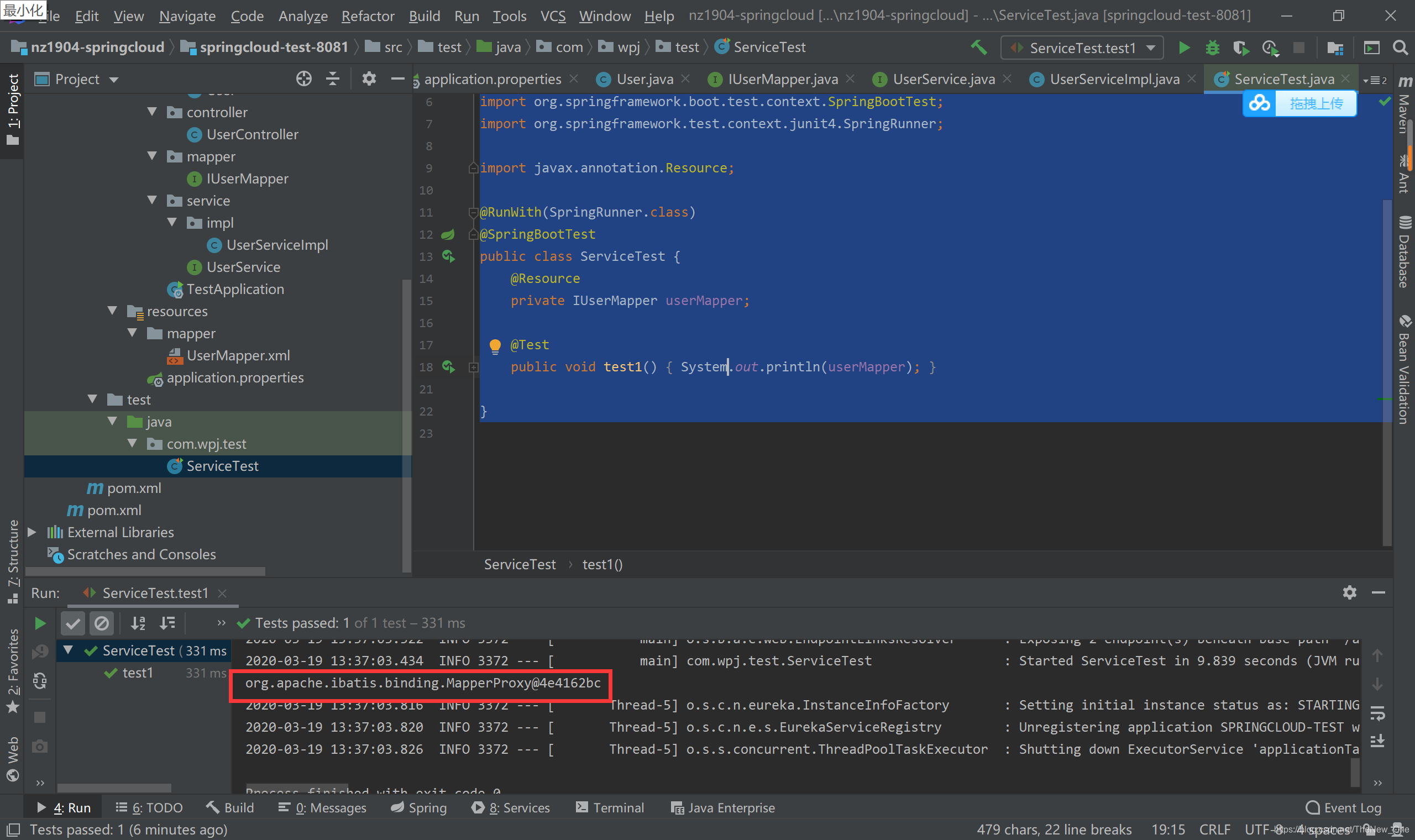
1.8 编写Controller
package com.wpj.controller;

import com.wpj.bean.User;
import com.wpj.service.UserService;
import org.springframework.beans.factory.annotation.Autowired;
import org.springframework.stereotype.Controller;
import org.springframework.web.bind.annotation.RequestBody;
import org.springframework.web.bind.annotation.RequestMapping;
import org.springframework.web.bind.annotation.ResponseBody;

@Controller
public class UserController {

    @Autowired
    private UserService userService;

    @RequestMapping("/user_login")
    @ResponseBody
    public User login(@RequestBody User user) {
        System.out.println("8082: " + user);
        return userService.login(user);
    }

}
1.10 编写程序入口
package com.wpj;

import org.mybatis.spring.annotation.MapperScan;
import org.springframework.boot.SpringApplication;
import org.springframework.boot.autoconfigure.SpringBootApplication;

@SpringBootApplication
@MapperScan(basePackages = {"com.wpj.mapper"})
public class TestApplication {
    public static void main(String[] args) {
        SpringApplication.run(TestApplication.class, args);
    }
}
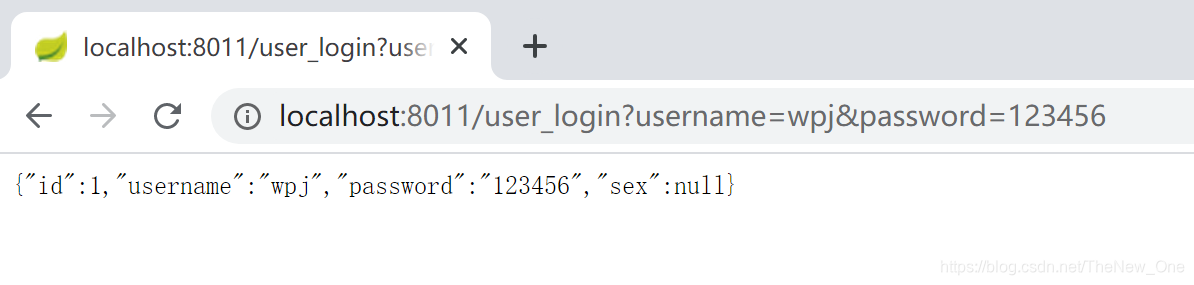
1.11 访问Controller测试
2. 案例-服务端
2.1 新建springcloud-test-8082(module-maven)
2.2 导包
<?xml version="1.0" encoding="UTF-8"?>
<project xmlns="http://maven.apache.org/POM/4.0.0"
         xmlns:xsi="http://www.w3.org/2001/XMLSchema-instance"
         xsi:schemaLocation="http://maven.apache.org/POM/4.0.0 http://maven.apache.org/xsd/maven-4.0.0.xsd">
    <parent>
        <artifactId>nz1904-springcloud</artifactId>
        <groupId>com.wpj</groupId>
        <version>1.0-SNAPSHOT</version>
    </parent>
    <modelVersion>4.0.0</modelVersion>

    <artifactId>springcloud-test-8082</artifactId>


    <dependencies>
        <dependency>
            <groupId>org.springframework.boot</groupId>
            <artifactId>spring-boot-starter-web</artifactId>
        </dependency>
        <!-- 添加OkHttp支持 发送远程调用的包-->
        <dependency>
            <groupId>com.squareup.okhttp3</groupId>
            <artifactId>okhttp</artifactId>
            <version>3.9.0</version>
        </dependency>
        <dependency>
            <groupId>org.springframework.boot</groupId>
            <artifactId>spring-boot-starter-test</artifactId>
            <scope>test</scope>
        </dependency>
        <!--导入Lombok依赖-->
        <dependency>
            <groupId>org.projectlombok</groupId>
            <artifactId>lombok</artifactId>
        </dependency>
        <dependency>
            <groupId>org.springframework.cloud</groupId>
            <artifactId>spring-cloud-starter-netflix-eureka-client</artifactId>
        </dependency>
        <!-- Ribbon重试机制-->
        <dependency>
            <groupId>org.springframework.retry</groupId>
            <artifactId>spring-retry</artifactId>
        </dependency>
        <!-- Feign -->
        <dependency>
            <groupId>org.springframework.cloud</groupId>
            <artifactId>spring-cloud-starter-openfeign</artifactId>
        </dependency>
        <!--thymeleaf模板-->
        <dependency>
            <groupId>org.springframework.boot</groupId>
            <artifactId>spring-boot-starter-thymeleaf</artifactId>
        </dependency>
        <!--解决thymeleaf模板引擎语法过于严格报错问题 -->
        <!--启用不严格检查html-->
        <dependency>
            <groupId>net.sourceforge.nekohtml</groupId>
            <artifactId>nekohtml</artifactId>
            <version>1.9.22</version>
        </dependency>

    </dependencies>

    <dependencyManagement>
        <dependencies>
            <dependency>
                <groupId>org.springframework.cloud</groupId>
                <artifactId>spring-cloud-dependencies</artifactId>
                <version>${spring-cloud.version}</version>
                <type>pom</type>
                <scope>import</scope>
            </dependency>
        </dependencies>
    </dependencyManagement>
</project>
2.3 编写application.properties
server.port=8081

# mybatis 别名扫描
mybatis.type-aliases-package=com.wpj.bean
# mapper.xml文件位置,如果没有映射文件,请注释掉
mybatis.mapper-locations=classpath:mapper/*.xml

# 连接四大参数
# 可省略,SpringBoot自动推断
spring.datasource.driverClassName=com.mysql.jdbc.Driver

spring.datasource.url=jdbc:mysql://127.0.0.1:3306/nz1904-springcloud?useUnicode=true&characterEncoding=utf-8
spring.datasource.username=root
spring.datasource.password=123456

# 服务的名字,注册到注册中心的名字,后期消费者来根据名字调用服务 可以重复
spring.application.name=springcloud-test-8081
# EurekaServer地址
eureka.client.service-url.defaultZone=http://eureka.7001.com:7001/eureka
# 当调用getHostname获取实例的hostname时,返回ip而不是host名称
eureka.instance.prefer-ip-address=true
# 指定自己的ip信息,不指定的话会自己寻找
eureka.instance.ip-address=127.0.0.1
# 执行当前服务的应用ID  不可以重复  标识的是每一个具体的的服务
eureka.instance.instance-id=springcloud-test-producer-8081
2.4 编写User
package com.wpj.bean;

import lombok.AllArgsConstructor;
import lombok.Data;
import lombok.NoArgsConstructor;

import java.io.Serializable;

@Data
@NoArgsConstructor
@AllArgsConstructor
public class User implements Serializable {
    private static final long serialVersionUID = -7229834289738094295L;
    private Integer id;
    private String username;
    private String password;
    private Integer sex;
}
2.5 编写UserClient
package com.wpj.api;

import com.wpj.bean.User;
import org.springframework.cloud.openfeign.FeignClient;
import org.springframework.web.bind.annotation.RequestBody;
import org.springframework.web.bind.annotation.RequestMapping;

@FeignClient("springcloud-test-8081")
public interface UserClient {
    @RequestMapping("/user_login")
    User login(@RequestBody User user);
}
2.6 编写Controller
package com.wpj.comtroller;

import com.wpj.api.UserClient;
import com.wpj.bean.User;
import org.springframework.context.annotation.Scope;
import org.springframework.stereotype.Controller;
import org.springframework.web.bind.annotation.RequestBody;
import org.springframework.web.bind.annotation.RequestMapping;
import org.springframework.web.bind.annotation.ResponseBody;

import javax.annotation.Resource;

@Controller
@Scope("prototype")
public class UserController {

    @Resource
    private UserClient userClient;

    @RequestMapping("/user_login")
    @ResponseBody
    public User login(User user) {
        return userClient.login(user);
    }

    @RequestMapping({"/","login"})
    public String loginUI(){
        return "login";
    }
}
2.7 编写主启动类
package com.wpj;

import org.springframework.boot.SpringApplication;
import org.springframework.boot.autoconfigure.SpringBootApplication;
import org.springframework.cloud.netflix.eureka.EnableEurekaClient;
import org.springframework.cloud.openfeign.EnableFeignClients;

@SpringBootApplication
@EnableEurekaClient
@EnableFeignClients
public class TestApplication8082 {
    public static void main(String[] args) {
        SpringApplication.run(TestApplication8082.class, args);
    }
}
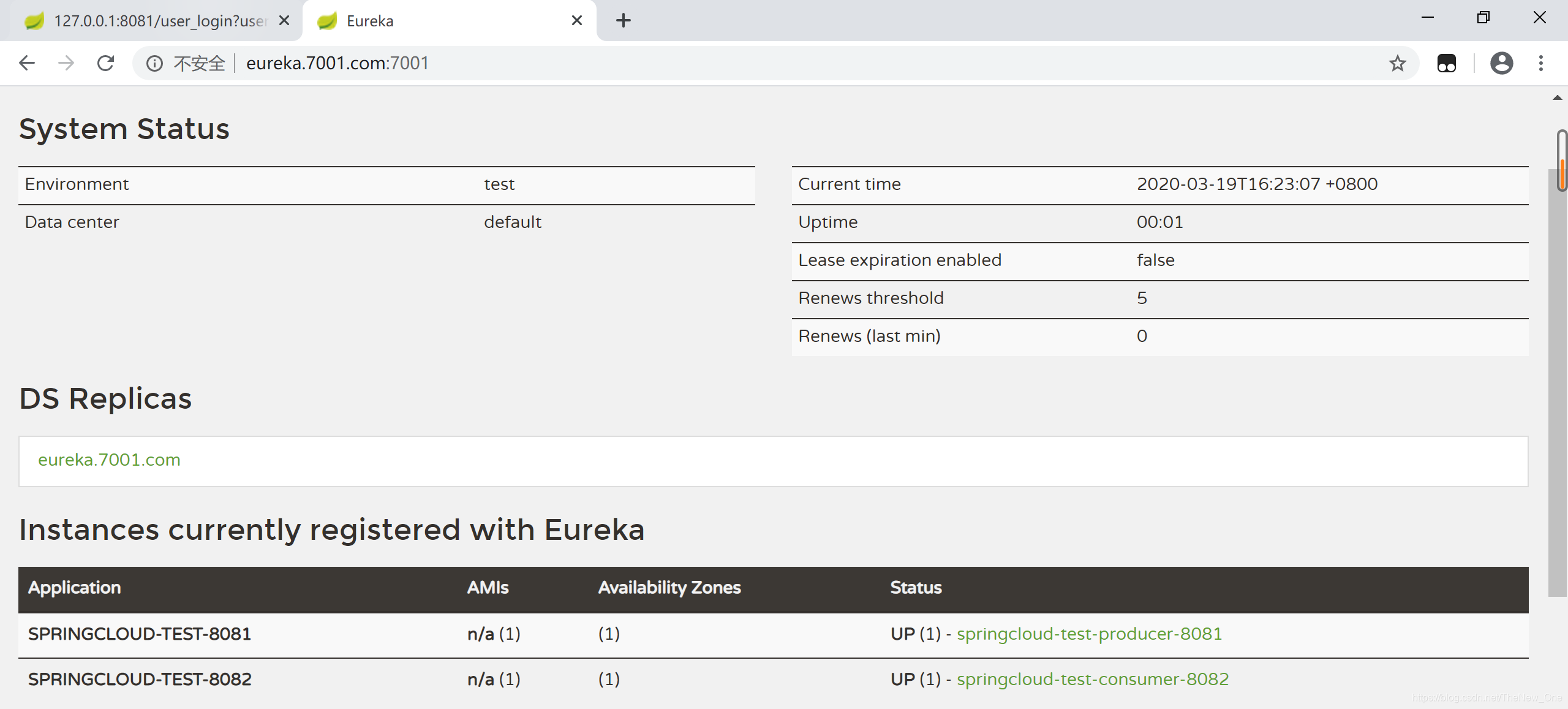
2.8 启动7001,8081,8082
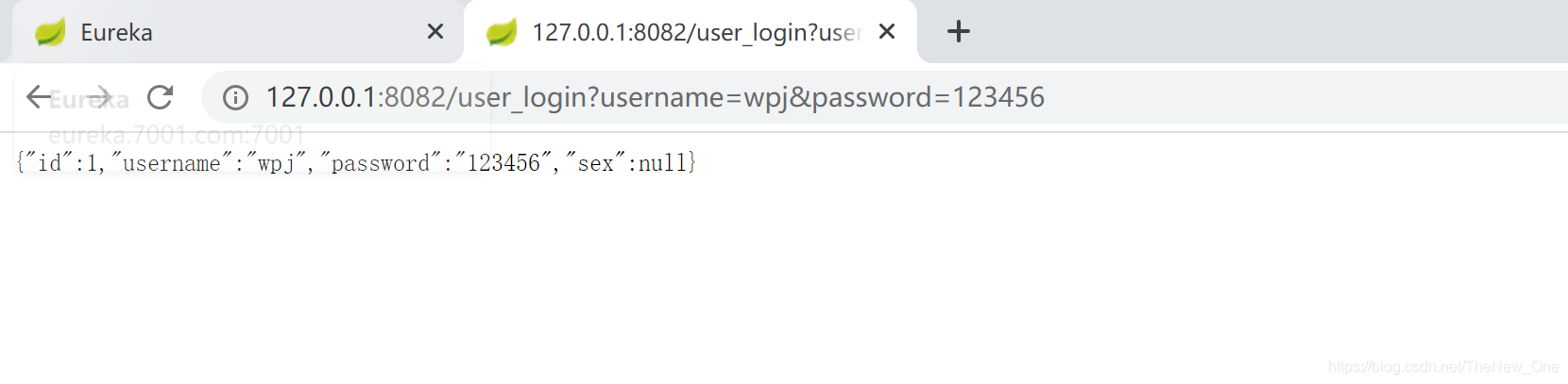
2.9 用8082访问8081
2.10 导入前端页面和样式
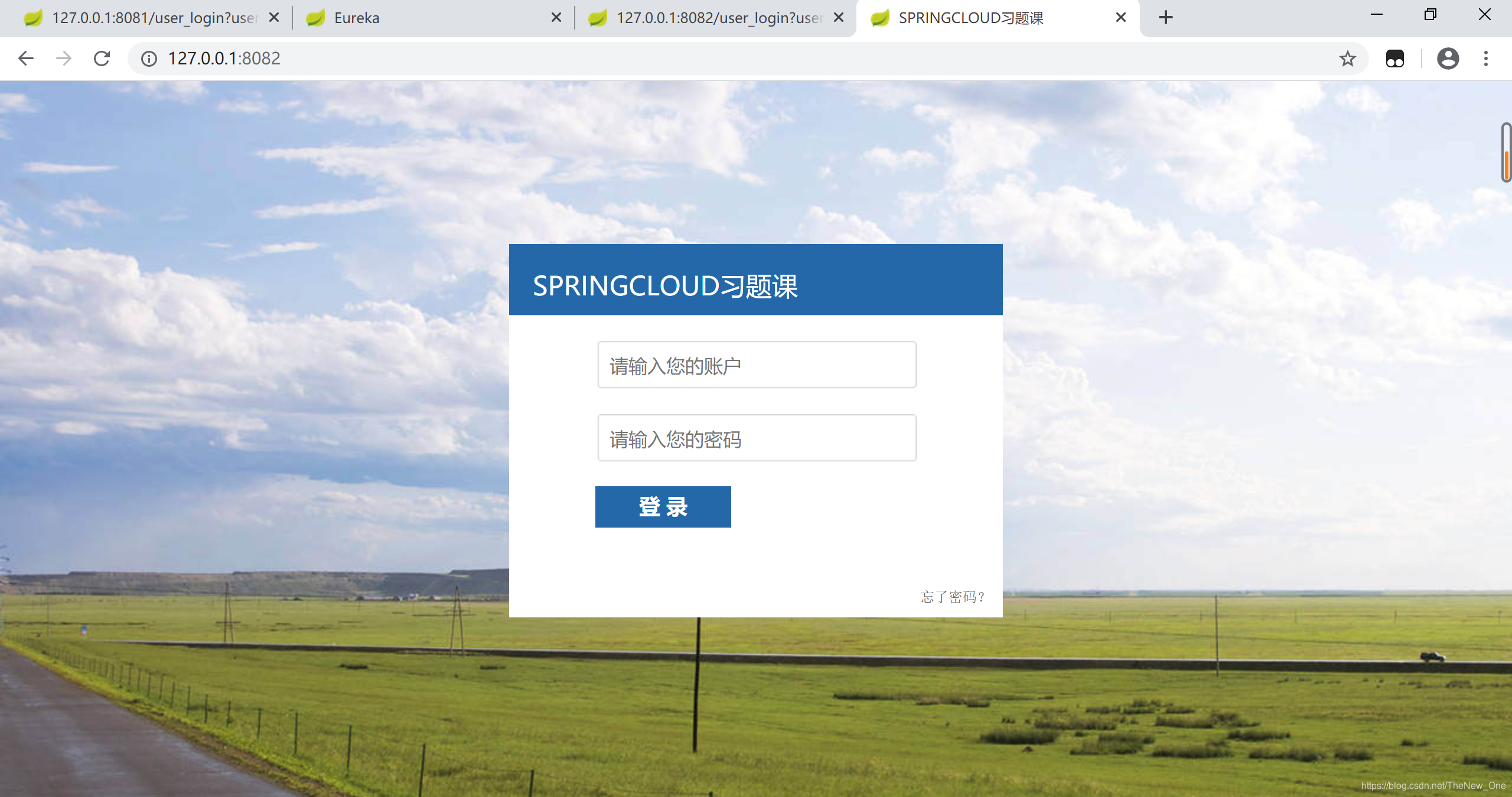
2.11 访问主页
3. 实现登录功能
3.1 修改login页面的一些表单属性
3.2 修改8282的UserController的登录方法
@RequestMapping("/user_login")
@ResponseBody
public void login(User user, HttpServletResponse response, HttpSession session) throws Exception{
    response.setContentType("text/html;charset=utf-8");
    System.out.println("表单的参数:"+user);
    User loginUser = userClient.login(user);
    System.out.println("loginUser="+loginUser);
    if(loginUser!=null){
        session.setAttribute("loginUser",loginUser);
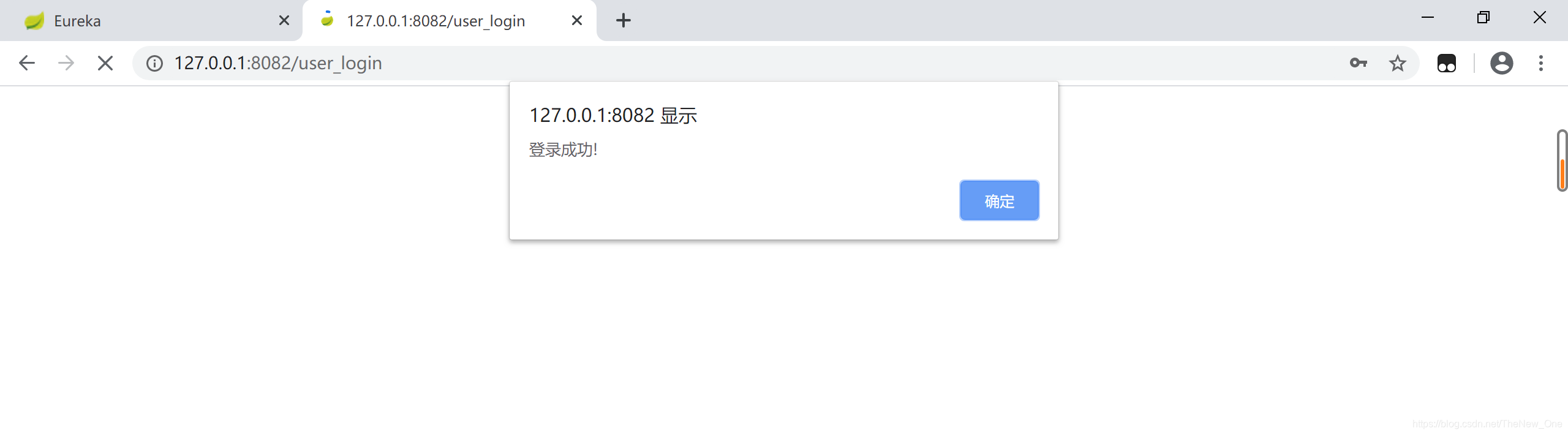
        response.getWriter().write("<script>alert('登录成功!');location.href='/page_index';</script>");
    }else{
        response.getWriter().write("<script>alert('账号或密码错误!');location.href='/login';</script>");
    }
}
3.3 编写CommComtroller
package com.wpj.comtroller;

import org.springframework.context.annotation.Scope;
import org.springframework.stereotype.Controller;
import org.springframework.web.bind.annotation.PathVariable;
import org.springframework.web.bind.annotation.RequestMapping;

@Controller
@Scope("prototype")
public class CommController {
    /**
     * 通用的页面跳转方法
     * @param page
     * @return
     */
    @RequestMapping("/page_{page}")
    public String toPage(@PathVariable("page") String page) {
        return page;
    }
}
3.4 登录
4. 创建商品服务工程
4.1 新建springcloud-test-pojo(module-maven)
4.2 导入lombox依赖
<!--导入Lombok依赖-->
<dependency>
    <groupId>org.projectlombok</groupId>
    <artifactId>lombok</artifactId>
</dependency>
4.3 定义两个User
package com.wpj;

import lombok.AllArgsConstructor;
import lombok.Data;
import lombok.NoArgsConstructor;

@Data
@AllArgsConstructor
@NoArgsConstructor
public class Product {
    private int pId;
    private String pName;
 	private Type type;
    private int pNumber;
    private String pUnit;
    private String pRemark;
    private int pDel;
}
package com.wpj;

import lombok.AllArgsConstructor;
import lombok.Data;
import lombok.NoArgsConstructor;

@Data
@NoArgsConstructor
@AllArgsConstructor
public class Type {
    private int tId;
    private String tName;
    private String tDesc;
    private String tRemark;
    private  int tDel;
}
4.4 sql
DROP TABLE IF EXISTS `tb_type`;
CREATE TABLE `tb_type` (
  `t_id` int(11) NOT NULL,
  `t_Name` varchar(255) DEFAULT NULL,
  `t_Desc` varchar(255) DEFAULT NULL,
  `t_Remark` varchar(255) DEFAULT NULL,
  `t_Del` int(11) DEFAULT NULL,
  PRIMARY KEY (`t_id`)
) ENGINE=InnoDB DEFAULT CHARSET=latin1;

INSERT INTO `tb_type` VALUES ('1', 'type1', 'type1', 'type1', '1');
INSERT INTO `tb_type` VALUES ('2', 'type2', 'type2', 'type3', '2');


DROP TABLE IF EXISTS `tb_product`;
CREATE TABLE `tb_product` (
  `p_id` int(11) NOT NULL AUTO_INCREMENT,
  `p_name` varchar(255) DEFAULT NULL,
  `p_tid` int(11) DEFAULT NULL,
  `p_number` int(11) DEFAULT NULL,
  `p_unit` varchar(255) DEFAULT NULL,
  `p_remark` varchar(255) DEFAULT NULL,
  `p_del` int(11) DEFAULT NULL,
  PRIMARY KEY (`p_id`),
  KEY `PK_P_T_ID` (`p_tid`),
  CONSTRAINT `PK_P_T_ID` FOREIGN KEY (`p_tid`) REFERENCES `tb_type` (`t_id`)
) ENGINE=InnoDB DEFAULT CHARSET=latin1;


INSERT INTO `tb_product` VALUES ('1', 'product1', '1', '100', 'product1', 'product1', '1');
INSERT INTO `tb_product` VALUES ('2', 'product2 ', '2', '200', 'product2', 'product2', '2');
4.5 新建springcloud-test-8083(module-maven)
4.6 导包
<?xml version="1.0" encoding="UTF-8"?>
<project xmlns="http://maven.apache.org/POM/4.0.0"
         xmlns:xsi="http://www.w3.org/2001/XMLSchema-instance"
         xsi:schemaLocation="http://maven.apache.org/POM/4.0.0 http://maven.apache.org/xsd/maven-4.0.0.xsd">
    <parent>
        <artifactId>nz1904-springcloud</artifactId>
        <groupId>com.wpj</groupId>
        <version>1.0-SNAPSHOT</version>
    </parent>
    <modelVersion>4.0.0</modelVersion>

    <artifactId>springcloud-test-product-8083</artifactId>
    <dependencies>
        <dependency>
            <groupId>org.springframework.boot</groupId>
            <artifactId>spring-boot-starter-jdbc</artifactId>
        </dependency>

        <dependency>
            <groupId>org.springframework.boot</groupId>
            <artifactId>spring-boot-starter-web</artifactId>
        </dependency>

        <dependency>
            <groupId>org.mybatis.spring.boot</groupId>
            <artifactId>mybatis-spring-boot-starter</artifactId>
            <version>2.0.1</version>
        </dependency>

        <dependency>
            <groupId>mysql</groupId>
            <artifactId>mysql-connector-java</artifactId>
            <version>5.1.28</version>
            <scope>runtime</scope>
        </dependency>

        <dependency>
            <groupId>org.springframework.boot</groupId>
            <artifactId>spring-boot-starter-test</artifactId>
            <scope>test</scope>
        </dependency>
        <!--导入Lombok依赖-->
        <dependency>
            <groupId>org.projectlombok</groupId>
            <artifactId>lombok</artifactId>
        </dependency>

        <!-- Eureka客户端 -->
        <dependency>
            <groupId>org.springframework.cloud</groupId>
            <artifactId>spring-cloud-starter-netflix-eureka-client</artifactId>
        </dependency>
        <!--监控依赖-->
        <dependency>
            <groupId>org.springframework.boot</groupId>
            <artifactId>spring-boot-starter-actuator</artifactId>
        </dependency>
        <dependency>
            <groupId>org.apache.httpcomponents</groupId>
            <artifactId>httpclient</artifactId>
            <version>4.5.8</version>
        </dependency>
    </dependencies>
    <!-- SpringCloud的依赖 -->
    <dependencyManagement>
        <dependencies>
            <dependency>
                <groupId>org.springframework.cloud</groupId>
                <artifactId>spring-cloud-dependencies</artifactId>
                <version>${spring-cloud.version}</version>
                <type>pom</type>
                <scope>import</scope>
            </dependency>
        </dependencies>
    </dependencyManagement>
    <build>
        <!--编译的时候同时也把包下面的xml同时编译进去-->
        <resources>
            <resource>
                <directory>src/main/java</directory>
                <includes>
                    <include>**/*.xml</include>
                </includes>
            </resource>
            <resource>
                <directory>src/main/resource</directory>
                <includes>
                    <include>**/*.xml</include>
                </includes>
            </resource>
        </resources>
    </build>
</project>
4.7 写程序入口
package com.wpj;

import org.mybatis.spring.annotation.MapperScan;
import org.springframework.boot.SpringApplication;
import org.springframework.boot.autoconfigure.SpringBootApplication;
import org.springframework.cloud.netflix.eureka.EnableEurekaClient;

@SpringBootApplication
@MapperScan(basePackages = {"com.wpj.mapper"})
@EnableEurekaClient
public class TestApplication8083 {
    public static void main(String[] args) {
        SpringApplication.run(TestApplication8083.class, args);
    }
}
4.8 引入test-pojo
<dependency>
    <groupId>com.wpj</groupId>
    <artifactId>springcloud-test-pojo</artifactId>
    <version>1.0-SNAPSHOT</version>
    <scope>compile</scope>
</dependency>
4.9 编写Mapper和xml文件
package com.wpj.mapper;

import com.wpj.Product;

import java.util.List;

public interface ProductMapper {
    Product getById(int pId);
    List<Product> getProducts();
    int addProduct(Product product);
    int deleteProduct(int pId);
    int updateById(Product product);
}
<?xml version="1.0" encoding="UTF-8"?>
<!DOCTYPE mapper
        PUBLIC "-//mybatis.org//DTD Mapper 3.0//EN"
        "http://mybatis.org/dtd/mybatis-3-mapper.dtd">
<mapper namespace="com.wpj.mapper.ProductMapper">

    <select id="getProducts" resultMap="productMap">
        SELECT P.*,T.t_name from tb_product P
        INNER JOIN tb_type T
        ON P.p_tid=T.t_id
        where P.p_del=0
    </select>

    <resultMap id="productMap" type="com.wpj.bean.Product">
        <id column="p_id" property="pId"/>
        <result column="p_name" property="pName"/>
        <result column="p_number" property="pNumber"/>
        <result column="p_unit" property="pUnit"/>
        <result column="p_remark" property="pRemark"/>
        <result column="p_del" property="pDel"/>
        <association property="type" javaType="com.wpj.bean.Type">
            <id column="p_tid" property="tId"/>
            <result column="t_name" property="tName"/>
        </association>
    </resultMap>

    <insert id="addProduct">
        insert into tb_product values (null,#{pName},#{type.tId},#{pUnit},#{pNumber},#{pRemark},0)
    </insert>

    <select id="getById" resultMap="productMap">
        SELECT P.*,T.t_name from tb_product P
        INNER JOIN tb_type T
        ON P.p_tid=T.t_id
        where P.p_del = 0 and P.p_id=#{pid}
    </select>

    <update id="deleteProduct">
        update tb_product set p_del=1 where p_id=#{pid}
    </update>

    <update id="updateById">
        update tb_product set p_name=#{pName},p_tid=#{type.tId},p_unit=#{pUnit},p_number=#{pNumber},p_remark=#{pRemark} where p_id=#{pId}
    </update>
</mapper>
4.10 编写service及其impl
package com.wpj.service;

import com.wpj.Product;

import java.util.List;

public interface ProductService {
    Product getById(int pId);
    List<Product> getProducts();
    int addProduct(Product product);
    int deleteProduct(int pId);
    int updateById(Product product);
}
package com.wpj.service.impl;

import com.wpj.Product;
import com.wpj.mapper.ProductMapper;
import com.wpj.service.ProductService;
import org.springframework.beans.factory.annotation.Autowired;
import org.springframework.stereotype.Service;

import java.util.List;

@Service
public class ProductServiceImpl implements ProductService {

    @Autowired
    private ProductMapper productMapper;

    @Override
    public Product getById(int pId) {
        return productMapper.getById(pId);
    }

    @Override
    public List<Product> getProducts() {
        return productMapper.getProducts();
    }

    @Override
    public int addProduct(Product product) {
        return productMapper.addProduct(product);
    }

    @Override
    public int deleteProduct(int pId) {
        return productMapper.deleteProduct(pId);
    }

    @Override
    public int updateById(Product product) {
        return productMapper.updateById(product);
    }
}
4.11 编写application.properties
server.port=8083

# mybatis 别名扫描
# mybatis.type-aliases-package=com.wpj.bean
# mapper.xml文件位置,如果没有映射文件,请注释掉
mybatis.mapper-locations=classpath:mapper/*.xml

# 连接四大参数
# 可省略,SpringBoot自动推断
spring.datasource.driverClassName=com.mysql.jdbc.Driver

spring.datasource.url=jdbc:mysql://127.0.0.1:3306/nz1904-springcloud?useUnicode=true&characterEncoding=utf-8
spring.datasource.username=root
spring.datasource.password=123456

# 服务的名字,注册到注册中心的名字,后期消费者来根据名字调用服务 可以重复
spring.application.name=springcloud-test-product-8083
# EurekaServer地址
eureka.client.service-url.defaultZone=http://eureka.7001.com:7001/eureka
# 当调用getHostname获取实例的hostname时,返回ip而不是host名称
eureka.instance.prefer-ip-address=true
# 指定自己的ip信息,不指定的话会自己寻找
eureka.instance.ip-address=127.0.0.1
# 执行当前服务的应用ID  不可以重复  标识的是每一个具体的的服务
eureka.instance.instance-id=springcloud-test-product-8083
4.12 testMapper
package com.wpj.test;

import com.wpj.bean.Product;
import com.wpj.bean.Type;
import com.wpj.mapper.ProductMapper;
import org.junit.Test;
import org.junit.runner.RunWith;
import org.springframework.boot.test.context.SpringBootTest;
import org.springframework.test.context.junit4.SpringRunner;

import javax.annotation.Resource;
import java.util.List;

@RunWith(SpringRunner.class)
@SpringBootTest
public class TestMyBaits {
    @Resource
    private ProductMapper productMapper;

    @Test
    public void testQuerys(){
        List<Product> products = productMapper.getProducts();
        for (Product product : products) {
            System.out.println(product);
        }
    }
    @Test
    public void testGetById(){
        Product product = productMapper.getById(1);
        System.out.println(product);
    }

    @Test
    public void testAdd(){
        Type t=new Type();
        t.setTId(2);
        Product p=new Product("苹果",t,100,"箱","新鲜苹果");
        int count = productMapper.addProduct(p);
        System.out.println(count>0?"新增成功":"新增失败");
    }

    @Test
    public void testDelete(){
        int count = productMapper.deleteProduct(1);
        System.out.println(count>0?"删除成功":"删除失败");
    }

    @Test
    public void testUpdateById(){
        Product product = productMapper.getById(1);
        product.setPName("进口的苹果");
        product.setPRemark("快来选购");
        int count = productMapper.updateById(product);
        System.out.println(count>0?"更新成功":"更新失败");

    }
}
4.13 编写Controller·
package com.wpj.controller;

import com.wpj.bean.Product;
import com.wpj.service.ProductService;
import org.springframework.beans.factory.annotation.Autowired;
import org.springframework.web.bind.annotation.RequestBody;
import org.springframework.web.bind.annotation.RequestMapping;
import org.springframework.web.bind.annotation.RestController;

import java.util.List;

@RestController
public class ProductController {

    @Autowired
    private ProductService productService;

    @RequestMapping("/product_list")
    public List<Product> getList(){
        return productService.getProducts();
    }

    @RequestMapping("/product_addProduct")
    public int addProduct(@RequestBody Product product){
        return productService.addProduct(product);
    }

    @RequestMapping("/product_getById")
    public Product getById(int id){
        return productService.getById(id);
    }

    @RequestMapping("/product_delete")
    public int deleteProduct(int id){
        return productService.deleteProduct(id);
    }

    @RequestMapping("/product_updatebyId")
    public int updateProduct(Product product){
        return productService.updateById(product);
    }
}





 扫一扫
扫一扫


 2079
2079

 被折叠的 条评论
为什么被折叠?
被折叠的 条评论
为什么被折叠?
 到【灌水乐园】发言





