



 本文详细介绍了C语言中的文件操作函数,包括open函数的访问模式、read和write函数的使用方法,以及lseek和close函数的作用。通过实例演示了如何打开、清空、写入和读取文件,适合初学者理解文件I/O操作基本原理。
一、文件操作函数
1.open函数
#include <fcntl.h>
int open(const char *pathname, int flags[, mode_t mode);
函数说明:
- pathname:待打开文件的文件路径名;
- flags:访问模式,常用的宏有:
– O_RDONLY:只读
– O_WRONLY: 只写
– O_RDWR: 读写
– O_CREAT: 创建一个文件并打开
– O_EXCL: 测试文件是否存在,不存在则创建
– O_TRUNC: 以只写或读写方式成功打开文件时,将文件长度截断为0
– O_APPEND: 以追加方式打开文件
(只有第二个参数flags = O_CREAT,第三个参数才会被用于设置新文件的权限,取值如下:)
– S_IRWXU: 文件所有者,读、写、执行
– S_IRUSR: 文件所有者,读
– S_IWUSR: 文件所有者,写
– S_IXUSR: 文件所有者,执行
– S_IRWXG: 文件所属组,读、写、执行
– S_IRGRP: 文件所属组,读
– S_IWGRP: 文件所属组,写
– S_IXGRP: 文件所属组,执行
– S_IRWXO: 其他人,读、写、执行
– S_IROTH: 其他人,读
– S_IWOTH: 其他人,写
– S_IXOTH: 其他人,执行
返回值说明:
- 调用成功时,返回一个文件描述符
- 调用不成功时,返回-1
2.read函数
#include <unistd.h>
ssize_t read(int fd, void *buf, size_t count);
函数参数说明:
- fd: 从open或create函数返回的文件描述符。
- buf: 缓冲区。
- count: 读取数据的字节数。
返回值说明:
- 正数:请求读取的字节数
- 0: 文件长度有限,若读写位置距文件末尾只有20字节,该函数请求读30字节,则第一次读取时返回值为20,第二次读取时,返回0
- -1: 读取文件出错
3.write函数
#include <unistd.h>
ssize_t write(int fd, void *buf, size_t count);
函数参数说明:
- fd: 从open或create函数返回的文件描述符。
- buf: 缓冲区。
- count: 读取数据的字节数。
返回值说明:
- 返回写入的字节数或者-1并设置errno
4.lseek函数
#include <unistd.h>
ssize_t write(int fd, off_t offset, int whence);
函数参数说明:
- fd: 从open或create函数返回的文件描述符。
- offset: 对文件偏移量的设置,参数可正可负。
- whence: 控制设置当前文件偏移量的方法。
1 . whence = SEEK_SET: 文件偏移量被设置为offset
2 . whence = SEEK_CUR: 文件偏移量被设置为当前偏移量+offset
3 . whence = SEEK_END: 文件偏移量被设置为文件长度+offset
返回值说明:
- 设置成功:返回新的偏移量
- 不成功:-1
5.close函数
#include <unistd.h>
int close(int fd);
返回值说明:
- 成功:返回0
- 不成功:-1
二、实际案例
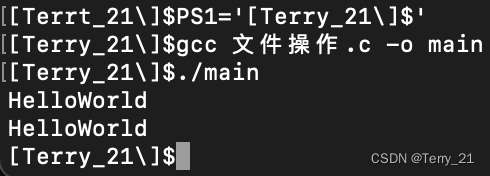
使用open函数打开或创建一个文件,将文件清空,使用write函数在文件中写入数据,并使用read函数将数据读取并打印。
代码:
#include <stdio.h>
#include <stdlib.h>
#include <unistd.h>
#include <fcntl.h>
#include <string.h>
int main(){
	int tempFd = 0;
	char tempFileName[20] = "test.txt";
	//Step 1. open the file.
	tempFd = open(tempFileName, O_RDWR|O_EXCL|O_TRUNC, S_IRWXG);
	if(tempFd == -1){
		perror("file open error.\n");
		exit(-1);
	}//of if
	//Step 2. write the data.
	int tempLen = 0;
	char tempBuf[100] = {0};
	scanf("%s", tempBuf);
	tempLen = strlen(tempBuf);
	write(tempFd, tempBuf, tempLen);
	close(tempFd);
	//Step 3. read the file
	tempFd = open(tempFileName, O_RDONLY);
	if(tempFd == -1){
		perror("file open error.\n");
		exit(-1);
	}//of if
	off_t tempFileSize = 0;
	tempFileSize = lseek(tempFd, 0, SEEK_END);
	lseek(tempFd, 0, SEEK_SET);
	while(lseek(tempFd, 0, SEEK_CUR)!= tempFileSize){
		read(tempFd, tempBuf, 1024);
		printf("%s\n", tempBuf);
	}//of while
	close(tempFd);
	return 0;
}//of main
结果截屏:





 扫一扫
扫一扫


 1万+
1万+

 被折叠的 条评论
为什么被折叠?
被折叠的 条评论
为什么被折叠?
 到【灌水乐园】发言





