 Windows命令设置静态IP


一、问题背景
我们在 Windows 上可以在 控制面板 > 网络和 Internet > 网络和共享中心 > 更改适配器选项 中,然后选择需要设置静态 IP 的网卡,点击 属性,选择 Internet 协议版本 4 (TCP/IPv4),随后即可设置静态 IP 地址。
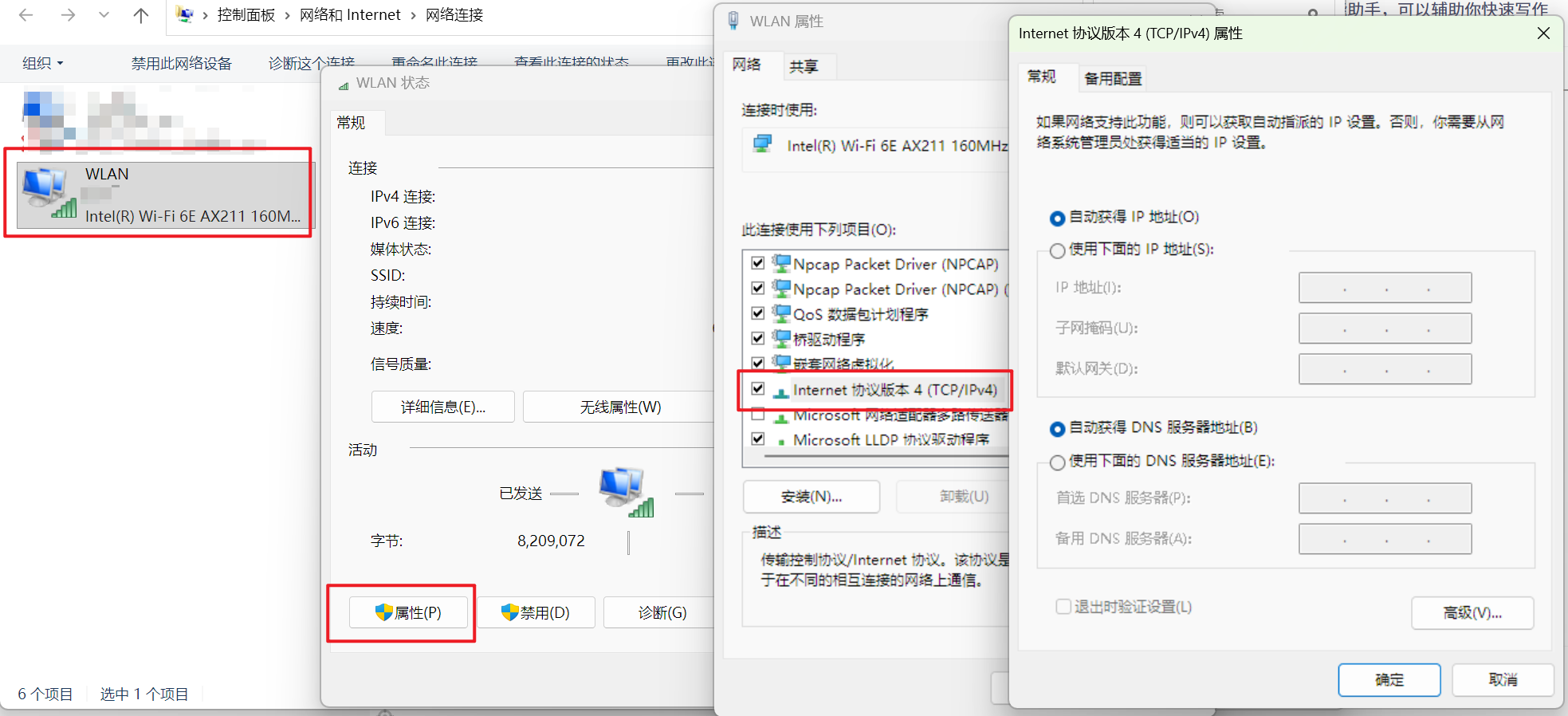
但如果我们需要设置自动化任务,使用 GUI 设置静态 IP 可能会带来不方便,因此我们希望可以使用命令设置静态 IP 。本文将详细介绍在 Windows 上使用命令的方式给网卡设置静态 IP 地址。
二、详细步骤
1. 获取网卡的 ID 和 名称
我们使用命令以下命令获取机器上所有的网络适配器的名称和 ID:
netsh interface ip show interfaces
例如:
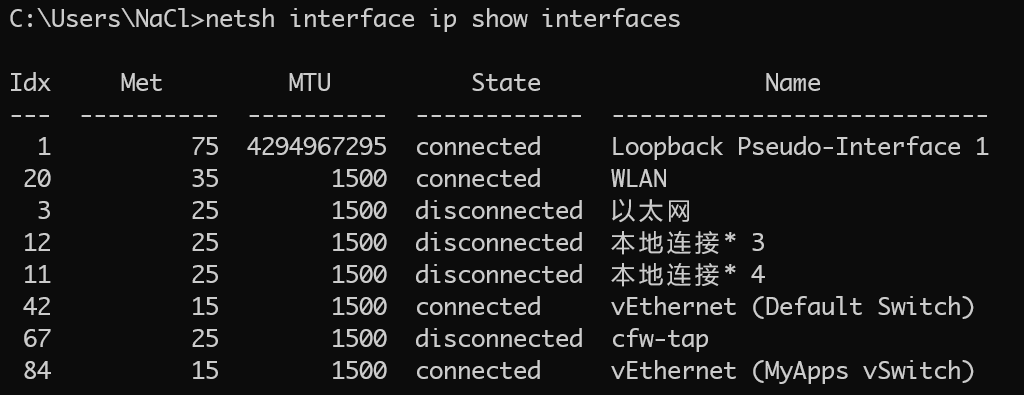
我们可以获得 wifi 网卡的 ID 为 20,网卡名为 WLAN,而有线连接的 ID 为 3,网卡名为 以太网 。
2. 设置静态 IP 地址
设置静态 IP 地址使用以下命令(需要以管理员身份运行):
netsh interface ip set address "连接名称"/索引号 static 静态IP地址 子网掩码 默认网关
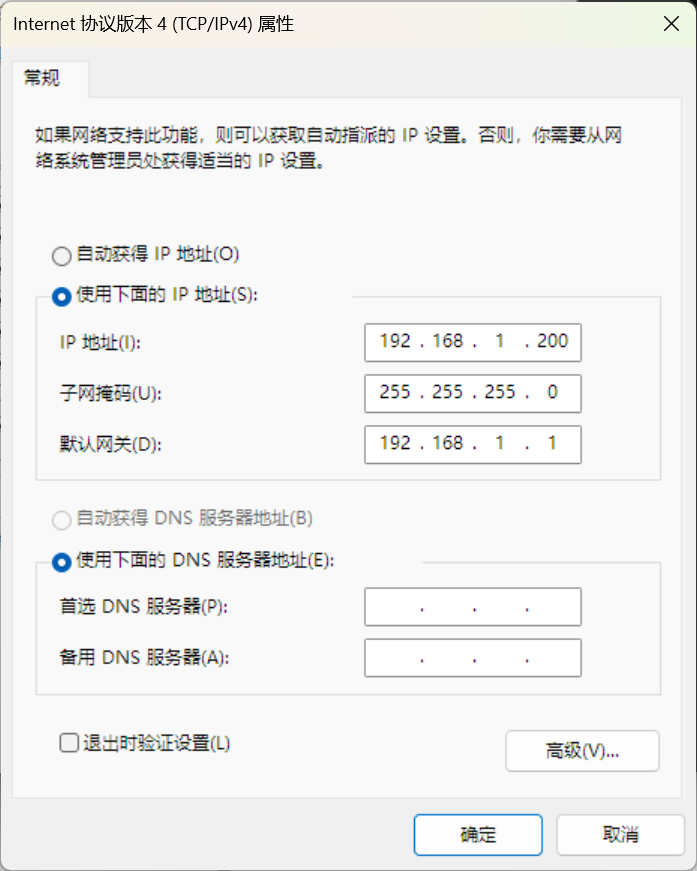
例如,我要给 wifi 网卡设置静态 IP 地址,静态 IP 地址为:192.168.1.200,子网掩码为 255.255.255.0,默认网关为 192.168.1.1,命令如下:
// 方案一 使用连接名称
netsh interface ip set address "WLAN" static 192.168.1.200 255.255.255.0 192.168.1.1

// 方案二 使用 索引号
netsh interface ip set address 20 static 192.168.1.200 255.255.255.0 192.168.1.1
此时可以去 网络适配器 中查看是否设置生效
3. 设置DNS
在设置完静态地址之后,往往需要设置 DNS,用以下命令进行配置即可(需要以管理员身份运行):
// 主 DNS 地址
netsh interface ip set dns "连接名称"/索引号 static DNS地址

//备用 DNS 地址
netsh interface ip add dns "连接名称"/索引号 DNS地址 index=2
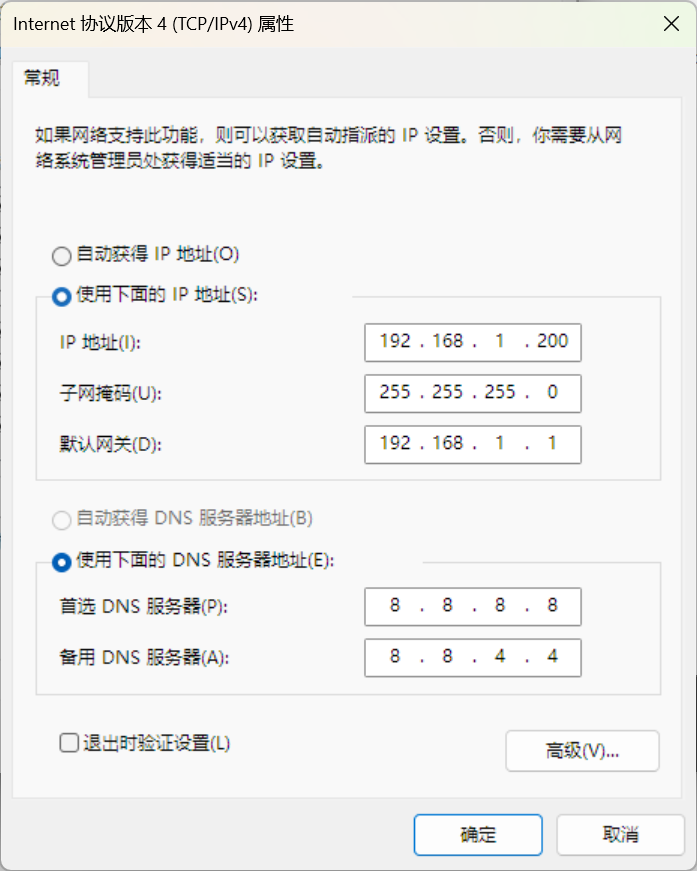
例如要给 wifi 网卡设置主 DNS 为 8.8.8.8,备用 DNS 地址 8.8.4.4:
// 方案一 使用 连接名称 设置
// 主 DNS 地址
netsh interface ip set dns "WLAN" static 8.8.8.8
//备用 DNS 地址
netsh interface ip add dns "WLAN" 8.8.4.4 index=2

// 方案二 使用 索引号 设置
// 主 DNS 地址
netsh interface ip set dns 20 static 8.8.8.8
//备用 DNS 地址
netsh interface ip add dns 20 8.8.4.4 index=2
同时可以使用 网络适配器 中查看是否设置生效
3. 还原动态 IP 地址
当我们希望从静态 IP 地址还原到动态 IP 地址(DHCP)时,可以使用如下两个命令进行还原:
// 还原 IP 地址
netsh interface ip set address "连接名称"/索引号 dhcp
// 还原 DNS 地址
netsh interface ip set dns "连接名称"/索引号 dhcp
例如,给 Wifi 网卡设置动态 IP 地址:
// 方案一 使用 网卡名称
netsh interface ip set address "WLAN" dhcp
netsh interface ip set dns "WLAN" dhcp

// 方案二 使用 网卡 IDx
netsh interface ip set address 20 dhcp
netsh interface ip set dns 20 dhcp
三、总结
// 获取机器上所有的网络适配器的名称和 ID
netsh interface ip show interfaces

// 设置静态 IP 地址
netsh interface ip set address "连接名称"/索引号 static 静态IP地址 子网掩码 默认网关

// 设置 DNS
// 主 DNS 地址
netsh interface ip set dns "连接名称"/索引号 static DNS地址
//备用 DNS 地址
netsh interface ip add dns "连接名称"/索引号 DNS地址 index=2

// 还原动态 IP 地址 (DHCP)
netsh interface ip set address "连接名称"/索引号 dhcp
// 还原动态 DNS 地址
netsh interface ip set dns "连接名称"/索引号 dhcp





 扫一扫
扫一扫


 1万+
1万+

 被折叠的 条评论
为什么被折叠?
被折叠的 条评论
为什么被折叠?
 到【灌水乐园】发言





