


 本文解决在Python+Selenium环境中使用Firefox时遇到的'geckodriver'未找到的问题,详细步骤包括下载geckodriver、配置环境变量及放置在Python目录下。
webdriver error: 'geckodriver' executable needs to be in PATH.
楼主#
更多发布于:2018-01-23 13:06
在使用python + selenium 搭建环境时:
运行如下代码:
from selenium import webdriver
from selenium.common.exceptions import NoSuchElementException
from selenium.webdriver.common.keys import Keys
# webdriver.Firefox() 找firefox 默认安装 路径
driver = webdriver.Firefox()
driver.get('http://baidu.com')
在运行过程中报错,提示信息如下:
selenium.common.exceptions.WebDriverException: Message: 'geckodriver' executable needs to be in PATH.
原因: 在selenium 3中使用webdriver.Firefox() , 如果下载geckodriver.exe
解决方案:
1. 下载geckodriver.exe , 下载地址:https://github.com/mozilla/geckodriver/releases
2. 下载后,将geckodriver.exe复制到Firefox 浏览器的安装目录. 一般默认路径在:C:\Program Files (x86)\mozilla firefox目录下;
3. 将FireFox 的路径添加到环境变量Path中添加路径:如,C:\Program Files (x86)\mozilla firefox;
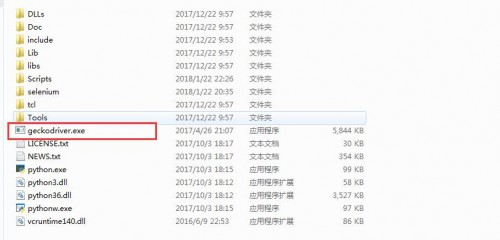
4. 将geckodriver.exe ,放到python 的目录下,如下:
注:如何还要报错,如下以下提示:
selenium.common.exceptions.SessionNotCreatedException: Message: Unable to find a matching set of capabilities
运行如下代码:
from selenium import webdriver
from selenium.common.exceptions import NoSuchElementException
from selenium.webdriver.common.keys import Keys
# webdriver.Firefox() 找firefox 默认安装 路径
driver = webdriver.Firefox()
driver.get('http://baidu.com')
在运行过程中报错,提示信息如下:
selenium.common.exceptions.WebDriverException: Message: 'geckodriver' executable needs to be in PATH.
原因: 在selenium 3中使用webdriver.Firefox() , 如果下载geckodriver.exe
解决方案:
1. 下载geckodriver.exe , 下载地址:https://github.com/mozilla/geckodriver/releases
2. 下载后,将geckodriver.exe复制到Firefox 浏览器的安装目录. 一般默认路径在:C:\Program Files (x86)\mozilla firefox目录下;
3. 将FireFox 的路径添加到环境变量Path中添加路径:如,C:\Program Files (x86)\mozilla firefox;
4. 将geckodriver.exe ,放到python 的目录下,如下:
注:如何还要报错,如下以下提示:
selenium.common.exceptions.SessionNotCreatedException: Message: Unable to find a matching set of capabilities





 扫一扫
扫一扫


 1296
1296

 被折叠的 条评论
为什么被折叠?
被折叠的 条评论
为什么被折叠?
 到【灌水乐园】发言





