



基础IO
1、重定向
1.1、文件描述符的分配规则
#include <stdio.h>
#include <string.h>
#include <unistd.h>
#include <sys/types.h>
#include <sys/stat.h>
#include <fcntl.h>

const char* filename = "log.txt";

int main()
{
    int fd = open(filename, O_CREAT|O_WRONLY|O_TRUNC, 0666);
    if (fd < 0)
    {
        perror("open");
        return 1;
    }

    printf("fd: %d\n", fd);
    const char* message = "hello linux\n";
    write(fd, message, strlen(message));
    close(fd);
    return 0;
}
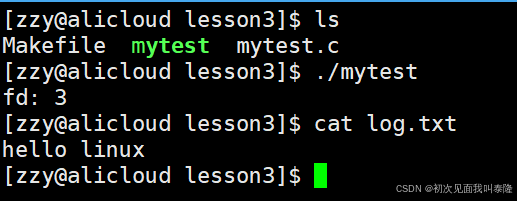
这个结果也很符合我们的预期,0、1、2号文件描述符分别对应了标准输入、标准输出、标准错误。所以我们打开的文件就在后面添加。
下面我们在代码前面加上close(0)、close(1)、close(2)然后在运行代码查看结果:
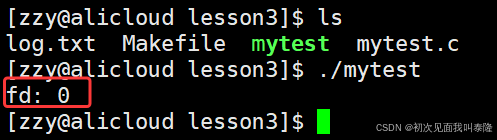
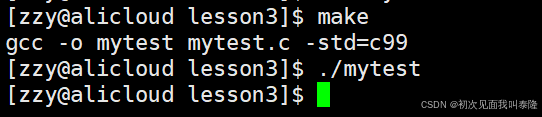
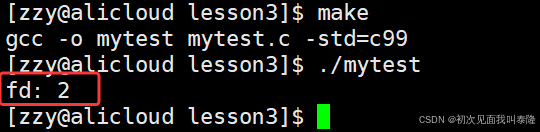
第一次我们把标准输入文件关了,然后我们打开的文件对应的文件描述符就是0。那么第二次我们把标准输出关了,而printf就是往标准输出文件中写入,所以没有打印信息,但是我们可以断定这次我们的fd一定是1。第三次我们把标准错误关了,fd就是2。
所以文件描述符的分配规则为:从0下标开始,寻找最小的、没有使用的数组位置,它的下标就是新打开文件的文件描述符。
1.2、重定向的原理
#include <stdio.h>
#include <string.h>
#include <unistd.h>
#include <sys/types.h>
#include <sys/stat.h>
#include <fcntl.h>

const char* filename = "log.txt";

int main()
{
    close(1);
    int fd = open(filename, O_CREAT|O_WRONLY|O_TRUNC, 0666);
    if (fd < 0)
    {
        perror("open");
        return 1;
    }

    const char* message = "hello linux\n";
    write(1, message, strlen(message));
    close(fd);
    return 0;
}
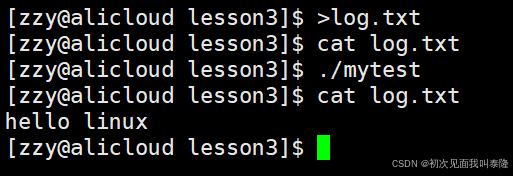
可以看到,本来应该向显示器上打印的数据,现在被写入到了log.txt中。在代码中我们把1号文件描述符对应的文件关了,然后open打开log.txt,所以log.txt对应的文件描述符就是1,然后我们向1写入本来是向显示器写入,现在是向log.txt写入。这就是输出重定向。
输出重定向:本来应该打印到显示器上的数据,现在重定向写入到文件中。
int fd = open(filename, O_CREAT|O_WRONLY|O_APPEND, 0666);
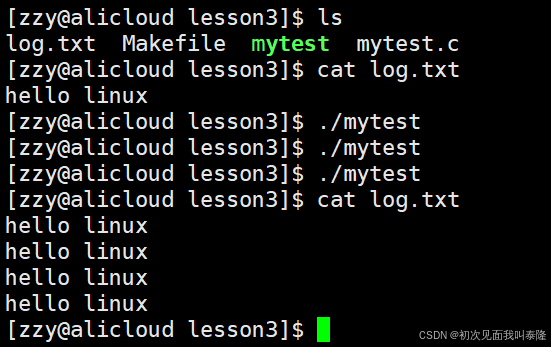
将open打开方式的O_TRUNC换成O_APPEND,那么不就变成追加重定向了吗?
下面我们再演示输入重定向:
#include <stdio.h>
#include <string.h>
#include <unistd.h>
#include <sys/types.h>
#include <sys/stat.h>
#include <fcntl.h>

const char* filename = "log.txt";

int main()
{
    close(0);
    int fd = open(filename, O_RDONLY);
    if (fd < 0)
    {
        perror("open");
        return 1;
    }
    char inbuff[1024];
    ssize_t n = read(0, inbuff, sizeof(inbuff)-1);
    inbuff[n] = '\0';
    printf("%s", inbuff);
    close(fd);
    return 0;
}
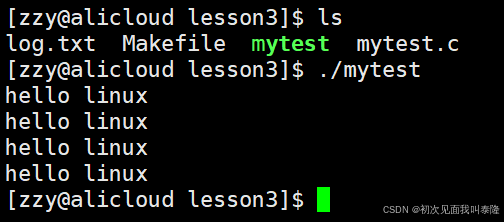
我们把0号文件描述符关了,那么再打开log.txt,此时log.txt对应的文件描述符就是0,然后我们使用read从0号文件中读取,本来应该是从标准输入读取的,现在是从log.txt文件中读取,这就是输入重定向。
输入重定向:本来应该从键盘读取的,现在从其他文件中读取。
下面画图分析这个过程:
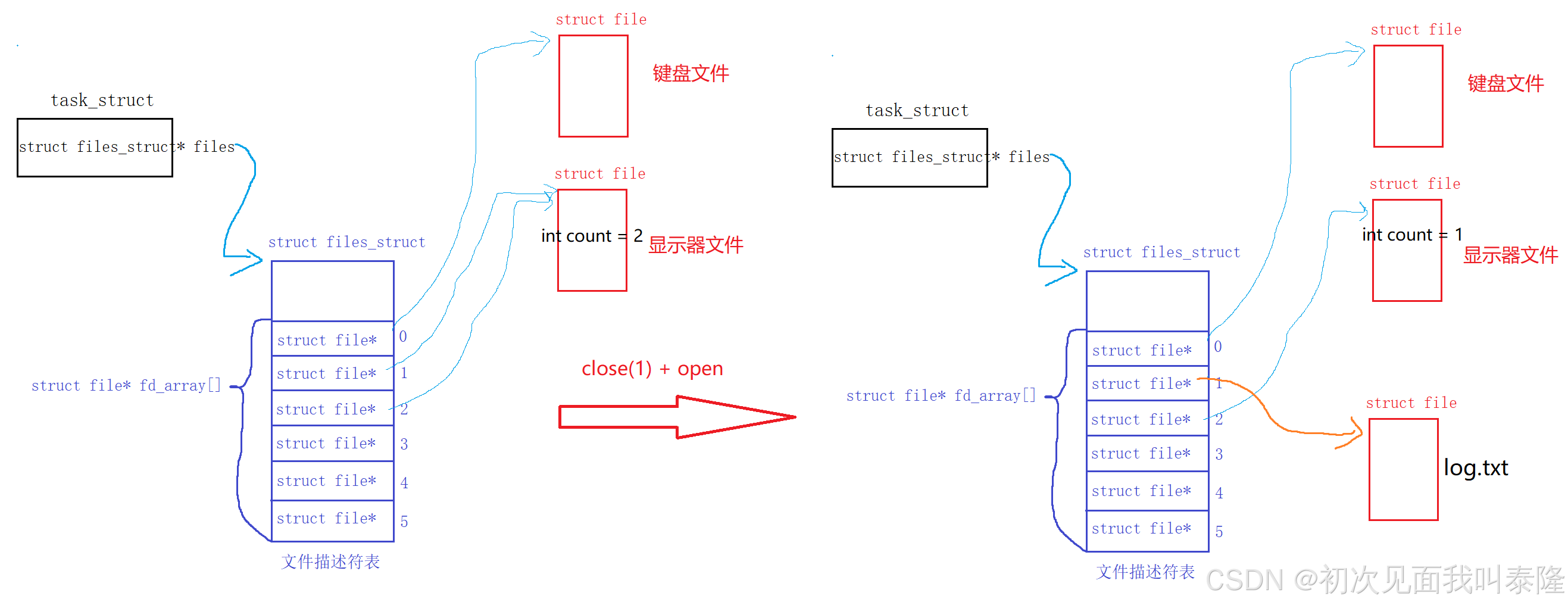
本来fd=1指向的是显示器文件,然后我们close(1),所以把显示器文件里面的引用计数--,然后将下标为1的指针置空,接着我们open打开log.txt,找到最小的、没有被使用的下标——1,然后让下标为1的指针指向log.txt的struct file对象。
但是这种方式是不太好的方式,我们可以先打开log.txt,此时open返回值fd=3,然后我们将下标为3的地址拷贝给下标为1的地址,这样就实现了重定向。
1.3、dup2系统调用
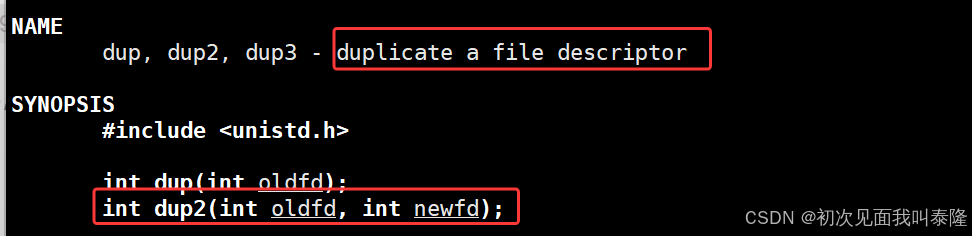

dup2有两个参数:oldfd和newfd,dup2是让newfd称为oldfd的拷贝。这里虽然说的是fd,但是我们要理解它拷贝的是struct file*的指针,拷贝的是地址。
下面给出dup2的原理分析图:
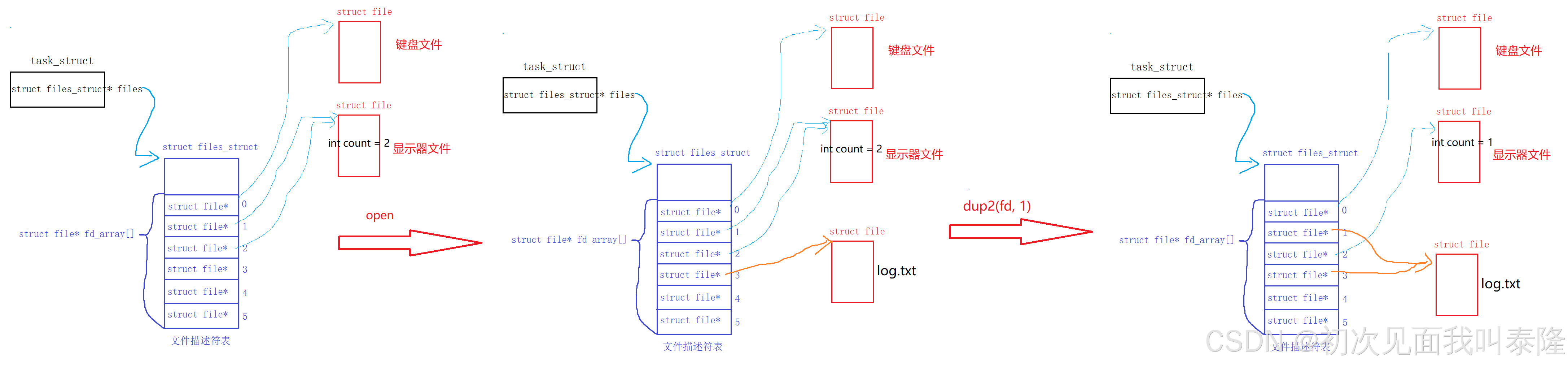
刚开始打开log.txt,那么返回值fd=4,然后调用dup2(fd, 1),让下标为1的指针曾为下标为fd的指针的拷贝。所以dup2之后,下标1和3都指向了log.txt的struct file对象,完成了输出重定向。至于fd=3的文件你要关也可以不关也行。
使用dup2实现输出重定向:
#include <stdio.h>
#include <string.h>
#include <unistd.h>
#include <sys/types.h>
#include <sys/stat.h>
#include <fcntl.h>

const char* filename = "log.txt";

int main()
{
    int fd = open(filename, O_CREAT|O_WRONLY|O_TRUNC, 0666);
    if (fd < 0)
    {
        perror("open");
        return 1;
    }
    dup2(fd, 1);
    close(fd);
    const char* message = "hello linux\n";
    int cnt = 5;
    while (cnt--)
    {
        write(1, message, strlen(message));
    }
    return 0;
}
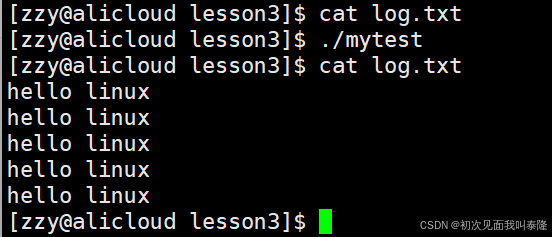
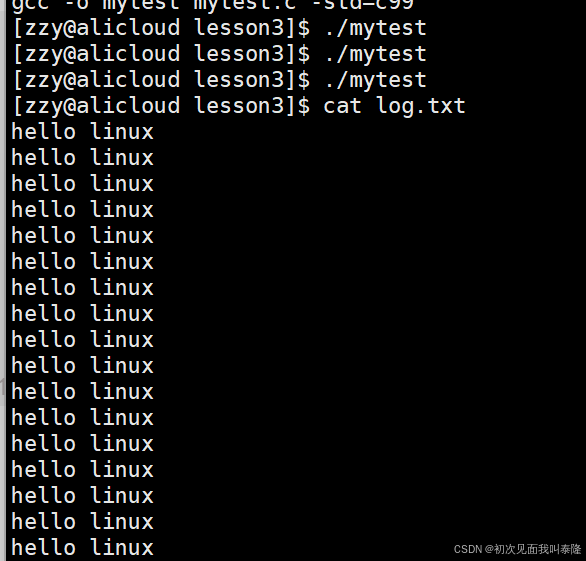
将open选项O_TRUNC替换成O_APPEND实现追加重定向:
使用dup2实现输入重定向:
#include <stdio.h>
#include <string.h>
#include <unistd.h>
#include <sys/types.h>
#include <sys/stat.h>
#include <fcntl.h>

const char* filename = "log.txt";
int main()
{
    int fd = open(filename, O_RDONLY);
    if (fd < 0)
    {
        perror("open");
        return 1;
    }
    dup2(fd, 0);
    close(fd);
    char inbuff[1024];
    ssize_t n = read(0, inbuff, sizeof(inbuff) - 1);
    inbuff[n] = '\0';
    printf("%s\n", inbuff);
    return 0;
}
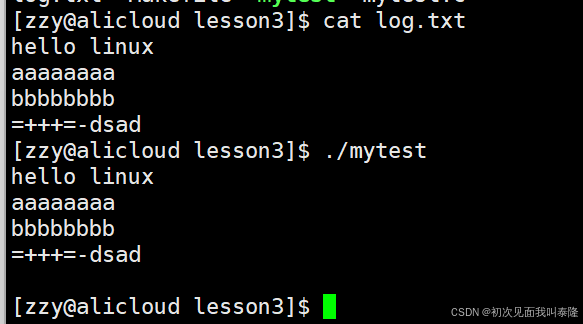
1.4、实现myshell支持重定向
#include <stdio.h>
#include <assert.h>
#include <stdlib.h>
#include <string.h>
#include <unistd.h>
#include <sys/types.h>
#include <sys/wait.h>
#include <sys/stat.h>
#include <fcntl.h>

#define LINE_SIZE 1024
#define ARGC_SIZE 32
#define EXIT_CODE
#define LEFT "["
#define RIGHT "]"
#define LABLE "$"
#define DELIM " \t"

#define NONE        -1
#define IN_REDIR     0
#define OUT_REDIR    1
#define APPEND_REDIR 2

int lastcode = 0;
int quit = 0;
char commandline[LINE_SIZE];
char* argv[ARGC_SIZE];
char pwd[LINE_SIZE];
char hostname[LINE_SIZE];
int redir = NONE;
char* redirfilename = NULL;


// 自定义环境变量表
char myenv[LINE_SIZE];
// 自定义本地变量表

char* GetHostName()
{
    //return getenv("HOSTNAME");
    gethostname(hostname, sizeof(hostname));
    return hostname;
}

char* GetUserName()
{
    return getenv("USER");
}

void GetPwd()
{
    getcwd(pwd, sizeof(pwd));
}

void SplitPwd()
{
    int j = 0;
    int len = strlen(pwd);
    for (int i = len - 1; i >= 0; i--)
    {
        if (pwd[i] == '/')
        {
            j = i;
            break;
        }
    }
    if (!j) {
        pwd[0] = '/';
        pwd[1] = '\0';
        return;
    }
    int l = 0;
    for (int i = j + 1; i < len; i++)
    {
        pwd[l++] = pwd[i];
    }
    pwd[l] = 0;
}

void CheckRedir(char* cline)
{
    char* pos = cline;
    while (*pos)
    {
        if (*pos == '>')
        {
            if (*(pos+1) == '>')
            {
                *pos++ = '\0';
                *pos++ = '\0';
                while (*pos == ' ') pos++;
                redirfilename = pos;
                redir = APPEND_REDIR;
            }
            else
            {
                *pos++ = '\0';
                while (*pos == ' ') pos++;
                redirfilename = pos;
                redir = OUT_REDIR;
            }
            break;
        }
        else if (*pos == '<')
        {
            *pos++ = '\0';
            while (*pos == ' ') pos++;
            redirfilename = pos;
            redir = IN_REDIR;
            break;
        }
        pos++;
    }
}

void Interact(char* cline, size_t size)
{
    GetPwd();
    SplitPwd();

    printf(LEFT"%s@%s %s"RIGHT""LABLE" ", GetUserName(), GetHostName(), pwd);
    char* s = fgets(cline, size, stdin);
    assert(s);
    (void)s;
    cline[strlen(cline)-1] = '\0';
    CheckRedir(cline);
}

int SplitString(char* _argv[], char* cline)
{
    int i = 0;
    _argv[i++]  = strtok(cline, DELIM);
    while (_argv[i++] = strtok(NULL, DELIM));
    return i - 1;
}

void NormalExcute(char* argv[])
{
    pid_t id = fork();
    if (id < 0)
    {
        perror("fork");
        return;
    }
    else if (id == 0)
    {
        if (redir == IN_REDIR)
        {
            int fd = open(redirfilename, O_RDONLY);
            dup2(fd, 0);
        }
        else if (redir == OUT_REDIR)
        {
            int fd = open(redirfilename, O_CREAT|O_WRONLY|O_TRUNC, 0666);
            dup2(fd, 1);
        }
        else if (redir == APPEND_REDIR)
        {
            int fd = open(redirfilename, O_CREAT|O_WRONLY|O_APPEND, 0666);
            dup2(fd, 1);
        }
        execvp(argv[0], argv);
        exit(0);
    }
    else
    {
        int status = 0;
        pid_t ret = waitpid(id, &status, 0);
        if (ret == id)
        {
            lastcode = WEXITSTATUS(status);
        }
    }
}

int BuildExcute(int _argc, char* _argv[])
{
    if (_argc == 2 && strcmp(_argv[0], "cd") == 0)
    {
        chdir(_argv[1]);
        GetPwd();
        sprintf(getenv("PWD"), "%s", pwd);
        return 1;
    }
    else if(_argc == 2 && strcmp(_argv[0], "export") == 0)
    {
        strcpy(myenv, _argv[1]);
        putenv(myenv);
        return 1;
    }
    else if (_argc == 2 && strcmp(_argv[0], "echo") == 0)
    {
        if (strcmp(_argv[1], "$?") == 0)
        {
            printf("%d\n", lastcode);
            lastcode = 0;
        }
        if (*_argv[1] == '$')
        {
            char* val = getenv(_argv[1] + 1);
            if (val) printf("%s\n", val);
        }
        else
        {
            printf("%s\n", _argv[1]);
        }
        return 1;
    }

    // 单独处理ls
    if (strcmp(_argv[0], "ls") == 0)
    {
        _argv[_argc++] = "--color";
        _argv[_argc] = NULL;
    }
    return 0;
}

int main()
{
    while (!quit)
    {
        redir = NONE;
        redirfilename = NULL;
        Interact(commandline, sizeof(commandline));
        int argc = SplitString(argv, commandline);
        if (argc == 0) continue;

        int n = BuildExcute(argc, argv);

        if (!n)
            NormalExcute(argv);
    }
    return 0;
}
问题:我们在创建子进程后,在子进程代码块内部打开了文件并使用dup2实现重定向,然后进行进程程序替换,这样难道不影响吗?
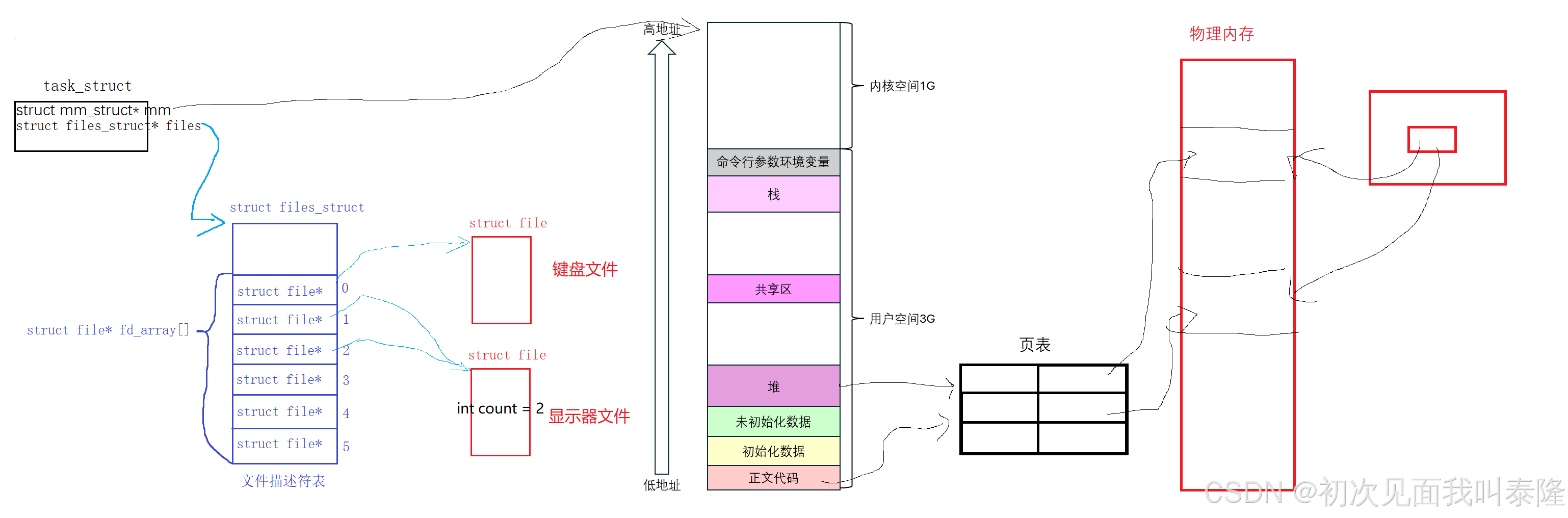
进程程序替换只替换右侧物理内存的代码和数据,对左边并没有任何影响,所以进程历史打开的文件与进行的各种重定向关系都和未来进行进程程序替换无关!程序替换并不影响文件访问。
1.5、标准输出VS标准错误
#include <stdio.h>
#include <string.h>
#include <unistd.h>
#include <sys/types.h>
#include <sys/stat.h>
#include <fcntl.h>

const char* filename = "log.txt";

int main()
{
    fprintf(stdout, "hello normal printf\n");
    fprintf(stdout, "hello normal printf\n");
    fprintf(stdout, "hello normal printf\n");
    fprintf(stderr, "hello error printf\n");
    fprintf(stderr, "hello error printf\n");
    fprintf(stderr, "hello error printf\n");
    return 0;
}
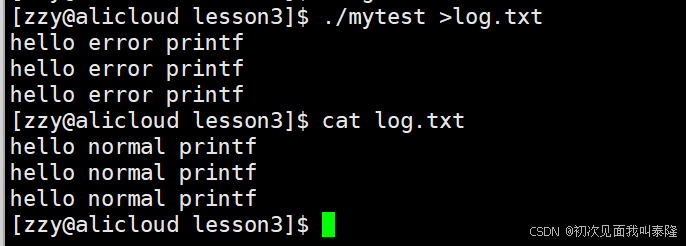
运行程序重定向后,我们发现只打印了error信息,而normal信息则是被重定向到了log.txt。因为输出重定向把3号文件描述符拷贝给了1号文件描述符,所以向标准输出打印的数据不显示,写入了文件,而向标准错误打印照样可以显示。
把标准输出和标准错误区分开了,我们就可以分别把标准输出和标准错误重定向到不同的文件,实际上标准错误一般都是一些日志信息。
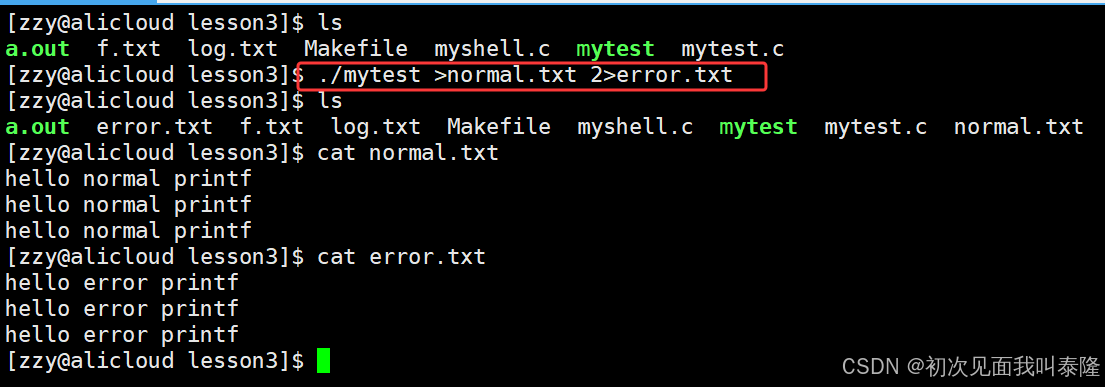
上面的指令就是把1号文件描述符重定向到normal.txt文件,2号文件描述符重定向到error.txt。可以看到1号文件描述符是可以省略的。
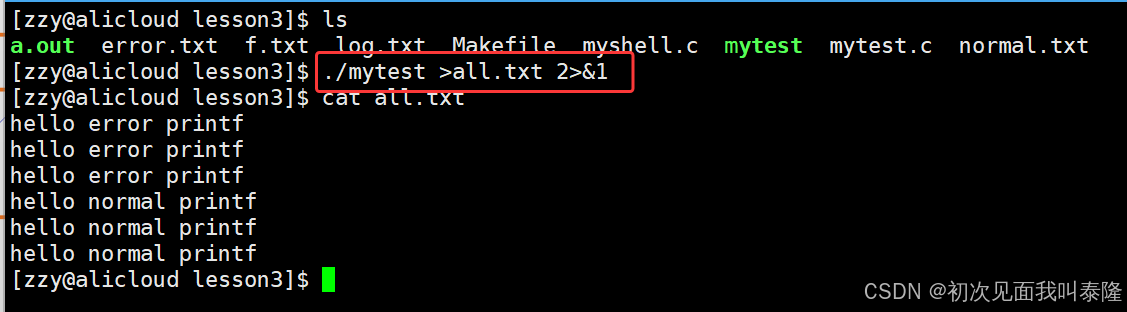
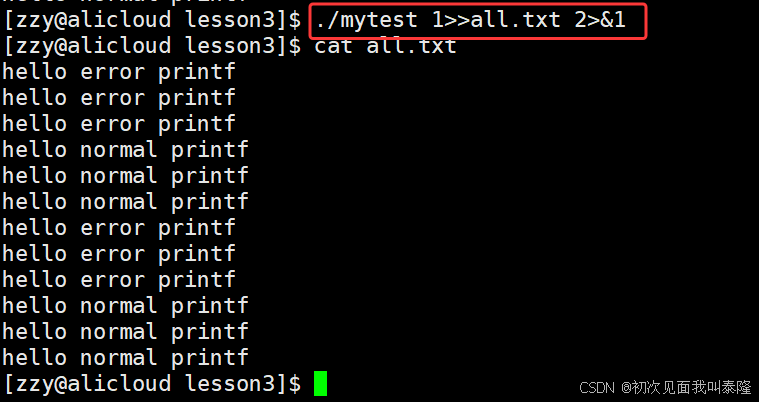
上面这是把1号文件描述符重定向到all.txt,并把1号的指针拷贝给了2号,所以标准输出和标准错误此时都重定向到了all.txt这个文件中,所以全都写入all.txt。
下面演示一下不省略的写法:
2、如何理解一切皆文件
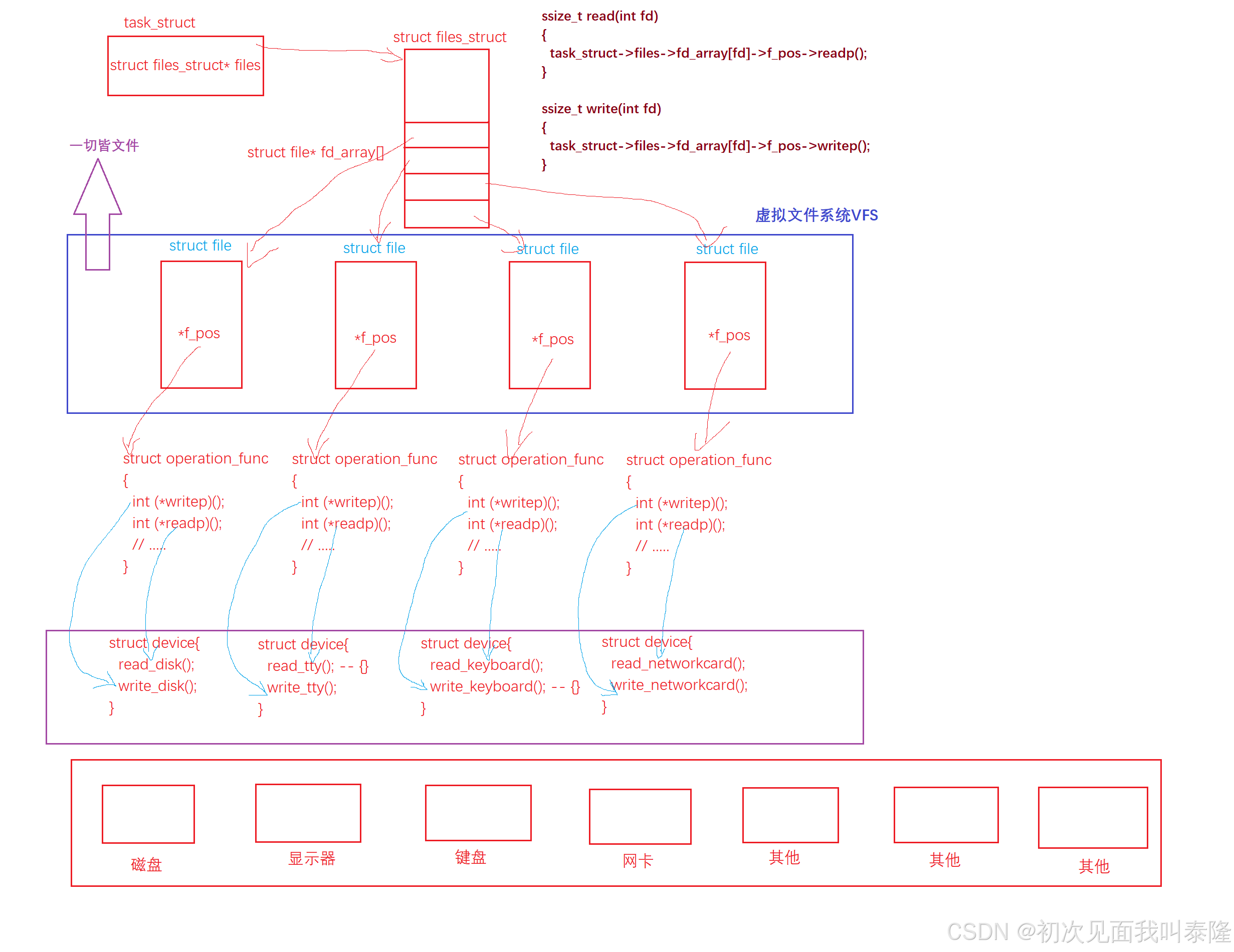
计算机内存在许多硬件,诸如磁盘、显示器、键盘、网卡等,虽然有内存和CPU,但是大部分都是外设。那么每种设备都有共同的一些属性,诸如设备号、状态等等信息,所以我们可以使用struct device将他们描述起来。那么每种设备肯定都要提供读写方法,所以显示器设备就有:read_tty()方法内容为空,write_tty(),键盘就有:read_keyboard(),write_keyboard(){}方法内容为空。也就是说每个描述的设备device对象都有读写方法。如果不存在对应的读或写,方法体内可以为空。
进程通过struct files_struct* flies指针找到struct files对象,struct files对象里面有文件描述符表,数组fd_array[]指向一个一个的struct file对象。那么操作系统内还有一种struct operation_func的类型,里面有读写函数指针,当然还会有其他内容,通过读写函数指针分别指向下面struct device里面的读写方法。然后struct file里面必定要有一个指针f_ops指向struct operation_func对象。这样,每个文件就不再关心下层了,直接使用读写函数指针去调用对应的读写方法即可。那么我们从struct file这层往上看,就是一切皆文件。而struct file这一层,我们称为VFS——虚拟文件系统。上层通过统一的文件接口访问底层设备。
再来看,struct file中有各种属性,但是C语言struct中不能写方法,所以使用函数指针来充当成员方法。struct file在我们看来就是基类,而下面的struct device不就是派生类吗。在上层,指针指向哪个对象就调用哪个对象的方法,这不就是多态吗。
3、缓冲区
3.1、观察现象
现象一:
#include <stdio.h>
#include <string.h>
#include <sys/types.h>
#include <sys/stat.h>
#include <fcntl.h>
#include <unistd.h>

int main()
{
    const char* fstr = "hello fwrite\n";
    const char* str = "hello write\n";
    printf("hello printf\n");
    fprintf(stdout, "hello fprintf\n");
    fwrite(fstr, strlen(fstr), 1, stdout);
    write(1, str, strlen(str));

    return 0;
}

直接运行程序,很符合我们的预期printf、fprintf、fwrite、write按照顺序打印。接着我们重定向到log.txt中,cat打印log.txt文件中的内容,我们发现顺序发生了变化,先打印write、然后才是printf、fprintf、fwrite。为什么顺序变了呢?
现象二:
#include <stdio.h>
#include <string.h>
#include <sys/types.h>
#include <sys/stat.h>
#include <fcntl.h>
#include <unistd.h>

int main()
{
    const char* fstr = "hello fwrite\n";
    const char* str = "hello write\n";
    printf("hello printf\n");
    fprintf(stdout, "hello fprintf\n");
    fwrite(fstr, strlen(fstr), 1, stdout);
    write(1, str, strlen(str));

    fork();
    return 0;
}
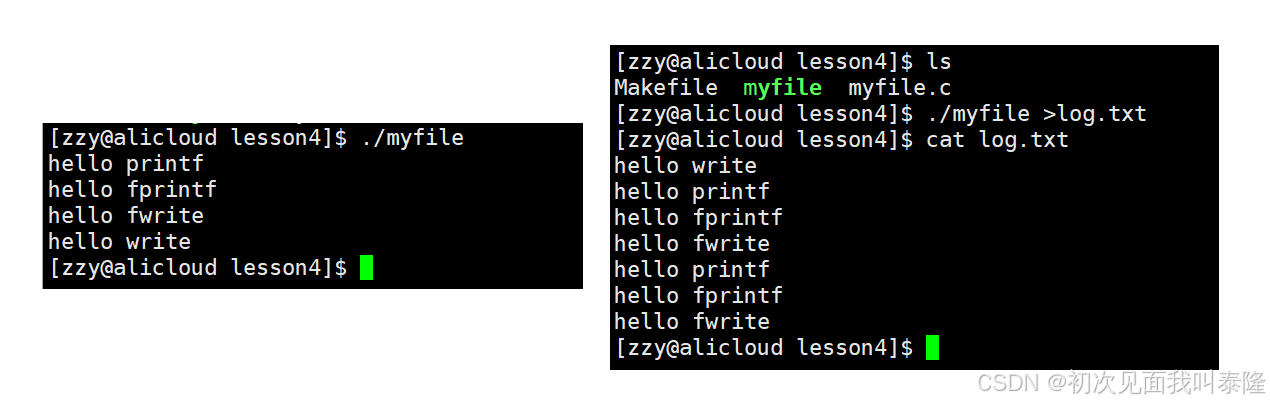
这份代码我们在最后添加了fork函数创建子进程,直接运行程序按照顺序打印出来了,很符合预期。但是当我们将输出结果重定向到log.txt文件中,再cat打印log.txt文件内容我们发现,先打印了hello write,后面接着是printf、fprintf、fwrite,并且它们都打印了两次。C接口打印了两次,系统调用只打印了一次。那么我们可以直接推断,一定跟fork有关。
现象三:
#include <stdio.h>
#include <string.h>
#include <sys/types.h>
#include <sys/stat.h>
#include <fcntl.h>
#include <unistd.h>

int main()
{
    const char* fstr = "hello fwrite\n";
    const char* str = "hello write\n";
    printf("hello printf\n");
    fprintf(stdout, "hello fprintf\n");
    fwrite(fstr, strlen(fstr), 1, stdout);
    write(1, str, strlen(str));

    close(1);
    //fork();
    return 0;
}

我们在最后把显示器文件给关了,再次运行程序,我们发现按照顺序打印,符合预期。接着我们重定向到log.txt文件,发现log.txt中只有hello write。
现象四:
#include <stdio.h>
#include <string.h>
#include <sys/types.h>
#include <sys/stat.h>
#include <fcntl.h>
#include <unistd.h>

int main()
{
    const char* fstr = "hello fwrite";
    const char* str = "hello write";
    printf("hello printf");
    fprintf(stdout, "hello fprintf");
    fwrite(fstr, strlen(fstr), 1, stdout);
    write(1, str, strlen(str));

    close(1);
    //fork();
    return 0;
}

再对代码进行修改,将我们要打印的内容后面的\n全部去掉,编译好后运行,我们发现只打印了hello write,重定向到log.txt文件中,log.txt中也只有hello write。
思考:为什么会出现上面这些情况呢?
3.2、C语言缓冲区
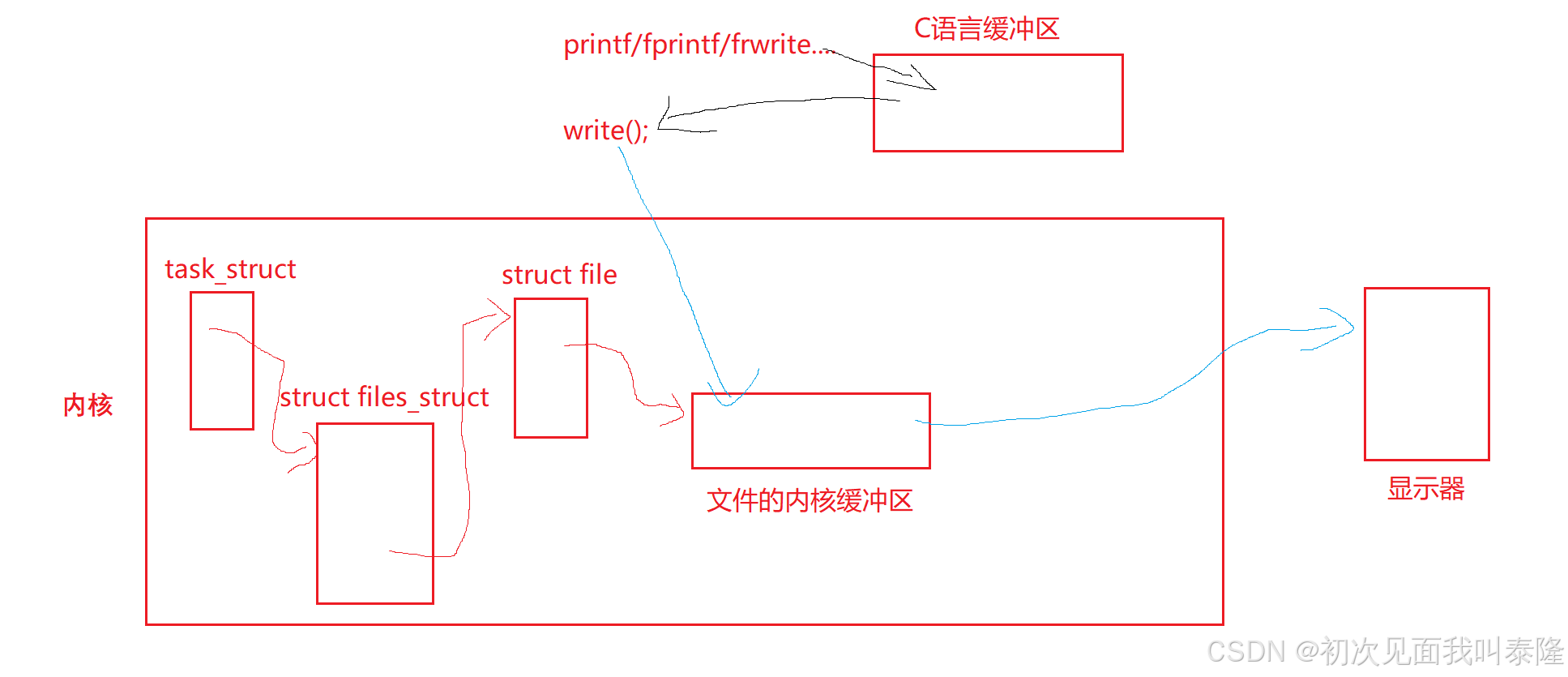
首先我们可以知道,这个缓冲区一定不在操作系统内部,不是系统级别的缓冲区。 根据现象4,我们调用了printf、fprintf、fwrite,并且字符串不带\n,所以会先存放在缓冲区中。而如果是内核级别的缓冲区,那么我们在close(1)的时候,一定会将缓冲区的数据刷新到显示器上。所以这个缓冲区不是系统级的缓冲区,而是用户级别的缓冲区。
在进度条那边,printf打印一个字符串如果不带\n,我们发现是无法显示到显示器上的,需要等到进程退出,才会刷新C语言的缓冲区,然后将字符串显示出来。而如果我们带了\n,那么就会直接刷新,说明当我们向显示器打印数据时,C语言的缓冲区碰到\n就会直接刷新。
显示器文件的刷新策略是行刷新,所以在printf执行完遇到\n,就会将数据刷新到内核中。而刷新的本质就是将数据通过 文件描述符fd=1 + write函数 写入到内核中。
根据上图,我们调用C接口printf/fprintf等,会先将数据写入到缓冲区中,等到合适的时候才会调用write将数据刷新到内核缓冲区。这个合适的时候比如遇到\n。
那么对于进程退出讲的两个函数:exit和_exit,我们就可以知道,exit本质上就是先fflush(stdout),然后再调用系统接口_exit。
那么下面有几个问题:
1、缓冲区刷新策略有哪些?
a、无缓冲——直接刷新。
b、行缓冲——不刷新,直到遇到\n。 显示器文件就是行缓冲的刷新策略。
c、全缓冲——缓冲区满了才刷新。 普通文件就是全缓冲的刷新策略。
2、进程退出的时候也会刷新缓冲区。
3、为什么要有这个缓冲区?
a、解决效率问题——用户的效率问题。
b、配合格式化。
(对于显示器来说,显示器是给人看的,所以刷新策略为行缓冲,而对于普通文件,我们写入普通文件采用全缓冲的方式,这样就不会频繁调用系统write接口,提高效率。也就是说本来可能要刷新十次,现在只需要刷新一两次,进而提高效率。另外我们平时向显示器打印整数、浮点数,最终都是要转换成字符的,最终在显示器上显示的都是字符串,而我们从键盘读入一个整数,本质也是先读入字符串,只不过C库给我们做了格式化,最后转换成整数。因此缓冲区可以配合格式化。)
4、这个缓冲区在哪里?
我们发现文件操作接口都绕不开C语言定义的FILE结构体对象,并且FILE里面也包含了文件描述符fd,所以FILE里面还有对应打开文件的缓冲区字段和维护信息。
我们每打开一个文件,底层都会调用open,在操作系统内创建一个struct file对象,而在C语言中会通过创建struct FILE对象来保存操作系统内的文件描述符,并且struct FILE里面还会维护一个缓冲区,这个缓冲区C语言在底层会给我们malloc出来,所以一个struct file对应一个C语言的缓冲区。并且这个缓冲区是用户级别的缓冲区。
3.3、分析现象
分析现象三:
1、不做重定向:printf、fprintf、fwrite先把数据写入到C语言缓冲区中,而它们写入的对象都是显示器文件,所以刷新策略是行缓冲,然后由于带了\n,所以会调用write函数将数据刷新到内核缓冲区。然后再调用write函数直接将数据写入到内核缓冲区中。最后操作系统会把文件内核缓冲区的数据刷到显示器上。所以printf、fprintf、fwrite、write都打印出来了。
2、做了重定向:重定向之后,写入的就是普通文件了,那么这时候刷新策略就变成了全缓冲,也就是要等到缓冲区满了才会刷新,所以printf、fprintf、fwrite都会将数据先写入到C语言缓冲区中,而write函数直接将数据写入到内核缓冲区。之后关闭1号文件,进程退出后要将数据刷新至1号文件就刷不了了,因为你已经关掉了。所以只打印了write。
分析现象四:
1、不做重定向:由于printf、fprintf、fwrite先将字符串写入到C语言的缓冲区中,而写入字符串都不带\n,所以不做刷新处理。而write函数会直接将数据写入到内核缓冲区中。接着我们关闭了显示器文件,那么在进程退出的时候,会将C语言缓冲区的数据刷新到文件描述符为1的文件内核缓冲区中,但是我们已经close(1)了,所以刷不进去,因此最后只打印了write。
2、做了重定向:重定向后写入的是普通文件,刷新策略变成了全缓冲,write会直接将数据写入到内核缓冲区中。所以最后只剩下write。类似现象三。
分析现象一:
1、不做重定向:向显示器文件写入,刷新策略为行缓冲,所以printf、fprintf、fwrite写入C语言缓冲区之后就会调用write函数刷新到内核缓冲区,最后调用write函数直接写入内核缓冲区中。所以按照顺序打印。
2、做了重定向:向普通文件写入,刷新策略变为全缓冲,所以printf、fprintf、fwrite写入C语言缓冲区暂存,然后write直接写入到内核缓冲区中,接着进程退出后会刷新C语言缓冲区,将数据刷新到内核中。所以先后打印write、printf、fprintf、fwrite。
分析现象二:
1、不做重定向:向显示器文件写入,刷新策略为行缓冲,所以printf、fprintf、fwrite写入C语言缓冲区之后就会调用write函数刷新到内核缓冲区,最后调用write函数直接写入内核缓冲区中。在最后调用了fork函数创建子进程,当父子进程某一方要退出时,要刷新缓冲区,但是刷新缓冲区也是写入,所以需要发生写时拷贝,但是父子进程都没有数据可以刷新到内核中,所以按照顺序打印。
2、做了重定向:向普通文件写入,刷新策略变为全缓冲,所以printf、fprintf、fwrite写入C语言缓冲区暂存,然后write直接写入到内核缓冲区中,接着fork创建子进程。父子进程某一方退出时要刷新缓冲区,但是刷新缓冲区本质也是写入,所以发生写时拷贝,各自私有一份。接着父子进程各自退出的时候都会把自己缓冲区内的信息刷新到内核中。因此先后打印write、printf、fprintf、fwrite。而C接口打印了两次。
最后我们验证一下:
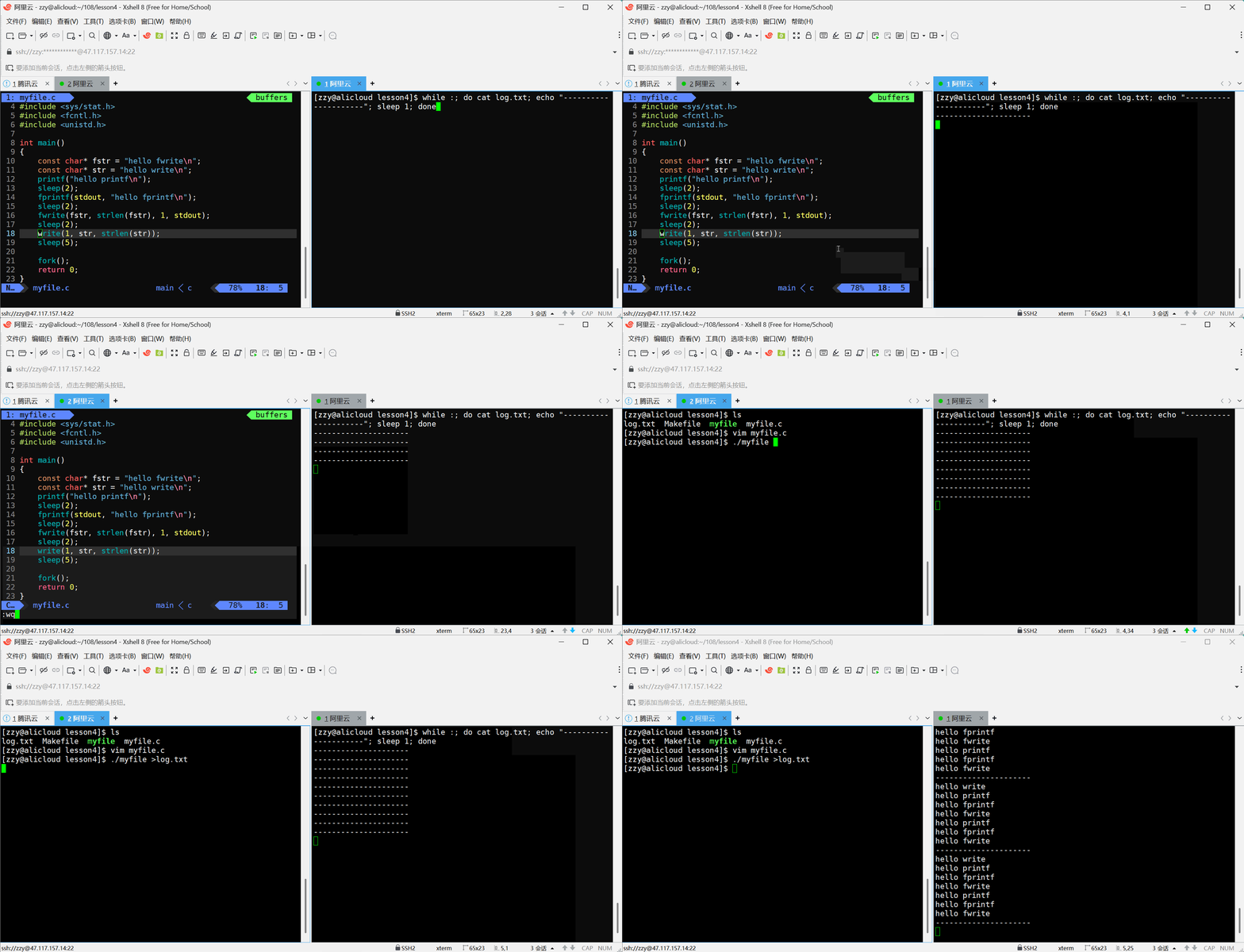
3.4、模拟实现C标准库
下面模拟实现C标准库的文件操作函数,模拟实现并不是为了造更好的轮子,只是为了更加了解底层。
// Mystdio.h
#ifndef __MYSTDIO_H__
#define __MYSTDIO_H__

#define SIZE 1024

#define FLUSH_NOW   1
#define FLUSH_LINE  2
#define FLUSH_ALL   4

typedef struct IO_FILE{
    int fileno;
    int flag;
    //char inbuffer[SIZE];
    //int in_pos;
    char outbuffer[SIZE];
    int out_pos;

}_FILE;

_FILE* _fopen(const char* filename, const char* flag);
int _fwrite(_FILE* fp, const char* str, int len);
void _fclose(_FILE* fp);

#endif
//Mystdio.c
#include "Mystdio.h"
#include <sys/types.h>
#include <sys/stat.h>
#include <fcntl.h>
#include <unistd.h>
#include <string.h>
#include <stdlib.h>
#include <assert.h>

#define FILE_MODE 0666

// w a r
_FILE* _fopen(const char* filename, const char* flag)
{
    assert(filename);
    assert(flag);
    int f = 0;
    int fd = -1;
    if (strcmp(flag, "w") == 0)
    {
        f = O_CREAT|O_WRONLY|O_TRUNC;
        fd = open(filename, f, FILE_MODE);
    }
    else if (strcmp(flag, "a") == 0)
    {
        f = O_CREAT|O_WRONLY|O_APPEND;
        fd = open(filename, f, FILE_MODE);
    }
    else if (strcmp(flag, "r") == 0)
    {
        f = O_RDONLY;
        fd = open(filename, f);
    }
    else return NULL;

    if (fd < 0) return NULL;
    _FILE* fp = (_FILE*)malloc(sizeof(_FILE));
    if (fp == NULL) return NULL;
    fp->fileno = fd;
    fp->flag = FLUSH_LINE;
    fp->out_pos = 0;
    return fp;
}

int _fwrite(_FILE* fp, const char* str, int len)
{
    memcpy(fp->outbuffer + fp->out_pos, str, len); // 没有做异常处理,也不考虑局部问题
    fp->out_pos += len;
    if (fp->flag & FLUSH_NOW)
    {
        write(fp->fileno, fp->outbuffer, fp->out_pos);
        fp->out_pos = 0;
    }
    else if (fp->flag & FLUSH_LINE)
    {
        if (fp->outbuffer[fp->out_pos - 1] == '\n')
        {
            write(fp->fileno, fp->outbuffer, fp->out_pos);
            fp->out_pos = 0;
        }
    }
    else if (fp->flag & FLUSH_ALL)
    {
        if (fp->out_pos == SIZE)
        {
            write(fp->fileno, fp->outbuffer, fp->out_pos);
            fp->out_pos = 0;
        }
    }
    return len;
}

void _fflush(_FILE* fp)
{
    if (fp->out_pos > 0)
    {
        write(fp->fileno, fp->outbuffer, fp->out_pos);
        fp->out_pos = 0;
    }
}

void _fclose(_FILE* fp)
{
    if (fp == NULL) return;
    _fflush(fp);
    close(fp->fileno);
    free(fp);
}
// main.c
#include "Mystdio.h"
#include <string.h>

#define filename "log.txt"

int main()
{
    _FILE* fp = _fopen(filename, "w");


    const char* msg = "hello linux\n";
    _fwrite(fp, msg, strlen(msg));

    _fclose(fp);
    return 0;
}





 扫一扫
扫一扫


 630
630

 被折叠的 条评论
为什么被折叠?
被折叠的 条评论
为什么被折叠?
 到【灌水乐园】发言





