



 本文详细介绍了在使用Maven进行项目打包时遇到的依赖解析错误,特别是关于org.apache.httpcomponents:httpclient-cache的问题,并提供了具体的解决步骤,包括下载并导入证书到Java的cacerts,以及如何重新配置Maven进行打包。
使用mvn package打包是出现如下错误
[ERROR] Failed to execute goal on project canvas: Could not resolve dependencies for project xxx:xxx:jar:0.0.1-SNAPSHOT: Failed to collect dependencies at org.apache.httpcomponents:httpclient-cache:jar:4.5.6: Failed to read artifact descriptor for org.apache.httpcomponents:httpclient-cache:jar:4.5.6: Could not transfer artifact org.apache.httpcomponents:httpclient-cache:pom:4.5.6 from/to aliyunmaven (https://maven.aliyun.com/repository/public): sun.security.validator.ValidatorException: PKIX path building failed: sun.security.provider.certpath.SunCertPathBuilderException: unable to find valid certification path to requested target -> [Help 1]
[ERROR]
[ERROR] To see the full stack trace of the errors, re-run Maven with the -e switch.
[ERROR] Re-run Maven using the -X switch to enable full debug logging.
[ERROR]
[ERROR] For more information about the errors and possible solutions, please read the following articles:
[ERROR] [Help 1] http://cwiki.apache.org/confluence/display/MAVEN/DependencyResolutionException
解决办法:
1. 下载证书crt
本地maven仓库改到阿里云了,因此访问报错提到的仓库网址

下载crt证书,保存到桌面
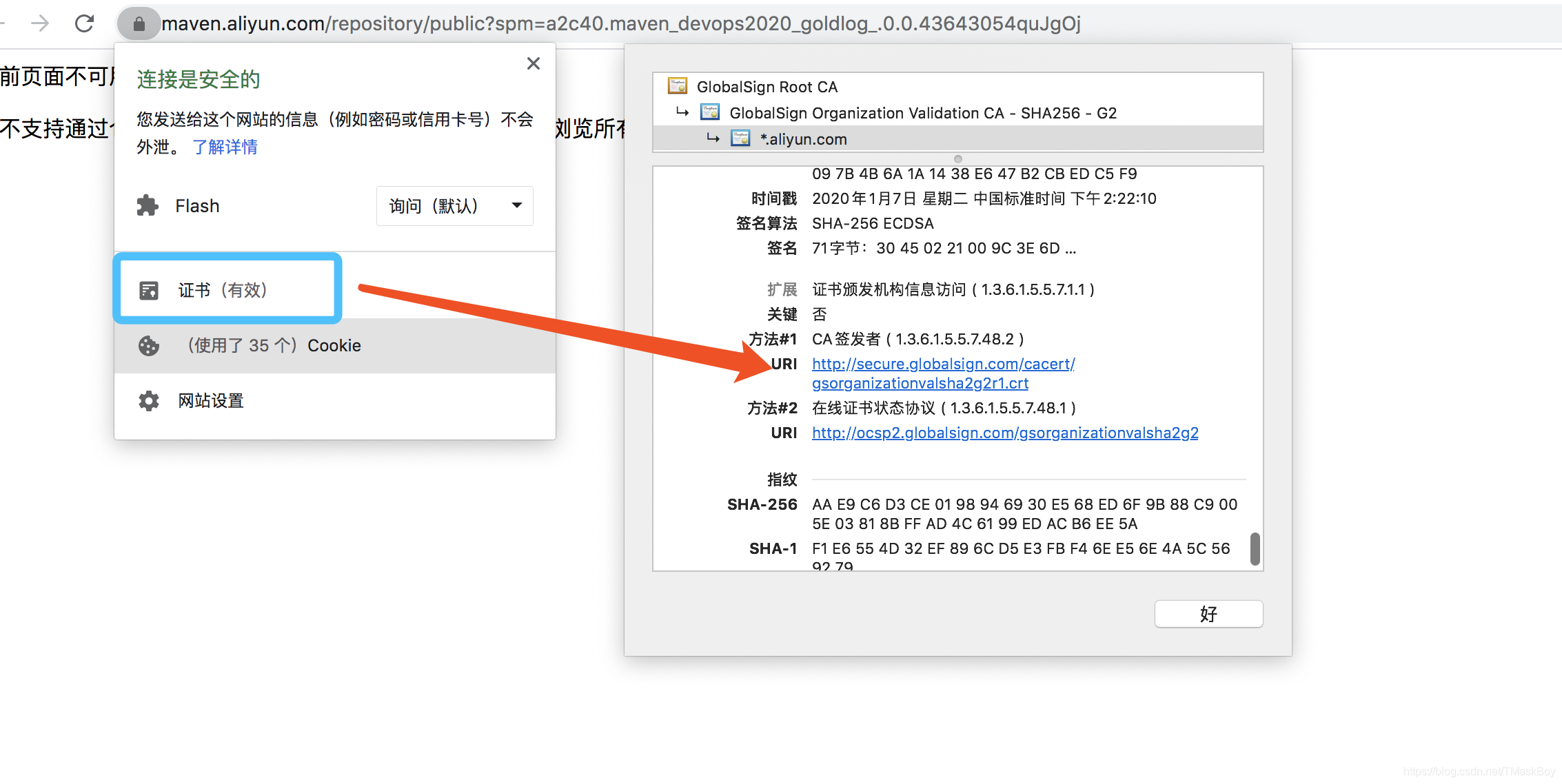
我下载的证书名为:gsorganizationvalsha2g2r1.crt
2. 导入证书
Mac终端执行(注意配置文件位置)
keytool -import -file gsorganizationvalsha2g2r1.crt -keystore $JAVA_HOME/jre/lib/security/cacerts
输入cacerts默认密码: changeit 是否导入输入:y
3. 重新打包
执行:mvn package -Djavax.net.ssl.trustStore=$JAVA_HOME/jre/lib/security/cacerts





 扫一扫
扫一扫


 2940
2940

 被折叠的 条评论
为什么被折叠?
被折叠的 条评论
为什么被折叠?
 到【灌水乐园】发言





