


一、内容简介
在现代 Web 应用开发中,性能优化是一个永恒的话题。Spring Framework 提供了强大的缓存抽象机制,通过简单的注解即可实现方法级别的缓存控制。其中,@Cacheable 是最常用的核心注解之一。本文将深入讲解 @Cacheable 注解的所有参数含义,并结合实际代码和测试案例,帮助开发者掌握其使用技巧与注意事项。
二、Spring Cache 简介
Spring Cache 是 Spring Framework 提供的一套声明式缓存抽象,它允许开发者通过注解方式轻松启用缓存功能,而无需关心底层缓存实现(如Redis、Caffeine、Ehcache 等)。只需在启动类上添加 @EnableCaching,并在方法上使用 @Cacheable、@CachePut、@CacheEvict 等注解,即可完成缓存逻辑。
本文重点聚焦于
@Cacheable注解的使用。
三、@Cacheable 注解详解
@Cacheable 用于标记一个方法的结果可以被缓存。当方法被调用时,Spring 会先检查缓存中是否存在对应 key 的结果,若存在则直接返回缓存值,不再执行方法体;若不存在,则执行方法并将结果存入缓存。
核心参数说明
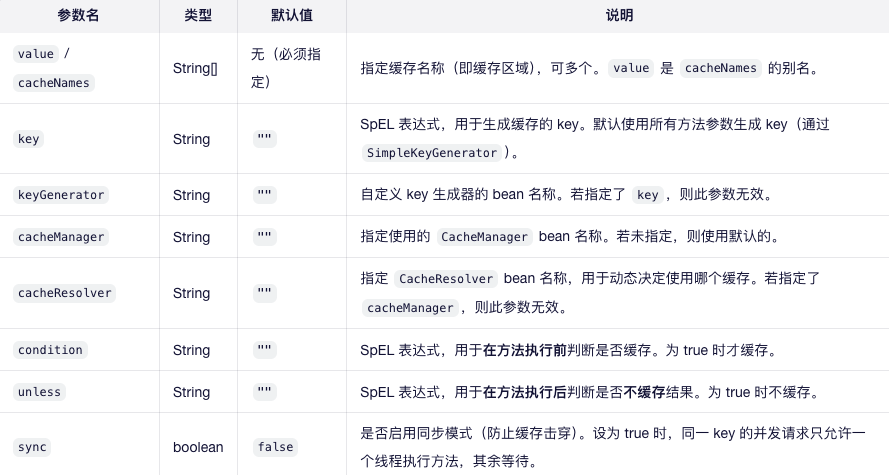
⚠️ 注意:
value和cacheNames功能相同,建议统一使用 cacheNames 以提高可读性。
四、代码案例
1. 项目依赖(Maven)
<dependencies>
    <dependency>
        <groupId>org.springframework.boot</groupId>
        <artifactId>spring-boot-starter-cache</artifactId>
    </dependency>
    <!-- 可选:使用 Caffeine 作为本地缓存 -->
    <dependency>
        <groupId>com.github.ben-manes.caffeine</groupId>
        <artifactId>caffeine</artifactId>
    </dependency>
</dependencies>
2. 启用缓存
@SpringBootApplication
@EnableCaching // 启用 Spring 缓存支持
public class CacheDemoApplication {
    public static void main(String[] args) {
        SpringApplication.run(CacheDemoApplication.class, args);
    }
}
3. 服务类(使用 @Cacheable)
@Service
public class UserService {

    private final Map<Long, String> userDb = new HashMap<>();

    public UserService() {
        userDb.put(1L, "Alice");
        userDb.put(2L, "Bob");
        userDb.put(3L, "Charlie");
    }

    /**
     * 基础用法:缓存用户信息
     */
    @Cacheable(cacheNames = "users", key = "#id")
    public String getUserById(Long id) {
        System.out.println("Fetching user from DB: " + id);
        return userDb.get(id);
    }

    /**
     * 使用 condition:仅当 id > 0 时缓存
     */
    @Cacheable(cacheNames = "users", key = "#id", condition = "#id > 0")
    public String getUserWithCondition(Long id) {
        System.out.println("Fetching user with condition: " + id);
        return userDb.get(id);
    }

    /**
     * 使用 unless:当返回 null 时不缓存
     */
    @Cacheable(cacheNames = "users", key = "#id", unless = "#result == null")
    public String getUserUnlessNull(Long id) {
        System.out.println("Fetching user unless null: " + id);
        return userDb.get(id); // 若 id 不存在,返回 null
    }

    /**
     * 同步模式:防止缓存击穿
     */
    @Cacheable(cacheNames = "users", key = "#id", sync = true)
    public String getUserSync(Long id) {
        System.out.println("Fetching user in sync mode: " + id);
        try {
            Thread.sleep(1000); // 模拟耗时操作
        } catch (InterruptedException e) {
            Thread.currentThread().interrupt();
        }
        return userDb.get(id);
    }
}
五、测试案例
1. 单元测试(JUnit 5)
@SpringBootTest
class UserServiceTest {

    @Autowired
    private UserService userService;

    @Test
    void testCacheableBasic() {
        // 第一次调用:执行方法并缓存
        String user1 = userService.getUserById(1L);
        assertEquals("Alice", user1);

        // 第二次调用:应从缓存读取,不打印日志
        String user2 = userService.getUserById(1L);
        assertEquals("Alice", user2);
        // 控制台应只打印一次 "Fetching user from DB: 1"
    }

    @Test
    void testCondition() {
        // id=1 > 0,应缓存
        userService.getUserWithCondition(1L);
        userService.getUserWithCondition(1L); // 第二次不应打印

        // id=-1 <= 0,不缓存,每次都会执行
        userService.getUserWithCondition(-1L);
        userService.getUserWithCondition(-1L); // 两次都打印
    }

    @Test
    void testUnless() {
        // id=1 存在,应缓存
        userService.getUserUnlessNull(1L);
        userService.getUserUnlessNull(1L); // 第二次不打印

        // id=99 不存在,返回 null,不缓存
        assertNull(userService.getUserUnlessNull(99L));
        assertNull(userService.getUserUnlessNull(99L)); // 两次都打印日志
    }

    @Test
    void testSyncMode() throws InterruptedException {
        // 并发调用,验证 sync=true 防止多次执行
        ExecutorService executor = Executors.newFixedThreadPool(5);
        CountDownLatch latch = new CountDownLatch(5);

        for (int i = 0; i < 5; i++) {
            executor.submit(() -> {
                userService.getUserSync(2L);
                latch.countDown();
            });
        }

        latch.await(); // 等待所有线程完成
        executor.shutdown();

        // 控制台应只打印一次 "Fetching user in sync mode: 2"
    }
}
六、注意事项
- 缓存穿透:查询不存在的数据会导致每次穿透到数据库。可通过 unless = “#result == null” 避免缓存 null 值,或使用布隆过滤器。
- 缓存雪崩:大量缓存同时失效。建议设置随机过期时间。
- 缓存击穿:热点 key 失效瞬间高并发访问。使用 sync = true 可缓解(仅限单机)。
- key 的唯一性:确保 key 表达式能唯一标识方法调用。避免不同参数产生相同 key。
- 序列化问题:若使用 Redis 等远程缓存,需确保对象可序列化(推荐使用 JSON 或自定义序列化器)。
- 事务与缓存:缓存操作在事务提交后才生效(若使用 Spring 事务),否则可能缓存脏数据。
七、结语
@Cacheable 是 Spring Cache 中最核心、最实用的注解之一。通过合理配置其参数,可以显著提升系统性能并降低数据库压力。但在实际使用中,也需警惕缓存一致性、穿透、雪崩等问题。建议结合业务场景选择合适的缓存策略与底层实现(如 Caffeine、Redis 等)。
希望本文能帮助你快速掌握 @Cacheable 的使用技巧。欢迎在评论区交流你的缓存实践经验!
📌 作者:保加利亚的风
📅 发布日期:2025年11月26日
🔗 相关标签:#SpringBoot #Cache #@Cacheable #性能优化 #Java






 扫一扫
扫一扫


 3567
3567

 被折叠的 条评论
为什么被折叠?
被折叠的 条评论
为什么被折叠?
 到【灌水乐园】发言





