



 本文详细介绍了在嵌入式Linux环境下使用Yocto Project进行编译的全过程,包括安装必要的软件包、设置git环境、初始化和同步Yocto项目、配置编译参数以及编译特定的Yocto镜像。
sudo apt-get install gawk wget git-core diffstat unzip texinfo gcc-multilib build-essential chrpath socat libsdl1.2-dev
sudo apt-get install libsdl1.2-dev xterm sed cvs subversion coreutils texi2html docbook-utils python-pysqlite2 help2man make gcc g++ desktop-file-utils
libgl1-mesa-dev libglu1-mesa-dev mercurial autoconf automake groff curl lzop asciidoc
To install the “repo” utility, perform these steps:
- Create a bin folder in the home directory.
Host Setup
i.MX Yocto Project User’s Guide, Rev. L4.14.98-2.0.0_ga, 04/2019
NXP Semiconductors 5
$ mkdir ~/bin (this step may not be needed if the bin folder already exists)
$ curl https://storage.googleapis.com/git-repo-downloads/repo > ~/bin/repo
$ chmod a+x ~/bin/repo
2. Add the following line to the  .bashrc file to ensure that the  ~/bin folder is in your PATH variable.
export PATH=~/bin:$PATH
First make sure that git is set up properly with the commands below.
$ git config --global user.name "sunxiaolin2016"
$ git config --global user.email "sun.xiaolin@icloud.com"
$ git config --list
$ mkdir imx-yocto-bsp
$ cd imx-yocto-bsp
$ repo init -u https://source.codeaurora.org/external/imx/imx-manifest -b imx-linux-sumo -m imx-4.14.98-2.0.0_ga.xml
$ repo sync
问题:https://gerrit.googlesource.com/git-repo/clone.bundle无法访问,repo无法正常进行。
报错:
Cannot get http://gerrit.googlesource.com/git-repo/clone.bundle
解决:
参考资料https://mirrors.tuna.tsinghua.edu.cn/help/git-repo/
重做下载:
curl https://mirrors.tuna.tsinghua.edu.cn/git/git-repo -o repo
chmod +x repo
重做更新:
export REPO_URL='https://mirrors.tuna.tsinghua.edu.cn/git/git-repo/'
重启终端terminal生效。
5.编译配置
DISTRO=fsl-imx-xwayland MACHINE=imx8qmmek source fsl-setup-release.sh -b build-x11
DISTRO=fsl-imx-xwayland MACHINE=imx8qmmek source fsl-setup-release.sh -b build-xwayland
6.编译,选择yocto image
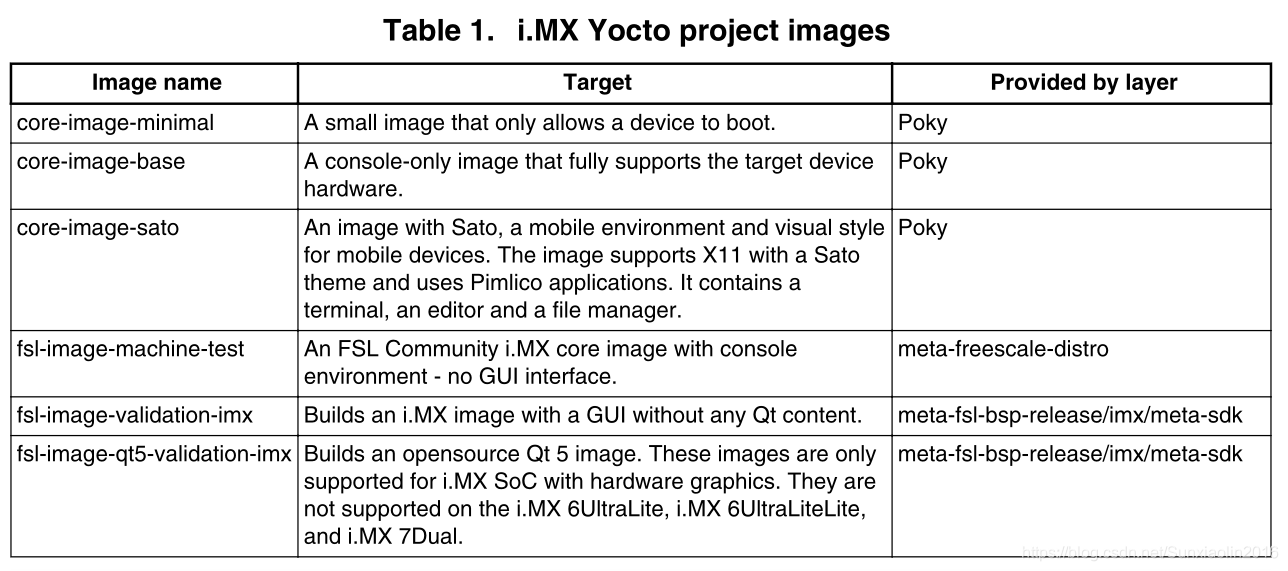
bitbake fsl-image-validation-imx
bitbake fsl-image-qt5-validation-imx





 扫一扫
扫一扫


 463
463

 被折叠的 条评论
为什么被折叠?
被折叠的 条评论
为什么被折叠?
 到【灌水乐园】发言





