



 本文介绍了在RecyclerView的网格布局中遇到最左和最右间距无法平分的问题,通过解析问题并提供一种简单的解决方法。首先,通过在BaseActivity中获取手机屏幕宽度,然后在GridRecyclerAdapter中计算单张图片的宽度,根据列数平分剩余屏幕宽度,最终实现图片的等间距展示。
问题描述:
网格布局显示的图片如下图效果:
很明显,第一张图片上1,4编号的间距不一致
效果图看起来明显比较和谐~(图中底色只是为了方便观看效果)


然后在网上找了一些方法,尝试了几种,最后参考和尝试了请叫我百米冲刺写的方法:
封装了MyDivider,出处:自定义RecyclerView.ItemDecoration,实现Item的等间距分割以及分割线效果
/**
 * Created by SummerMay on 2018/5/11.
 * RecyclerView的分隔线(网格布局)
 */

public class MyDividerItem extends RecyclerView.ItemDecoration {
    private int leftRight;
    private int topBottom;

    public MyDividerItem(int leftRight, int topBottom) {
        this.leftRight = leftRight;
        this.topBottom = topBottom;
    }

    @Override
    public void getItemOffsets(Rect outRect, View view, RecyclerView parent, RecyclerView.State state) {
        GridLayoutManager layoutManager = (GridLayoutManager) parent.getLayoutManager();
        final GridLayoutManager.LayoutParams lp = (GridLayoutManager.LayoutParams) view.getLayoutParams();
        final int childPosition = parent.getChildAdapterPosition(view);
        final int spanCount = layoutManager.getSpanCount();
        if (layoutManager.getOrientation() == GridLayoutManager.VERTICAL) {
            //判断是否在第一排
            if (layoutManager.getSpanSizeLookup().getSpanGroupIndex(childPosition, spanCount) == 0) {
                //第一排的需要上面
                outRect.top = topBottom;
            }
            outRect.bottom = topBottom;
            //这里忽略和合并项的问题,只考虑占满和单一的问题
            if (lp.getSpanSize() == spanCount) {
                //占满
                outRect.left = leftRight;
                outRect.right = leftRight;
            } else {
                outRect.left = (int) (((float) (spanCount - lp.getSpanIndex())) / spanCount * leftRight);
                outRect.right = (int) (((float) leftRight * (spanCount + 1) / spanCount) - outRect.left);
            }
        } else {
            if (layoutManager.getSpanSizeLookup().getSpanGroupIndex(childPosition, spanCount) == 0) {
                //第一排的需要left
                outRect.left = leftRight;
            }
            outRect.right = leftRight;
            //这里忽略和合并项的问题,只考虑占满和单一的问题
            if (lp.getSpanSize() == spanCount) {
                //占满
                outRect.top = topBottom;
                outRect.bottom = topBottom;
            } else {
                outRect.top = (int) (((float) (spanCount - lp.getSpanIndex())) / spanCount * topBottom);
                outRect.bottom = (int) (((float) topBottom * (spanCount + 1) / spanCount) - outRect.top);
            }
        }
    }
}
用上之后,第一时间用模拟器跑了一次,间距看起来明显对了,,真机上一跑,问题依旧呀..
然后我用一种相对简单的方式解决了,步骤如下:
1.在BaseActivity中加入获取手机屏幕宽度的方法
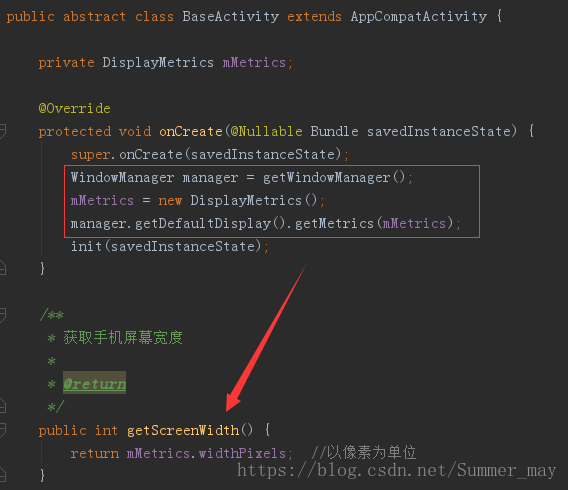
2.在GridRecyclerAdapter中,使用获取屏幕宽度的方法获取到屏幕宽度,主要的计算就是单张图片的宽度:
1)假定我们有spanCount张图片(实际就是网格布局的列数)
2)观察一下,我们竖向的间隔一共有spanCount+1个
3)下面,我们用屏幕的宽度-间隔数量,也就是screenWidth - leftRight * (spanCount + 1),leftRight即竖向间隔的宽度,不清楚的可以先看看自定义RecyclerView.ItemDecoration,实现Item的等间距分割以及分割线效果
4)然后,我们用列数来平分剩下的屏幕宽度,也就是第3)步中得到的结果除以spanCount,即(screenWidth - leftRight * (spanCount + 1)) / spanCount
5)最后,我们设置图片的宽高即可(这里我让图片显示为正方形,宽高一致)
/**
 * Created by SummerMay on 2018/5/25.
 * 网格布局
 */

public class GridRecyclerAdapter extends RecyclerView.Adapter<GridRecyclerAdapter.ViewHolder> {

    private final LayoutInflater mInflater;
    private BaseActivity activity;
    private int leftRight;
    private int topBottom;
    private int spanCount;

    /**
     * 构造方法
     */
    public GridRecyclerAdapter(BaseActivity activity, int spanCount, int leftRight, int topBottom) {
        this.activity = activity;
        this.spanCount = spanCount;
        this.leftRight = leftRight;
        this.topBottom = topBottom;
        mInflater = LayoutInflater.from(activity);
    }

    @Override
    public ViewHolder onCreateViewHolder(ViewGroup parent, int viewType) {
        ViewHolder holder = new ViewHolder(mInflater.inflate(R.layout.item_grid, parent, false));
        return holder;
    }

    @Override
    public void onBindViewHolder(ViewHolder holder, int position) {
        int i = position + 1;
        holder.posTv.setText("第" + i + "张");
        //获取屏幕宽度
        int screenWidth = activity.getScreenWidth();
        //获取单张图片宽度
        int itemImgWidth = (screenWidth - leftRight * (spanCount + 1)) / spanCount;
        //设置图片宽高
        ViewGroup.LayoutParams params = holder.gridIv.getLayoutParams();
        params.width = itemImgWidth;
        params.height = itemImgWidth;
        holder.gridIv.setLayoutParams(params);
    }

    @Override
    public int getItemCount() {
        return 20;
    }

    class ViewHolder extends RecyclerView.ViewHolder {

        @BindView(R.id.grid_iv)
        ImageView gridIv;
        @BindView(R.id.pos_tv)
        TextView posTv;

        public ViewHolder(View itemView) {
            super(itemView);
            ButterKnife.bind(this, itemView);
        }
    }
}
3.最后贴上Activity的代码
/**
 * Created by SummerMay on 2018/5/9.
 * RecyclerView
 */

public class RecyclerActivity extends BaseActivity {

    private static final String TAG = "RecyclerActivity";
    private int leftRight;
    private int topBottom;
    private int spanCount;

    @BindView(R.id.recycler_rv)
    RecyclerView mRecyclerRv;

    @Override
    protected int getLayoutId() {
        return R.layout.activity_recycler;
    }

    @Override
    protected void initView(Bundle savedInstanceState) {
        //网格布局
        spanCount = 3;  //列数
        leftRight = 15;  //左右间隔
        topBottom = 15;  //上下间隔
        mRecyclerRv.setLayoutManager(new GridLayoutManager(this, spanCount,
                LinearLayoutManager.VERTICAL, false));
        mRecyclerRv.setAdapter(new GridRecyclerAdapter(this, spanCount, leftRight, topBottom));
        mRecyclerRv.addItemDecoration(new MyDividerItem(leftRight, topBottom));
    }
}





 扫一扫
扫一扫


 845
845

 被折叠的 条评论
为什么被折叠?
被折叠的 条评论
为什么被折叠?
 到【灌水乐园】发言





