



 本文详细介绍如何在Ubuntu上安装Git,并创建Git服务器端。包括创建git用户、配置仓库、从Windows克隆Linux仓库以及配置gitlog等步骤。
在Linux端创建Git服务器方法:
Ubuntu上安装Git
- sudo apt-get install git ,之后哎终端测试git --version是否有信息输出;
服务器端创建 git 用户
- 切换到用户目录 :cd 即可,我的当前目录是/home/tom;

- 查看用户是否存在 :id tom;
 不存在就创建用户和密码(一般省略) :useradd tom,passwd git ;
 - 用户目录下创建文件夹:cd ~;mkdir GitResponsity;
- 创建测试空目录 :mkdir -p home/tom/GitResponsity/testResponsity.git;
- 进入测试目录并初始化(很重要) :git init --bare ./testResponsity.git;
- 修改仓库owner : git init --bare home/tom/GitResponsity/testResponsity.git;
- 查看.git文件夹的所有者:ll,如果部位tom用户就将用户修改为tom,chown -R tom:tom testResponsity.git/;
windows克隆Linux仓库
- 本地创建文件夹:假设GitResponsity;
- 克隆远程仓库:切换到上面创建的文件夹下;git clone tom@ubuntu的IP第地址:/home/tom/GitResponsity/testResponsity.git
- 创建测试文件:创建一个a.txt文件;
- 添加提交并推送到远程仓库:切换到GitResponsity下,git add a.txt,
git commit -m “test commit”, git push tom@ubuntu的IP第地址:/home/tom/GitResponsity/testResponsity.git;
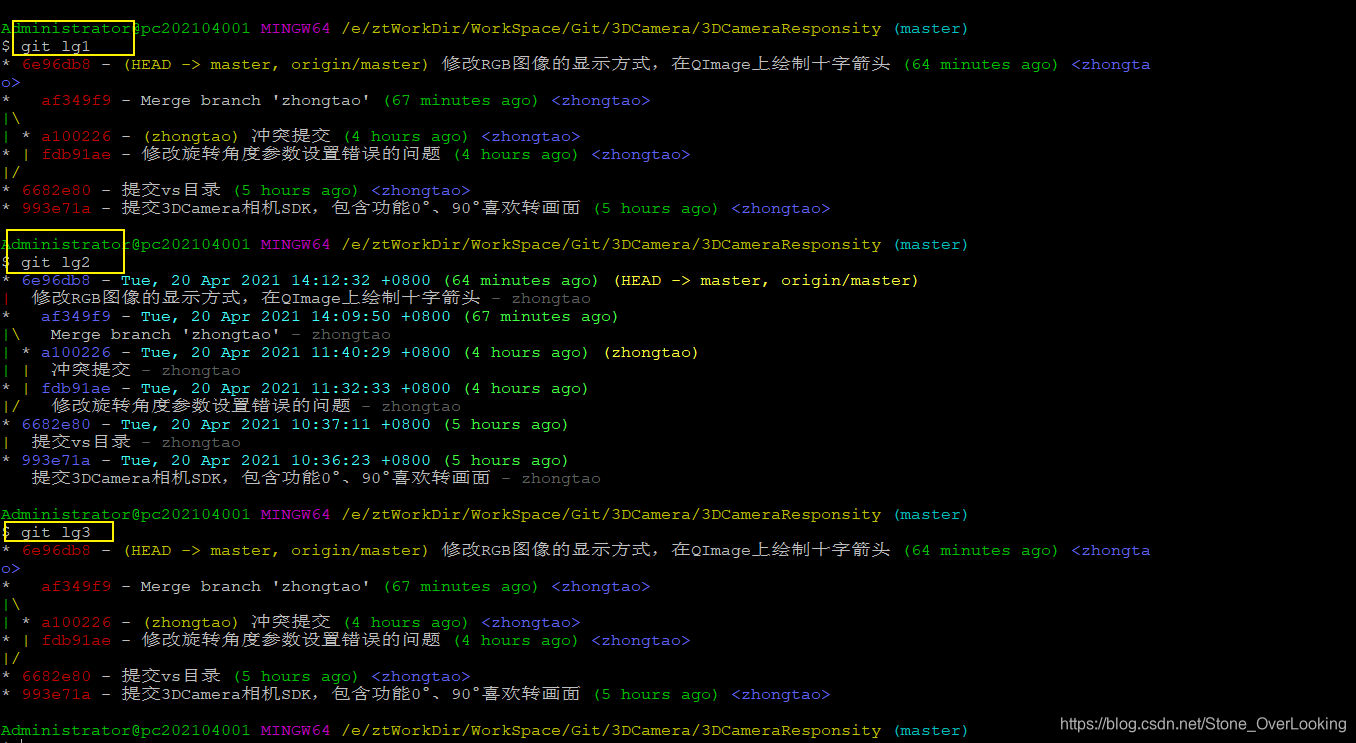
配置git log
windows客户端需要在 .gitconfig文件中配置相应的输出格式;

lg1 = log --graph --all --pretty=format:'%Cred%h%Creset -%C(yellow)%d%Creset %s %Cgreen(%cr) %C(bold blue)<%an>%Creset' --abbrev-commit --date=relative
lg2 = log --graph --abbrev-commit --decorate --format=format:'%C(bold blue)%h%C(reset) - %C(bold cyan)%aD%C(reset) %C(bold green)(%ar)%C(reset)%C(bold yellow)%d%C(reset)%n'' %C(white)%s%C(reset) %C(dim white)- %an%C(reset)' -10 --all
lg3 = log --color --graph --pretty=format:'%Cred%h%Creset -%C(yellow)%d%Creset %s %Cgreen(%cr) %C(bold blue)<%an>%Creset' --abbrev-commit --
.gitconfig路径:C:\Users\Administrator
使用方式:





 扫一扫
扫一扫


 1579
1579

 被折叠的 条评论
为什么被折叠?
被折叠的 条评论
为什么被折叠?
 到【灌水乐园】发言





