JAVA将PDF转图片

前言

当今时代,PDF 文件已经成为了常用的文档格式。然而,在某些情况下,我们可能需要将 PDF 文件转换为图片格式,以便更方便地分享和使用。这时,我们可以使用 Java 编程语言来实现这个功能。Java 提供了许多库和工具,可以帮助我们将 PDF 文件转换为图片格式并进行后续处理。


框架用的若依框架

引入依赖

<dependency>
    <groupId>org.apache.pdfbox</groupId>
    <artifactId>pdfbox</artifactId>
    <version>2.0.24</version>
</dependency>

转换方法

/**
  * PDF转图片
  * @param inputStream:文件输入流
  * @return
  */
 public static List<String> pdfToImageBuInput(InputStream inputStream){
     List<String> imageList = new ArrayList<>();
     PDDocument document = null;
     try {
         // 加载PDF文档
         document = PDDocument.load(inputStream);
         // 创建PDFRenderer对象
         PDFRenderer renderer = new PDFRenderer(document);
         List<BufferedImage> images = new ArrayList<>();
         for (int i = 0; i < document.getNumberOfPages(); i++) {
            /**
              * 《 72 》 此处设置得越大像素越高,生成得时候也会越久
              * DPI 的设置一般根据具体的需求和使用场景来决定。DPI 越高,生成的图片分辨率越大,图像质量也越高,
              * 但同时文件大小也会变得更大。通常情况下,如果需要对生成的图片进行放大、裁剪等操作,建议将 DPI 设置得较高,
              * 以保证图像质量和细节的清晰度;如果只是需要简单地浏览或共享图片,可以适当降低 DPI 以减小文件大小。在实际开发中,
              * 可以根据不同的应用场景进行调整。一般来说,72 DPI 是一个比较常见的默认值,可以作为参考。
              */
             BufferedImage image = renderer.renderImageWithDPI(i, 72, ImageType.RGB);
             images.add(image);
         }
         for (int i = 0; i < images.size(); i++) {
             String name =  System.currentTimeMillis() + i + 1 + ".png"; // 时间戳生成名称并+1
             String imagesPath = RuoYiConfig.getProfileImages() + "/" + name;
             // 保存图片到文件
             ImageIO.write(images.get(i), "PNG", new File(imagesPath));
             String webPath = FileUploadUtils.getPathFileName(RuoYiConfig.getProfileImages(), name);
             imageList.add(webPath);
         }
         return imageList;
     } catch (Exception e) {
         e.printStackTrace();
         return null;
     } finally {
         // 关闭文档
         try {
             if (document != null) {
                 document.close();
             }
             if (inputStream != null) {
                 inputStream.close();
             }
         } catch (IOException e) {
             e.printStackTrace();
         }
     }
 }

测试方法

@PostMapping("/uploadNews")
public AjaxResult uploadNews(MultipartFile file)
 {
     try
     {
     	 //返回文件路径地址结果集
         List<String> list = PdfToImageUtils.pdfToImageBuInput(file.getInputStream());
         AjaxResult ajax = AjaxResult.success();
         ajax.put("list", list);//上传文件名称
         return ajax;
     }
     catch (Exception e)
     {
         e.printStackTrace();
         return AjaxResult.error(e.getMessage());
     }
 }

测试请求

返回结果为图片路径
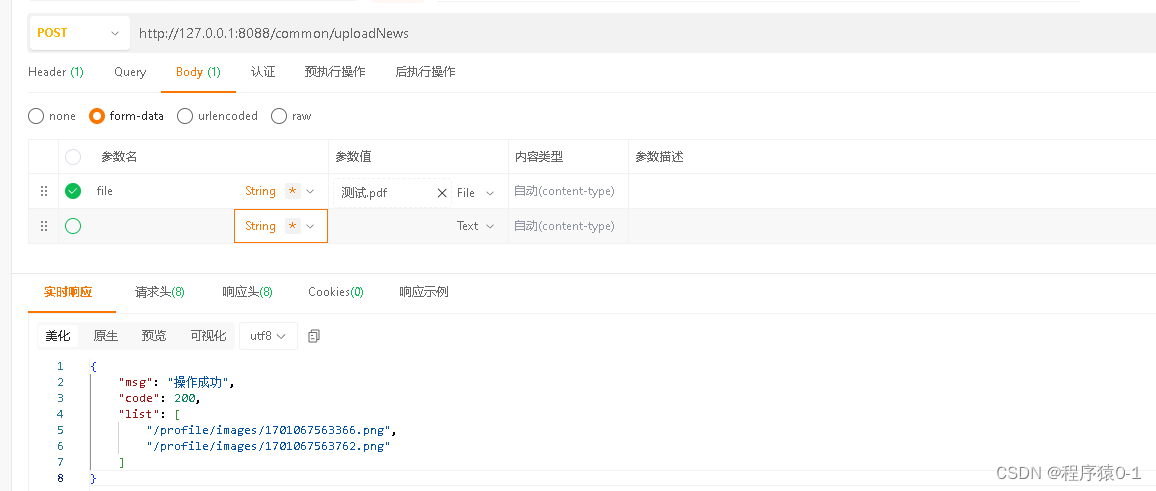
在这里插入图片描述

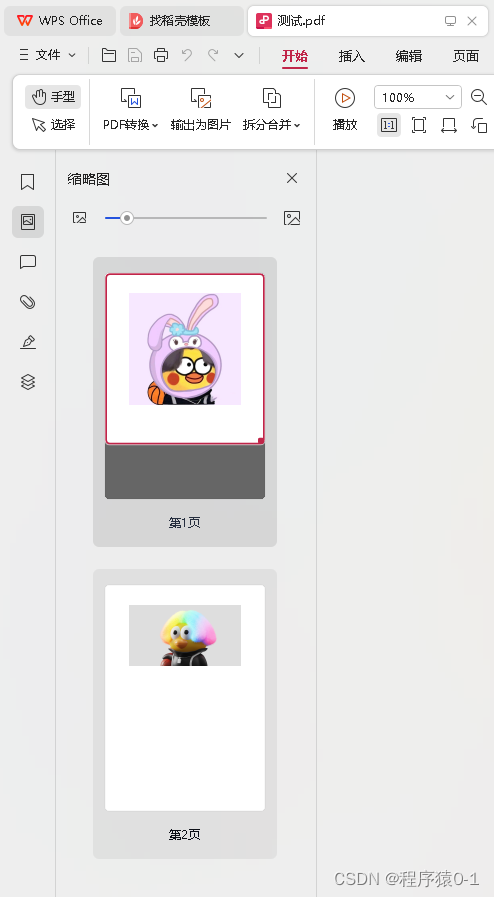
PDF内容如下

PDF内容一共两页,会将这两页转换成图片显示
在这里插入图片描述

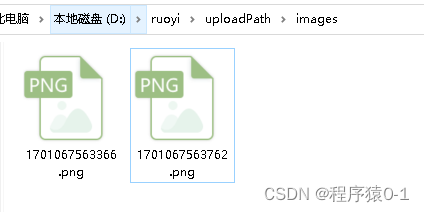
最终结果

在这里插入图片描述


### Java PDF to Image Conversion Libraries and Methods For converting PDF documents into images using Java, several libraries offer this functionality with varying levels of control over output quality and performance. #### Using jPedal Library jPedal is a powerful library that allows for high-quality conversion of PDF pages to images. For scenarios where maintaining the highest possible visual fidelity is crucial, `org.jpedal.examples.images.ConvertPagesToImages` can be utilized when slightly lower quality but faster processing times are acceptable[^1]. This method ensures efficient handling while providing options to balance between speed and resolution as needed by specific applications. ```java import org.jpedal.PdfDecoder; import org.jpedal.exception.PdfException; public class PdfToImageConverter { private static void convertPdfPageToFile(String pdfFile, String outputFile) throws PdfException { try (final PdfDecoder decode_pdf = new PdfDecoder(true)) { decode_pdf.openPdfFile(pdfFile); int numberOfPages = decode_pdf.getPageCount(); for(int i=1; i<=numberOfPages; i++){ BufferedImage image = decode_pdf.getPageAsBufferedImage(i); File file = new File(outputFile + "_page_" + i + ".png"); ImageIO.write(image,"PNG",file); } } catch(IOException e){ throw new RuntimeException(e.getMessage()); } } } ``` #### Utilizing Other Tools Mentioned in References Beyond jPedal, other tools mentioned also support similar operations though primarily focused on different aspects like report generation or document manipulation: - **Apache PDFBox**: While mainly designed for working directly with PDF structures including text extraction, it does provide capabilities for rendering pages visually. - **iText**: Known more so for its role in generating rather than reading existing PDF content, still offers some basic functionalities related to page rendering which could serve simple needs within certain constraints. In summary, among these choices, jPedal stands out particularly well-suited towards achieving optimal results during conversions due to specialized features catering specifically toward such tasks alongside flexibility regarding trade-offs between efficiency versus outcome precision[^3]. --related questions-- 1. What factors should one consider before choosing a particular tool/library for PDF-to-image conversion? 2. How do the licensing models differ across various available solutions? 3. Can you compare the performance metrics associated with each option discussed here? 4. Are there any open-source alternatives outside those listed above worth exploring further?
评论 1
成就一亿技术人!
拼手气红包6.0元
还能输入1000个字符
 
红包 添加红包
表情包 插入表情
 条评论被折叠 查看
添加红包

请填写红包祝福语或标题

红包个数最小为10个

红包金额最低5元

当前余额3.43前往充值 >
需支付:10.00
成就一亿技术人!
领取后你会自动成为博主和红包主的粉丝 规则
hope_wisdom
发出的红包
实付
使用余额支付
点击重新获取
扫码支付
钱包余额 0

抵扣说明:

1.余额是钱包充值的虚拟货币,按照1:1的比例进行支付金额的抵扣。
2.余额无法直接购买下载,可以购买VIP、付费专栏及课程。

余额充值