



1 Qt中的目录操作
1.1 QDir
QDir是Qt中功能强大的目录操作类:
- Qt中的目录分隔符统一使用’/’。
- QDir能够对目录进行任意操作(创建、删除、重命名)。
- QDir能够获取指定目录中的所有条目(文件和文件夹)。
- QDir能够使用过滤字符串获取指定条目。
- QDir能够获取系统中的所有根目录。
目录操作基础示例:
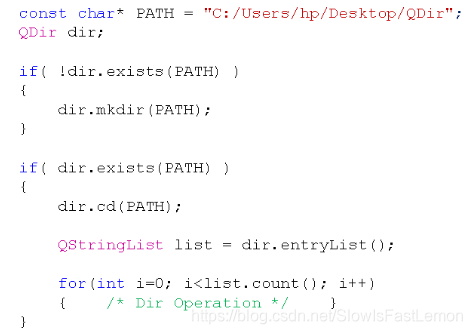
编程实验:目录操作示例
#include <QtCore/QCoreApplication>
#include <QDir>
#include <QFileInfo>
#include <QFileInfoList>
#include <QDebug>

void test_dir()
{
    const char* PATH = "C:/Users/hp/Desktop/QDir";
    QDir dir;

    if( !dir.exists(PATH) )
    {
        dir.mkdir(PATH);
    }

    if( dir.exists(PATH) )
    {
        dir.cd(PATH);

        QStringList list = dir.entryList();

        for(int i=0; i<list.count(); i++)
        {
            qDebug() << list[i];
        }
    }
}

unsigned int calculate_size(QString path)
{
    QFileInfo info(path);
    unsigned int ret = 0;

    if( info.isFile() )
    {
        ret = info.size();
    }
    else if( info.isDir() )
    {
        QDir dir(path);
        QFileInfoList list = dir.entryInfoList();

        for(int i=0; i<list.count(); i++)
        {
            if( (list[i].fileName() != ".") && (list[i].fileName() != "..") )
            {
                ret += calculate_size(list[i].absoluteFilePath());
            }
        }
    }

    return ret;
}

int main(int argc, char *argv[])
{
    QCoreApplication a(argc, argv);

    test_dir();

    qDebug() << calculate_size("C:/Users/hp/Desktop/QDir");

    return a.exec();
}
2 Qt中的文件系统监视器
2.1 QFileSystemWatcher
QFileSystemWatcher用于监控文件和目录的状态变化:
- 能够监控特定目录和文件的状态。
- 能够同时对多个目录和文件进行监控。
- 当目录或者文件发生改变时将触发信号。
- 可以通过信号与槽的机制捕捉信号并作出响应。
文件监控示例:
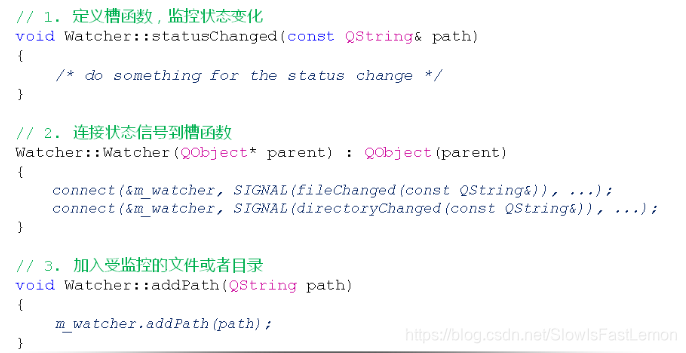
Watcher.h:
#ifndef _WATCHER_H_
#define _WATCHER_H_

#include <QObject>
#include <QFileSystemWatcher>

class Watcher : public QObject
{
    Q_OBJECT

    QFileSystemWatcher m_watcher;
private slots:
    void statusChanged(const QString& path);
public:
    explicit Watcher(QObject *parent = 0);
    void addPath(QString path);
};

#endif // WATCHER_H
Watcher.cpp:
#include "Watcher.h"
#include <QDebug>

Watcher::Watcher(QObject *parent) : QObject(parent)
{
    connect(&m_watcher, SIGNAL(fileChanged(const QString&)), this, SLOT(statusChanged(const QString&)));
    connect(&m_watcher, SIGNAL(directoryChanged(const QString&)), this, SLOT(statusChanged(const QString&)));
}

void Watcher::statusChanged(const QString &path)
{
    qDebug() << path << "is changed!";
}

void Watcher::addPath(QString path)
{
    m_watcher.addPath(path);
}
main.cpp:
#include <QtCore/QCoreApplication>
#include "Watcher.h"

int main(int argc, char *argv[])
{
    QCoreApplication a(argc, argv);
    Watcher watcher;

    watcher.addPath("C:/Users/hp/Desktop/text.txt");
    watcher.addPath("C:/Users/hp/Desktop/QDir");

    return a.exec();
}
参考资料:





 扫一扫
扫一扫


 1479
1479

 被折叠的 条评论
为什么被折叠?
被折叠的 条评论
为什么被折叠?
 到【灌水乐园】发言





