



 本文详细介绍了Redis中的List数据类型,包括LPUSH、RPUSH、LPOP、RPOP等操作,以及如何通过LREM删除元素、LSET更新元素、LRANGE获取范围值等。还提到了LINSERT用于在列表中插入元素,LLEN获取列表长度,以及LTRIM进行列表修剪。此外,文章讨论了LPOS命令用于查找匹配元素的索引,以及List在实现栈、队列、数组和阻塞操作(如RPOPLPUSH和BRPOPLPUSH)等场景的应用。
Redis-Value基本数据类型之List类型
1. 框架图:
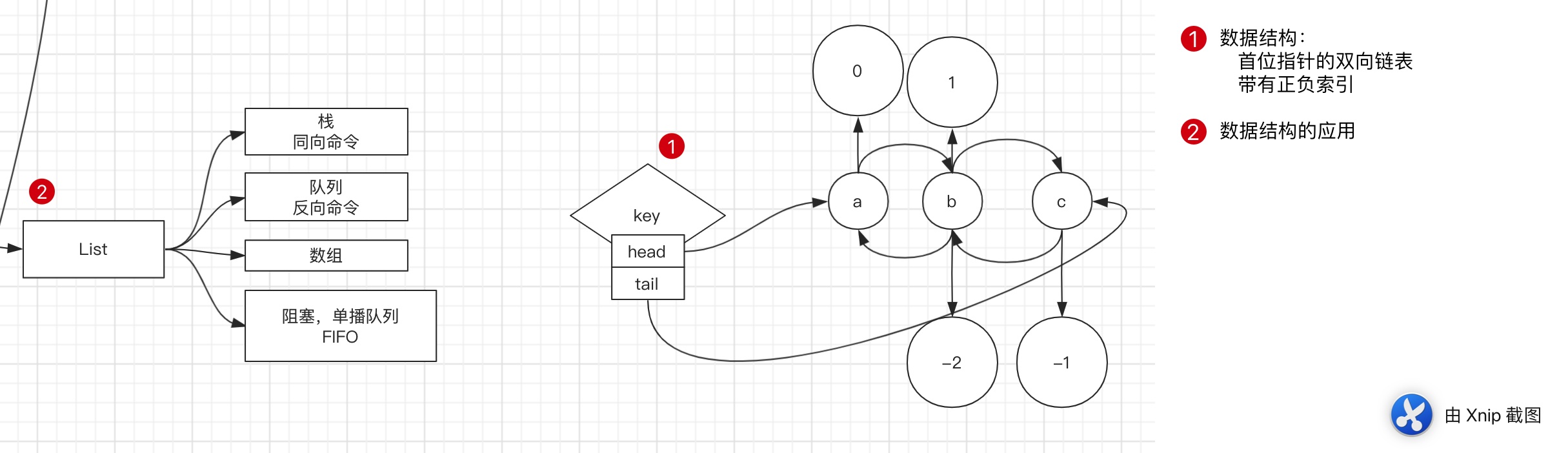
2. help @LIST
127.0.0.1:6379> help @list

  BLPOP key [key ...] timeout
  summary: Remove and get the first element in a list, or block until one is available
  since: 2.0.0

  BRPOP key [key ...] timeout
  summary: Remove and get the last element in a list, or block until one is available
  since: 2.0.0

  BRPOPLPUSH source destination timeout
  summary: Pop an element from a list, push it to another list and return it; or block until one is available
  since: 2.2.0

  LINDEX key index
  summary: Get an element from a list by its index
  since: 1.0.0

  LINSERT key BEFORE|AFTER pivot element
  summary: Insert an element before or after another element in a list
  since: 2.2.0

  LLEN key
  summary: Get the length of a list
  since: 1.0.0

  LPOP key
  summary: Remove and get the first element in a list
  since: 1.0.0

  LPOS key element [RANK rank] [COUNT num-matches] [MAXLEN len]
  summary: Return the index of matching elements on a list
  since: 6.0.6

  LPUSH key element [element ...]
  summary: Prepend one or multiple elements to a list
  since: 1.0.0

  LPUSHX key element [element ...]
  summary: Prepend an element to a list, only if the list exists
  since: 2.2.0

  LRANGE key start stop
  summary: Get a range of elements from a list
  since: 1.0.0

  LREM key count element
  summary: Remove elements from a list
  since: 1.0.0

  LSET key index element
  summary: Set the value of an element in a list by its index
  since: 1.0.0

  LTRIM key start stop
  summary: Trim a list to the specified range
  since: 1.0.0

  RPOP key
  summary: Remove and get the last element in a list
  since: 1.0.0

  RPOPLPUSH source destination
  summary: Remove the last element in a list, prepend it to another list and return it
  since: 1.2.0

  RPUSH key element [element ...]
  summary: Append one or multiple elements to a list
  since: 1.0.0

  RPUSHX key element [element ...]
  summary: Append an element to a list, only if the list exists
  since: 2.2.0
3. 命令列表:
-
LPUSH 左入
-
RPUSH 右入
-
RPUSHX
RPUSHX将值 value 插入到列表key的表尾, 当且仅当key存在并且是一个列表。 和RPUSH命令相反, 当 key 不存在时,RPUSHX 命令什么也不做。
-
LPOP 左出
-
RPOP 右出
-
LSET
LSET key index element- 根据索引进行更新值
-
LRANGE 取出范围内的值
-
LREM
-
LREM key count element summary: Remove elements from a list -
count为负数表示反方向 -
127.0.0.1:6379> RPUSH mylist a b c d 1 2 3 4 3 3 3
(integer) 11
127.0.0.1:6379>
127.0.0.1:6379> LRANGE mylist 0 -1
 1) "a"
 2) "b"
 3) "c"
 4) "d"
 5) "1"
 6) "2"
 7) "3"
 8) "4"
 9) "3"
10) "3"
11) "3"
127.0.0.1:6379> LREM mylist 2 3
(integer) 2
127.0.0.1:6379> LRANGE mylist 0 -1
1) "a"
2) "b"
3) "c"
4) "d"
5) "1"
6) "2"
7) "4"
8) "3"
9) "3"
127.0.0.1:6379> LREM mylist -2 3
(integer) 2
127.0.0.1:6379> LRANGE mylist 0 -1
1) "a"
2) "b"
3) "c"
4) "d"
5) "1"
6) "2"
7) "4"
-
-
LTRIM
-

-
LTRIM key start stop summary: Trim a list to the specified range -
Redis LTRIM 用于修剪(trim)一个已存在的 list,这样 list 就会只包含指定范围的指定元素。start 和 stop 都是由0开始计数的, 这里的 0 是列表里的第一个元素(表头),1 是第二个元素,以此类推。
例如:
LTRIM foobar 0 2将会对存储在 foobar 的列表进行修剪,只保留列表里的前3个元素。start 和 end 也可以用负数来表示与表尾的偏移量,比如 -1 表示列表里的最后一个元素, -2 表示倒数第二个,等等。
超过范围的下标并不会产生错误:如果 start 超过列表尾部,或者 start > end,结果会是列表变成空表(即该 key 会被移除)。 如果 end 超过列表尾部,Redis 会将其当作列表的最后一个元素。
LTRIM 的一个常见用法是和 LPUSH / RPUSH 一起使用。 例如:
LPUSH mylist someelement
LTRIM mylist 0 99
这对命令会将一个新的元素 push 进列表里,并保证该列表不会增长到超过100个元素。
这是很有用的,比如当用 Redis 来存储日志。 需要特别注意的是,当用这种方式来使用 LTRIM 的时候,操作的复杂度是 O(1) , 因为平均情况下,每次只有一个元素会被移除。
-
-
LINSERT
-
LINSERT key BEFORE|AFTER pivot element summary: Insert an element before or after another element in a list -
redis> RPUSH mylist "Hello"
(integer) 1
redis> RPUSH mylist "World"
(integer) 2
redis> LINSERT mylist BEFORE "World" "There"
(integer) 3
redis> LRANGE mylist 0 -1
1) "Hello"
2) "There"
3) "World"
-
-
LLEN
- 返回链表长度
-
LINDEX
- 取出指定index的值
-
LPOS
-
LPOS key element [RANK rank] [COUNT num-matches] [MAXLEN len] summary: Return the index of matching elements on a list -
RANK选项表示返回第几个匹配的元素,即如果有列表中有多个元素匹配,那么 rank 为 1 时返回第一个匹配的元素, rank 为 2 时返回第二个匹配的元素,以此类推。
负值
RANK参数表示换一个搜索方向,从列表尾部想列表头部搜索。 -
COUNT选项表示返回要匹配的总数,
我们可以组合使用
COUNT和RANK,RANK表示从第几个匹配开始计算COUNT为 0 时表示返回所有匹配成员的索引数组。 -
MAXLEN选项表示只查找最多 len 个成员。例如t
MAXLEN 1000表示之查找前 1000 个成员,这样可以提高查询效率,如果我们想在一个大的列表中,尽快找到匹配的元素,这样做效率最高。eg:
redis> RPUSH mylist a b c d 1 2 3 4 3 3 3
(integer) 11
redis> LPOS mylist 3
(integer) 6
redis> LPOS mylist 3 COUNT 0 RANK 2
1) (integer) 8
2) (integer) 9
3) (integer) 10
-
4. 应用场景:
-
栈
- 正向命令
-
队列
- 反向命令
-
数组
- 索引操作
-
阻塞,单播队列
-
RPOPLPUSH
-
RPOPLPUSH source destination summary: Remove the last element in a list, prepend it to another list and return it since: 1.2.0 -
BRPOPLPUSH
BLOCK -
是
RPOPLPUSH的阻塞版本 -
BRPOPLPUSH LIST1 ANOTHER_LIST TIMEOUT -
summary: Pop an element from a list, push it to another list and return it; or block until one is available -
超时参数设为
0表示阻塞时间可以无限期延长(block indefinitely) 。
-





 扫一扫
扫一扫


 2427
2427

 被折叠的 条评论
为什么被折叠?
被折叠的 条评论
为什么被折叠?
 到【灌水乐园】发言





