



 本文详细介绍了JavaScript中的async函数和await关键字,包括它们的含义、使用方式以及特点。通过实例展示了async函数如何返回Promise对象,以及在错误处理中的应用。文章还探讨了如何在async函数中捕获和处理错误,以及利用Promise.all()并行执行任务的方法。
一、async函数
1、async含义
async函数是Generator函数的语法糖
2、async的使用
async函数使用时将Generator函数的星号(*)替换成async,将yield替换成await
        async function show(){
            return '22'
        }  //show是一个promise函数
        show().then(res=>{
            console.log(res);
        })
async的特点
(1)await只能放到async函数中使用
(2)相比generator语义化更强
(3)await后面可以是promise对象,也可以是数字,字符串,布尔值
(4)async函数返回的是一个promise对象
(5)只要await语句后面的Promise的状态变成reject,那么整个async函数会中断执行
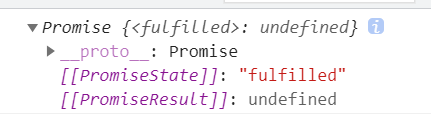
3、验证async函数返回一个promise对象
        async function fn(){}
        console.log(fn());
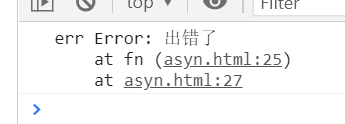
4、async函数中出错
        async function fn(){
            throw new Error('出错了')
        }
        fn().then(res=>{
            console.log('res',res);
        }).catch(err=>{
            console.log('err',err);
        })
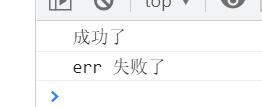
5、await后面的语句出错,函数后面将中断执行
错误在成功之后,错误和成功都会执行
        async function fn(){
            let a=await Promise.resolve('成功了')
            console.log(a);
            await Promise.reject('失败了')
        }
        fn().then(res=>{
            console.log('res',res);
        }).catch(err=>{
            console.log('err',err);
        })
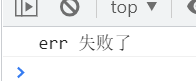
如果错误在前,成功将不执行
        async function fn(){
            await Promise.reject('失败了')
            let a=await Promise.resolve('成功了')
            console.log(a);

        }
        fn().then(res=>{
            console.log('res',res);
        }).catch(err=>{
            console.log('err',err);
        })
解决async函数中的报错
1、使用try{}catch(){}
        async function fn(){
            try{
                await Promise.reject('出错了')
            }catch(err){
                let a=await Promise.resolve('成功了');
                console.log(a);
            }
        }
        fn();
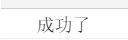
2、添加catch捕获错误
        async function fn(){
            await Promise.reject('出错了').catch(err=>{
                console.log(err);
            })
            let a=await Promise.resolve('成功了');
            console.log(a);
        }
        fn()
3、统一捕获错误
try {
    let f1 = await Promise.resolve('成功了');
    let f2 = await Promise.resolve('成功了');
    let f3 = await Promise.reject('出错了');
}catch(e){}
4、使用promise.all()方法
// async
async function fn(){
    let [f1,f2,f3] = await Promise.all([
        Promise.resolve('成功了1'),
        Promise.resolve('成功了2'),
        Promise.resolve('成功了3')
    ])


    console.log(f1);
    console.log(f2);
    console.log(f3);
}
fn();
async function show() {
    let p1 = await new Promise((res, rej) => {
        $.ajax({
            url: 'https://jsonplaceholder.typicode.com/todos/1',
            success: function (data) {
                console.log(data);
                res()
            },
            error: function (err) {
                rej()
            }
        })
    });

    let p2 = await new Promise((res, rej) => {
        $.ajax({
            url: 'https://jsonplaceholder.typicode.com/todos/2',
            success: function (data) {
                console.log(data);
                res()
            },
            error: function (err) {
                rej()
            }
        })
    });

}

let pp = show();





 扫一扫
扫一扫


 1571
1571

 被折叠的 条评论
为什么被折叠?
被折叠的 条评论
为什么被折叠?
 到【灌水乐园】发言





