



- 流水线过程中通过git push代码异常
- 运行mvn release:prepare时提示ref HEAD is not a symbolic ref
流水线过程中通过git push代码异常
.gitlab-ci.yml样例文件
#设置job阶段的环境变量
variables:
  PUBLISH_IND: "true"
stages:          # List of stages for jobs, and their order of execution
  - test
 # 在所有job之前运行的操作:输出所有环境变量,代码提交人,设置git账户和邮箱
before_script:
  - printenv
  - echo $CI_COMMIT_AUTHOR
  - git config --global user.email "your.email"
  - git config --global user.name "your.name"


test-job:       # This job runs in the build stage, which runs first.
  stage: test
  script:
    - echo "Compiling the code..."
    - |
      if [ "$PUBLISH_IND" = "true" ]; then
        echo aa="true"
      else
        echo aa="false"
      fi
    - git checkout main
    - echo "test file name" > "aa.txt"
    - git add .
    - git commit -m "11111"
    - git push
** 错误信息:remote: You are not allowed to upload code**
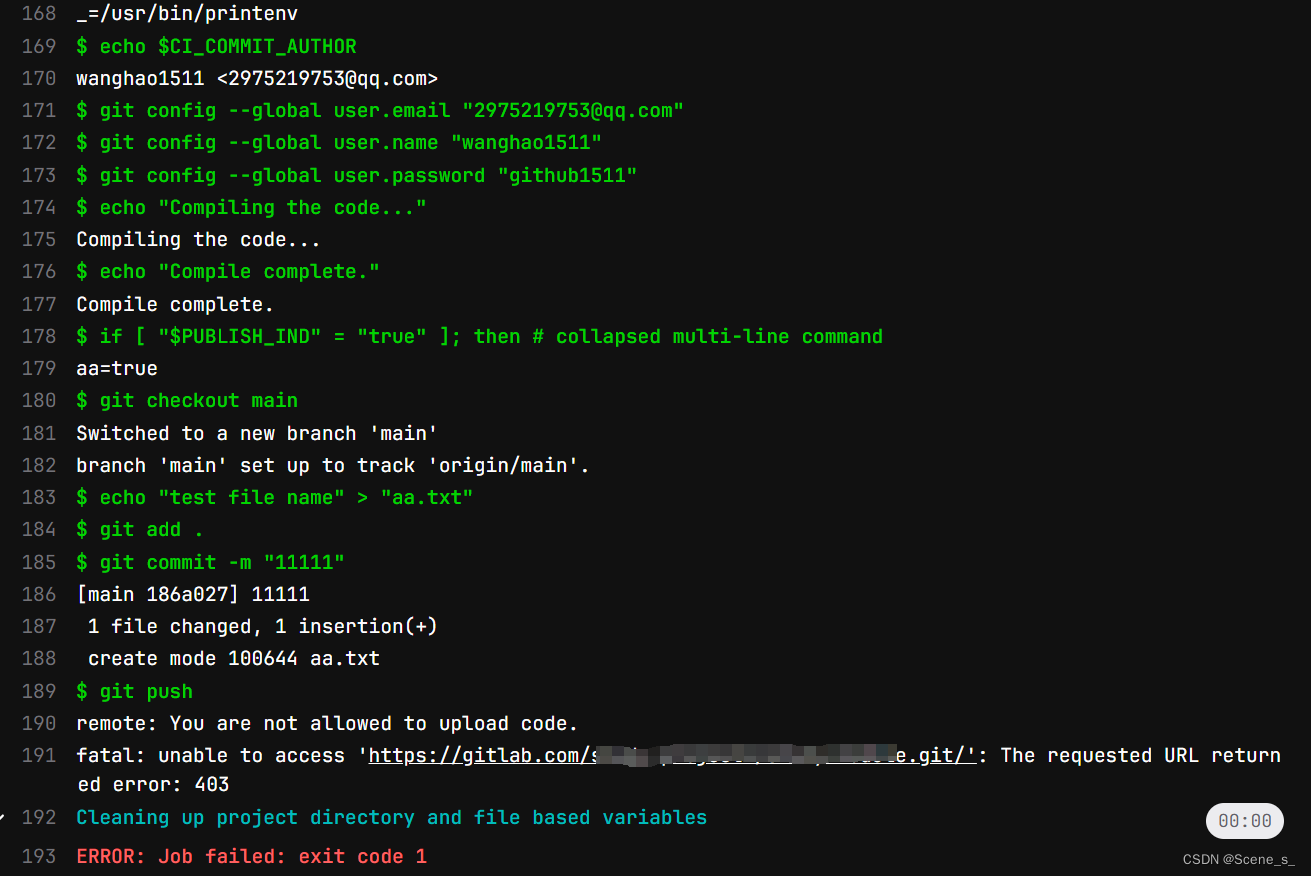
问题排查
运行GitLab Runner会在配置的runner服务器中拉取代码,然后在项目目录下生成隐藏目录【.git】里面有一个config文件,打开会看到[remote “origin”]部分的url中有拼接gitlab-ci-token:xxxxxxx,这部分是运行runner的时候自动生成的,解下来主要修改这个url
[core]
	repositoryformatversion = 0
	filemode = false
	bare = false
	logallrefupdates = true
	symlinks = false
	ignorecase = true
[submodule]
	active = .
[remote "origin"]
	url = https://gitlab-ci-token:xxxxxxx@gitlab.com/your-project.git
	fetch = +refs/heads/*:refs/remotes/origin/*
[branch "master"]
	remote = origin
	merge = refs/heads/master
解决push代码异常
在runner服务器中运行下方命令,设置该gitlab账户的ssh key,运行后会在用户目录下生成两个文件【id_rsa】和【id_rsa.pub】
ssh-keygen -t rsa -b 4096 -C "your_email@example.com"
进入当前用户目录下找到【.ssh/id_rsa.pub】,复制其中内容到gitlab中的ssh key中
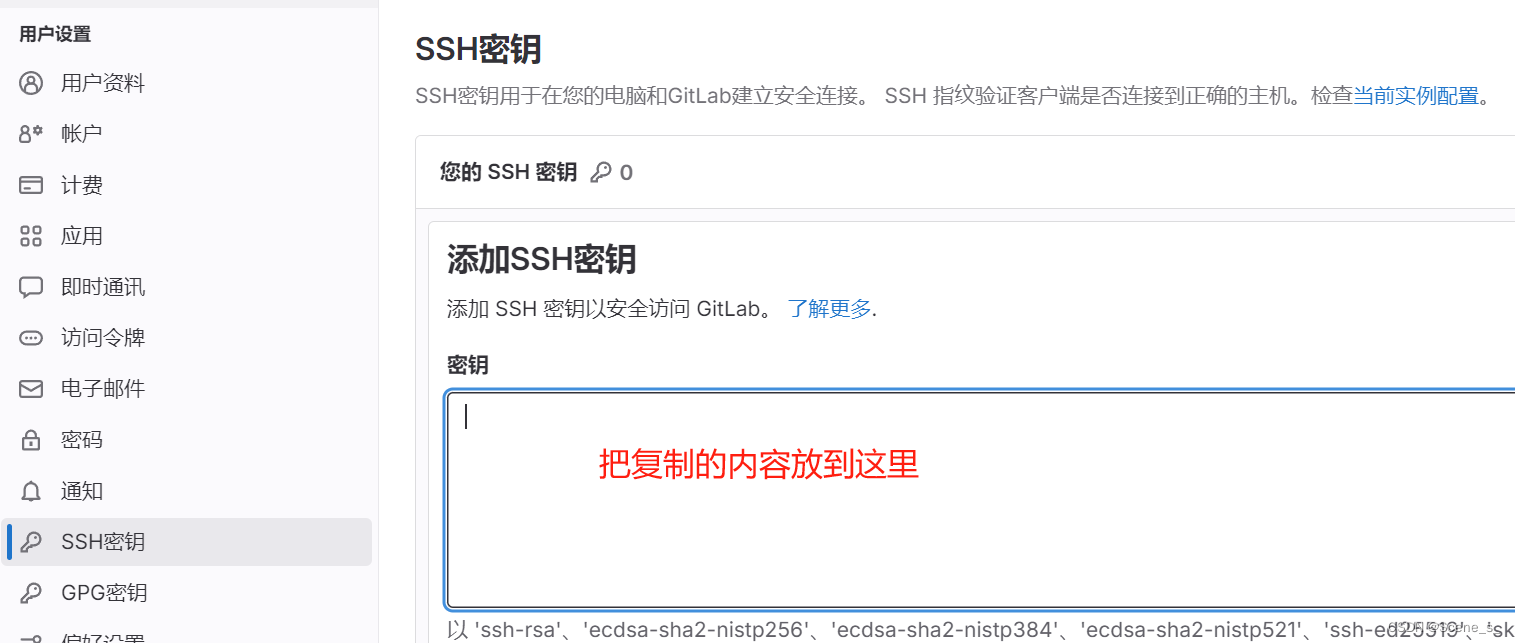
修改[remote “origin”]中的url
CI_SERVER_HOST:部署的gitlab服务器域名或者ip
CI_PROJECT_PATH:项目名称
git remote rm origin && git remote add origin git@"$CI_SERVER_HOST:"$CI_PROJECT_PATH"
运行上方文件,会把config文件[remote “origin”]部分的改成【git@gitlab.com:study-project4/study-module.git】这样,
push代码
运行流水线就会发现能正常push代码了。如果还不行改一下git push换成下方的,指定提交分支
$CI_COMMIT_BRANCH是CICD内置阶段的环境变量,不是自定义的
git push --set-upstream origin $CI_COMMIT_BRANCH
为了判断是否有需要提交的代码可以使用,因为下方的是运行于Linux环境的sh脚本,如果想直接加入到.gitlab-ci.yml中需要改一下script部分
if [[ -n $(git status --porcelain ) ]]; then
   git commit -m "提交消息"
   git push --set-upstream origin $CI_COMMIT_BRANCH
fi
test-job:       # This job runs in the build stage, which runs first.
  stage: test
  script:
    - echo "Compiling the code..."
    - git checkout main
    - echo "test file name" > "aa.txt"
    - git add .
    - |
      if [[ -n $(git status --porcelain ) ]]; then
         git commit -m "提交消息"
         git push --set-upstream origin $CI_COMMIT_BRANCH
      fi
运行mvn release:prepare时提示 “ref HEAD is not a symbolic ref”

- 问题原因:
在运行mn release:perpare的操作中会有一个内置的git symbolic-ref命令,提示的错误,在它之前有修改文件的操作,并且commit,然后就会有Git存储库的状态与插件期望的状态不匹配导致 - 解决方法:
在运行mvn release:perpare之前加入下方命令
git fetch origin
git checkout $CI_COMMIT_BRANCH
git reset --hard origin/$CI_COMMIT_BRANCH
git pull origin $CI_COMMIT_BRANCH
.gitlab-ci.yml样例文件
#设置job阶段的环境变量
variables:
  #release中设置的发布版本
  RELEASEVERSION:"0.0.1.RELEASE"
  #release中设置的下一个开发版本
  DEVVERSION:"0.0.1-SNAPSHOT"
stages:
  - release
 # 在所有job之前运行的操作:输出所有环境变量,代码提交人,设置git账户和邮箱
before_script:
  - printenv
  - echo $CI_COMMIT_AUTHOR
  - git config --global user.email "your.email"
  - git config --global user.name "your.name"

release-job:       # This job runs in the build stage, which runs first.
  stage: release
  script:
    - echo "Compiling the code..."
    - git fetch origin
    - git checkout $CI_COMMIT_BRANCH
    - git reset --hard origin/$CI_COMMIT_BRANCH
    - git pull origin $CI_COMMIT_BRANCH
    - mvn clean
    - mvn release:clean
    - mvn -B release:prepare -DignoreSnapshots=true -DautoVersionSubmodules=true -Dtag=$RELEASEVERSION -DreleaseVersion=$RELEASEVERSION -DdevelopmentVersion=$DEVVERSION -Darguments="-DskipTests"
    - mvn release:perform -Darguments="-DskipTests"
上方的【mvn release:prepare】的意思是-B使用非交互,默认使用的时候会在控制台提示发布版本号,下一个开发版本号,tag标签,这里是都给了变量设置好了,并且跳过了测试然后执行发布操作【mvn release:perform 】
把mvn release的两步操作放到一个CICD的job中日志过长,考虑分成两个job
- 分成两个job需要考虑,如何不让job并行执行,release-job2必须依赖release-job1先执行完,并且让release-job1生成的工作文件传给release-job2,所以使用CICD中的needs配置(依赖于上一个job)和artiacts配置(传递文件给下一个job)
.gitlab-ci.yml样例文件
#设置job阶段的环境变量
variables:
  #release中设置的发布版本
  RELEASEVERSION:"0.0.1.RELEASE"
  #release中设置的下一个开发版本
  DEVVERSION:"0.0.1-SNAPSHOT"
stages:
  - release
 # 在所有job之前运行的操作:输出所有环境变量,代码提交人,设置git账户和邮箱
before_script:
  - printenv
  - echo $CI_COMMIT_AUTHOR
  - git config --global user.email "your.email"
  - git config --global user.name "your.name"

release-job1:       # This job runs in the build stage, which runs first.
  stage: release
  script:
    - echo "Compiling the code..."
    - git fetch origin
    - git checkout $CI_COMMIT_BRANCH
    - git reset --hard origin/$CI_COMMIT_BRANCH
    - git pull origin $CI_COMMIT_BRANCH
    - mvn release:perform -Darguments="-DskipTests"
  artifacts:
    paths:
      - $CI_PROJECT_DIR


release-job2:       # This job runs in the build stage, which runs first.
  stage: release
  script:
    - echo "Compiling the code..."
    - git fetch origin
    - git checkout $CI_COMMIT_BRANCH
    - git reset --hard origin/$CI_COMMIT_BRANCH
    - git pull origin $CI_COMMIT_BRANCH
    - mvn release:perform -Darguments="-DskipTests"
  needs:
    - release-job1
为了防止每次push都触发可以使用only命令或者rules命令控制比如是在合并阶段触发,或者是在gitlab页面触发的流水线,记着only和relues不能同时存在一个job中
test-job:       # 控制只能是在网页发起的流水线才会触发,CI_PIPELINE_SOURCE还有一个push参数
  stage:
  script:
    - echo "test rules"
  rules:
    - if: '$CI_PIPELINE_SOURCE == "web"'
更多变量参数下方的文档
GitLab官方CICD文档
maven-release-plugin文档





 扫一扫
扫一扫


 1178
1178

 被折叠的 条评论
为什么被折叠?
被折叠的 条评论
为什么被折叠?
 到【灌水乐园】发言





