

Get Started: Chat application

本文介绍如何使用Node.js和Socket.IO创建一个基本的实时聊天应用程序。该应用能够在客户端和服务器之间建立双向通信,实现消息的即时发送与接收。

In this guide we’ll create a basic chat application. It requires almost no basic prior knowledge of Node.JS or Socket.IO, so it’s ideal for users of all knowledge levels.

Introduction

Writing a chat application with popular web applications stacks like LAMP (PHP) has traditionally been very hard. It involves polling the server for changes, keeping track of timestamps, and it’s a lot slower than it should be.

Sockets have traditionally been the solution around which most realtime chat systems are architected, providing a bi-directional communication channel between a client and a server.

This means that the server can push messages to clients. Whenever you write a chat message, the idea is that the server will get it and push it to all other connected clients.

The web framework

The first goal is to setup a simple HTML webpage that serves out a form and a list of messages. We’re going to use the Node.JS web framework express to this end. Make sure Node.JS is installed.

First let’s create a package.json manifest file that describes our project. I recommend you place it in a dedicated empty directory (I’ll call mine chat-example).

{
  "name": "socket-chat-example",
  "version": "0.0.1",
  "description": "my first socket.io app",
  "dependencies": {}
}

Now, in order to easily populate the dependencies with the things we need, we’ll use npm install --save:

npm install --save express@4.10.2

Now that express is installed we can create an index.js file that will setup our application.

var app = require('express')();
var http = require('http').Server(app);

app.get('/', function(req, res){
  res.send('<h1>Hello world</h1>');
});

http.listen(3000, function(){
  console.log('listening on *:3000');
});

This translates into the following:

  1. Express initializes app to be a function handler that you can supply to an HTTP server (as seen in line 2).
  2. We define a route handler / that gets called when we hit our website home.
  3. We make the http server listen on port 3000.

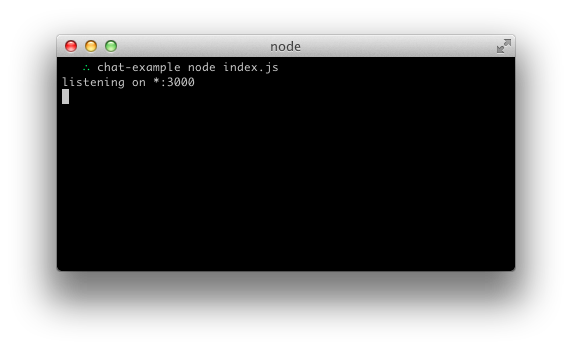
If you run node index.js you should see the following:
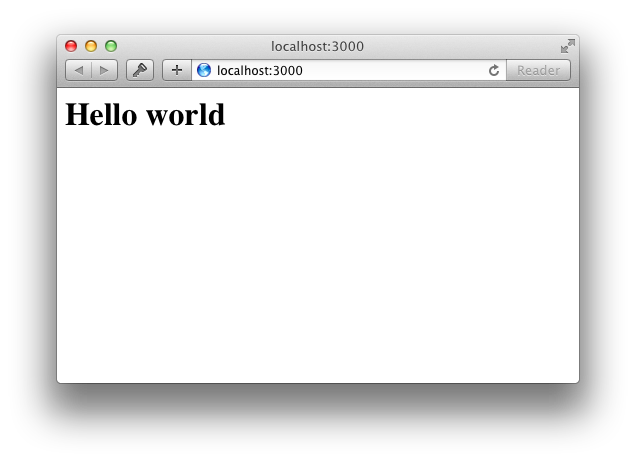
And if you point your browser to http://localhost:3000:
Serving HTML

So far in index.js we’re calling res.send and pass it a HTML string. Our code would look very confusing if we just placed our entire application’s HTML there. Instead, we’re going to create a index.html file and serve it.

Let’s refactor our route handler to use sendFile instead:

app.get('/', function(req, res){
  res.sendFile(__dirname + '/index.html');
});

And populate index.html with the following:

<!doctype html>
<html>
  <head>
    <title>Socket.IO chat</title>
    <style>
      * { margin: 0; padding: 0; box-sizing: border-box; }
      body { font: 13px Helvetica, Arial; }
      form { background: #000; padding: 3px; position: fixed; bottom: 0; width: 100%; }
      form input { border: 0; padding: 10px; width: 90%; margin-right: .5%; }
      form button { width: 9%; background: rgb(130, 224, 255); border: none; padding: 10px; }
      #messages { list-style-type: none; margin: 0; padding: 0; }
      #messages li { padding: 5px 10px; }
      #messages li:nth-child(odd) { background: #eee; }
    </style>
  </head>
  <body>
    <ul id="messages"></ul>
    <form action="">
      <input id="m" autocomplete="off" /><button>Send</button>
    </form>
  </body>
</html>

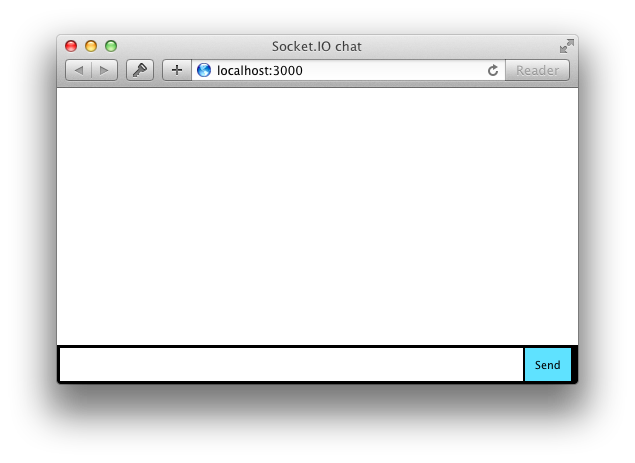
If you restart the process (by hitting Control+C and running node index again) and refresh the page it should look like this:
Integrating Socket.IO

Socket.IO is composed of two parts:

  • A server that integrates with (or mounts on) the Node.JS HTTP Server: socket.io
  • A client library that loads on the browser side: socket.io-client

During development, socket.io serves the client automatically for us, as we’ll see, so for now we only have to install one module:

npm install --save socket.io

That will install the module and add the dependency to package.json. Now let’s edit index.js to add it:

var app = require('express')();
var http = require('http').Server(app);
var io = require('socket.io')(http);

app.get('/', function(req, res){
  res.sendfile('index.html');
});

io.on('connection', function(socket){
  console.log('a user connected');
});

http.listen(3000, function(){
  console.log('listening on *:3000');
});

Notice that I initialize a new instance of socket.io by passing the http (the HTTP server) object. Then I listen on theconnection event for incoming sockets, and I log it to the console.

Now in index.html I add the following snippet before the </body>:

<script src="/socket.io/socket.io.js"></script>
<script>
  var socket = io();
</script>

That’s all it takes to load the socket.io-client, which exposes a io global, and then connect.

Notice that I’m not specifying any URL when I call io(), since it defaults to trying to connect to the host that serves the page.

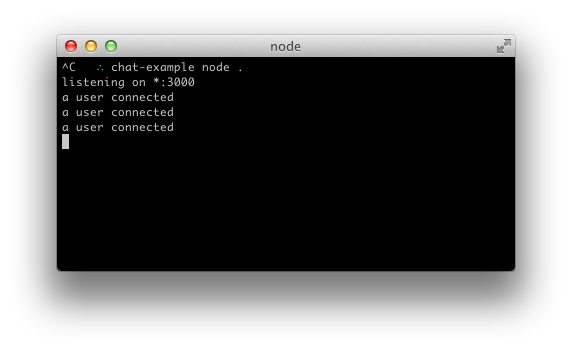
If you now reload the server and the website you should see the console print “a user connected”.
Try opening several tabs, and you’ll see several messages:
Each socket also fires a special disconnect event:

io.on('connection', function(socket){
  console.log('a user connected');
  socket.on('disconnect', function(){
    console.log('user disconnected');
  });
});

Then if you refresh a tab several times you can see it in action:

Emitting events

The main idea behind Socket.IO is that you can send and receive any events you want, with any data you want. Any objects that can be encoded as JSON will do, and binary data is supported too.

Let’s make it so that when the user types in a message, the server gets it as a chat message event. The scripts section in index.html should now look as follows:

<script src="https://cdn.socket.io/socket.io-1.2.0.js"></script>
<script src="http://code.jquery.com/jquery-1.11.1.js"></script>
<script>
  var socket = io();
  $('form').submit(function(){
    socket.emit('chat message', $('#m').val());
    $('#m').val('');
    return false;
  });
</script>

And in index.js we print out the chat message event:

io.on('connection', function(socket){
  socket.on('chat message', function(msg){
    console.log('message: ' + msg);
  });
});

The result should be like the following video:

Broadcasting

The next goal is for us to emit the event from the server to the rest of the users.

In order to send an event to everyone, Socket.IO gives us the io.emit:

io.emit('some event', { for: 'everyone' });

If you want to send a message to everyone except for a certain socket, we have the broadcast flag:

io.on('connection', function(socket){
  socket.broadcast.emit('hi');
});

In this case, for the sake of simplicity we’ll send the message to everyone, including the sender.

io.on('connection', function(socket){
  socket.on('chat message', function(msg){
    io.emit('chat message', msg);
  });
});

And on the client side when we capture a chat message event we’ll include it in the page. The total client-side JavaScript code now amounts to:

<script>
  var socket = io();
  $('form').submit(function(){
    socket.emit('chat message', $('#m').val());
    $('#m').val('');
    return false;
  });
  socket.on('chat message', function(msg){
    $('#messages').append($('<li>').text(msg));
  });
</script>

And that completes our chat application, in about 20 lines of code! This is what it looks like:

Homework

Here are some ideas to improve the application:

  • Broadcast a message to connected users when someone connects or disconnects
  • Add support for nicknames
  • Don’t send the same message to the user that sent it himself. Instead, append the message directly as soon as he presses enter.
  • Add “{user} is typing” functionality
  • Show who’s online
  • Add private messaging
  • Share your improvements!

Getting this example

You can find it on GitHub here.

$ git clone https://github.com/guille/chat-example.git
[root@yfw ~]# cd /opt/openfire [root@yfw openfire]# systemctl restart openfire [root@yfw openfire]# curl -v -X GET \ > -H "Authorization: Bearer uEufYKuoXRnq3lrHq8BB/BG8qPzK5M0/FsYyNFf+zDo=" \ > -H "Accept: application/json" \ > http://127.0.0.1:9090/plugins/restapi/v1/users Note: Unnecessary use of -X or --request, GET is already inferred. * Trying 127.0.0.1... * TCP_NODELAY set * Connected to 127.0.0.1 (127.0.0.1) port 9090 (#0) > GET /plugins/restapi/v1/users HTTP/1.1 > Host: 127.0.0.1:9090 > User-Agent: curl/7.61.1 > Authorization: Bearer uEufYKuoXRnq3lrHq8BB/BG8qPzK5M0/FsYyNFf+zDo= > Accept: application/json > < HTTP/1.1 401 Unauthorized < Date: Thu, 02 Oct 2025 13:21:26 GMT < Content-Security-Policy: default-src 'self'; style-src 'self' 'unsafe-inline'; script-src 'self' 'unsafe-inline' 'unsafe-eval'; base-uri 'self'; form-action 'self'; img-src 'self' igniterealtime.org; < X-Frame-Options: SAMEORIGIN < Set-Cookie: JSESSIONID=node01bwlcb28fkm7m1grebtzffvd7b0.node0; Path=/; HttpOnly < Access-Control-Allow-Origin: * < Access-Control-Allow-Headers: origin, content-type, accept, authorization < Access-Control-Allow-Credentials: true < Access-Control-Allow-Methods: GET, POST, PUT, DELETE, OPTIONS, HEAD < Cache-Control: must-revalidate,no-cache,no-store < Content-Type: application/json < Content-Length: 106 < { "servlet":"PluginServlet", "message":"Unauthorized", "url":"/plugins/restapi/v1/users", "status":"401" * Connection #0 to host 127.0.0.1 left intact }[root@yfw openfire]# cat /opt/openfire/conf/openfire.xml | grep -A 5 -B 5 "restapi" [root@yfw openfire]# cat /opt/openfire/conf/openfire.xml | grep -A 5 -B 5 "restapi" [root@yfw openfire]# cat /opt/openfire/conf/openfire.xml | grep -A 5 -B 5 "restapi" [root@yfw openfire]# Swagger UI http://124.71.230.244:9090/plugins/restapi/v1/openapi.yaml Explore Openfire REST API 1.11.0-SNAPSHOT OAS3 http://124.71.230.244:9090/plugins/restapi/v1/openapi.yaml This is the documentation for a REST API of the Openfire Real-time communication server. Ignite Realtime Foundation - Website Apache 2.0 Servers /plugins Authorize Clustering Reporting the status of Openfire clustering GET /restapi/v1/clustering/nodes/{nodeId} Get a specific cluster node GET /restapi/v1/clustering/nodes Get all cluster nodes GET /restapi/v1/clustering/status Get clustering status User Group Managing Openfire user groupings. GET /restapi/v1/groups Get groups POST /restapi/v1/groups Create group GET /restapi/v1/groups/{groupName} Get group PUT /restapi/v1/groups/{groupName} Update group DELETE /restapi/v1/groups/{groupName} Delete group Chat room Managing Multi-User chat rooms. POST /restapi/v1/chatrooms/{roomName}/{affiliation}/{jid} Add room affiliation DELETE /restapi/v1/chatrooms/{roomName}/{affiliation}/{jid} Remove room affiliation POST /restapi/v1/chatrooms/{roomName}/{affiliation}/group/{groupname} Add room affiliations DELETE /restapi/v1/chatrooms/{roomName}/{affiliation}/group/{groupname} Remove room affiliations GET /restapi/v1/chatrooms/{roomName}/{affiliation} All room affiliations PUT /restapi/v1/chatrooms/{roomName}/{affiliation} Replace room affiliations POST /restapi/v1/chatrooms/{roomName}/{affiliation} Add room affiliations GET /restapi/v1/chatrooms Get chat rooms POST /restapi/v1/chatrooms Create chat room POST /restapi/v1/chatrooms/bulk Create multiple chat rooms GET /restapi/v1/chatrooms/{roomName} Get chat room PUT /restapi/v1/chatrooms/{roomName} Update chat room DELETE /restapi/v1/chatrooms/{roomName} Delete chat room GET /restapi/v1/chatrooms/{roomName}/chathistory Get room history GET /restapi/v1/chatrooms/{roomName}/occupants Get room occupants GET /restapi/v1/chatrooms/{roomName}/participants Get room participants POST /restapi/v1/chatrooms/{roomName}/invite/{jid} Invite user or group POST /restapi/v1/chatrooms/{roomName}/invite Invite a collection of users and/or groups Chat service Managing Multi-User chat services. GET /restapi/v1/chatservices Get chat services POST /restapi/v1/chatservices Create new multi-user chat service Message Sending (chat) messages to users. POST /restapi/v1/messages/users Broadcast Message Archive Server-sided storage of chat messages. GET /restapi/v1/archive/messages/unread/{jid} Unread message count Security Audit Log Inspecting the security audit log. GET /restapi/v1/logs/security Get log entries Client Sessions Managing live client sessions. GET /restapi/v1/sessions Get all sessions GET /restapi/v1/sessions/{username} Get user sessions DELETE /restapi/v1/sessions/{username} Kick user sessions Statistics Inspecting Openfire statistics. GET /restapi/v1/system/statistics/sessions Get client session counts System Managing Openfire system configuration GET /restapi/v1/system/properties Get system properties POST /restapi/v1/system/properties Create system property GET /restapi/v1/system/properties/{propertyKey} Get system property PUT /restapi/v1/system/properties/{propertyKey} Update system property DELETE /restapi/v1/system/properties/{propertyKey} Remove system property GET /restapi/v1/system/liveness Perform all liveness checks GET /restapi/v1/system/liveness/deadlock Perform 'deadlock' liveness check. GET /restapi/v1/system/liveness/properties Perform 'properties' liveness check. GET /restapi/v1/system/readiness Perform all readiness checks GET /restapi/v1/system/readiness/cluster Perform 'cluster' readiness check GET /restapi/v1/system/readiness/connections Perform 'connections' readiness check GET /restapi/v1/system/readiness/plugins Perform 'plugins' readiness check GET /restapi/v1/system/readiness/server Perform 'server started' readiness check Users Managing Openfire users. POST /restapi/v1/users/{username}/groups/{groupName} Add user to group DELETE /restapi/v1/users/{username}/groups/{groupName} Delete user from group GET /restapi/v1/users/{username}/groups Get user's groups POST /restapi/v1/users/{username}/groups Add user to groups DELETE /restapi/v1/users/{username}/groups Delete user from groups POST /restapi/v1/lockouts/{username} Lock user out DELETE /restapi/v1/lockouts/{username} Unlock user GET /restapi/v1/users/{username}/roster Retrieve user roster POST /restapi/v1/users/{username}/roster Create roster entry PUT /restapi/v1/users/{username}/roster/{rosterJid} Update roster entry DELETE /restapi/v1/users/{username}/roster/{rosterJid} Remove roster entry GET /restapi/v1/users Get users POST /restapi/v1/users Create user GET /restapi/v1/users/{username} Get user PUT /restapi/v1/users/{username} Update user DELETE /restapi/v1/users/{username} Delete user UserService (deprecated) Undocumented UserService endpoint, retained for backwards compatibility. GET /restapi/v1/userservice POST /restapi/v1/userservice default GET /application.wadl/{path} GET /application.wadl Schemas ClusterNodeEntity ClusterNodeEntities ClusteringEntity GroupEntity GroupEntities ErrorResponse AffiliatedEntities MUCRoomEntity RoomCreationResultEntities RoomCreationResultEntity MUCRoomEntities MUCRoomMessageEntities MUCRoomMessageEntity OccupantEntities OccupantEntity ParticipantEntities ParticipantEntity MUCInvitationEntity MUCInvitationsEntity MUCServiceEntity MUCServiceEntities MessageEntity MsgArchiveEntity SecurityAuditLog SecurityAuditLogs SessionEntities SessionEntity SessionsCount SystemProperty SystemProperties UserGroupsEntity RosterItemEntity RosterEntities UserEntity UserProperty UserEntities Error
10-03
REST API 属性 使用下面的表单启用或禁用REST API并配置身份验证。 REST API 属性已成功编辑。 REST API REST API 可以使用下面定义的共享密钥进行安全保护 或者使用 HTTP 基本身份验证。 此外,为了增加额外的安全性,您可以指定允许使用此服务的 IP 地址列表。 空列表意味着该服务可以从任何位置访问。地址之间用逗号分隔。 已启用 - REST API请求将被处理。 禁用 - REST API请求将被忽略。 HTTP基本认证 - 通过Openfire管理员账户进行REST API认证。 密钥认证 - 通过指定的密钥进行 REST API 认证。 秘密密钥: YkhTa0ePxkFSDHWr 自定义认证过滤器类名 - REST API 认证委托给某个其他插件中实现的自定义过滤器。 注意:在自定义认证过滤器之间来回切换会强制重新加载 REST API 插件 过滤器 类名: 允许的IP地址: 124.71.230.244 附加日志记录 已启用 - 日志记录已启用 已禁用 - 日志记录已禁用 您可以在此找到关于Openfire REST API的详细文档: REST API文档(在新标签页中打开)Swagger UI http://124.71.230.244:9090/plugins/restapi/v1/openapi.yaml Explore Openfire REST API 1.8.0 OAS3 http://124.71.230.244:9090/plugins/restapi/v1/openapi.yaml This is the documentation for a REST API of the Openfire Real-time communication server. Ignite Realtime Foundation - Website Apache 2.0 Servers /plugins Authorize Clustering Reporting the status of Openfire clustering GET /restapi/v1/clustering/nodes/{nodeId} Get a specific cluster node GET /restapi/v1/clustering/nodes Get all cluster nodes GET /restapi/v1/clustering/status Get clustering status User Group Managing Openfire user groupings. GET /restapi/v1/groups Get groups POST /restapi/v1/groups Create group GET /restapi/v1/groups/{groupName} Get group PUT /restapi/v1/groups/{groupName} Update group DELETE /restapi/v1/groups/{groupName} Delete group Chat room Managing Multi-User chat rooms. POST /restapi/v1/chatrooms/{roomName}/admins/{jid} Add room admin DELETE /restapi/v1/chatrooms/{roomName}/admins/{jid} Remove room admin POST /restapi/v1/chatrooms/{roomName}/admins/group/{groupname} Add room admins DELETE /restapi/v1/chatrooms/{roomName}/admins/group/{groupname} Remove room admins POST /restapi/v1/chatrooms/{roomName}/members/{jid} Add room member DELETE /restapi/v1/chatrooms/{roomName}/members/{jid} Remove room member POST /restapi/v1/chatrooms/{roomName}/members/group/{groupname} Add room members DELETE /restapi/v1/chatrooms/{roomName}/members/group/{groupname} Remove room members POST /restapi/v1/chatrooms/{roomName}/outcasts/{jid} Add room outcast DELETE /restapi/v1/chatrooms/{roomName}/outcasts/{jid} Remove room outcast POST /restapi/v1/chatrooms/{roomName}/outcasts/group/{groupname} Add room outcasts DELETE /restapi/v1/chatrooms/{roomName}/outcasts/group/{groupname} Remove room outcasts POST /restapi/v1/chatrooms/{roomName}/owners/{jid} Add room owner DELETE /restapi/v1/chatrooms/{roomName}/owners/{jid} Remove room owner POST /restapi/v1/chatrooms/{roomName}/owners/group/{groupname} Add room owners DELETE /restapi/v1/chatrooms/{roomName}/owners/group/{groupname} Remove room owners GET /restapi/v1/chatrooms Get chat rooms POST /restapi/v1/chatrooms Create chat room GET /restapi/v1/chatrooms/{roomName} Get chat room PUT /restapi/v1/chatrooms/{roomName} Update chat room DELETE /restapi/v1/chatrooms/{roomName} Delete chat room GET /restapi/v1/chatrooms/{roomName}/chathistory Get room history GET /restapi/v1/chatrooms/{roomName}/occupants Get room occupants GET /restapi/v1/chatrooms/{roomName}/participants Get room participants POST /restapi/v1/chatrooms/{roomName}/invite/{jid} Invite user Message Sending (chat) messages to users. POST /restapi/v1/messages/users Broadcast Message Archive Server-sided storage of chat messages. GET /restapi/v1/archive/messages/unread/{jid} Unread message count Security Audit Log Inspecting the security audit log. GET /restapi/v1/logs/security Get log entries Client Sessions Managing live client sessions. GET /restapi/v1/sessions Get all sessions GET /restapi/v1/sessions/{username} Get user sessions DELETE /restapi/v1/sessions/{username} Kick user sessions Statistics Inspecting Openfire statistics. GET /restapi/v1/system/statistics/sessions Get client session counts System Managing Openfire system configuration GET /restapi/v1/system/properties Get system properties POST /restapi/v1/system/properties Create system property GET /restapi/v1/system/properties/{propertyKey} Get system property PUT /restapi/v1/system/properties/{propertyKey} Update system property DELETE /restapi/v1/system/properties/{propertyKey} Remove system property GET /restapi/v1/system/liveness Perform all liveness checks GET /restapi/v1/system/liveness/deadlock Perform 'deadlock' liveness check. GET /restapi/v1/system/liveness/properties Perform 'properties' liveness check. GET /restapi/v1/system/readiness Perform all readiness checks GET /restapi/v1/system/readiness/cluster Perform 'cluster' readiness check GET /restapi/v1/system/readiness/connections Perform 'connections' readiness check GET /restapi/v1/system/readiness/plugins Perform 'plugins' readiness check GET /restapi/v1/system/readiness/server Perform 'server started' readiness check Users Managing Openfire users. POST /restapi/v1/users/{username}/groups/{groupName} Add user to group DELETE /restapi/v1/users/{username}/groups/{groupName} Delete user from group GET /restapi/v1/users/{username}/groups Get user's groups POST /restapi/v1/users/{username}/groups Add user to groups DELETE /restapi/v1/users/{username}/groups Delete user from groups POST /restapi/v1/lockouts/{username} Lock user out DELETE /restapi/v1/lockouts/{username} Unlock user GET /restapi/v1/users/{username}/roster Retrieve user roster POST /restapi/v1/users/{username}/roster Create roster entry PUT /restapi/v1/users/{username}/roster/{rosterJid} Update roster entry DELETE /restapi/v1/users/{username}/roster/{rosterJid} Remove roster entry GET /restapi/v1/users Get users POST /restapi/v1/users Create user GET /restapi/v1/users/{username} Get user PUT /restapi/v1/users/{username} Update user DELETE /restapi/v1/users/{username} Delete user UserService (deprecated) Undocumented UserService endpoint, retained for backwards compatibility. GET /restapi/v1/userservice POST /restapi/v1/userservice default GET /application.wadl/{path} GET /application.wadl Schemas ClusterNodeEntity ClusterNodeEntities ClusteringEntity GroupEntity GroupEntities MUCRoomEntity MUCRoomMessageEntities MUCRoomMessageEntity OccupantEntities OccupantEntity ParticipantEntities ParticipantEntity MUCRoomEntities MUCInvitationEntity MessageEntity MsgArchiveEntity SecurityAuditLog SecurityAuditLogs SessionEntities SessionEntity SessionsCount SystemProperty SystemProperties UserGroupsEntity RosterItemEntity RosterEntities UserEntity UserProperty UserEntities Error
10-03
评论
添加红包

请填写红包祝福语或标题

红包个数最小为10个

红包金额最低5元

当前余额3.43前往充值 >
需支付:10.00
成就一亿技术人!
领取后你会自动成为博主和红包主的粉丝 规则
hope_wisdom
发出的红包
实付
使用余额支付
点击重新获取
扫码支付
钱包余额 0

抵扣说明:

1.余额是钱包充值的虚拟货币,按照1:1的比例进行支付金额的抵扣。
2.余额无法直接购买下载,可以购买VIP、付费专栏及课程。

余额充值


